The best Pear Deck alternatives are AhaSlides, Nearpod, ClassPoint, Curipod, Mentimeter Slido. 둘 다 필요한 경우 Google Slides and desktop PowerPoint, AhaSlides is a strong option: its add-ons work in Google Slides and in the PowerPoint desktop app on Windows or Mac, with polls, quizzes, word clouds and Q&A.
Pear Deck is a good tool, and plenty of teachers stay with it. People usually look elsewhere because they teach from desktop PowerPoint, want more than questions on slides, or need a tool that also works outside school. Here is how six alternatives compare, with prices from each vendor's own pricing page.
Pear Deck alternatives at a glance
The table shows where each tool works and the entry paid plan for one teacher.
| 수단 | 와 함께 작동 | 무료 계획 | 유료 플랜 |
|---|---|---|---|
| AhaSlides | Google Slides, PowerPoint on Windows and Mac, or on its own | 네, 소규모 세션의 경우 가능합니다. | Essential, $7.95 a month billed yearly |
| 배 데크 | Google Slides and PowerPoint Online | 가능 | Teacher Premium, $149 a year with the educator discount |
| 니어 포드 | 업로드 Google Slides, PowerPoint and PDF files; Google Slides add-on from Gold | Yes (Silver, 40 students a lesson) | Gold, $159 a year |
| ClassPoint | PowerPoint on Windows | Yes (Basic, 25 students per class) | Pro, $96 billed yearly |
| 큐리포드 | Its own writing lessons | 가능 | School and District, custom pricing |
| Mentimeter | PowerPoint add-in, or on its own | 가능 | Basic for education, $8.99 per presenter a month billed yearly |
| Slido | Google Slides and PowerPoint on Windows and Mac | 가능 | Education plans from €15 (euros) a month paid yearly |
각 판매업체의 자체 가격 페이지를 기준으로 2026년 11월 20일을 확인했습니다.
Want live questions in the deck you already use? 무료 가입.
What do Pear Deck alternatives need to do?
Pear Deck's strength is that you never leave your slides. You build in a sidebar, present, and students answer on their own devices, live or at their own pace. A good alternative should keep that, and fix whatever made you look in the first place.
One common reason: Pear Deck's help guide says it works only in the online version of PowerPoint, and the desktop app is not supported.
Which Pear Deck alternatives work with Google Slides and PowerPoint?
1. AhaSlides
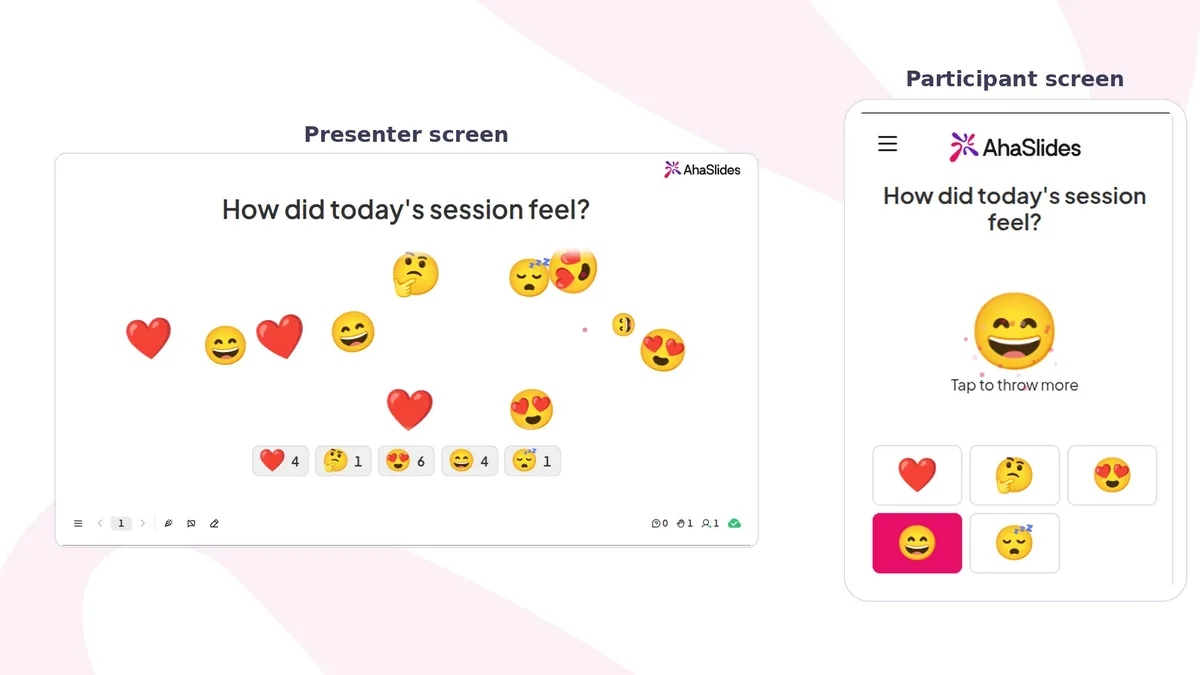
와 더불어 AhaSlides 추가 기능 Google Slides, you create interactive slides right in your deck, present with AhaSlides, and students join by scanning the QR code on the slide or opening the link. Every AhaSlides slide type works in the add-on, and responses are saved to your AhaSlides report (per-student detail on Pro).
The PowerPoint 추가 기능 works in the desktop app on Windows or Mac (Office 2019 and later). When your slideshow reaches an AhaSlides slide, the session starts by itself. You can also build the whole lesson in AhaSlides, set it to self-paced for homework, or turn a PowerPoint or PDF into a quiz with AI.
- 최상의 : teachers who switch between Google Slides and PowerPoint, or who teach beyond the classroom too.
- 한도: no ready-made lesson library, so you write your own questions or let AI draft them.
- 가격: a free plan for small sessions. Essential is $7.95 a month billed yearly ($23.95 monthly), and Pro is $15.95 a month billed yearly ($49.95 monthly). See 교육 가격 교사를 위해.
2. 니어포드
Nearpod pairs your slides with a library of 22,000+ resources: lessons, videos and activities, including Draw It, VR field trips and the Time to Climb game. You can upload Google Slides, PowerPoint or PDF files and run them live or student-paced. 가격표 페이지 lists Silver free for 40 students per lesson, and Gold at $159 a year, which adds the Google Slides add-on. See our Nearpod alternatives.
최상의 : schools that want ready-made content. 한도: 전에, Google Slides add-on is a paid feature.
3. ClassPoint
ClassPoint lives inside PowerPoint, with quizzes, polls, annotation and AI questions written from your slides. It downloads for PowerPoint on Windows (Windows 10 and Office 2013 or later), according to its download page. 가격표 페이지 lists Basic free for 25 students per class, and Pro at $8 a month or $96 billed yearly for up to 200 students per class. Compare more options in our ClassPoint 대안 안내서.
최상의 : PowerPoint teachers on Windows. 한도: it is built around PowerPoint rather than Google Slides.
4. Curipod
Curipod now describes itself as a writing practice platform, with teacher-led lessons where students write, get real-time AI feedback and revise. 가격표 페이지 lists a free teacher plan and custom pricing for schools and districts. See our Curipod alternatives.
최상의 : writing lessons. 한도: it does not add questions to your own slides the way Pear Deck does.
5. Mentimeter
Mentimeter runs polls, quizzes and word clouds, and its PowerPoint add-in puts them inside your deck. Its education plans page lists education prices: Basic at $8.99 and Pro at $14.99 per presenter a month, billed yearly. Our AhaSlides vs Mentimeter page goes deeper.
최상의 : polls and word clouds in lectures. 한도: its free plan limits how many participants join each month.
6. Slido
Slido adds polls, quizzes and anonymous Q&A to Google Slides and to PowerPoint on Windows and Mac. Its education page lists paid plans from €15 a month, paid yearly. See AhaSlides vs Slido.
최상의 : Q&A in large lectures. 한도: it is built for questions and polls more than full lessons.
How do you switch from Pear Deck to AhaSlides?
원본을 보관하세요 Google Slides content and recreate its Pear Deck questions with AhaSlides slides. Pear Deck interactions do not transfer.
- 부가 기능을 설치하십시오. 추가 AhaSlides 추가 기능 Google Slides, or the add-in to PowerPoint on Windows or Mac.
- 로그인하십시오. 귀하의 사용 AhaSlides account, or create a free one from the add-on.
- Add interactive slides. Insert a poll, quiz, word cloud or Q&A where you used Pear Deck questions.
- 선물. Students scan the QR code on the slide or open the link, with no app or account.
- 보고서를 확인하세요. 당신을 엽니 다 AhaSlides report after class to see how the class answered; Pro shows each student's answers.
더 많은 아이디어를 얻으려면 읽어보세요. 대화형 Google Slides: 기능, 팁 및 요령.
Free Pear Deck alternative templates to host
Pick a ready-made lesson, change the questions and present it from AhaSlides.

Bell-Ringer Warm-Up: Brain Teasers
A spinner challenge, four timed brain teasers and a leaderboard to start class.
이 템플릿을 사용하세요
Mid-Lesson Check-In: Our Solar System
Five true or false claims about the planets, a confidence scale and a leaderboard.
이 템플릿을 사용하세요
Should Homework Be Banned? A Class Discussion
A before-and-after poll, both sides of the argument and a live Q&A.
이 템플릿을 사용하세요
Friday Reflection: How Was Your Week?
A calm end-of-week word cloud, a rating scale and a goal for next week.
이 템플릿을 사용하세요Prefer to start in your deck? See the Google Slides 부가 기능.
Add live questions to your next lesson
자주하는 질문
What is a free alternative to Pear Deck?
AhaSlides, Nearpod, ClassPoint, Curipod, Mentimeter Slido all have free plans. AhaSlides suits you if you want interactive slides inside both Google Slides and desktop PowerPoint.
가요 AhaSlides 작업 Google Slides like Pear Deck?
예. AhaSlides add-on lets you add polls, quizzes, word clouds and Q&A to your Google Slides deck, and students join from the QR code on the slide.
Does Pear Deck work in desktop PowerPoint?
No. Pear Deck's help guide says it works only in PowerPoint Online. The AhaSlides add-in works in the PowerPoint desktop app on Windows and Mac.
Pear Deck 가격은 얼마인가요?
Pear Deck's pricing page lists a free teacher plan and Teacher Premium at $149 a year with the educator discount, with schools and districts by quote (checked 20 November 2026).
Can students answer at their own pace in AhaSlides?
Yes. Set the presentation to self-paced and students work through it on their own devices, in class or as homework.