
Αν κάνετε παρουσιάσεις στο PowerPoint και θέλετε ζωντανές δημοσκοπήσεις, κουίζ και ερωτήσεις και απαντήσεις χωρίς να φύγετε από την πλατφόρμα σας, Slido για το PowerPoint είναι μια επιλογή. Αυτός ο οδηγός δείχνει πώς να το εγκαταστήσετε, τι επιτρέπει το δωρεάν πρόγραμμα και πού υστερεί. Το συγκρίνουμε επίσης με άλλα πρόσθετα του PowerPoint, συμπεριλαμβανομένων των δικών μας, AhaSlides.
Slido πρόσθετο για το PowerPoint: τι πρέπει να γνωρίζετε
Slido για το PowerPoint είναι μια ενσωμάτωση που προσθέτει Slido δημοσκοπήσεις, κουίζ και ερωτήσεις και απαντήσεις στις διαφάνειές σας. Slido αποτελεί πλέον μέρος των Cisco και Webex, αλλά η ενσωμάτωση του PowerPoint εξακολουθεί να είναι ξεχωριστή λήψη από Slidoδικό του ιστότοπο.
- Δεν βρίσκεται στο χώρο αποθήκευσης πρόσθετων του PowerPoint. Κατεβάζετε ένα πρόγραμμα εγκατάστασης από Slido και εκτελέστε το στον υπολογιστή από τον οποίο παρουσιάζετε. Οι συνάδελφοί σας πρέπει επίσης να το εγκαταστήσουν.
- Υποστηρίζονται τα Windows και Mac. Slido παραθέτει Windows 10 22H2 ή νεότερη έκδοση με PowerPoint 2016 ή νεότερη έκδοση και macOS 12 (Monterey) ή νεότερη έκδοση με PowerPoint 2019 ή νεότερη έκδοση.
- Το PowerPoint Online δεν υποστηρίζεται. Slido λέει ότι δεν υποστηρίζει αυτήν τη στιγμή το PowerPoint Online, επομένως χρειάζεστε την εφαρμογή για υπολογιστές.
- Οι συμμετέχοντες δεν χρειάζονται τίποτα. Συνδέονται με έναν κωδικό, έναν κωδικό QR ή έναν σύνδεσμο.
Το δωρεάν βασικό πρόγραμμα επιτρέπει έως και 100 συμμετέχοντες, με έως και τρεις δημοσκοπήσεις και ένα κουίζ ανά Slido εκδήλωση, σύμφωνα με Slidoαπαντήσεις της κοινότηταςΤα ετήσια προγράμματα επί πληρωμή αίρουν αυτά τα όρια. Ελέγξτε Slido για το PowerPoint για τις τρέχουσες απαιτήσεις πριν από την εγκατάσταση.
Πώς να χρησιμοποιήσετε το Slido πρόσθετο για το PowerPoint
- Πηγαίνετε στο Slido για το PowerPoint και κάντε κλικ στο κουμπί "Λήψη δωρεάν".
- Εκτελέστε το πρόγραμμα εγκατάστασης και ακολουθήστε τις οδηγίες. Κλείστε και ανοίξτε ξανά το PowerPoint στη συνέχεια.
- Ανοίξτε μια παρουσίαση και κάντε κλικ στο Slido κουμπί στη γραμμή εργαλείων του PowerPoint. Συνδεθείτε ή δημιουργήστε ένα Slido λογαριασμός.
- Επιλέξτε μια δραστηριότητα από το Slido σε ένα πλαίσιο, όπως μια δημοσκόπηση ή ένα κουίζ, πληκτρολογήστε την ερώτησή σας και προσθέστε την. Κάθε μία από αυτές γίνεται μια νέα διαφάνεια.
- Ξεκινήστε την προβολή διαφανειών. Η προβολή διαφανειών. Slido Η διαφάνεια δείχνει τον κωδικό συμμετοχής και οι συμμετέχοντες απαντούν στα τηλέφωνά τους.
Εάν το κουμπί δεν εμφανίζεται, ελέγξτε ότι η έκδοση του PowerPoint που διαθέτετε πληροί τις παραπάνω απαιτήσεις και ότι η ενσωμάτωση έχει εγκατασταθεί στον υπολογιστή από τον οποίο κάνετε την παρουσίαση.
Slido εναλλακτικές λύσεις πρόσθετων για το PowerPoint
Εάν χρειάζεστε PowerPoint στο web, εγκατάσταση από το κατάστημα ή ένα δωρεάν πρόγραμμα με περισσότερο χώρο, αυτές είναι οι κύριες επιλογές. Ο πίνακας χρησιμοποιεί τις σελίδες κάθε προμηθευτή, όπως ελέγχθηκε στις 14 Οκτωβρίου 2026.
| Χαρακτηριστικό | Slido | AhaSlides | Mentimeter | ClassPoint |
|---|---|---|---|---|
| Windows | ✅ | ✅ | ✅ | ✅ |
| Mac | ✅ | ✅ | ✅ | Μη καταχωρημένος |
| PowerPoint στο διαδίκτυο | ✕ | ✅ | ✕ | Μη καταχωρημένος |
| Πως να εγκαταστήσετε | Ξεχωριστή λήψη από Slido | Πηγή εφαρμογής Microsoft | Πηγή εφαρμογής Microsoft | Ξεχωριστή λήψη από ClassPoint |
| Δωρεάν σχέδιο | ✅ Έως 100 συμμετέχοντες 3 δημοσκοπήσεις και 1 κουίζ ανά εκδήλωση | ✅ Έως 50 συμμετέχοντες 5 ερωτήσεις κουίζ και 3 ερωτήσεις δημοσκόπησης ανά παρουσίαση | ✅ Με όρια | ✅ Βασικό πρόγραμμα |
| Πληρωμένο πρόγραμμα από | Ετήσια σχέδια Βλέπω Slido τιμολόγηση | $ 7.95 / μήνα Απαραίτητο, χρεώνεται ετησίως | $ 11.99 / μήνα Βασικό, ανά παρουσιαστή, χρεώνεται ετησίως | $ 8 / μήνα Pro, ή 96 $ χρέωση ετησίως |
Πηγές: Slido, AhaSlides τιμολόγηση, Mentimeter φώναξε και βοήθεια με το πρόσθετο, ClassPoint τιμολόγηση και κατεβάστε σελίδα.
AhaSlides και Mentimeter εγκατάσταση από το Microsoft AppSource, επομένως δεν υπάρχει ξεχωριστό πρόγραμμα εγκατάστασης για εγκατάσταση. ClassPoint απευθύνεται στη διδασκαλία στην τάξη και αναφέρει τα Windows ως το υποστηριζόμενο σύστημά του. Για μια ευρύτερη σύγκριση, ανατρέξτε στους οδηγούς μας για Slido εναλλακτικές λύσεις και Mentimeter εναλλακτικές λύσεις.
Πώς να χρησιμοποιήσετε το AhaSlides πρόσθετο για το PowerPoint
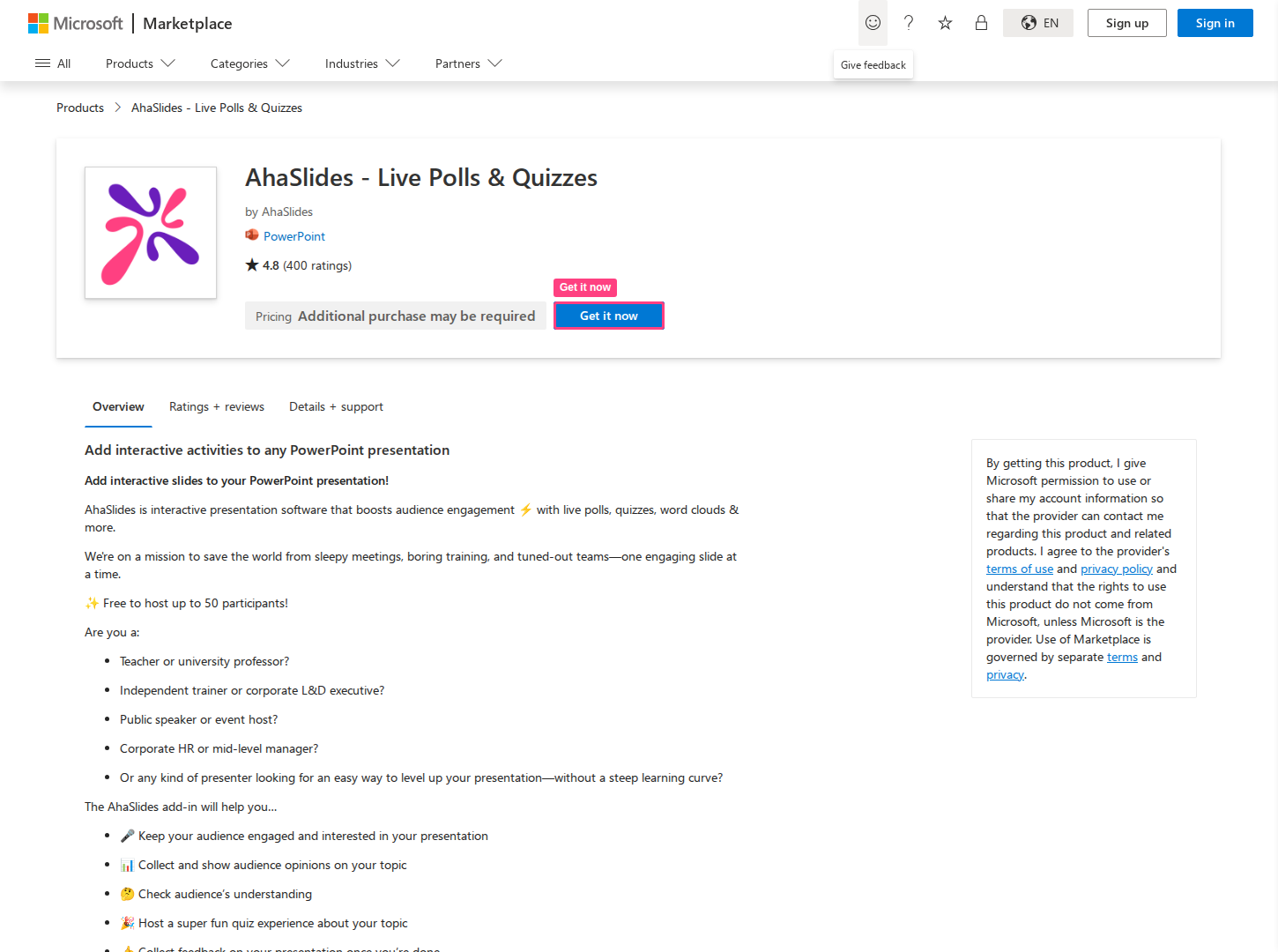
The AhaSlides Το πρόσθετο ενσωματώνει ζωντανές διαφάνειες από το δικό σας AhaSlides λογαριασμό στην τράπουλά σας. Λειτουργεί με κάθε AhaSlides τύπου διαφάνειας, επομένως οι δημοσκοπήσεις, τα κουίζ, τα σύννεφα λέξεων, οι ερωτήσεις και απαντήσεις και τα υπόλοιπα εκτελούνται όλα μέσα στο PowerPoint. Λειτουργεί επίσης σε PowerPoint για το web, ώστε να μπορείτε να προσθέσετε και να παρουσιάσετε AhaSlides διαφάνειες από το πρόγραμμα περιήγησής σας χωρίς εγκατάσταση σε υπολογιστή. Στον ιστό, οι διαφάνειες προστίθενται μία κάθε φορά, ενώ παράλληλα προστίθεται ολόκληρο το AhaSlides παρουσίαση ως μία διαφάνεια PowerPoint λειτουργεί τόσο στο web όσο και στον υπολογιστή. άρθρο βοήθειας έχει τις λεπτομέρειες.
- Στο PowerPoint, ανοίξτε την καρτέλα Αρχική, επιλέξτε Πρόσθετα και, στη συνέχεια, Περισσότερα πρόσθετα. Σε παλαιότερες εκδόσεις, χρησιμοποιήστε την επιλογή Εισαγωγή και, στη συνέχεια, Λήψη προσθέτων.
- Ψάχνω για "AhaSlides"και κάντε κλικ στην επιλογή Προσθήκη".
- Στο πρόσθετο, συνδεθείτε. Εάν το PowerPoint έχει συνδεθεί με έναν εταιρικό ή σχολικό λογαριασμό Microsoft, κάντε κλικ στην επιλογή Συνέχεια ως με τη διεύθυνση email σας και βρίσκεστε εντός, χωρίς κωδικό πρόσβασης ή παράθυρο προγράμματος περιήγησης. Διαφορετικά, κάντε κλικ στην επιλογή Σύνδεση: ανοίγει το πρόγραμμα περιήγησής σας, ώστε να μπορείτε να συνδεθείτε AhaSlides λογαριασμό και, στη συνέχεια, σας επιστρέφει στο PowerPoint.
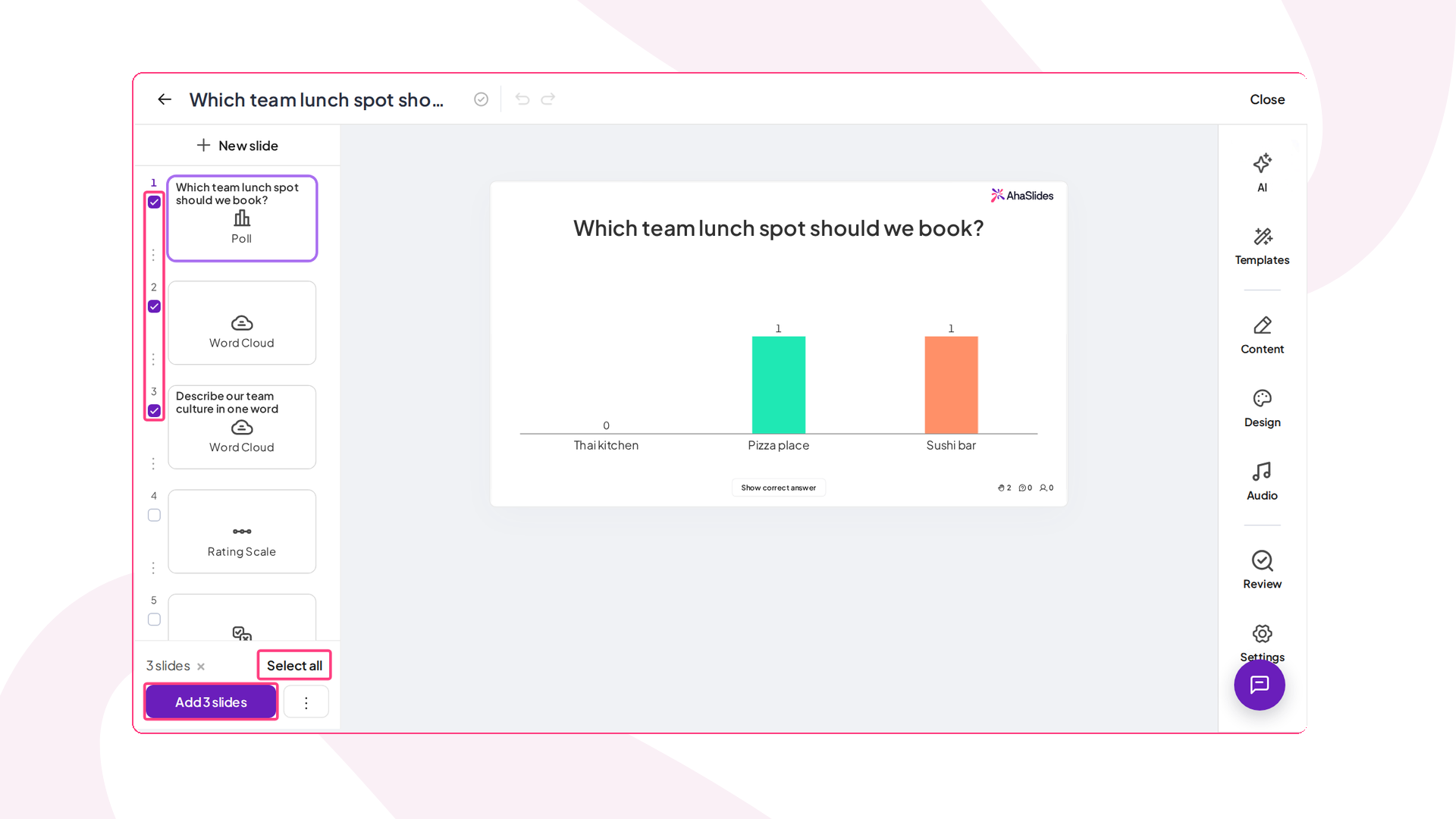
- Επιλέξτε την παρουσίαση που θέλετε, επιλέξτε τις διαφάνειες που χρειάζεστε και κάντε κλικ στην επιλογή Προσθήκη διαφανειών. Για να προσθέσετε ολόκληρη την παρουσίαση ως μία διαφάνεια PowerPoint, χρησιμοποιήστε το μενού με τις τρεις τελείες και επιλέξτε Προσθήκη παρουσίασης.
- Παρουσιάστε κανονικά. Όταν φτάσετε σε ένα AhaSlides διαφάνεια, οι συμμετέχοντες συνδέονται από τα τηλέφωνά τους με έναν κωδικό QR ή έναν σύνδεσμο.
Η κοινή χρήση της τράπουλας δεν απαιτεί επιπλέον βήμα. Στείλτε το αρχείο PowerPoint σε έναν συνάδελφο στο δικό σας AhaSlides τομέα email ομάδας ή εταιρείας και μπορούν να επεξεργαστούν και να παρουσιάσουν τον AhaSlides γλιστράει μόλις το ανοίξουν. Πώς λειτουργεί η κοινή χρήση αρχείων.
Μερικοί περιορισμοί που πρέπει να γνωρίζετε. Το πρόσθετο εκτελείται στην εφαρμογή PowerPoint για υπολογιστή σε Windows και Mac, όχι στο PowerPoint για το Web, και χρειάζεται PowerPoint 2019 ή νεότερη έκδοση. Το δωρεάν AhaSlides Το σχέδιο καλύπτει έως και 50 συμμετέχοντες, με έως και 5 ερωτήσεις κουίζ και 3 ερωτήσεις δημοσκόπησης ανά παρουσίαση. Για τα πλήρη βήματα, ανατρέξτε στο AhaSlides οδηγός προσθήκηςΓια να κατασκευάσετε μια τράπουλα από την αρχή, διαβάστε τον οδηγό μας για δημιουργία διαδραστικού PowerPoint.
Συχνές ερωτήσεις
Πώς λαμβάνετε πρόσθετα για το PowerPoint;
Ανοίξτε το PowerPoint, μεταβείτε στην καρτέλα Αρχική, επιλέξτε Πρόσθετα, έπειτα Περισσότερα πρόσθετα και αναζητήστε το κατάστημα. Σε παλαιότερες εκδόσεις, το κατάστημα βρίσκεται στην ενότητα Εισαγωγή και στη συνέχεια Λήψη προσθέτων. Κάντε κλικ στην επιλογή Προσθήκη για εγκατάσταση. Slido αποτελεί την εξαίρεση: πρόκειται για ξεχωριστή λήψη από SlidoΟ ιστότοπος.
Είναι το Slido δωρεάν πρόσθετο;
Slido διαθέτει ένα δωρεάν βασικό πρόγραμμα για έως και 100 συμμετέχοντες, με περιορισμό σε τρεις δημοσκοπήσεις και ένα κουίζ ανά Slido εκδήλωση. Τα ετήσια προγράμματα επί πληρωμή καταργούν αυτούς τους περιορισμούς και προσθέτουν λειτουργίες. Δείτε Slidoσελίδα τιμολόγησης για τα τρέχοντα σχέδια.
Μήπως Slido υποστηρίζει το PowerPoint Online;
Όχι. Slido δηλώνει ότι δεν υποστηρίζει προς το παρόν το PowerPoint Online, επομένως η ενσωμάτωση απαιτεί εγκατεστημένο PowerPoint σε Windows ή Mac.
Μήπως Slido Δουλεύω σε Mac;
Ναί. Slido για το PowerPoint υποστηρίζει macOS 12 (Monterey) ή νεότερη έκδοση με PowerPoint 2019 ή νεότερη έκδοση.