
Parhaat viikoittaiset tiimin palautteenantokysymykset ovat lyhyitä, samoja joka viikko ja helppoja vastata alle minuutissa. Valitse kolmesta viiteen alla olevista listoista ja lähetä ne sitten meille. Slack AhaSlides varten Slack: tyyppi /ahaslides luo, valitse Viikoittainen pulssi, edit its questions, add your own and press Kirje.
Milloin viikoittaisia tarkastuskysymyksiä käytetään
A weekly check-in works when you want to know how the team is doing without adding another meeting. Say you lead a design team and want a read on workload before Monday planning. On Friday you post four questions in #team-design, and people answer between tasks.
Muita hyviä hetkiä siihen liittyen:
- A remote or hybrid team that rarely talks all at once
- The end of a sprint or a busy week
- A new team or a new manager, to learn what people need
- A slow week, to see whether slow means calm or stuck
Keep a weekly check-in short. If you need a long, formal survey, send it from a full AhaSlides survey link instead.
Why ask in Slack
- Ihmiset vastaavat siellä missä he jo ovat. No new tab and no email to dig out, so answering takes seconds.
- You see how many have answered. Viesti sijaitsee kanavalla ja näyttää vastanneiden ihmisten määrän.
- Vastaukset eivät vieri pois. Jokainen vastaus tallennetaan muistiisi AhaSlides report, so you can compare one week with the next.
Viikoittaiset tiimin sisäänkirjautumiskysymykset kopioitavaksi
Each question is marked with the Slack question type that fits it. All of them are types you can pick in the Create window. For a rating or a score, you can change the words at each end of the scale.
The weekly pulse: start here
Jos kysyt vain kaksi asiaa, kysy nämä. Ne ovat kaksi kysymystä valmiissa kysymyksessä. Viikoittainen pulssi in AhaSlides varten Slack, and the second one is optional for the people answering.
| Kysymys | Kirjoita Luo-ikkunaan |
|---|---|
| Millainen viikkosi oli? | Rating 1 to 5, from Very poor to Great |
| What made it that way? | Jatkokysymys, jonka voi ohittaa |
Wins and progress
| Kysymys | Kirjoita Luo-ikkunaan |
|---|---|
| Mistä yhdestä asiasta olet ylpeä tällä viikolla? | Lyhyt vastaus |
| Did you finish what you planned this week? | kyllä vai ei |
| How much progress did you make on your top priority? | Rating 1 to 5, from Barely any to A lot |
Workload and focus
| Kysymys | Kirjoita Luo-ikkunaan |
|---|---|
| Is your workload manageable right now? | Rating 1 to 5, from Not at all to Completely |
| Is anything blocking your work right now? | Yes or no, with a follow-up asked only when the answer is Yes |
| How much focus time did you get this week? | Monivalinta: Tuskin lainkaan, Jonkin verran, Paljon |
Toinen on valmis Keskittyminen ja estäminen check-in: it asks "What is it?" only of people who answer Yes.
Tiimi ja tuki
| Kysymys | Kirjoita Luo-ikkunaan |
|---|---|
| Do you get the support you need from the team? | Rating 1 to 5, from Not at all to Completely |
| Kuinka kiinteäksi koet olevasi joukkueessa? | Rating 1 to 5, from Not at all to Very |
| Who helped you most this week? | Lyhyt vastaus |
Katse eteenpäin
| Kysymys | Kirjoita Luo-ikkunaan |
|---|---|
| What's your top priority for next week? | Lyhyt vastaus |
| What's one thing we should change? | Lyhyt vastaus |
| Kuinka valmiina tunnet olevasi ensi viikkoon? | Pisteet 1–10 |
Mitä tarvitset
- A Slack työtila, jossa on AhaSlides varten Slack asennetaan
- An AhaSlides account for the person who posts the check-in (any plan works, including Free)
- Ei mitään vastaajille: he eivät tarvitse AhaSlides tili
Viikoittaisen kirjautumisen lähettäminen Slack
Vaihe 1: Lisää AhaSlides varten Slack
Avaa AhaSlides varten Slack asennussivu ja lisää sovellus työtilaasi. Ensimmäisellä painalluksella Kirje, AhaSlides asks you to sign in and keeps your draft while you do.
Step 2: Open the Create window and pick a check-in
In the channel you want, type /ahaslides luo. Alla Kirjaudu sisään tiimin kanssa, Lehdistö Viikoittainen pulssi. For Workload, Focus and blockers, Team connection and more, press Kaikki mallit.
Step 3: Swap in your questions
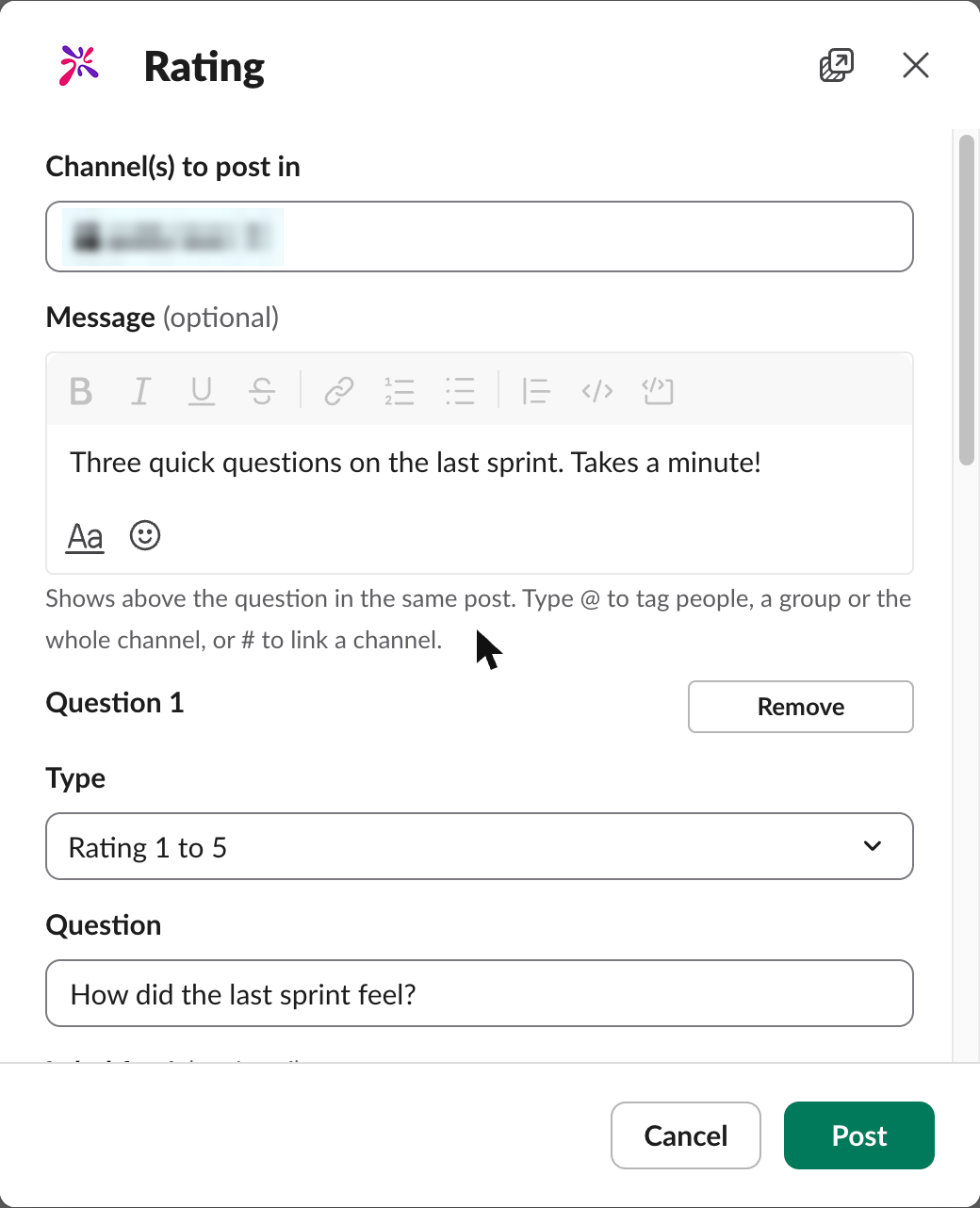
The channel you're in is already picked, and Viesti lets you add a line so people know why you're asking. Edit the first question's wording (it stays a rating question and keeps its follow-up), then press + Lisää kysymys for each question you want from the lists above, up to 10 in one post, and pick each one's type from its Tyyppi menu. Three to five questions is plenty.
Vaihe 4: Valitse anonyymit vastaukset ja kuka näkee tulokset
Alle Asetukset, puutiainen Anonyymit vastaukset if you want honest answers without names. Workload and Wellbeing start with it ticked; Weekly pulse starts with it off. Näytä tulokset kaikille is ticked to start with, so the whole channel sees the results. Untick it to keep them to yourself.
Vaihe 5: Lähetä se ja katso vastausten saapumista
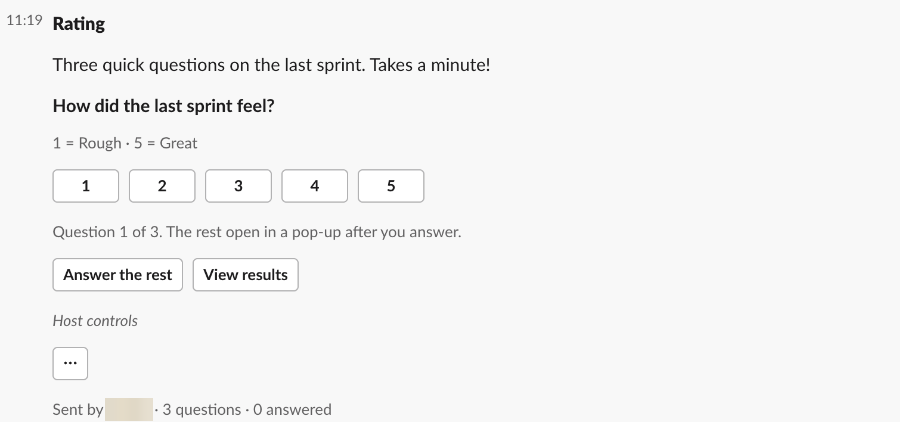
lehdistö Kirje. The first question sits right in the post, and people tap an answer. Vastaa loput opens the other questions in a pop-up, and the post shows how many people have answered. Post it on the same day each week so it becomes a habit.
Jumiutunut askelmaan? The full guide covers every option and common fixes. For more on surveys, read Kuinka luoda kyselylomake SlackJos haluat myös päivittäisen rytmin, katso Kuinka suorittaa päivittäinen sisäänkirjautuminen SlackKatso kanavassa pyörivä stand-up-esitys Asynkronisen stand-upin ajaminen Slack.
Vinkkejä sisäänkirjautumisviestin kirjoittamiseen
- Ask the same first question every week, so you can see a trend.
- Keep it to five questions or fewer, and make the follow-up optional.
- Say why you're asking in the Message line.
- Use anonymous answers for workload and wellbeing, and named answers for wins and next steps.
- Share what you changed because of the answers, so people see the point of replying.
FAQ
How many weekly check-in questions should I ask?
Three to five. A short check-in gets more answers, and you can always add a question later. The Create window takes up to 10 in one post.
Should a weekly check-in be anonymous?
Se riippuu siitä, mitä kysyt. Työmäärään ja hyvinvointiin liittyviin kysymyksiin vastataan rehellisemmin, kun ne ovat nimettömiä. Voittoja ja ensi viikkoa koskevat kysymykset toimivat hyvin nimien kanssa. Anonyymit vastaukset rastitettu, nimet piilotetaan kaikilta, myös sinulta.
Tarvitsevatko ihmiset tilin vastatakseen?
No. People answer in Slack ilman AhaSlides tili.
How often should I send a weekly check-in?
Once a week, on the same day. You post it yourself each time. If something goes wrong when you send it, opas has the fixes.
Kokeile sitä työtilassasi
Send your first weekly check-in in about a minute.