
The fastest way to hear from your team is to ask where they already talk. To create a survey in Slack sa AhaSlides za Slacktipa /ahaslides kreiraj, add your questions and press pošta. Your team answers with buttons right in the channel, one question at a time, and every answer is saved in your AhaSlides prijaviti.
When to use a survey in Slack
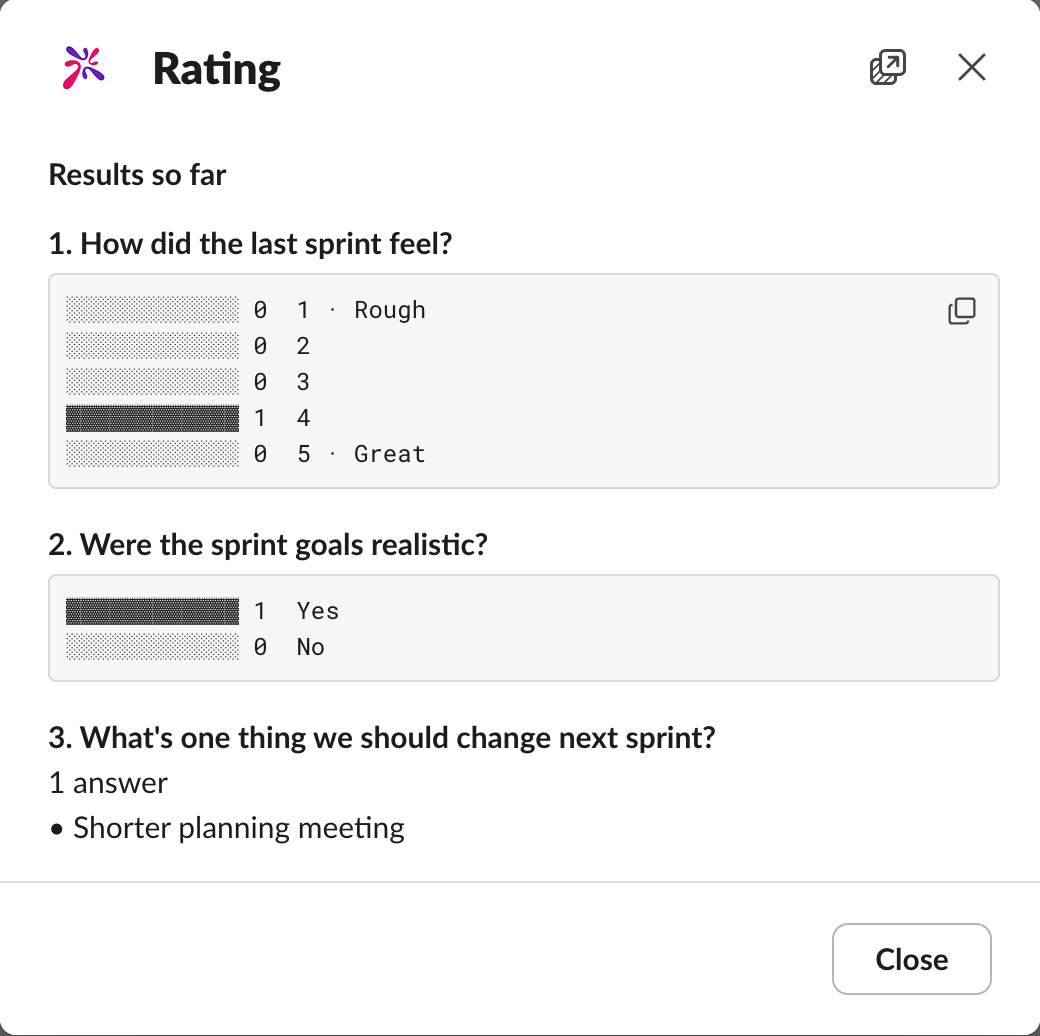
A survey in Slack works best when you want a few honest answers from a group that already talks in a channel. Say you want to know how the last sprint felt. Instead of booking a meeting or emailing a form, you post three questions in #team-product, and people answer between tasks.
Other good moments for it:
- Feedback straight after a team event, a workshop or an all-hands
- A quick check on workload or wellbeing, with anonymous answers
- Choosing between options when you also want to know why people chose them
- A short eNPS check with a follow-up question
Zadržati Slack for short surveys: that's what makes a survey in Slack quick to answer. A long, formal survey with dozens of questions is easier to answer from a full survey link, which AhaSlides can also give you.
Why run your survey in Slack
You shouldn't have to chase people just to find out what they think. A survey in the channel cuts most of that chasing out:
- People answer where they already are. No new tab, no login and no email to dig out, so answering takes seconds.
- You can see how many have answered. The survey sits in the channel, so people spot it as they catch up, and the count on the post keeps you up to date.
- The answers don't scroll away. A Slack thread soon disappears up the channel. Every answer to your survey stays in your AhaSlides report, ready to read or share later.
Što trebaš
- A Slack radni prostor s AhaSlides za Slack instaliran
- An AhaSlides account for the person who creates the survey (any plan works, including Free)
- Nothing for the people answering: they don't need an AhaSlides račun
Kako kreirati anketu u Slack, korak po korak
Korak 1: Dodaj AhaSlides za Slack
Otvorite AhaSlides za Slack stranica za instalaciju i dodajte aplikaciju u svoj radni prostor. Prvi put kada pritisnete pošta, AhaSlides traži od vas da se prijavite na svoj AhaSlides račun i čuva vašu skicu dok to radite. Prijavljujete se samo jednom.
Step 2: Open the Create window
In the channel you want to survey, type /ahaslides kreiraj. The Create window opens. Pick a starting point: a ready-made check-in under Check in with team (Weekly pulse, eNPS or Wellbeing, with more under Svi predlošci), or a single question under Postavite pitanje (Poll, Rating or Brainstorm). Each check-in comes with its questions already written, plus a follow-up question people can skip.
Korak 3: Napišite svoja pitanja
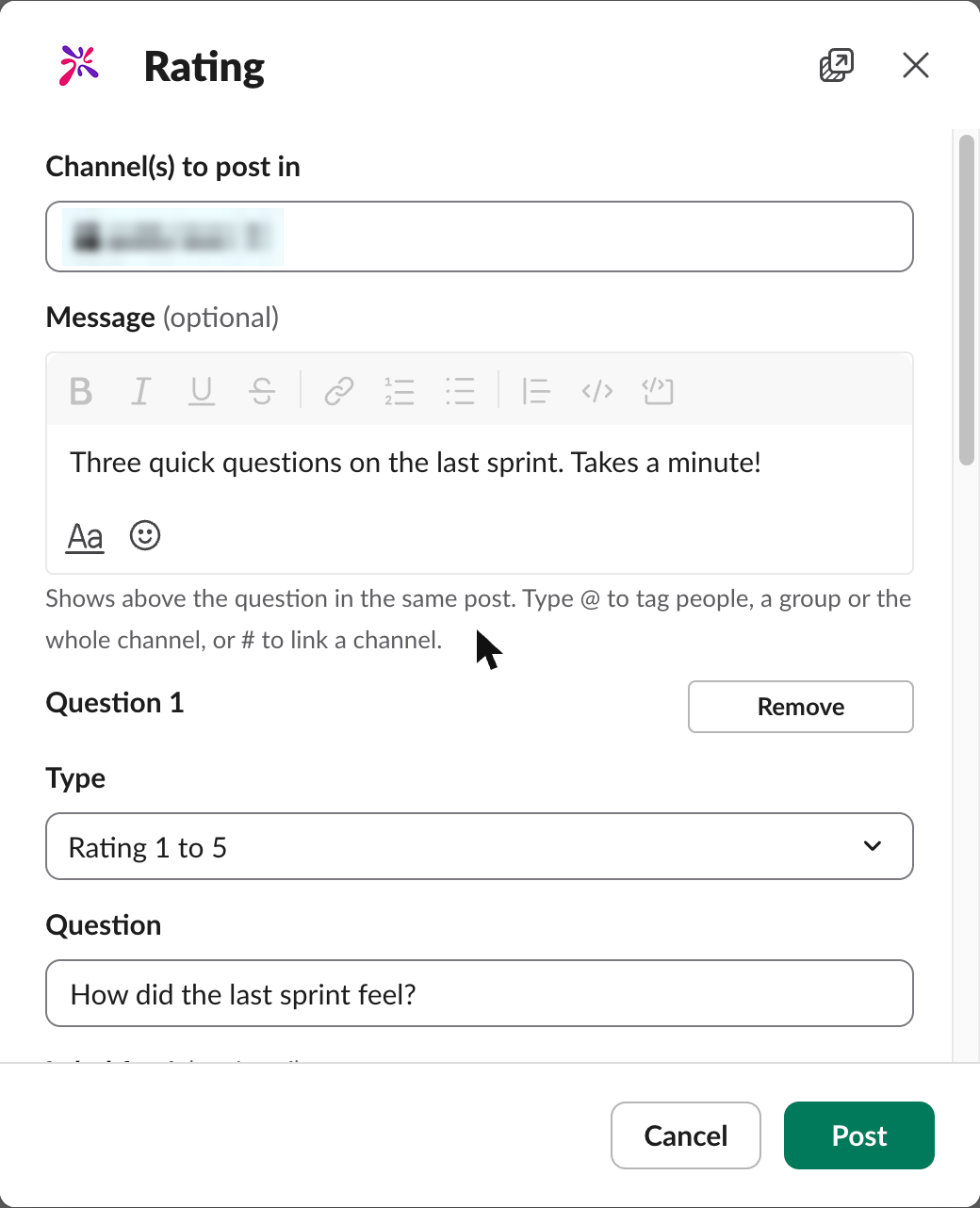
Pod Channel(s) to post in, the channel you're in is already picked, and you can add more. In Poruka, add a line so people know why you're asking; it shows above the question. Write your first question, then press + Dodaj pitanje for each one after it, up to 10 in one post. Pick each question's type from its Tip izbornik:
- Više izbora
- Rating 1 to 5
- Score 1 to 10
- da ili ne
- Kratak odgovor
For a multiple choice question, put the options one per line, up to six. For a rating or score, you can change the words at each end of the scale.
Step 4: Choose anonymous answers and who sees results
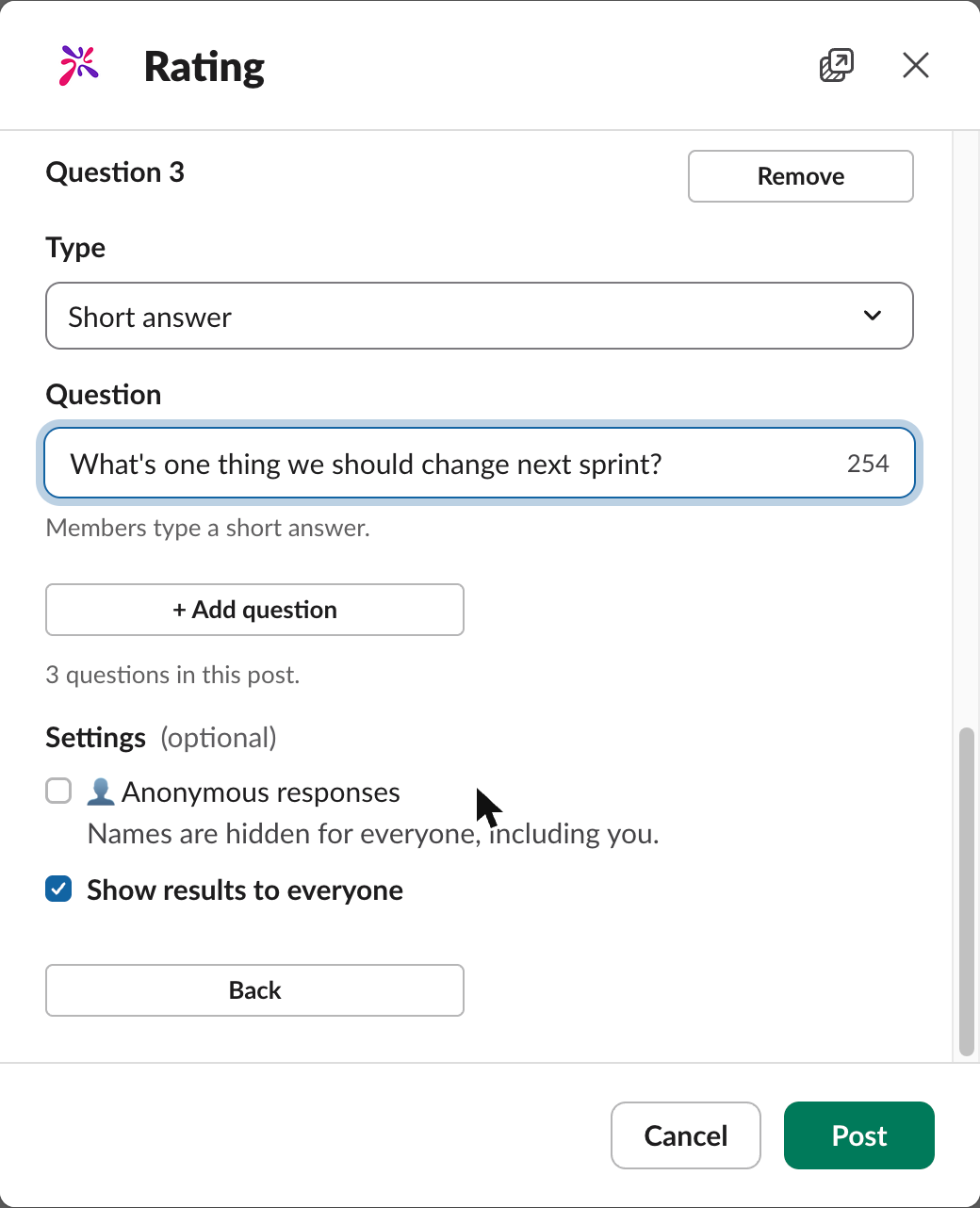
Pod Postavke, označite Anonimni odgovori if you want honest answers without names. eNPS and Wellbeing start with it ticked. Names are then hidden for everyone, you included, in Slack a AhaSlides. Prikaži rezultate svima is ticked to start with, so the whole channel can see the results. Untick it to keep them to yourself.
Step 5: Post it and watch the answers come in
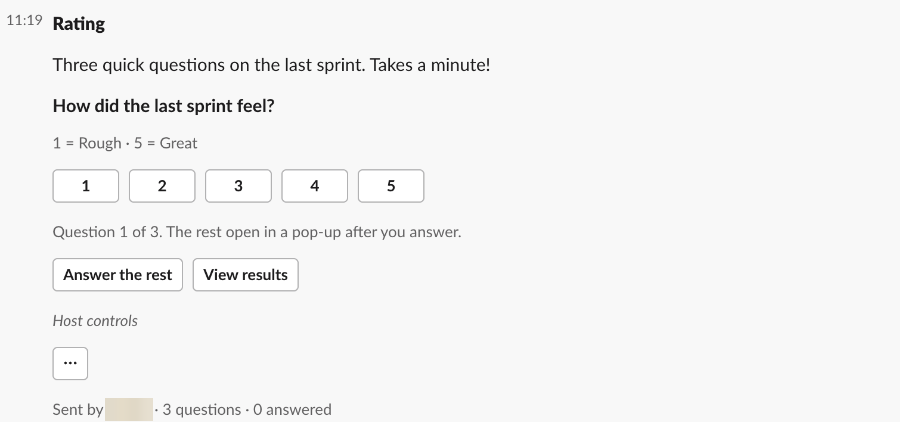
Press pošta. AhaSlides creates the survey in your account and posts it to the channel. The first question sits right in the post: people tap an answer, or type one and press Enter. Odgovori na ostalo then opens the other questions in a pop-up, one at a time. Until they finish, they can tap a different answer or press Nazad to change an earlier one. The bottom of the post shows how many people have answered.
Step 6: Read the results
As the host, press the ... gumb pod Kontrole domaćina za Prikaz rezultata, Završi odgovaranje or Otvori u AhaSlides. If you left Prikaži rezultate svima on, everyone else gets a Prikaz rezultata button too. When you end answering, the survey also closes in AhaSlides, vaš AhaSlides report has every answer.
Zaglavili ste na stepenici? The AhaSlides za Slack voditi pokriva sve opcije i najčešće popravke.
Already have a survey in AhaSlides?
You don't need to build it again. Type /ahaslides trčanje, Pod, ispod Što želiš pokrenuti?, odaberite Pregled, then pick it from your list or paste its link. Choose the channel and settings and press trčanje. If the survey is still a draft, it is published when you run it. Slack can't show date, grid or contact detail questions, so those are skipped, and AhaSlides sends you a direct message listing them.
Five tips to get more people answering
- Neka bude kratko. Three to five questions is plenty for a channel. People answer between tasks, so a survey they can finish in a minute is an easy one to say yes to.
- Say why you're asking. One line in the message ("We'll use this to plan next quarter's offsite") tells people their answer will change something.
- Go anonymous for sensitive topics. On workload, wellbeing or feedback about managers, people may feel safer being open when their name isn't attached.
- End with an open question. A short answer question such as "What's one thing we should change?" can give you the most useful reply of the lot.
- Zatvorite petlju. Post a short summary of the results and what you'll do next. Seeing the last survey change something gives people a reason to answer the next one.
Česta pitanja
Can you create a survey in Slack?
Da. Slack's Workflow Builder can collect answers with a form. For ratings, scores and multiple choice that people answer right in the channel post, with every answer saved in a report, use AhaSlides za Slack: type /ahaslides kreiraj, add your questions and press pošta.
Do people need an account to answer?
No. Only the person who creates the survey signs in to AhaSlides. Everyone else answers with buttons in Slack.
Can you make an anonymous survey in Slack?
Yes. Tick Anonimni odgovori before you post. Names are hidden for everyone, including you, in Slack i u vašem AhaSlides prijaviti.
Can I send the same survey to several channels?
Yes. Pick more than one channel in the Create window before you post.
Is AhaSlides za Slack besplatno?
Da. Radi na svakom AhaSlides plan, uključujući besplatni.
Što ako za moj radni prostor prvo treba odobrenje aplikacija?
Slack traži od vas da pošaljete zahtjev za instalaciju, a vlasnik radnog prostora ili upravitelj aplikacije ga odobrava.
Povezano štivo: Kako napraviti anketu u Slack, for a single quick question.
Find out what your team thinks, right where they work. dodati AhaSlides za Slack and post your first survey in a few minutes.