Skip to content
Claim this template

Free course template · Global

Malware and ransomware: How infections spread and what to do

A ready-made course, live deck and two surveys for all employees. 30 minutes, 6 lessons. Last reviewed 21 October 2026; not legal advice.

Claim the templatePreview the courseDownload SCORM for your LMS

Free. No credit card. Edit everything.

Play a game from the course

Malware and ransomware: How infections spread and what to do: try 3 questions

Three questions from this course. Pick an answer, then see why.

Play the game

Game not loading? Open it in a new tab (opens in a new tab)

Three pieces that work together

Learners sign in, so every finish and score is recorded. 7 fields to fill in with your details.
Claim the template
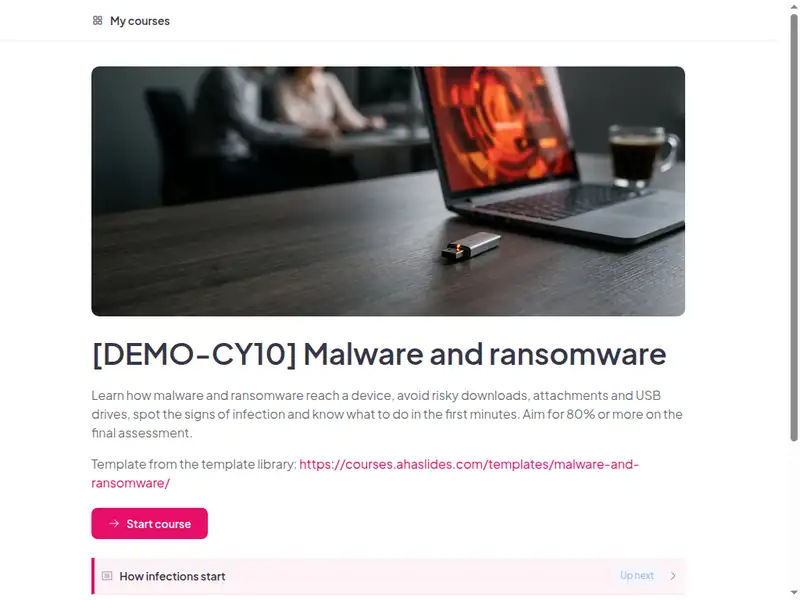
The Malware and ransomware: How infections spread and what to do course as a learner first sees it

6 lessons, about 30 minutes

Minutes are an estimate.

  • Lesson 1: How infections start · 6 min

    Before you begin · The free font · How did it start?

  • Lesson 2: Ways in · 5 min

    Common routes · What it does · Check

  • Lesson 3: Safe habits · 5 min

    Habits · Backups and updates · Try it

  • Lesson 4: Spotting the signs · 5 min

    Signs · First minutes · Check

  • Lesson 5: Grey areas: pressure and payment · 5 min

    Pressure tactics · What would you do? · Check

  • Lesson 6: Your checklist and the final assessment · 4 min

    Next steps · Practice

Claim the template

Inside this course

Taken from the course itself.

By the end, learners can

  • Explain how malware and ransomware reach a device
  • Avoid risky downloads, attachments and removable media
  • Recognise signs of infection and act within minutes
  • Know why backups and updates protect the organisation
  • Report and stay calm during a ransomware event

Sample questions, with answers

  1. What is the most common way an infection starts?

    • A person clicks or opens something
    • A server breaks on its own
    • A printer jams

    Answer: A person clicks or opens something. Most malware needs a person to run it, often without knowing.

    Lesson 1: How infections start

  2. Why are labels such as "salaries" a warning sign on a found drive?

    • They are used to tempt people to plug it in
    • They show the drive is safe
    • They mean the drive is encrypted

    Answer: They are used to tempt people to plug it in. Attackers use curiosity as bait. A tempting label is a reason to be careful.

    Lesson 3: Safe habits

  3. A note on screen says to pay within a day. Who decides what to do about payment?

    • The organisation's response team, not you
    • The first person who sees it
    • The IT intern

    Answer: The organisation's response team, not you. Payment is a serious decision with legal and practical risks. It is never a decision for an individual, and paying does not guarantee the files come back.

    Lesson 5: Grey areas: pressure and payment

A scenario from "Safe habits"

You find a USB drive in the car park labelled "salaries".

Best response: Do not plug it in, hand it to security.

Weaker responses: Check what is on it; Take it home; Leave it.

Related articles

An article from the AhaSlides blog that uses this course.

Common questions

Yes. Claiming the template and editing it are free.

Yes. The course is self-paced and online, and the live deck lets you add a live session in the room or online.

At onboarding and in the annual refresher.

All employees, with an IT help desk variant as a note; run by L&D with IT.

Record completion in your own LMS or record system, so you can show who finished the course and when.

Your own details, each highlighted inside the course:
  • The route for reporting a security incident or suspected breach, and the time limit that applies
  • Link to the list of approved tools and services
  • Link to the next course in your security awareness path
  • Where course completions are recorded
  • Link to the self-paced course
Then edit anything else you like: wording, scenarios, your logo.
Visit the help centre (opens in a new tab)