
The best weekly team check-in questions are short, the same every week and easy to answer in under a minute. Pick three to five from the lists below, then send them in Slack ar AhaSlides forums Slack: tips /ahaslides izveidot, izvēlēties Nedēļas pulss, edit its questions, add your own and press amats.
When to use weekly check-in questions
A weekly check-in works when you want to know how the team is doing without adding another meeting. Say you lead a design team and want a read on workload before Monday planning. On Friday you post four questions in #team-design, and people answer between tasks.
Citi labi brīži tam:
- A remote or hybrid team that rarely talks all at once
- The end of a sprint or a busy week
- A new team or a new manager, to learn what people need
- A slow week, to see whether slow means calm or stuck
Keep a weekly check-in short. If you need a long, formal survey, send it from a full AhaSlides survey link instead.
Why ask in Slack
- Cilvēki atbild tur, kur viņi jau atrodas. No new tab and no email to dig out, so answering takes seconds.
- You see how many have answered. The post sits in the channel and shows the number of people who have replied.
- Atbildes neaizritinās. Katra atbilde ir saglabāta jūsu atmiņā AhaSlides report, so you can compare one week with the next.
Weekly team check-in questions to copy
Each question is marked with the Slack question type that fits it. All of them are types you can pick in the Create window. For a rating or a score, you can change the words at each end of the scale.
The weekly pulse: start here
If you only ask two things, ask these. They are the two questions in the ready-made Nedēļas pulss in AhaSlides forums Slack, and the second one is optional for the people answering.
| jautājums | Type in the Create window |
|---|---|
| Kā pagāja tava nedēļa? | Rating 1 to 5, from Very poor to Great |
| What made it that way? | Follow-up question, which people can skip |
Wins and progress
| jautājums | Type in the Create window |
|---|---|
| What's one thing you're proud of this week? | Īsā atbilde |
| Did you finish what you planned this week? | Jā vai nē |
| How much progress did you make on your top priority? | Rating 1 to 5, from Barely any to A lot |
Workload and focus
| jautājums | Type in the Create window |
|---|---|
| Is your workload manageable right now? | Rating 1 to 5, from Not at all to Completely |
| Is anything blocking your work right now? | Yes or no, with a follow-up asked only when the answer is Yes |
| How much focus time did you get this week? | Multiple choice: Hardly any, Some, Plenty |
The second one is the ready-made Fokuss un bloķētāji check-in: it asks "What is it?" only of people who answer Yes.
Komanda un atbalsts
| jautājums | Type in the Create window |
|---|---|
| Do you get the support you need from the team? | Rating 1 to 5, from Not at all to Completely |
| How connected do you feel to the team? | Rating 1 to 5, from Not at all to Very |
| Who helped you most this week? | Īsā atbilde |
Raugoties uz priekšu
| jautājums | Type in the Create window |
|---|---|
| What's your top priority for next week? | Īsā atbilde |
| What's one thing we should change? | Īsā atbilde |
| How ready do you feel for next week? | Vērtējums no 1 līdz 10 |
Ko tev vajag
- A Slack darba vieta ar AhaSlides forums Slack uzstādītas
- An AhaSlides konts personai, kas reģistrējas (der jebkurš plāns, ieskaitot bezmaksas plānu)
- Nekas cilvēkiem, kas atbild: viņiem tas nav vajadzīgs AhaSlides konts
How to send your weekly check-in in Slack
1. darbība: pievienojiet AhaSlides forums Slack
Atveriet AhaSlides forums Slack instalēšanas lapa un pievienojiet lietotni savai darba vietai. Pirmo reizi nospiežot amats, AhaSlides asks you to sign in and keeps your draft while you do.
Step 2: Open the Create window and pick a check-in
In the channel you want, type /ahaslides izveidot. Zem Sazinieties ar komandu, nospiediet Nedēļas pulss. For Workload, Focus and blockers, Team connection and more, press Visas veidnes.
Step 3: Swap in your questions
The channel you're in is already picked, and Ziņas teksts lets you add a line so people know why you're asking. Edit the first question's wording (it stays a rating question and keeps its follow-up), then press + Pievienot jautājumu for each question you want from the lists above, up to 10 in one post, and pick each one's type from its Veids menu. Three to five questions is plenty.
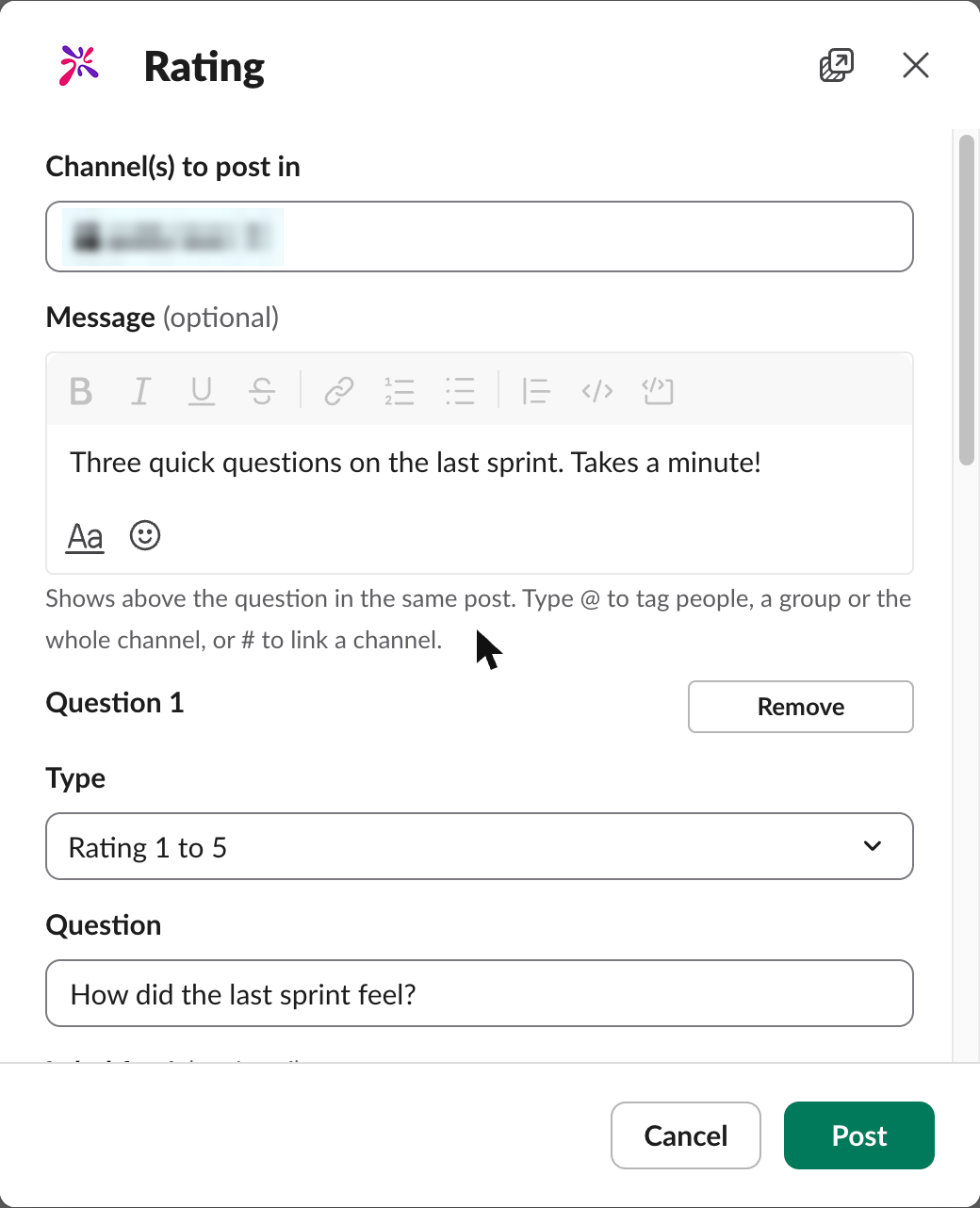
4. darbība. Izvēlieties anonīmas atbildes un to, kas redz rezultātus
Zem Settings, atzīmējiet Anonīmas atbildes if you want honest answers without names. Workload and Wellbeing start with it ticked; Weekly pulse starts with it off. Rādīt rezultātus visiem is ticked to start with, so the whole channel sees the results. Untick it to keep them to yourself.
5. darbība. Publicējiet to un vērojiet, kā pienāk atbildes
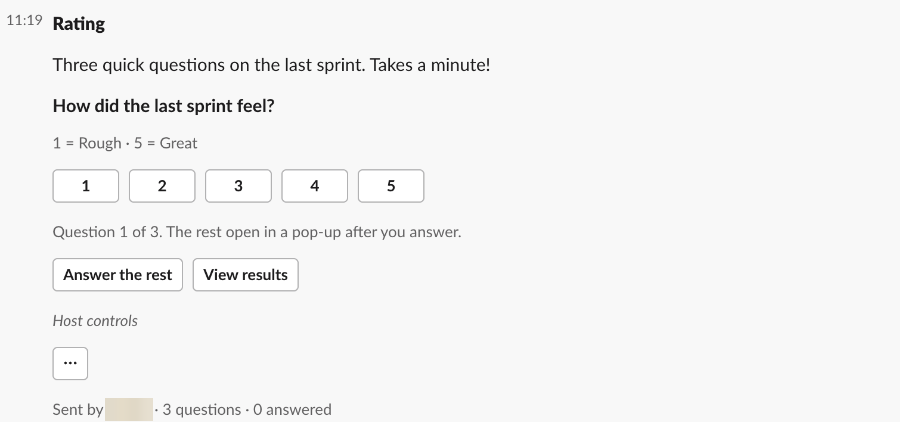
prese amats. The first question sits right in the post, and people tap an answer. Atbildiet uz pārējo opens the other questions in a pop-up, and the post shows how many people have answered. Post it on the same day each week so it becomes a habit.
Iestrēdzis uz pakāpiena? The full guide covers every option and common fixes. For more on surveys, read Kā izveidot aptauju pakalpojumā Slack. If you also want a daily rhythm, see Kā veikt ikdienas reģistrēšanos Slack. For a stand-up that runs in the channel, see Kā palaist asinhrono stand-up video Slack.
Tips for a check-in people answer
- Ask the same first question every week, so you can see a trend.
- Keep it to five questions or fewer, and make the follow-up optional.
- Say why you're asking in the Message line.
- Use anonymous answers for workload and wellbeing, and named answers for wins and next steps.
- Share what you changed because of the answers, so people see the point of replying.
FAQ
How many weekly check-in questions should I ask?
Three to five. A short check-in gets more answers, and you can always add a question later. The Create window takes up to 10 in one post.
Should a weekly check-in be anonymous?
It depends on what you ask. Workload and wellbeing questions get more honest answers when they are anonymous. Questions about wins and next week work well with names. With Anonīmas atbildes ticked, names are hidden for everyone, you included.
Vai cilvēkiem ir nepieciešams konts, lai atbildētu?
No. People answer in Slack bez an AhaSlides kontā.
How often should I send a weekly check-in?
Once a week, on the same day. You post it yourself each time. If something goes wrong when you send it, ceļvedis has the fixes.
Try it in your workspace
Send your first weekly check-in in about a minute.