
Solis 1: Strādājiet ar moduļiem
Savienot AhaSlides MCP serveris uz Claude vai ChatGPT, nosūtiet katru uzvedni un pielāgojiet tās veidoto.
Brief Claude or ChatGPT in the chat, and the AhaSlides MCP server builds your webinar deck, customer survey or event content in your AhaSlides account. Learn the prompts, and every campaign takes far less time to prepare.
Apmēram 2 stundas 20 minūtes · 6 moduļi · Savā tempā · Pabeigšanas sertifikāts
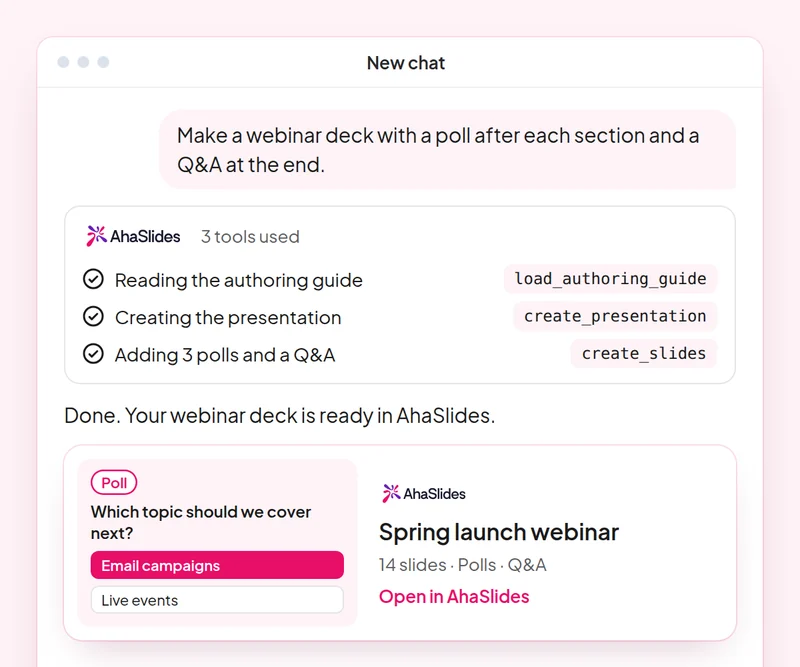
Mērķis: Plan a webinar deck with polls, a word cloud and Q&A built in.
Prasme: build-presentation
mēģināt: “Build a 45-minute webinar presentation launching our spring collection, with a poll, a word cloud and a Q&A slide.”
Tu dabū: An editable webinar deck with speaker notes.
Mērķis: Find and choose images for your slides without leaving the conversation.
Prasme: add-images
mēģināt: “Find stock photos of people working in a café for the title and section slides of my webinar deck, and show me the options first.”
Tu dabū: Photo options to choose from, uploaded to your slides once you pick.
Mērķis: Ask customers for feedback with a short satisfaction survey.
Prasme: build-survey
mēģināt: “Create a 7-question customer satisfaction survey for people who joined our product webinar. Do not publish it yet.”
Tu dabū: A draft survey that asks before it goes live.
Mērķis: Share what an audience said as a report page your team can open.
Prasme: create-insight-report
mēģināt: “Build a shareable report of the poll and word cloud answers from last week's webinar.”
Tu dabū: A report page you can share with the team once you confirm what it shows.
Mērķis: Turn a one-off webinar into an on-demand course.
Prasme: convert-content
mēģināt: “Turn our product launch webinar deck into a 2-lesson self-paced course for new customers.”
Tu dabū: A new course built from the webinar. The deck stays as it is.
Mērķis: Know who joined your webinar and who engaged most, so sales talks to the right people.
Prasme: track-participants
mēģināt: “From my [product launch webinar], list the attendees who answered the most polls and questions, and draft a thank-you email for each of them.”
Tu dabū: A ranked list of your most engaged attendees, with a thank-you ready for each. Detailed per-person reports need a paid plan.
Run one campaign from start to finish: plan the webinar deck with images, survey the people who joined, share a report of what they said and turn the webinar into a course for people who missed it. Keep the prompts that worked, so next time this work is a quick routine.
A 10-question quiz on webinar decks, images, customer surveys and reporting audience results. Pass it to earn your certificate of completion.
Katrs kurss ir AhaSlides Aptuveni 2 stundas un 20 minūtes ilgs e-mācību kurss, pēc kura pabeigšanas tiek izsniegts pārbaudāms sertifikāts.
Savienot AhaSlides MCP serveris uz Claude vai ChatGPT, nosūtiet katru uzvedni un pielāgojiet tās veidoto.
Apvienojiet sešas prasmes vienā reālā nodarbībā no sava darba.
Take a 10-question quiz on webinar decks, images, customer surveys and reporting audience results.
Nokārtojiet testu, lai nopelnītu pārbaudāmu AhaSlides pabeigšanas sertifikāts ar verifikācijas saiti, ko varat kopīgot.
Jā, kursa apmeklēšana ir bez maksas. Jūs to apgūstat savā tempā. AhaSlides konts, un dažas moduļu izmantotās funkcijas, piemēram, detalizēti pārskati, ir iekļautas maksas plānos. Skatīt cenas par to, ko katrs plāns ietver.
Claude (vietnēs claude.ai, Cowork un Claude Code), ChatGPT un jebkurā klientā, kas atbalsta attālinātus MCP serverus. Claude pievienojiet pielāgotu savienotāju ar https://mcp.ahaslides.com/mcp kā servera URL. ChatGPT atrodiet AhaSlides cilnē Spraudņi. Skatiet AhaSlides MCP serveris lapu, lai redzētu visas darbības.
Tie ir 17 publiskie AhaSlides prasmes Klodam, bezmaksas un atvērtā koda GitHubKatrs no tiem pasaka Klodam, kurš AhaSlides MCP rīki, lai izsauktu un norādītu uz to AhaSlidespašu autorēšanas rokasgrāmatas.