
Krok 1: Przepracuj moduły
Połącz AhaSlides Serwer MCP do Claude'a lub ChatGPT, wyślij każdy monit i stwórz swój własny.
Brief Claude or ChatGPT in the chat, and the AhaSlides MCP server builds your webinar deck, customer survey or event content in your AhaSlides account. Learn the prompts, and every campaign takes far less time to prepare.
Około 2 godzin 20 minut · 6 modułów · We własnym tempie · Certyfikat ukończenia
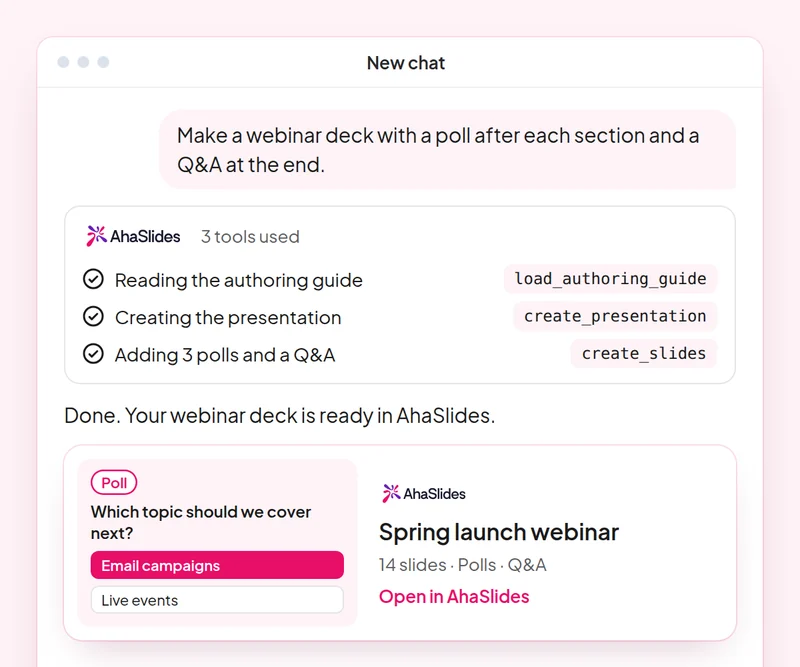
Cel: Plan a webinar deck with polls, a word cloud and Q&A built in.
Umiejętność: build-presentation
Wypróbuj: “Build a 45-minute webinar presentation launching our spring collection, with a poll, a word cloud and a Q&A slide.”
Otrzymujesz: An editable webinar deck with speaker notes.
Cel: Find and choose images for your slides without leaving the conversation.
Umiejętność: add-images
Wypróbuj: “Find stock photos of people working in a café for the title and section slides of my webinar deck, and show me the options first.”
Otrzymujesz: Photo options to choose from, uploaded to your slides once you pick.
Cel: Ask customers for feedback with a short satisfaction survey.
Umiejętność: build-survey
Wypróbuj: “Create a 7-question customer satisfaction survey for people who joined our product webinar. Do not publish it yet.”
Otrzymujesz: A draft survey that asks before it goes live.
Cel: Share what an audience said as a report page your team can open.
Umiejętność: create-insight-report
Wypróbuj: “Build a shareable report of the poll and word cloud answers from last week's webinar.”
Otrzymujesz: A report page you can share with the team once you confirm what it shows.
Cel: Turn a one-off webinar into an on-demand course.
Umiejętność: convert-content
Wypróbuj: “Turn our product launch webinar deck into a 2-lesson self-paced course for new customers.”
Otrzymujesz: A new course built from the webinar. The deck stays as it is.
Cel: Know who joined your webinar and who engaged most, so sales talks to the right people.
Umiejętność: track-participants
Wypróbuj: “From my [product launch webinar], list the attendees who answered the most polls and questions, and draft a thank-you email for each of them.”
Otrzymujesz: A ranked list of your most engaged attendees, with a thank-you ready for each. Detailed per-person reports need a paid plan.
Run one campaign from start to finish: plan the webinar deck with images, survey the people who joined, share a report of what they said and turn the webinar into a course for people who missed it. Keep the prompts that worked, so next time this work is a quick routine.
A 10-question quiz on webinar decks, images, customer surveys and reporting audience results. Pass it to earn your certificate of completion.
Każdy kurs jest AhaSlides Kurs e-learningowy trwający około 2 godzin i 20 minut, po ukończeniu którego otrzymasz weryfikowalny certyfikat.
Połącz AhaSlides Serwer MCP do Claude'a lub ChatGPT, wyślij każdy monit i stwórz swój własny.
Połącz sześć umiejętności w jedną prawdziwą sesję w swojej pracy.
Take a 10-question quiz on webinar decks, images, customer surveys and reporting audience results.
Zdaj quiz, aby zdobyć weryfikowalny AhaSlides certyfikat ukończenia kursu z linkiem weryfikacyjnym, którym możesz się podzielić.
Tak, udział w kursie jest bezpłatny. Uczestniczysz w nim samodzielnie. AhaSlides Konto i niektóre funkcje używane przez moduły, takie jak szczegółowe raporty, są częścią planów płatnych. Zobacz ceny co obejmuje każdy plan.
Claude (w claude.ai, Cowork i Claude Code), ChatGPT i dowolnym kliencie obsługującym zdalne serwery MCP. W Claude dodaj niestandardowy łącznik z https://mcp.ahaslides.com/mcp jako adres URL serwera. W ChatGPT znajdź AhaSlides na karcie Wtyczki. Zobacz AhaSlides Serwer MCP strona zawierająca pełną instrukcję.
Są to 17 publiczne AhaSlides umiejętności dla Claude'a, darmowe i otwarte oprogramowanie na GitHubKażdy z nich mówi Claude'owi, który AhaSlides Narzędzia MCP do wywoływania i kierowania nimi AhaSlideswłasne przewodniki autorskie.