
The best weekly team check-in questions are short, the same every week and easy to answer in under a minute. Pick three to five from the lists below, then send them in Slack implementate cu AhaSlides pentru Slacktip /ahaslides creează, alege Puls săptămânal, edit its questions, add your own and press Post.
When to use weekly check-in questions
A weekly check-in works when you want to know how the team is doing without adding another meeting. Say you lead a design team and want a read on workload before Monday planning. On Friday you post four questions in #team-design, and people answer between tasks.
Alte momente bune pentru asta:
- A remote or hybrid team that rarely talks all at once
- The end of a sprint or a busy week
- A new team or a new manager, to learn what people need
- A slow week, to see whether slow means calm or stuck
Keep a weekly check-in short. If you need a long, formal survey, send it from a full AhaSlides survey link instead.
Why ask in Slack
- Oamenii răspund unde se află deja. No new tab and no email to dig out, so answering takes seconds.
- You see how many have answered. The post sits in the channel and shows the number of people who have replied.
- Răspunsurile nu se derulează. Fiecare răspuns este salvat în AhaSlides report, so you can compare one week with the next.
Weekly team check-in questions to copy
Each question is marked with the Slack question type that fits it. All of them are types you can pick in the Create window. For a rating or a score, you can change the words at each end of the scale.
The weekly pulse: start here
If you only ask two things, ask these. They are the two questions in the ready-made Puls săptămânal in AhaSlides pentru Slack, and the second one is optional for the people answering.
| Întrebare | Type in the Create window |
|---|---|
| Cum a fost săptămâna ta? | Rating 1 to 5, from Very poor to Great |
| What made it that way? | Follow-up question, which people can skip |
Wins and progress
| Întrebare | Type in the Create window |
|---|---|
| What's one thing you're proud of this week? | Răspuns scurt |
| Did you finish what you planned this week? | da sau nu |
| How much progress did you make on your top priority? | Rating 1 to 5, from Barely any to A lot |
Workload and focus
| Întrebare | Type in the Create window |
|---|---|
| Is your workload manageable right now? | Rating 1 to 5, from Not at all to Completely |
| Is anything blocking your work right now? | Yes or no, with a follow-up asked only when the answer is Yes |
| How much focus time did you get this week? | Multiple choice: Hardly any, Some, Plenty |
The second one is the ready-made Concentrare și blocanți check-in: it asks "What is it?" only of people who answer Yes.
Team and support
| Întrebare | Type in the Create window |
|---|---|
| Do you get the support you need from the team? | Rating 1 to 5, from Not at all to Completely |
| How connected do you feel to the team? | Rating 1 to 5, from Not at all to Very |
| Who helped you most this week? | Răspuns scurt |
Privind înainte
| Întrebare | Type in the Create window |
|---|---|
| What's your top priority for next week? | Răspuns scurt |
| What's one thing we should change? | Răspuns scurt |
| How ready do you feel for next week? | Scor de la 1 la 10 |
De ce ai nevoie
- A Slack spațiu de lucru cu AhaSlides pentru Slack instalat
- An AhaSlides cont pentru persoana care postează check-in-ul (orice abonament funcționează, inclusiv gratuit)
- Nimic pentru cei care răspund: nu au nevoie de un AhaSlides cont
How to send your weekly check-in in Slack
Pasul 1: Adăugați AhaSlides pentru Slack
Deschideți AhaSlides pentru Slack pagină de instalare și adăugați aplicația în spațiul dvs. de lucru. Prima dată când apăsați Post, AhaSlides asks you to sign in and keeps your draft while you do.
Step 2: Open the Create window and pick a check-in
In the channel you want, type /ahaslides creează. Sub Verificați cu echipa, presa Puls săptămânal. For Workload, Focus and blockers, Team connection and more, press Toate șabloanele.
Step 3: Swap in your questions
The channel you're in is already picked, and Mesaj lets you add a line so people know why you're asking. Edit the first question's wording (it stays a rating question and keeps its follow-up), then press + Adăugați o întrebare for each question you want from the lists above, up to 10 in one post, and pick each one's type from its Tip menu. Three to five questions is plenty.
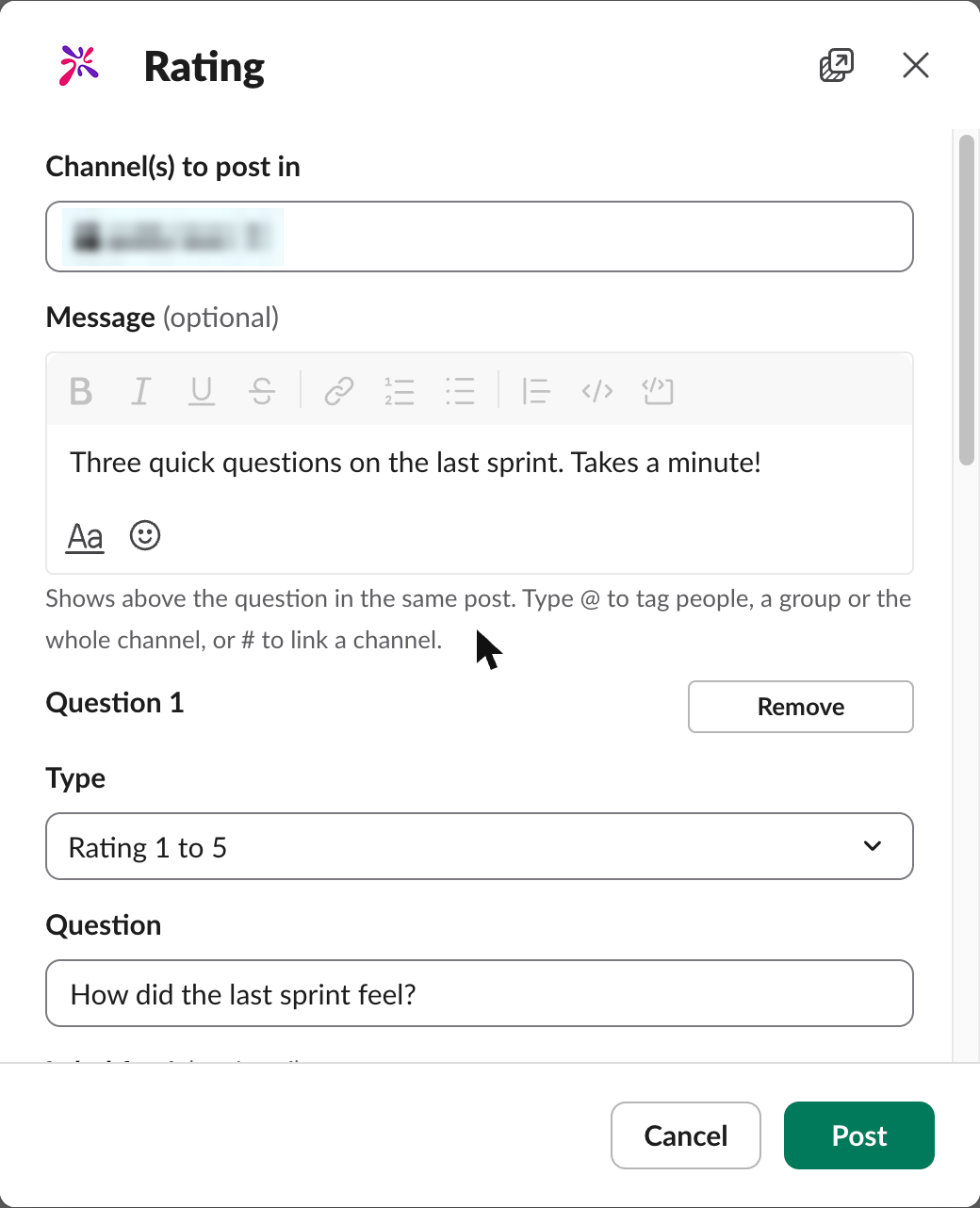
Pasul 4: Alegeți răspunsuri anonime și cine vede rezultatele
În Setări cont, bifați Răspunsuri anonime if you want honest answers without names. Workload and Wellbeing start with it ticked; Weekly pulse starts with it off. Afișați rezultatele tuturor is ticked to start with, so the whole channel sees the results. Untick it to keep them to yourself.
Pasul 5: Postează-l și urmărește cum vin răspunsurile
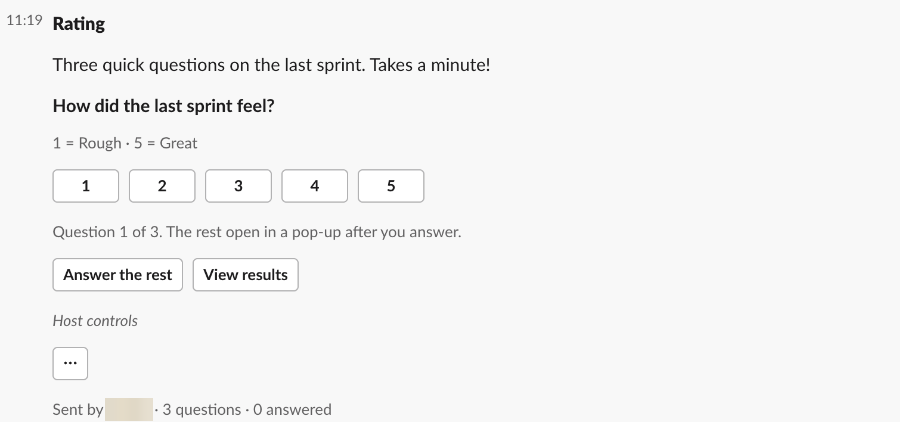
Anunturi Post. The first question sits right in the post, and people tap an answer. Răspundeți la restul opens the other questions in a pop-up, and the post shows how many people have answered. Post it on the same day each week so it becomes a habit.
Blocat pe o treaptă? The full guide covers every option and common fixes. For more on surveys, read Cum să creezi un sondaj în Slack. If you also want a daily rhythm, see Cum se efectuează o înregistrare zilnică Slack. For a stand-up that runs in the channel, see Cum să rulezi un stand-up asincron în Slack.
Tips for a check-in people answer
- Ask the same first question every week, so you can see a trend.
- Keep it to five questions or fewer, and make the follow-up optional.
- Say why you're asking in the Message line.
- Use anonymous answers for workload and wellbeing, and named answers for wins and next steps.
- Share what you changed because of the answers, so people see the point of replying.
FAQ
How many weekly check-in questions should I ask?
Three to five. A short check-in gets more answers, and you can always add a question later. The Create window takes up to 10 in one post.
Should a weekly check-in be anonymous?
It depends on what you ask. Workload and wellbeing questions get more honest answers when they are anonymous. Questions about wins and next week work well with names. With Răspunsuri anonime ticked, names are hidden for everyone, you included.
Au nevoie oamenii de un cont pentru a răspunde?
No. People answer in Slack fără un AhaSlides cont.
How often should I send a weekly check-in?
Once a week, on the same day. You post it yourself each time. If something goes wrong when you send it, Ghidul has the fixes.
Try it in your workspace
Send your first weekly check-in in about a minute.