
ขั้นตอนที่ 1: Work through the modules
เชื่อมต่อ AhaSlides MCP server to Claude or ChatGPT, send each prompt and make what it builds your own.
Ask Claude or ChatGPT for an icebreaker, a team quiz or a live Q&A, and the AhaSlides MCP server builds it in your AhaSlides account, ready to run. Learn the prompts once, and getting a meeting or event ready takes minutes, not hours.
About 2 hours 20 minutes · 6 modules · At your own pace · Certificate of completion
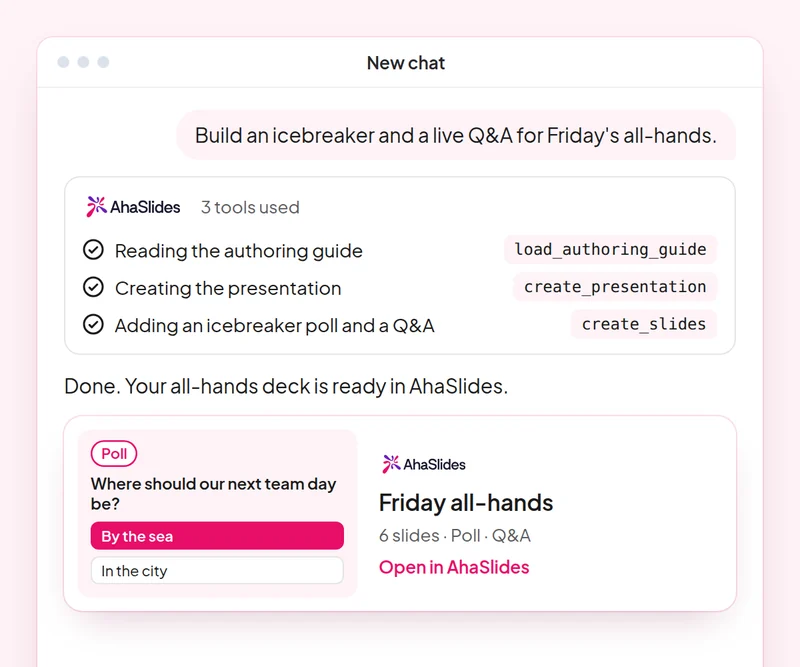
เป้าหมาย: Open any meeting or event with an activity everyone joins.
สกิล: build-presentation
ลอง: “Build an icebreaker for a 60-person team offsite: a welcome slide, a word cloud on one word for this year and a quick poll.”
คุณได้รับ: A ready-to-run deck that gets everyone answering from the first minute.
เป้าหมาย: Build a fair team quiz with accurate answers.
สกิล: make-quiz
ลอง: “Make a 15-question general knowledge quiz for our end-of-year party, played in teams.”
คุณได้รับ: A scored quiz and how guests join it on their phones.
เป้าหมาย: Change timing, order and settings of an existing deck with one prompt.
สกิล: edit-slides
ลอง: “In my offsite deck, give every quiz question 20 seconds and move the feedback poll to the end.”
คุณได้รับ: Your changes made to the existing slides, with a summary of what changed.
เป้าหมาย: Run a moderated Q&A where you approve every question shown.
สกิล: moderate-live-qna
ลอง: “Show me the new questions from the panel Q&A and suggest which to approve. Wait for my yes before you change anything.”
คุณได้รับ: Questions sorted into approve and dismiss with reasons, applied only after you agree.
เป้าหมาย: Read the room's feedback and plan the next event from it.
สกิล: review-results
ลอง: “How did people answer the feedback poll at today's offsite?”
คุณได้รับ: A summary of responses with one or two ideas for your next event.
เป้าหมาย: Know who came, who joined in and who stayed quiet, so you follow up with the right people.
สกิล: track-participants
ลอง: “From my [team offsite] session, list who joined, who answered nothing, and draft a short follow-up asking the quiet ones for their views.”
คุณได้รับ: An attendance and participation list, with follow-ups for the people you did not hear from. Detailed per-person reports need a paid plan.
Host one real meeting or event: open with an icebreaker, run a team quiz and a moderated Q&A, then review the feedback and note what you would change next time. Keep the prompts that worked, so next time this work is a quick routine.
A 10-question quiz on icebreakers, team quizzes, deck edits and Q&A moderation. Pass it to earn your certificate of completion.
Each course is an AhaSlides eLearning course of about 2 hours 20 minutes that issues a verifiable certificate when you finish.
เชื่อมต่อ AhaSlides MCP server to Claude or ChatGPT, send each prompt and make what it builds your own.
Put the six skills together on one real session from your work.
Take a 10-question quiz on icebreakers, team quizzes, deck edits and Q&A moderation.
Pass the quiz to earn a verifiable AhaSlides certificate of completion, with a verify link you can share.
Yes, the course costs nothing to take. You follow it in your own AhaSlides บัญชีผู้ใช้ และฟีเจอร์บางอย่างที่โมดูลใช้ เช่น รายงานโดยละเอียด เป็นส่วนหนึ่งของแพ็กเกจแบบชำระเงิน โปรดดูรายละเอียดเพิ่มเติม การตั้งราคา สำหรับรายละเอียดเกี่ยวกับสิ่งที่แต่ละแผนรวมอยู่ด้วย
Claude (on claude.ai, Cowork and Claude Code), ChatGPT and any client that supports remote MCP servers. In Claude, add a custom connector with https://mcp.ahaslides.com/mcp เป็น URL ของเซิร์ฟเวอร์ ใน ChatGPT ให้ค้นหา AhaSlides ในแท็บปลั๊กอิน ดูที่นี่ AhaSlides เซิร์ฟเวอร์ MCP ดูรายละเอียดขั้นตอนทั้งหมดได้ที่หน้านี้
พวกเขาคือบุคคลสาธารณะทั้ง 17 คน AhaSlides ทักษะสำหรับ Claude, ซอฟต์แวร์โอเพนซอร์สฟรีบน GitHubแต่ละคนบอกคล็อดว่า... AhaSlides เครื่องมือ MCP สำหรับการโทรและชี้ไปยัง AhaSlidesคู่มือการเขียนของตนเอง