
ขั้นตอนที่ 1: ดำเนินการตามโมดูลต่างๆ
เชื่อมต่อ AhaSlides เซิร์ฟเวอร์ MCP ส่งข้อมูลไปยัง Claude หรือ ChatGPT ส่งข้อความแจ้งเตือนแต่ละข้อความ แล้วปรับแต่งสิ่งที่สร้างขึ้นให้เป็นของคุณเอง
เชื่อมต่อ AhaSlides MCP server to Claude or ChatGPT, then ask for a lesson in the chat: the deck, the quiz and a summary of the results land in your AhaSlides account. Six modules teach you the prompts, so lessons take far less time to prepare.
ประมาณ 2 ชั่วโมง 20 นาที · 6 โมดูล · เรียนรู้ตามจังหวะของคุณเอง · ใบรับรองการสำเร็จหลักสูตร
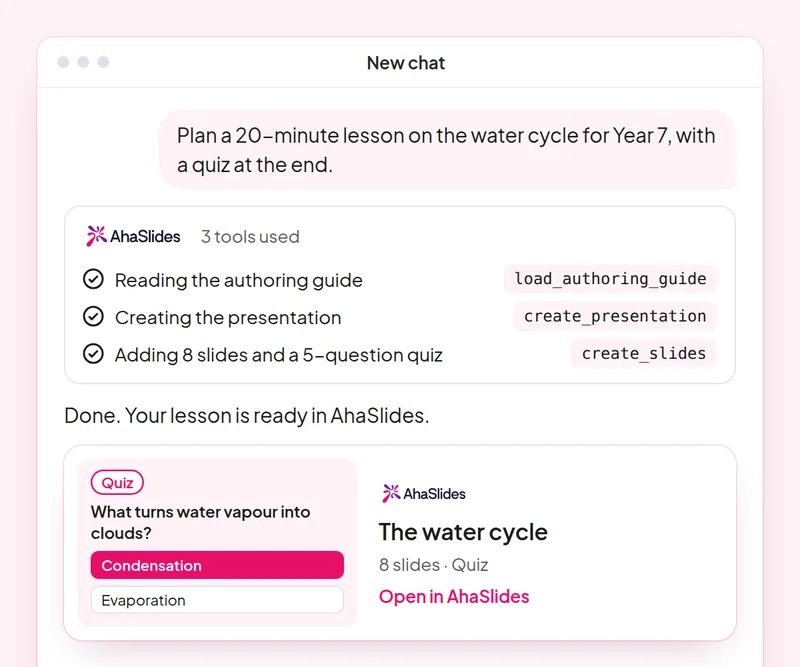
เป้าหมาย: Write a lesson prompt that names the topic, age group, length and interactive slides you want.
สกิล: build-presentation
ลอง: “Turn my Year 8 lesson on the water cycle into a 12-slide AhaSlides presentation with a word cloud warm-up, two polls and speaker notes on every slide.”
คุณได้รับ: An editable deck in your AhaSlides account, with a one-line summary of each slide.
เป้าหมาย: Get a fair, accurate quiz at the right level, and check every answer before you run it.
สกิล: make-quiz
ลอง: “Make a 10-question quiz on adding fractions for 11-year-olds, with one correct answer and three plausible wrong answers per question.”
คุณได้รับ: A scored quiz presentation and how your students join it.
เป้าหมาย: Collect honest student feedback and keep a survey as a draft until you have read it.
สกิล: build-survey
ลอง: “Create a 6-question end-of-term survey for my students about homework load, lesson pace and what helped them most. Do not publish it yet.”
คุณได้รับ: A draft survey you can read through before you publish it.
เป้าหมาย: Read quiz results by question and turn them into a plan for the next lesson.
สกิล: review-results
ลอง: “How did my class answer in yesterday's fractions quiz? Which questions did most students get wrong?”
คุณได้รับ: Participant numbers, the headline result per question and one or two ideas for the next lesson.
เป้าหมาย: Reuse a lesson as self-paced revision without changing the original deck.
สกิล: convert-content
ลอง: “Turn my water cycle presentation into a self-paced revision course with three short lessons.”
คุณได้รับ: An unpublished AhaSlides course built from your deck. The deck itself is not changed.
เป้าหมาย: Know which students need help, by name, before the next lesson.
สกิล: track-participants
ลอง: “Look at the results of my [Year 8 fractions] quiz and list the students who scored under [60%], with the questions each one missed. Then draft a short, kind note to each of them.”
คุณได้รับ: A follow-up list by student and a note ready to send to each one. Detailed per-person reports need a paid plan.
Plan one real lesson end to end: build the deck and the quiz with Claude or ChatGPT, run them with your class, then ask for a summary of the results and plan the next lesson from it. Keep the prompts that worked, so next time this work is a quick routine.
A 10-question quiz on writing good prompts for lessons and quizzes, and on checking what the MCP server builds before it reaches your class. Pass it to earn your certificate of completion.
แต่ละหลักสูตรคือ AhaSlides หลักสูตรอีเลิร์นนิงใช้เวลาประมาณ 2 ชั่วโมง 20 นาที และจะออกใบรับรองที่ตรวจสอบได้เมื่อเรียนจบ
เชื่อมต่อ AhaSlides เซิร์ฟเวอร์ MCP ส่งข้อมูลไปยัง Claude หรือ ChatGPT ส่งข้อความแจ้งเตือนแต่ละข้อความ แล้วปรับแต่งสิ่งที่สร้างขึ้นให้เป็นของคุณเอง
นำทักษะทั้งหกมาใช้ร่วมกันในการทำงานจริงหนึ่งครั้ง
Take a 10-question quiz on writing good prompts for lessons and quizzes, and on checking what the MCP server builds before it reaches your class.
ผ่านการทดสอบเพื่อรับใบรับรองที่ตรวจสอบได้ AhaSlides ใบรับรองการสำเร็จการศึกษา พร้อมลิงก์ยืนยันที่คุณสามารถแชร์ได้
ใช่แล้ว หลักสูตรนี้เรียนฟรี คุณเรียนด้วยตนเองก็ได้ AhaSlides บัญชีผู้ใช้ และฟีเจอร์บางอย่างที่โมดูลใช้ เช่น รายงานโดยละเอียด เป็นส่วนหนึ่งของแพ็กเกจแบบชำระเงิน โปรดดูรายละเอียดเพิ่มเติม การตั้งราคา สำหรับรายละเอียดเกี่ยวกับสิ่งที่แต่ละแผนรวมอยู่ด้วย
Claude (บน claude.ai, Cowork และ Claude Code), ChatGPT และไคลเอ็นต์ใด ๆ ที่รองรับเซิร์ฟเวอร์ MCP ระยะไกล ใน Claude ให้เพิ่มตัวเชื่อมต่อแบบกำหนดเองด้วย https://mcp.ahaslides.com/mcp เป็น URL ของเซิร์ฟเวอร์ ใน ChatGPT ให้ค้นหา AhaSlides ในแท็บปลั๊กอิน ดูที่นี่ AhaSlides เซิร์ฟเวอร์ MCP ดูรายละเอียดขั้นตอนทั้งหมดได้ที่หน้านี้
พวกเขาคือบุคคลสาธารณะทั้ง 17 คน AhaSlides ทักษะสำหรับ Claude, ซอฟต์แวร์โอเพนซอร์สฟรีบน GitHubแต่ละคนบอกคล็อดว่า... AhaSlides เครื่องมือ MCP สำหรับการโทรและชี้ไปยัง AhaSlidesคู่มือการเขียนของตนเอง