
1 Adım: Modülleri sırayla tamamlayın.
bağlamak AhaSlides MCP sunucusundan Claude veya ChatGPT'ye her bir komut istemini gönderin ve oluşturduğu içeriği kendinize göre uyarlayın.
Brief Claude or ChatGPT in the chat, and the AhaSlides MCP server builds your webinar deck, customer survey or event content in your AhaSlides account. Learn the prompts, and every campaign takes far less time to prepare.
Yaklaşık 2 saat 20 dakika · 6 modül · Kendi hızınızda · Tamamlama sertifikası
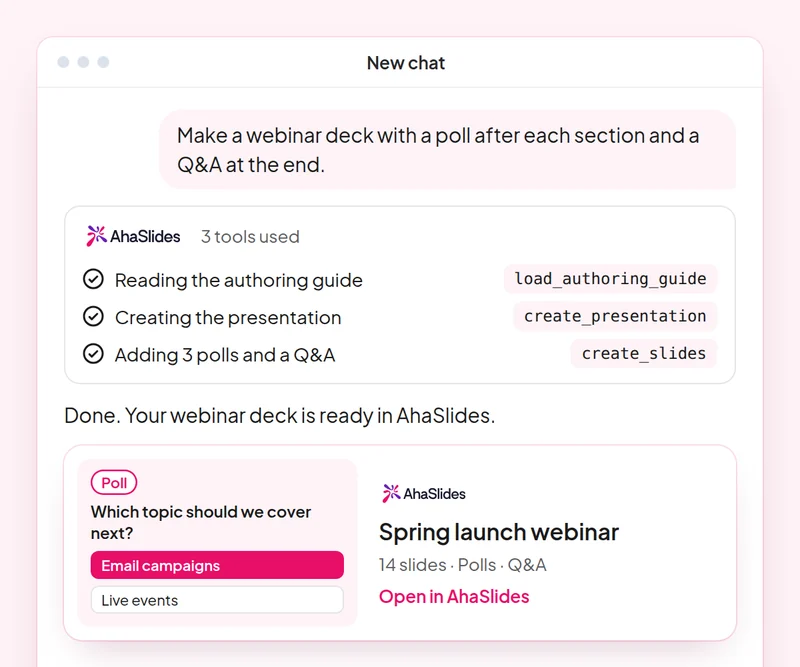
Amaç: Plan a webinar deck with polls, a word cloud and Q&A built in.
Yetenek: build-presentation
deneyin: “Build a 45-minute webinar presentation launching our spring collection, with a poll, a word cloud and a Q&A slide.”
Alacağınız: An editable webinar deck with speaker notes.
Amaç: Find and choose images for your slides without leaving the conversation.
Yetenek: add-images
deneyin: “Find stock photos of people working in a café for the title and section slides of my webinar deck, and show me the options first.”
Alacağınız: Photo options to choose from, uploaded to your slides once you pick.
Amaç: Ask customers for feedback with a short satisfaction survey.
Yetenek: build-survey
deneyin: “Create a 7-question customer satisfaction survey for people who joined our product webinar. Do not publish it yet.”
Alacağınız: A draft survey that asks before it goes live.
Amaç: Share what an audience said as a report page your team can open.
Yetenek: create-insight-report
deneyin: “Build a shareable report of the poll and word cloud answers from last week's webinar.”
Alacağınız: A report page you can share with the team once you confirm what it shows.
Amaç: Turn a one-off webinar into an on-demand course.
Yetenek: convert-content
deneyin: “Turn our product launch webinar deck into a 2-lesson self-paced course for new customers.”
Alacağınız: A new course built from the webinar. The deck stays as it is.
Amaç: Know who joined your webinar and who engaged most, so sales talks to the right people.
Yetenek: track-participants
deneyin: “From my [product launch webinar], list the attendees who answered the most polls and questions, and draft a thank-you email for each of them.”
Alacağınız: A ranked list of your most engaged attendees, with a thank-you ready for each. Detailed per-person reports need a paid plan.
Run one campaign from start to finish: plan the webinar deck with images, survey the people who joined, share a report of what they said and turn the webinar into a course for people who missed it. Keep the prompts that worked, so next time this work is a quick routine.
A 10-question quiz on webinar decks, images, customer surveys and reporting audience results. Pass it to earn your certificate of completion.
Her ders bir AhaSlides Yaklaşık 2 saat 20 dakika süren ve tamamlandığında doğrulanabilir bir sertifika veren e-öğrenme kursu.
bağlamak AhaSlides MCP sunucusundan Claude veya ChatGPT'ye her bir komut istemini gönderin ve oluşturduğu içeriği kendinize göre uyarlayın.
Bu altı beceriyi iş hayatınızdan gerçek bir oturumda bir araya getirin.
Take a 10-question quiz on webinar decks, images, customer surveys and reporting audience results.
Sınavı geçerek doğrulanabilir bir sertifika kazanın. AhaSlides Tamamlama sertifikası, paylaşabileceğiniz bir doğrulama bağlantısıyla birlikte.
Evet, kursa katılmak ücretsiz. Kendi başınıza takip ediyorsunuz. AhaSlides Hesap ve modüllerin kullandığı bazı özellikler, örneğin detaylı raporlar, ücretli planların bir parçasıdır. Bkz. fiyatlandırma Her planın neleri içerdiğine dair.
Claude (claude.ai, Cowork ve Claude Code'da), ChatGPT ve uzaktan MCP sunucularını destekleyen herhangi bir istemci. Claude'da, özel bir bağlayıcı ekleyin. https://mcp.ahaslides.com/mcp Sunucu URL'si olarak. ChatGPT'de bulun. AhaSlides Eklentiler sekmesinde. Bakınız AhaSlides MCP sunucusu Tüm adımlar için ilgili sayfaya bakın.
Bunlar 17 kamu görevlisi. AhaSlides Claude için beceriler, ücretsiz ve açık kaynaklı GitHubHer biri Claude'a hangisi olduğunu söyler. AhaSlides MCP araçları, çağrı yapmak ve yönlendirmek için kullanılır. AhaSlides'kendi yazarlık kılavuzları.