
Крок 1: Опрацювання модулів
Підключіть AhaSlides Сервер MCP до Claude або ChatGPT, надсилайте кожне запит і робіть те, що він створює, своїм власним.
Ask Claude or ChatGPT for an icebreaker, a team quiz or a live Q&A, and the AhaSlides MCP server builds it in your AhaSlides account, ready to run. Learn the prompts once, and getting a meeting or event ready takes minutes, not hours.
Близько 2 годин 20 хвилин · 6 модулів · У вашому власному темпі · Сертифікат проходження
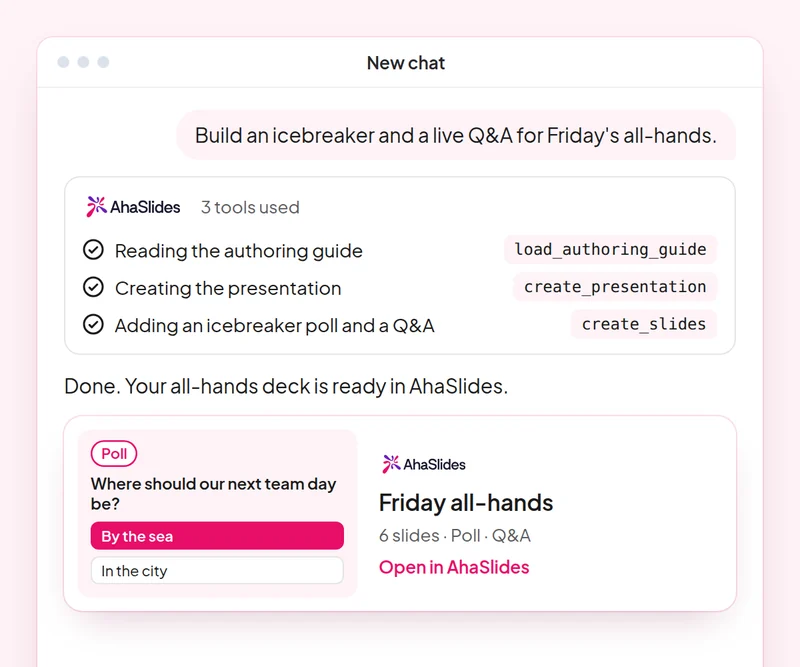
Мета: Open any meeting or event with an activity everyone joins.
Навик: build-presentation
спробувати: “Build an icebreaker for a 60-person team offsite: a welcome slide, a word cloud on one word for this year and a quick poll.”
Ви отримуєте: A ready-to-run deck that gets everyone answering from the first minute.
Мета: Build a fair team quiz with accurate answers.
Навик: make-quiz
спробувати: “Make a 15-question general knowledge quiz for our end-of-year party, played in teams.”
Ви отримуєте: A scored quiz and how guests join it on their phones.
Мета: Change timing, order and settings of an existing deck with one prompt.
Навик: edit-slides
спробувати: “In my offsite deck, give every quiz question 20 seconds and move the feedback poll to the end.”
Ви отримуєте: Your changes made to the existing slides, with a summary of what changed.
Мета: Run a moderated Q&A where you approve every question shown.
Навик: moderate-live-qna
спробувати: “Show me the new questions from the panel Q&A and suggest which to approve. Wait for my yes before you change anything.”
Ви отримуєте: Questions sorted into approve and dismiss with reasons, applied only after you agree.
Мета: Read the room's feedback and plan the next event from it.
Навик: review-results
спробувати: “How did people answer the feedback poll at today's offsite?”
Ви отримуєте: A summary of responses with one or two ideas for your next event.
Мета: Know who came, who joined in and who stayed quiet, so you follow up with the right people.
Навик: track-participants
спробувати: “From my [team offsite] session, list who joined, who answered nothing, and draft a short follow-up asking the quiet ones for their views.”
Ви отримуєте: An attendance and participation list, with follow-ups for the people you did not hear from. Detailed per-person reports need a paid plan.
Host one real meeting or event: open with an icebreaker, run a team quiz and a moderated Q&A, then review the feedback and note what you would change next time. Keep the prompts that worked, so next time this work is a quick routine.
A 10-question quiz on icebreakers, team quizzes, deck edits and Q&A moderation. Pass it to earn your certificate of completion.
Кожен курс є AhaSlides Електронний курс тривалістю приблизно 2 години 20 хвилин, після завершення якого ви отримуєте перевірений сертифікат.
Підключіть AhaSlides Сервер MCP до Claude або ChatGPT, надсилайте кожне запит і робіть те, що він створює, своїм власним.
Поєднайте шість навичок разом на одному реальному занятті з вашої роботи.
Take a 10-question quiz on icebreakers, team quizzes, deck edits and Q&A moderation.
Пройдіть тест, щоб отримати перевірений AhaSlides сертифікат про завершення з посиланням для підтвердження, яким ви можете поділитися.
Так, курс безкоштовний. Ви проходите його самостійно. AhaSlides обліковий запис, а деякі функції, які використовують модулі, такі як детальні звіти, є частиною платних планів. Див. ціни за те, що включає кожен план.
Claude (на claude.ai, Cowork та Claude Code), ChatGPT та будь-який клієнт, який підтримує віддалені MCP-сервери. У Claude додайте користувацький конектор за допомогою https://mcp.ahaslides.com/mcp як URL-адресу сервера. У ChatGPT знайдіть AhaSlides на вкладці Плагіни. Див. AhaSlides Сервер MCP сторінку для повних кроків.
Вони є 17 громадськістю AhaSlides навички для Клода, безкоштовні та з відкритим вихідним кодом на GitHubКожен з них каже Клоду, який AhaSlides Інструменти MCP для виклику та вказує на них AhaSlidesвласні авторські посібники.