
Крок 1: Опрацювання модулів
Підключіть AhaSlides Сервер MCP до Claude або ChatGPT, надсилайте кожне запит і робіть те, що він створює, своїм власним.
Brief Claude or ChatGPT in the chat, and the AhaSlides MCP server builds your webinar deck, customer survey or event content in your AhaSlides account. Learn the prompts, and every campaign takes far less time to prepare.
Близько 2 годин 20 хвилин · 6 модулів · У вашому власному темпі · Сертифікат проходження
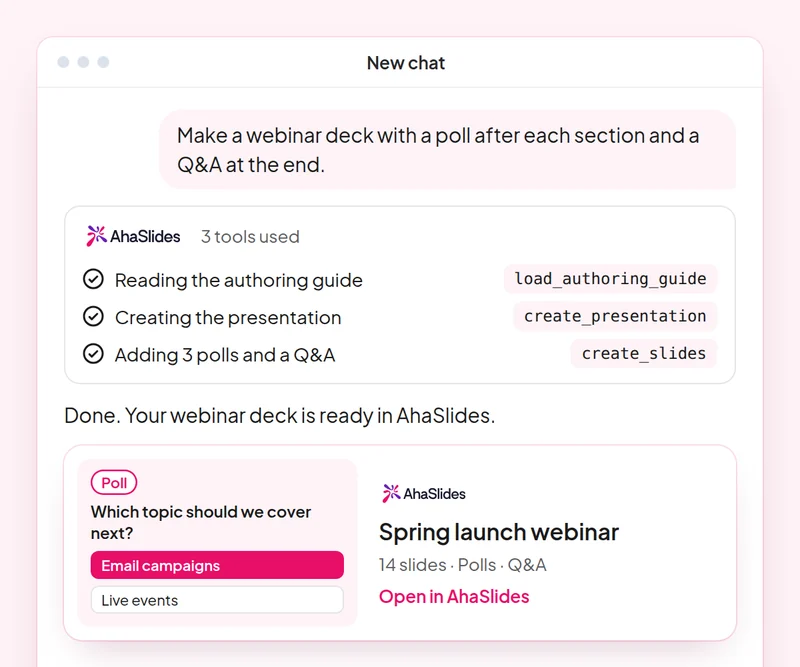
Мета: Plan a webinar deck with polls, a word cloud and Q&A built in.
Навик: build-presentation
спробувати: “Build a 45-minute webinar presentation launching our spring collection, with a poll, a word cloud and a Q&A slide.”
Ви отримуєте: An editable webinar deck with speaker notes.
Мета: Find and choose images for your slides without leaving the conversation.
Навик: add-images
спробувати: “Find stock photos of people working in a café for the title and section slides of my webinar deck, and show me the options first.”
Ви отримуєте: Photo options to choose from, uploaded to your slides once you pick.
Мета: Ask customers for feedback with a short satisfaction survey.
Навик: build-survey
спробувати: “Create a 7-question customer satisfaction survey for people who joined our product webinar. Do not publish it yet.”
Ви отримуєте: A draft survey that asks before it goes live.
Мета: Share what an audience said as a report page your team can open.
Навик: create-insight-report
спробувати: “Build a shareable report of the poll and word cloud answers from last week's webinar.”
Ви отримуєте: A report page you can share with the team once you confirm what it shows.
Мета: Turn a one-off webinar into an on-demand course.
Навик: convert-content
спробувати: “Turn our product launch webinar deck into a 2-lesson self-paced course for new customers.”
Ви отримуєте: A new course built from the webinar. The deck stays as it is.
Мета: Know who joined your webinar and who engaged most, so sales talks to the right people.
Навик: track-participants
спробувати: “From my [product launch webinar], list the attendees who answered the most polls and questions, and draft a thank-you email for each of them.”
Ви отримуєте: A ranked list of your most engaged attendees, with a thank-you ready for each. Detailed per-person reports need a paid plan.
Run one campaign from start to finish: plan the webinar deck with images, survey the people who joined, share a report of what they said and turn the webinar into a course for people who missed it. Keep the prompts that worked, so next time this work is a quick routine.
A 10-question quiz on webinar decks, images, customer surveys and reporting audience results. Pass it to earn your certificate of completion.
Кожен курс є AhaSlides Електронний курс тривалістю приблизно 2 години 20 хвилин, після завершення якого ви отримуєте перевірений сертифікат.
Підключіть AhaSlides Сервер MCP до Claude або ChatGPT, надсилайте кожне запит і робіть те, що він створює, своїм власним.
Поєднайте шість навичок разом на одному реальному занятті з вашої роботи.
Take a 10-question quiz on webinar decks, images, customer surveys and reporting audience results.
Пройдіть тест, щоб отримати перевірений AhaSlides сертифікат про завершення з посиланням для підтвердження, яким ви можете поділитися.
Так, курс безкоштовний. Ви проходите його самостійно. AhaSlides обліковий запис, а деякі функції, які використовують модулі, такі як детальні звіти, є частиною платних планів. Див. ціни за те, що включає кожен план.
Claude (на claude.ai, Cowork та Claude Code), ChatGPT та будь-який клієнт, який підтримує віддалені MCP-сервери. У Claude додайте користувацький конектор за допомогою https://mcp.ahaslides.com/mcp як URL-адресу сервера. У ChatGPT знайдіть AhaSlides на вкладці Плагіни. Див. AhaSlides Сервер MCP сторінку для повних кроків.
Вони є 17 громадськістю AhaSlides навички для Клода, безкоштовні та з відкритим вихідним кодом на GitHubКожен з них каже Клоду, який AhaSlides Інструменти MCP для виклику та вказує на них AhaSlidesвласні авторські посібники.