Skip to content
Claim this template

Free course template · Global

AI in hiring and people decisions: Fair, lawful and human-led

A ready-made course, live deck and two surveys for HR. 45 minutes, 6 lessons. Last reviewed 21 October 2026; not legal advice.

Claim the templatePreview the courseDownload SCORM for your LMS

Free. No credit card. Edit everything.

Play a game from the course

AI in hiring and people decisions: Fair, lawful and human-led: try 3 questions

Three questions from this course. Pick an answer, then see why.

Play the game

Game not loading? Open it in a new tab (opens in a new tab)

Three pieces that work together

Learners sign in, so every finish and score is recorded. 9 fields to fill in with your details.
Claim the template
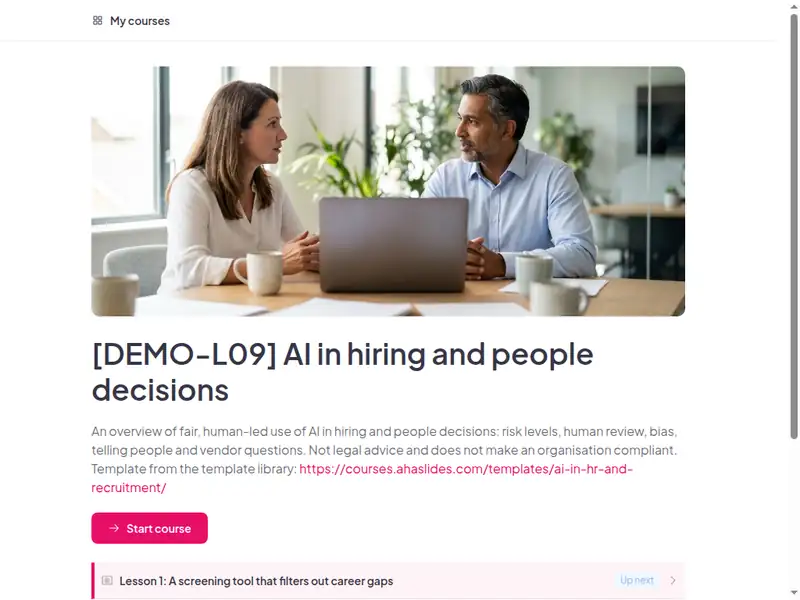
The AI in hiring and people decisions: Fair, lawful and human-led course as a learner first sees it

6 lessons, about 45 minutes

Minutes are an estimate.

  • Lesson 1: A screening tool that filters out career gaps · 9 min

    Before you begin · An invented story · What would you do?

  • Lesson 2: Risk levels, banned uses and candidate rights · 9 min

    Risk levels · Sort the use · Where the law differs

  • Lesson 3: Before, during and after using AI in hiring · 9 min

    Process · Put it in order · Reasons that work

  • Lesson 4: Grey areas: enthusiasm scores, public chatbots, AI-drafted letters · 9 min

    Scenario · Scenario · Scenario

  • Lesson 5: Who approves HR AI tools and handles queries · 6 min

    Approval and queries · Vendor questions

  • Lesson 6: Final assessment · 3 min

    Practice

Claim the template

Inside this course

Taken from the course itself.

By the end, learners can

  • Identify which HR uses of AI are treated as high-risk or regulated
  • Apply human review and documented reasons to AI-assisted shortlisting and decisions
  • Recognise and escalate signs of bias in screening tools
  • Tell candidates and employees when and how AI is used
  • Know what to ask a vendor before buying an HR AI tool

Sample questions, with answers

  1. What is the best first step for Mei Lin?

    • Keep using it: it is fast
    • Pause use and raise it with the policy owner
    • Hide the pattern
    • Tell candidates the tool is neutral

    Answer: Pause use and raise it with the policy owner. Pause use and raise it with the policy owner. Carrying on, hiding the pattern or telling candidates the tool is neutral leaves a possible problem in place.

    Lesson 1: A screening tool that filters out career gaps

  2. A human reviewer should...

    • Click approve
    • Review and record reasons
    • Follow the score
    • Skip documentation

    Answer: Review and record reasons. Review each case and record job-related reasons. Clicking approve, following the score or skipping documentation removes the human from the decision.

    Lesson 3: Before, during and after using AI in hiring

  3. An AI-drafted warning letter should be...

    • Sent as drafted
    • Checked fact by fact against records
    • Sent after removing one fact
    • Approved by asking the AI

    Answer: Checked fact by fact against records. Checked fact by fact against records, then handled through your HR process. A fluent draft is not evidence.

    Lesson 4: Grey areas: enthusiasm scores, public chatbots, AI-drafted letters

A scenario from "Grey areas: enthusiasm scores, public chatbots, AI-drafted letters"

An interview tool gives candidates an "enthusiasm score" from video.

Best response: Do not use it for decisions, tell the policy owner, record concerns.

Weaker responses: Use it as a tie-break; Use it only on a few roles; Tell candidates it is neutral.

Common questions

Yes. Claiming the template and editing it are free.

Yes. The course is self-paced and online, and the live deck lets you add a live session in the room or online.

Before an AI tool is used in hiring or people decisions, annually for HR teams and hiring managers.

HR, recruiters, hiring managers and people-analytics staff.

Record completion in your own LMS or record system, so you can show who finished the course and when.

Your own details, each highlighted inside the course:
  • HR legal contact
  • HR AI owner
  • HR AI approval route
  • Candidate query route
  • AI incident route
  • AI policy link
  • LMS or record system
Then edit anything else you like: wording, scenarios, your logo.
Visit the help centre (opens in a new tab)