
Krok 1: Work through the modules
Pripojiť AhaSlides MCP server to Claude or ChatGPT, send each prompt and make what it builds your own.
Brief Claude or ChatGPT in the chat, and the AhaSlides MCP server builds your webinar deck, customer survey or event content in your AhaSlides account. Learn the prompts, and every campaign takes far less time to prepare.
About 2 hours 20 minutes · 6 modules · At your own pace · Certificate of completion
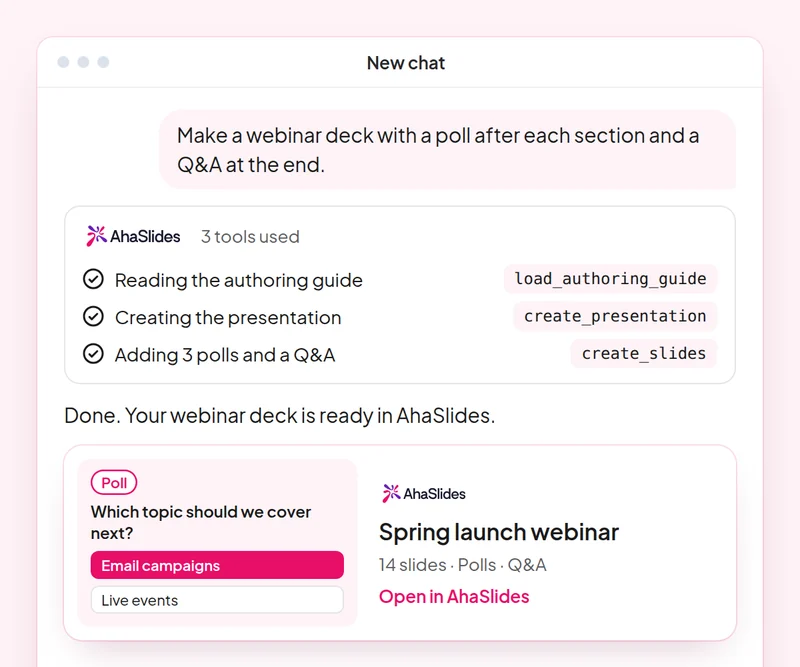
Cieľ: Plan a webinar deck with polls, a word cloud and Q&A built in.
skill: build-presentation
vyskúšajte nasledujúci postup: “Build a 45-minute webinar presentation launching our spring collection, with a poll, a word cloud and a Q&A slide.”
získate: An editable webinar deck with speaker notes.
Cieľ: Find and choose images for your slides without leaving the conversation.
skill: add-images
vyskúšajte nasledujúci postup: “Find stock photos of people working in a café for the title and section slides of my webinar deck, and show me the options first.”
získate: Photo options to choose from, uploaded to your slides once you pick.
Cieľ: Ask customers for feedback with a short satisfaction survey.
skill: build-survey
vyskúšajte nasledujúci postup: “Create a 7-question customer satisfaction survey for people who joined our product webinar. Do not publish it yet.”
získate: A draft survey that asks before it goes live.
Cieľ: Share what an audience said as a report page your team can open.
skill: create-insight-report
vyskúšajte nasledujúci postup: “Build a shareable report of the poll and word cloud answers from last week's webinar.”
získate: A report page you can share with the team once you confirm what it shows.
Cieľ: Turn a one-off webinar into an on-demand course.
skill: convert-content
vyskúšajte nasledujúci postup: “Turn our product launch webinar deck into a 2-lesson self-paced course for new customers.”
získate: A new course built from the webinar. The deck stays as it is.
Cieľ: Know who joined your webinar and who engaged most, so sales talks to the right people.
skill: track-participants
vyskúšajte nasledujúci postup: “From my [product launch webinar], list the attendees who answered the most polls and questions, and draft a thank-you email for each of them.”
získate: A ranked list of your most engaged attendees, with a thank-you ready for each. Detailed per-person reports need a paid plan.
Run one campaign from start to finish: plan the webinar deck with images, survey the people who joined, share a report of what they said and turn the webinar into a course for people who missed it. Keep the prompts that worked, so next time this work is a quick routine.
A 10-question quiz on webinar decks, images, customer surveys and reporting audience results. Pass it to earn your certificate of completion.
Each course is an AhaSlides eLearning course of about 2 hours 20 minutes that issues a verifiable certificate when you finish.
Pripojiť AhaSlides MCP server to Claude or ChatGPT, send each prompt and make what it builds your own.
Put the six skills together on one real session from your work.
Take a 10-question quiz on webinar decks, images, customer surveys and reporting audience results.
Pass the quiz to earn a verifiable AhaSlides certificate of completion, with a verify link you can share.
Yes, the course costs nothing to take. You follow it in your own AhaSlides account, and some features the modules use, such as detailed reports, are part of the paid plans. See cien za to, čo každý plán zahŕňa.
Claude (on claude.ai, Cowork and Claude Code), ChatGPT and any client that supports remote MCP servers. In Claude, add a custom connector with https://mcp.ahaslides.com/mcp as the server URL. In ChatGPT, find AhaSlides in the Plugins tab. See the AhaSlides MCP server page for the full steps.
They are the 17 public AhaSlides skills for Claude, free and open source on GitHub. Each one tells Claude which AhaSlides MCP tools to call and points it at AhaSlides' own authoring guides.