
Hakbang 1: Pag-aralan ang mga modyul
Ikonekta ang AhaSlides I-download ang MCP server papunta kay Claude o ChatGPT, ipadala ang bawat prompt at gawin mong iyo ang binubuo nito.
Brief Claude or ChatGPT in the chat, and the AhaSlides MCP server builds your webinar deck, customer survey or event content in your AhaSlides account. Learn the prompts, and every campaign takes far less time to prepare.
Mga 2 oras 20 minuto · 6 na modyul · Sa sarili mong bilis · Sertipiko ng pagkumpleto
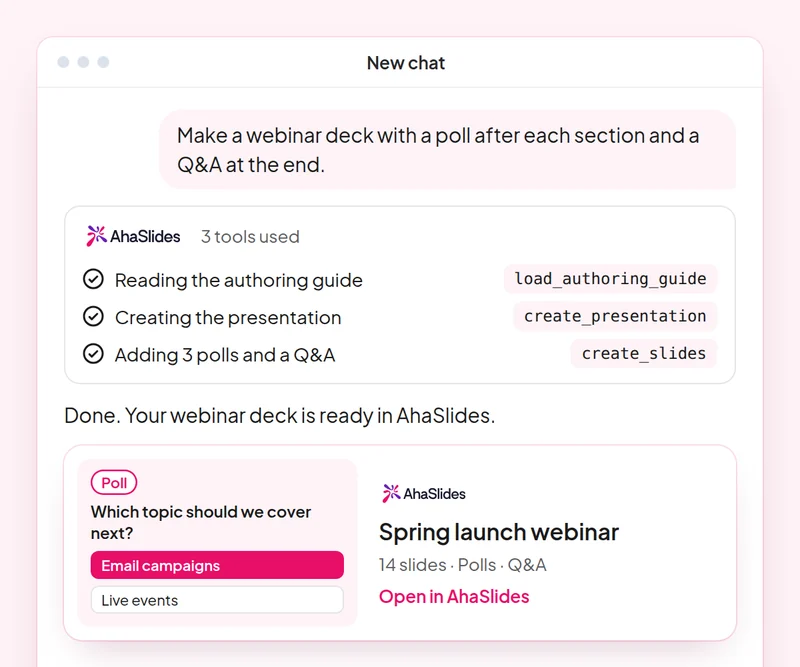
Layunin: Plan a webinar deck with polls, a word cloud and Q&A built in.
Kasanayan: build-presentation
Subukan: “Build a 45-minute webinar presentation launching our spring collection, with a poll, a word cloud and a Q&A slide.”
Nakuha mo: An editable webinar deck with speaker notes.
Layunin: Find and choose images for your slides without leaving the conversation.
Kasanayan: add-images
Subukan: “Find stock photos of people working in a café for the title and section slides of my webinar deck, and show me the options first.”
Nakuha mo: Photo options to choose from, uploaded to your slides once you pick.
Layunin: Ask customers for feedback with a short satisfaction survey.
Kasanayan: build-survey
Subukan: “Create a 7-question customer satisfaction survey for people who joined our product webinar. Do not publish it yet.”
Nakuha mo: A draft survey that asks before it goes live.
Layunin: Share what an audience said as a report page your team can open.
Kasanayan: create-insight-report
Subukan: “Build a shareable report of the poll and word cloud answers from last week's webinar.”
Nakuha mo: A report page you can share with the team once you confirm what it shows.
Layunin: Turn a one-off webinar into an on-demand course.
Kasanayan: convert-content
Subukan: “Turn our product launch webinar deck into a 2-lesson self-paced course for new customers.”
Nakuha mo: A new course built from the webinar. The deck stays as it is.
Layunin: Know who joined your webinar and who engaged most, so sales talks to the right people.
Kasanayan: track-participants
Subukan: “From my [product launch webinar], list the attendees who answered the most polls and questions, and draft a thank-you email for each of them.”
Nakuha mo: A ranked list of your most engaged attendees, with a thank-you ready for each. Detailed per-person reports need a paid plan.
Run one campaign from start to finish: plan the webinar deck with images, survey the people who joined, share a report of what they said and turn the webinar into a course for people who missed it. Keep the prompts that worked, so next time this work is a quick routine.
A 10-question quiz on webinar decks, images, customer surveys and reporting audience results. Pass it to earn your certificate of completion.
Ang bawat kurso ay isang AhaSlides Kurso sa eLearning na tumatagal nang humigit-kumulang 2 oras at 20 minuto na maglalabas ng mabe-verify na sertipiko kapag natapos mo na.
Ikonekta ang AhaSlides I-download ang MCP server papunta kay Claude o ChatGPT, ipadala ang bawat prompt at gawin mong iyo ang binubuo nito.
Pagsama-samahin ang anim na kasanayan sa isang totoong sesyon mula sa iyong trabaho.
Take a 10-question quiz on webinar decks, images, customer surveys and reporting audience results.
Ipasa ang pagsusulit upang makakuha ng isang mabe-verify na resulta AhaSlides sertipiko ng pagkumpleto, kasama ang link ng pag-verify na maaari mong ibahagi.
Oo, walang bayad ang kursong kukunin. Ikaw mismo ang susunod dito. AhaSlides account, at ang ilang feature na ginagamit ng mga module, tulad ng mga detalyadong ulat, ay bahagi ng mga bayad na plano. Tingnan pagpepresyo para sa kung ano ang kasama sa bawat plano.
Claude (sa claude.ai, Cowork at Claude Code), ChatGPT at anumang client na sumusuporta sa mga remote MCP server. Sa Claude, magdagdag ng custom connector gamit ang https://mcp.ahaslides.com/mcp bilang URL ng server. Sa ChatGPT, hanapin ang AhaSlides sa tab na Mga Plugin. Tingnan ang AhaSlides MCP server pahina para sa kumpletong mga hakbang.
Sila ang 17 pampublikong AhaSlides mga kasanayan para kay Claude, libre at open source sa GitHubSinasabi ng bawat isa kay Claude kung alin AhaSlides Mga tool ng MCP para tawagan at ituro ito AhaSlides'sariling mga gabay sa pag-akda.