Skip to content
Claim this template

Free course template · Global

AI security for everyone: Shadow AI, prompt injection and manipulated outputs

A ready-made course, live deck and two surveys for all employees; security champions. 30 minutes, 6 lessons. Last reviewed 21 October 2026; not legal advice.

Claim the templatePreview the courseDownload SCORM for your LMS

Free. No credit card. Edit everything.

Play a game from the course

AI security for everyone: Shadow AI, prompt injection and manipulated outputs: try 3 questions

Three questions from this course. Pick an answer, then see why.

Play the game

Game not loading? Open it in a new tab (opens in a new tab)

Three pieces that work together

Learners sign in, so every finish and score is recorded. 8 fields to fill in with your details.
Claim the template
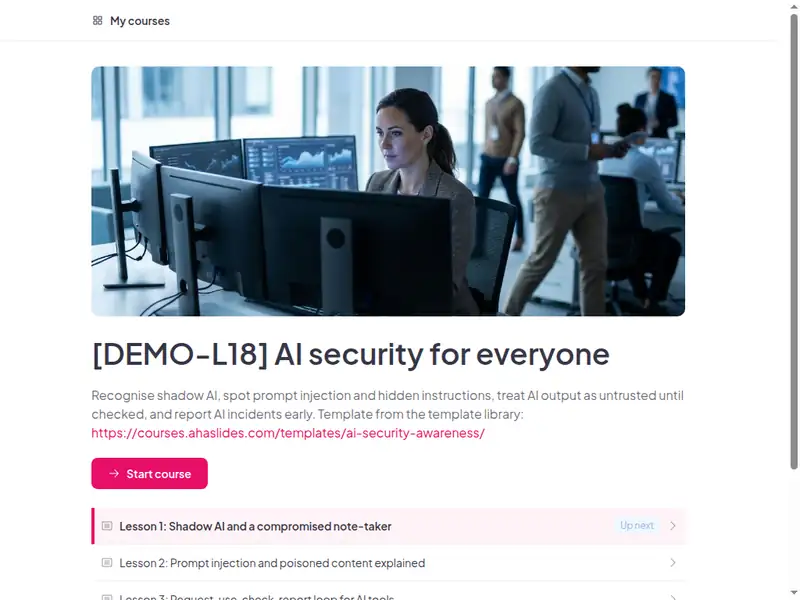
The AI security for everyone: Shadow AI, prompt injection and manipulated outputs course as a learner first sees it

6 lessons, about 30 minutes

Minutes are an estimate.

  • Lesson 1: Shadow AI and a compromised chatbot · 6 min

    Before you begin · The free assistant nobody approved · How it happened

  • Lesson 2: Prompt injection and poisoned content explained · 6 min

    What it is · Spot the hidden instruction · Check

  • Lesson 3: Request, use, check, report loop for AI tools · 5 min

    The loop · Approved, request first, never · Check

  • Lesson 4: Hidden instructions in PDFs and emails · 4 min

    The PDF · The email

  • Lesson 5: Free AI extensions and unknown code packages · 4 min

    The extension · Unknown code

  • Lesson 6: Reporting incidents and requesting approved tools, then final assessment · 5 min

    Report path · Request a tool · Practice

Claim the template

Inside this course

Taken from the course itself.

By the end, learners can

  • Recognise shadow AI and request tools through the approved route
  • Explain prompt injection and spot suspicious instructions in documents, emails and web pages
  • Treat AI outputs, links and code as untrusted until checked
  • Report AI-related security incidents quickly

Sample questions, with answers

  1. What was the biggest gap in the story?

    • Lena used a calendar
    • Nobody in IT knew the tool was connected to company files
    • The tool was free
    • The notes were not accurate

    Answer: Nobody in IT knew the tool was connected to company files. IT did not know the tool was connected, so nobody could review it, limit its access or react when the vendor was compromised. Signing up and connecting a calendar are not wrong in themselves; doing it without the approved route is the gap.

    Lesson 1: Shadow AI and a compromised chatbot

  2. A teammate suggests a free AI plug-in for the shared document editor and says it is safe. What do you do?

    • Install it: a teammate vouches for it
    • Install it on one document first
    • Request it through the approved route and wait for the answer
    • Ignore the suggestion and never mention it

    Answer: Request it through the approved route and wait for the answer. Ask for it through the approved route. A teammate's opinion is not a review, and IT can check the access it asks for and offer an approved alternative. Installing first and asking later leaves you exposed in the meantime.

    Lesson 3: Request, use, check, report loop for AI tools

  3. An assistant tells you to download a package from an unfamiliar site and install it. What is the safest next step?

    • Install it: the assistant sounded sure
    • Install it, then run a scan
    • Ask the owner of the code base or IT before you install anything
    • Install it on a colleague's machine first

    Answer: Ask the owner of the code base or IT before you install anything. Treat it as untrusted until checked: ask the owner of the code base or IT before installing. A plausible name or a confident answer is not a check.

    Lesson 5: Free AI extensions and unknown code packages

A scenario from "Hidden instructions in PDFs and emails"

You ask an assistant to summarise a supplier PDF and it starts asking for your login.

Best response: Stop, do not follow it, report the document.

Weaker responses: Follow the request; Close it and forget; Forward the PDF to colleagues to check.

Common questions

Yes. Claiming the template and editing it are free.

Yes. The course is self-paced and online, and the live deck lets you add a live session in the room or online.

Annually with the security awareness cycle; when AI tools are rolled out; after an AI-related near miss.

All employees; security champions; run by IT security, compliance or L&D.

Record completion in your own LMS or record system, so you can show who finished the course and when.

Your own details, each highlighted inside the course:
  • AI incident report path
  • AI tool request form
  • Approved AI tools
  • Security contact
  • AI policy link
  • LMS or record system
Then edit anything else you like: wording, scenarios, your logo.
Visit the help centre (opens in a new tab)