
Your daily stand-up shouldn't eat into your team's best focus hours. To run an async stand-up in Slack, post the same short survey to your team channel each day with AhaSlides for Slack. Build the questions once with /ahaslides vytvořit, then post them each morning with /ahaslides běží. Everyone answers when they start work, and every day's answers are saved in one AhaSlides nahlásit.
Posting it each morning takes a few seconds.
When an async stand-up makes sense
An async stand-up replaces the daily call with three questions people answer in writing. Think of an engineering team split between London and Ho Chi Minh City. No call time suits everyone, so the team lead posts the stand-up in #team-platform at the start of their day, and each person answers when they log on.
Funguje to také dobře pro:
- Teams with a lot of focus work, where a fixed meeting breaks up the morning
- Part-time or flexible teams who don't all start at the same time
- Busy weeks, when you want the updates without one more meeting
Async standups aren't a full replacement for talking. When something is blocked or complicated, a quick call still sorts it out faster, and the stand-up answers tell you who to call.
Why take your stand-up async
Updates work best when they happen where the work already is. Moving the stand-up into your team channel means:
- Everyone gets their morning back. No call to join, so people keep the hours when they focus best.
- Time zones stop getting in the way. People answer when their day starts, not when the meeting is.
- You keep a record. Every answer is saved in your AhaSlides report, so you can look back at last week's blockers without scrolling through the channel.
Co potřebuješ
- A Slack pracovní prostor s AhaSlides for Slack instalovány
- An AhaSlides account for the person who posts the stand-up (any plan works, including Free)
- Nothing for the team: they answer in Slack bez AhaSlides účet
Jak spustit asynchronní stand-up v Slack, krok za krokem
Krok 1: Přidat AhaSlides for Slack
Otevřete AhaSlides for Slack instalační stránka a přidejte aplikaci do svého pracovního prostoru. Při prvním stisknutí Post, AhaSlides požádá vás o přihlášení do AhaSlides účet a uchovává váš koncept, zatímco to děláte. Přihlásíte se pouze jednou.
Step 2: Build your stand-up questions once
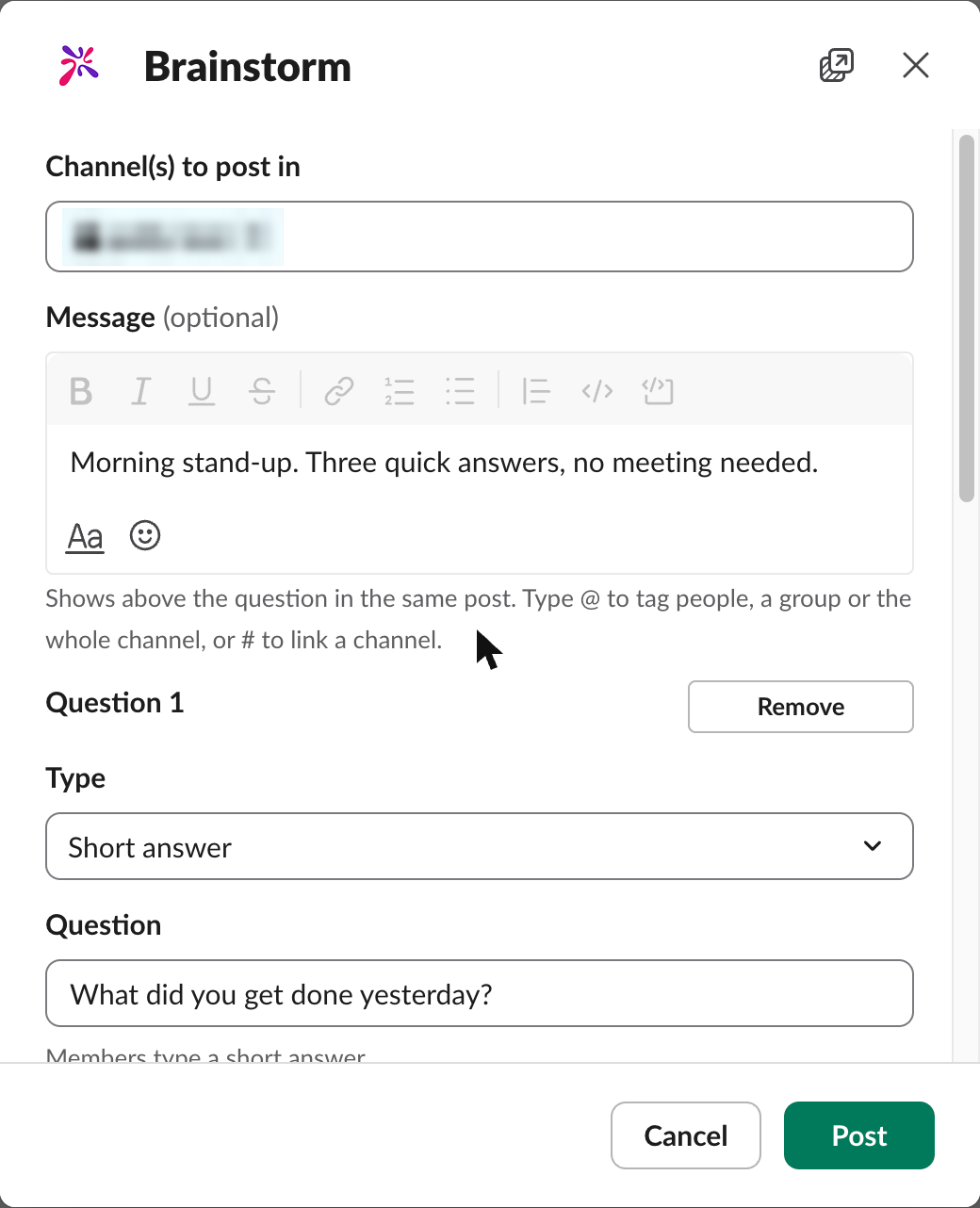
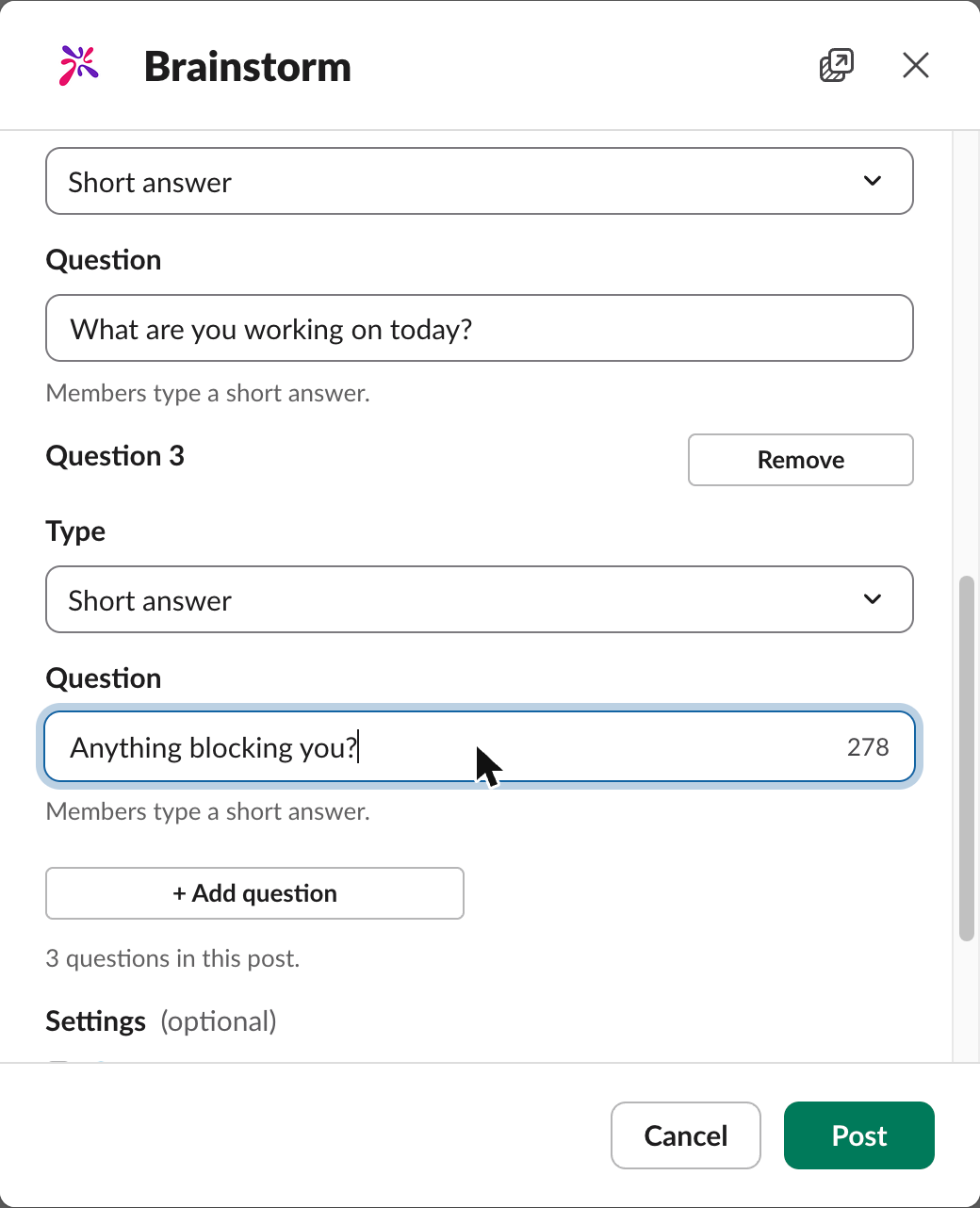
In your team channel, type /ahaslides vytvořit a vybrat Brainstorm pod Zeptejte se. Brainstorm starts with a Short answer question, and every question you add after it starts as Short answer too. That suits a stand-up, where people write their update in a sentence. Set up the classic three questions, pressing + Přidat otázku for each new one:
- Stručná odpověď: What did you get done yesterday?
- Stručná odpověď: Na čem dnes pracuješ?
- Stručná odpověď: Anything blocking you?
In Zpráva, add a line such as "Daily stand-up: one line per question is plenty." The survey is saved in your AhaSlides account under its first question, so you can find it tomorrow. For a lighter weekly check, use Focus and blockers pod Všechny šablony.
Step 3: Choose who sees the answers, then post
Pod Nastavení, odejít Zobrazit výsledky všem ticked so the team can see each other's updates, and leave Anonymní odpovědi off so each update has a name in your AhaSlides report. Press Post, and today's stand-up is in the channel. Leave answers open on this first post: ending answering on it also closes the survey in AhaSlides, and a closed survey no longer shows in your list.
Step 4: Post it again each morning
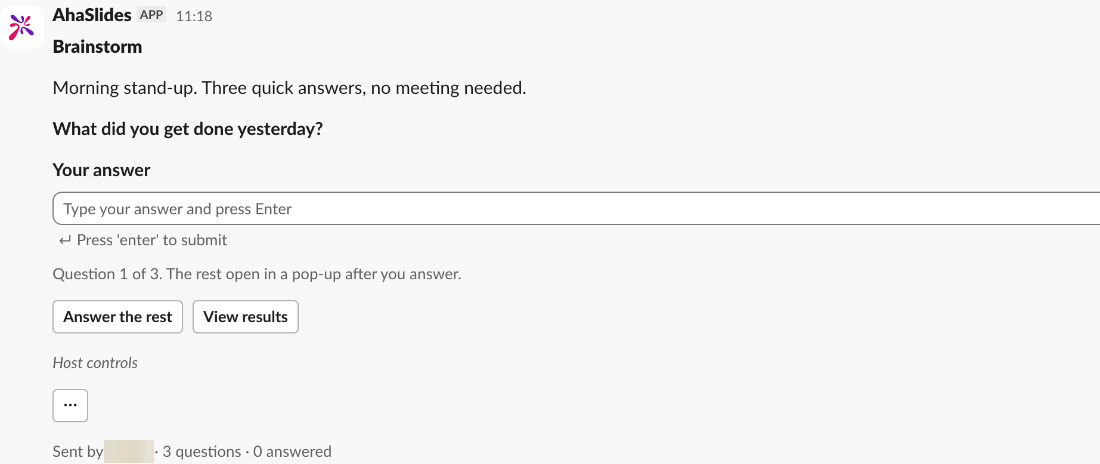
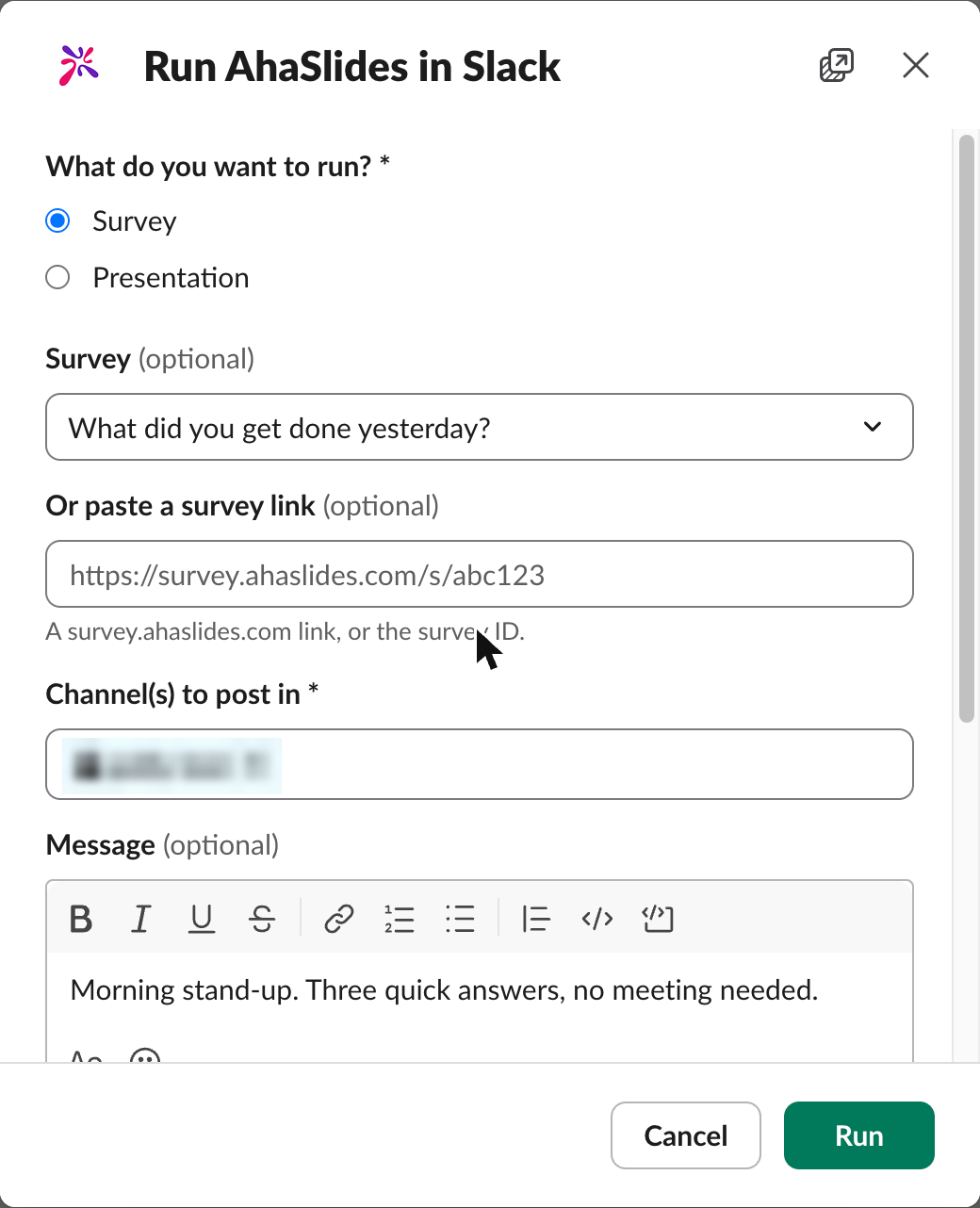
Each morning, post the same survey again. You don't need to rebuild it. Type /ahaslides běží. Pod Co chcete provozovat?zvolte Přehled, pick your stand-up from your list, choose the channel and press Běh.
Each post collects a fresh round of answers, so people answer again every day. All the answers are saved in the same AhaSlides survey, so the report builds up day by day. On these daily posts, Ukončit odpovídání stops answers in Slack only, so the survey stays ready for tomorrow.
Step 5: Read the updates and follow up on blockers
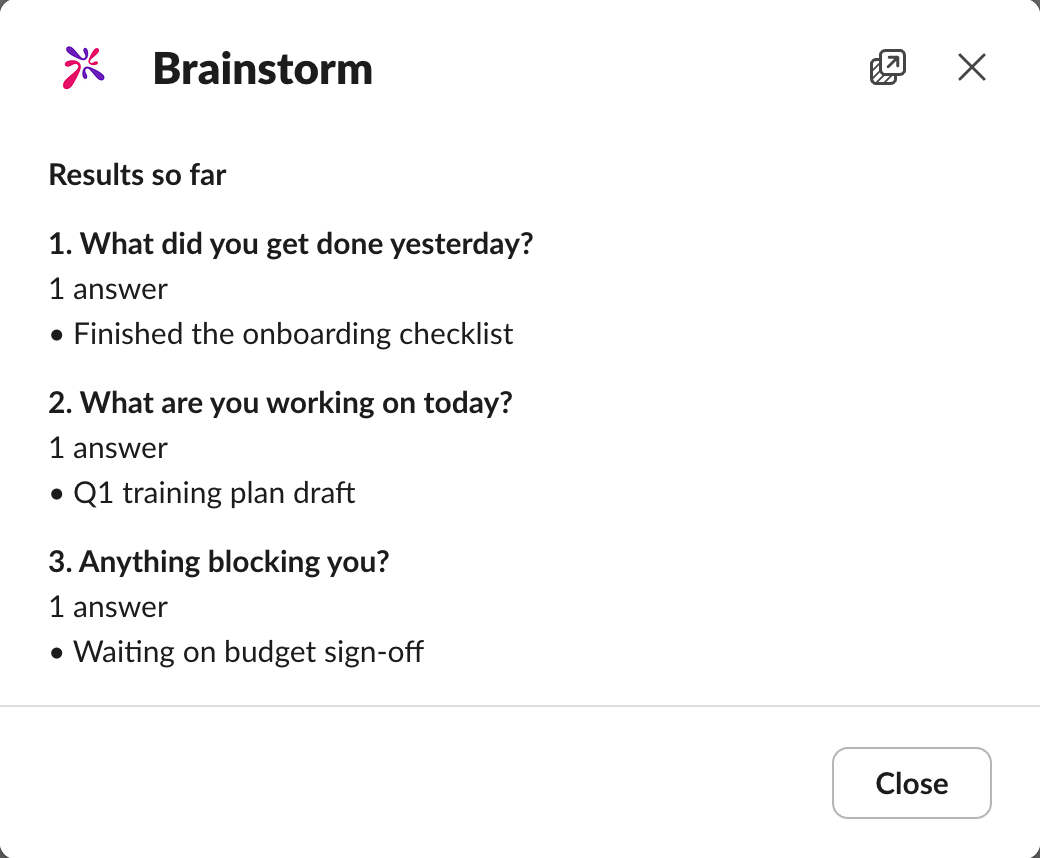
As the host, press the ... tlačítko v části Ovládací prvky hostitele pro Zobrazit výsledky, which lists the written answers without names. Press Otevřít v AhaSlides to see who said what. When someone names a blocker under "Anything blocking you?", that's your cue to message them or set up a quick call.
Zasekli jste se na schodu? Jedno AhaSlides for Slack průvodce Zahrnuje všechny možnosti a nejběžnější opravy.
Tips for a stand-up your team keeps up with
- Post it at the same time every day. A Slack reminder helps the habit stick, for example /remind me to post the stand-up every weekday at 9am.
- Udržujte otázky krátké. Three short questions are easier to keep up with every day than six.
- Ask for a sentence, not an essay. Say so in the post message: "One line per question is plenty."
- Act on blockers fast. When flagged blockers go unanswered, people may stop flagging them. A quick reply shows the stand-up is worth filling in.
- Agree who posts it. When the usual host is on leave, decide who posts it so the habit doesn't drop.
Nejčastější dotazy
What is an async stand-up?
An async stand-up (or asynchronous daily standup) is a daily team update done in writing instead of a meeting. Each person answers a few short questions, usually what they did yesterday, what they're doing today and whether anything is blocking them, whenever their day starts.
How do I post the stand-up each day?
Typ /ahaslides běžízvolte Přehled, pick your stand-up and press Běh. It takes a few seconds.
Can people answer the stand-up again tomorrow?
Yes. Each day's post collects a new round of answers, and they're all saved in the same AhaSlides průzkum.
Does my team need an AhaSlides účet?
No. Only the person who posts the stand-up signs in. Everyone else answers in Slack.
Is AhaSlides for Slack volný, uvolnit?
Ano. Funguje to na každém AhaSlides plán, včetně bezplatného.
Co když můj pracovní prostor vyžaduje nejprve schválení aplikací?
Slack požádá vás o odeslání požadavku na instalaci a vlastník pracovního prostoru nebo správce aplikace jej schválí.
I can't find my stand-up survey in the list. Why?
It's listed under its first question, such as "What did you get done yesterday?". A survey that has been closed in AhaSlides doesn't show, which happens if you ended answering on the first post you made with /ahaslides vytvořit. Jedno AhaSlides for Slack průvodce explains each option in the Run window.
Související čtení: Jak vytvořit anketu v Slack, for a single quick question, such as picking a day for the team retro.
Get your team's updates without another meeting. přidat AhaSlides for Slack today, and tomorrow's stand-up is one command away.