
A caption this game is simple: show the group one funny photo, everyone writes a caption for it, and the group votes for the best one. It takes 5 minutes a round, works for any group size, and all you need is a photo and a way to collect the captions. That makes it one of the easiest games for a team meeting, a year-end party or a video call.
It works because laughing is social. Researchers reviewing the evidence in Trends in Cognitive Sciences note that we are 30 times more likely to laugh when we are with someone else than when we are on our own (Scott, Lavan, Chen and McGettigan, 2014). A caption contest gives a group something to laugh at together.
Below: the rules in five steps, 30 photo prompts in 3 rounds (office, year-end party, hybrid and remote), each split into sets of 5 with Vores valg for every round, then the rules that keep it safe for work and how to host it from one screen.
The caption this game at a glance
- Spillere: 4 or more; on the free plan up to 50 people can join, and paid plans take more
- Tid: About 5 minutes per photo
- Du har brug for: varmt vand, vaskeklude og vatrondeller. 3 to 5 photos and a way to collect captions: paper slips, a chat, or phones
- Arbejder: I et rum, på et videoopkald eller hybridopkald
- Vinde: The caption with the most votes wins the round
How to play the caption this game: the rules in 5 steps
- Vis billedet. Put it on the big screen or share it on the call, and give the group 10 seconds to take it in.
- Write captions. Give everyone 90 seconds to write one caption. Shorter is funnier: aim for under 15 words.
- Reveal the captions. Show them one at a time, without names if you can, so people vote for the joke and not the joker.
- Stemme. Everyone votes for their favourite. Nobody may vote for their own.
- Kron vinderen. The top caption scores 3 points, second scores 2 and third scores 1. After 3 to 5 photos, the highest total wins.
Variant: the reverse caption. Show a caption first ("When the client says 'one small change'") and let teams find or take the best matching photo in 3 minutes. It suits an in-person party with phones out.
Round 1: office photo prompts
Ten scenes from everyday work. Source each one from licensed stock or take it yourself in the office.
Set A: around the office
- A printer with paper pouring out across the floor.
- One lonely doughnut left in a big open box in the kitchen.
- A desk buried under sticky notes, with one note stuck to the monitor that says "urgent".
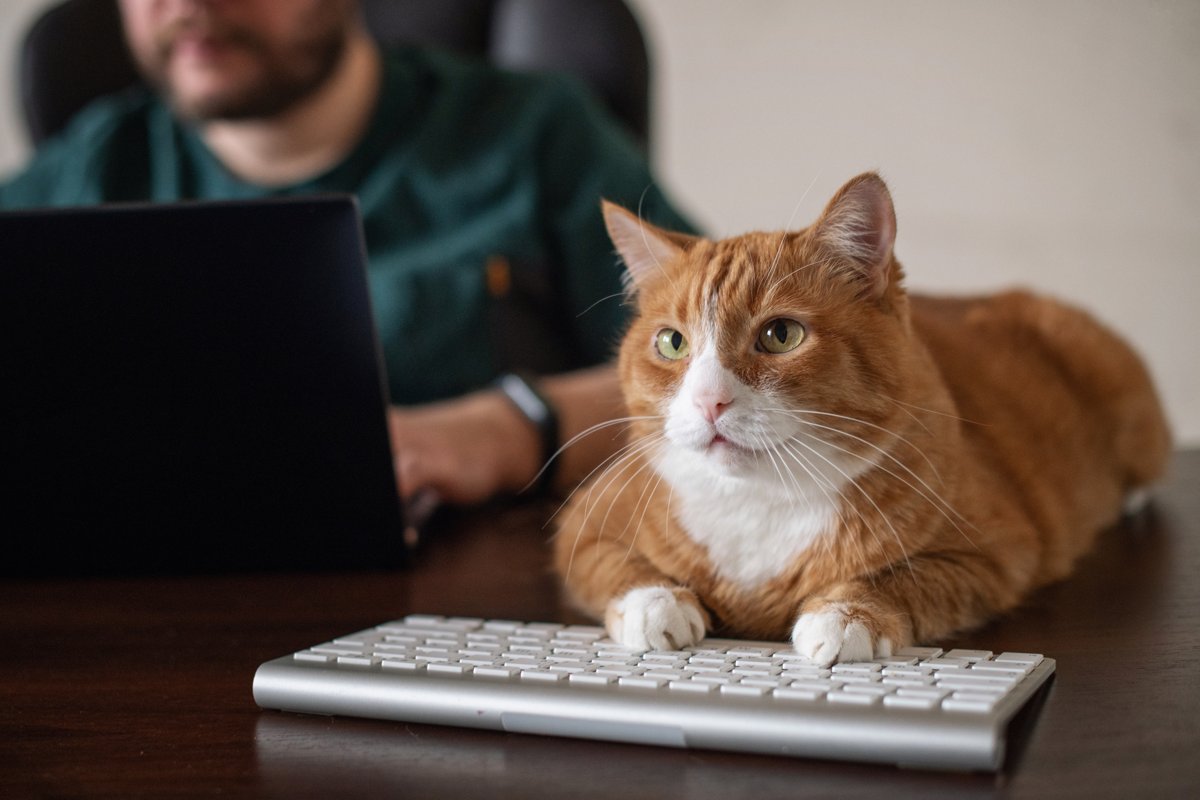
- A cat sitting on a laptop keyboard during what looks like a video call.
- A meeting room where every chair is empty except one.
Set B: work moments
- A person staring at a whiteboard covered in arrows that go nowhere.
- A coffee mug the size of a bucket.
- A colleague asleep on a beanbag with a laptop still open.
- A dog in a tie sitting at a desk.
- A fridge note that says "Whoever ate my lunch: I know."
Our pick: prompt 4, the cat on the laptop. Everyone has been on that call, and it works for remote and office teams alike.
Round 2: year-end party photo prompts
Ten scenes for the end-of-year party, including Christmas and Lunar New Year.
Set A: festive chaos
- A Christmas tree that has fallen over, still with all its lights on.
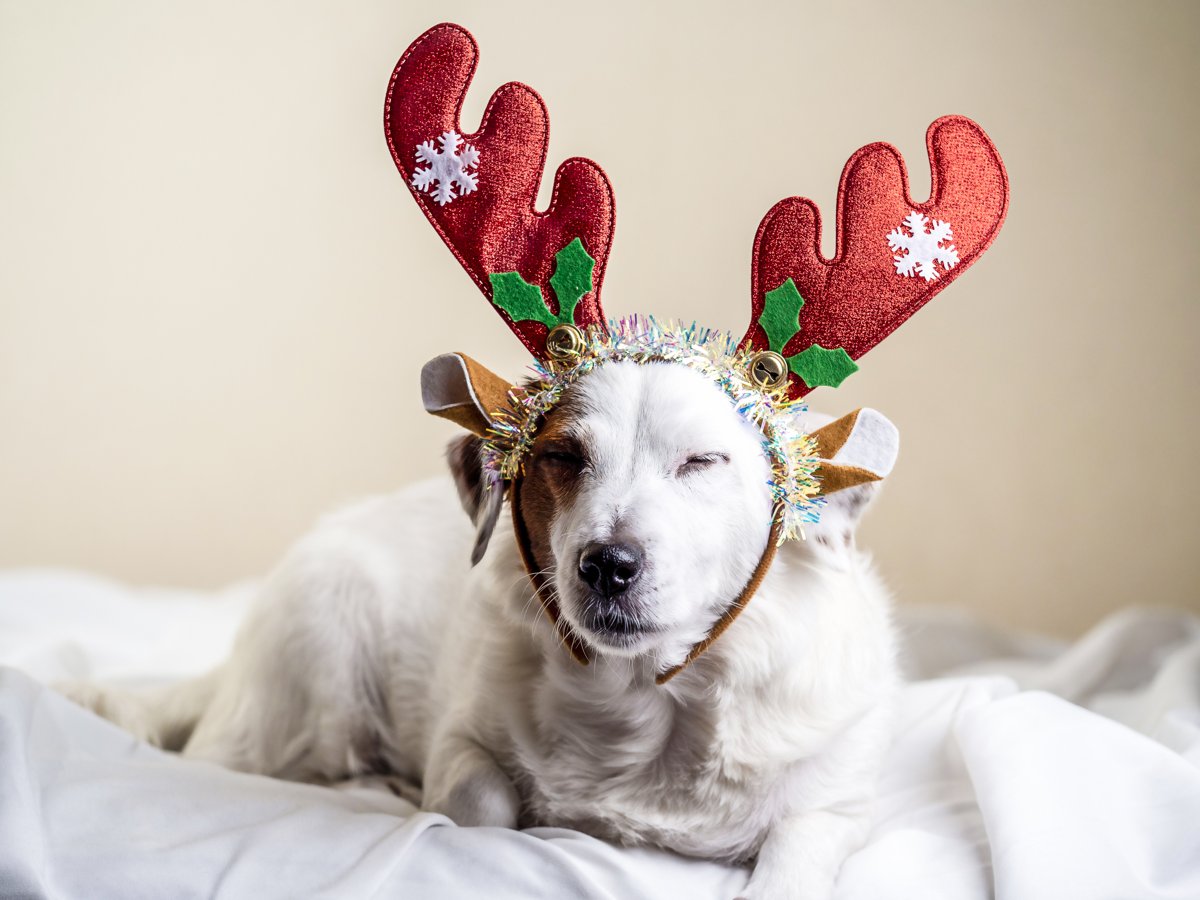
- A dog wearing reindeer antlers and a deeply serious face.
- A tangle of fairy lights the size of a football.
- A person in a Christmas jumper three sizes too big.
- A gingerbread house that has collapsed in on itself.
Set B: party moments
- A karaoke singer at full volume, eyes closed.
- A dance floor with exactly one person dancing.
- A table of gifts where one present is wrapped in newspaper.
- A firework bursting behind a group of people who are all looking at their phones.
- A stack of red envelopes next to a calculator.
Our pick: prompt 17, one person dancing. It is the most familiar office-party scene there is, it is kind rather than cruel, and the winning caption usually becomes the party's in-joke.
Round 3: hybrid and remote photo prompts
Ten scenes for teams that spend their day on video calls.
Set A: working from home
- A person in a shirt and tie on top and pyjama trousers below, joining a video call from their bed.
- A colleague on a video call holding a rubber duck up to the camera as if it were a project update.
- A laptop balanced on an ironing board as a standing desk.
- A home office where the background is a pile of laundry.
- A person on a call wearing headphones, with a dog barking in the window behind.
Set B: on the call
- A video call grid where every square shows the same blank stare.
- A person waving goodbye on a call, then still sitting there 10 seconds later.
- A laptop camera covered by a sticky note with a smiley face drawn on it.
- A person talking with their hand pointing at a microphone icon.
- A team photo where half the people are on a screen held up by the other half.
Our pick: prompt 26, the blank-stare grid. Hybrid teams rarely get to laugh at the same thing at the same moment, and this one works for everyone on the call and in the room.

How to judge a caption competition
A vote works for a casual round. For a prize, or a photo that splits the group, judge on three things and keep the scoring visible:
- Surprise (0 to 3). Does the caption go somewhere the photo does not? "The cat on the keyboard" is the photo; "Per my last meow" is the joke.
- Fit (0 to 3). Does it match what is in the picture, down to the details? A caption that works on any photo scores 0.
- Brevity (0 to 2). Under 10 words scores 2, 10 to 15 scores 1, longer scores 0.
Caption formulas that work. Give people one to start from, then let them break it:
- The thought bubble. Write what the subject is thinking. Photo 4, the cat on the keyboard: "I have read the whole email and I disagree."
- The meeting line. Put a phrase from work in the subject's mouth. Photo 17, one person dancing: "Great turnout, let's circle back."
- The headline. Report it as news. Photo 12, the dog in antlers: "Local dog accepts promotion to lead reindeer."
- The mismatch. Describe it far too calmly. Photo 21, shirt and pyjama trousers: "Business formal, as agreed."
Run a tie-break in seconds: the two captions with equal votes go head to head in a second vote, and the player who wrote the shortest wins if it is still level.
Rules to keep a caption contest safe for work
The best captions are cheeky, never cruel. Agree these rules before the first photo.
- No colleagues' photos without consent. Use licensed stock or photos the people in them have agreed to share. A photo of a colleague asleep at their desk is not a prompt, even if they are laughing now.
- No meme images you do not have rights to. Meme photos usually belong to someone else. Use the scenes above with licensed stock instead.
- Punch up, not down. No jokes about appearance, age, gender, religion, ethnicity or anyone's job level.
- Name a moderator. One person hides any caption that breaks the rules before it reaches the screen.
- Hold det kort. Three to five photos is enough. Stop while people are still laughing.
How to host a caption contest for a group on AhaSlides
AhaSlides is an all-in-one engagement platform for teams and classrooms. Everyone sends captions from their phones, so anyone can enter a caption without speaking up:
- Submit and vote in one slide: Brainstorm. Put the photo on its own Image slide, then add a Brainstorm slide right after it that asks "Caption this". Players submit captions on their phones, then vote, and the results rank the captions by votes. A Brainstorm slide can carry a photo itself in a live session, but a shared preview hides it, so the Image slide keeps it visible everywhere. Set how many votes each player gets (the default is 4).
- Or collect captions with Open Ended. Show the photo on an Image slide before it and turn on the Blasfællesskab, which hides common English swear words. Pick the En efter en layout to reveal captions one at a time. Leave Saml publikumsoplysninger off so captions appear without names, or turn it on to show who wrote each one after the vote.
- Vote on the shortlist: Pick Answer or Poll. Paste the top 4 captions in as options. Pick Answer adds a leaderboard if you want points across rounds; a Poll keeps it light. Poll is built in the online meningsmåling maker; Pick Answer is a quiz slide.
- The grand final: Tournament Bracket. Put the top two captions from each of four photos into an 8-entry bracket and let everyone vote head to head until one caption is champion.
- Pick the next photo chooser: navn hjulspinder. Spin to pick who chooses the next photo from your shortlist.
Want it ready-made? The Caption this game template has 12 slides: an Image slide before each caption round, two Brainstorm rounds, two Open Ended rounds and a final poll with a thumbnail of each photo. Its photos are AI-generated, so no real person appears in them:
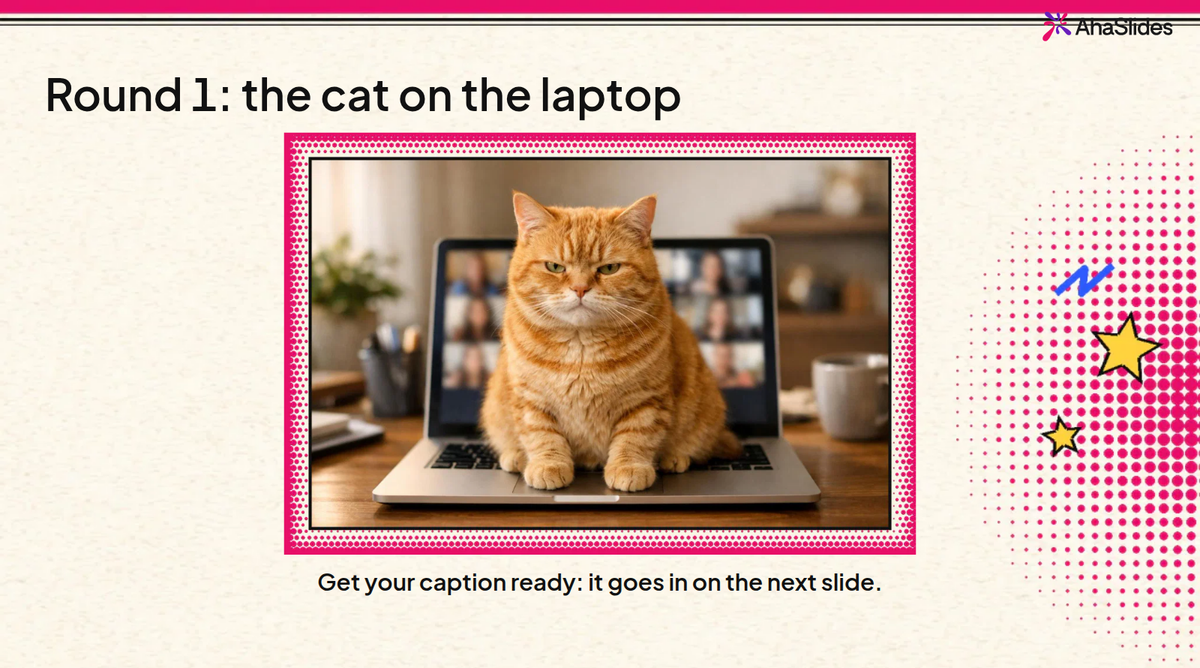
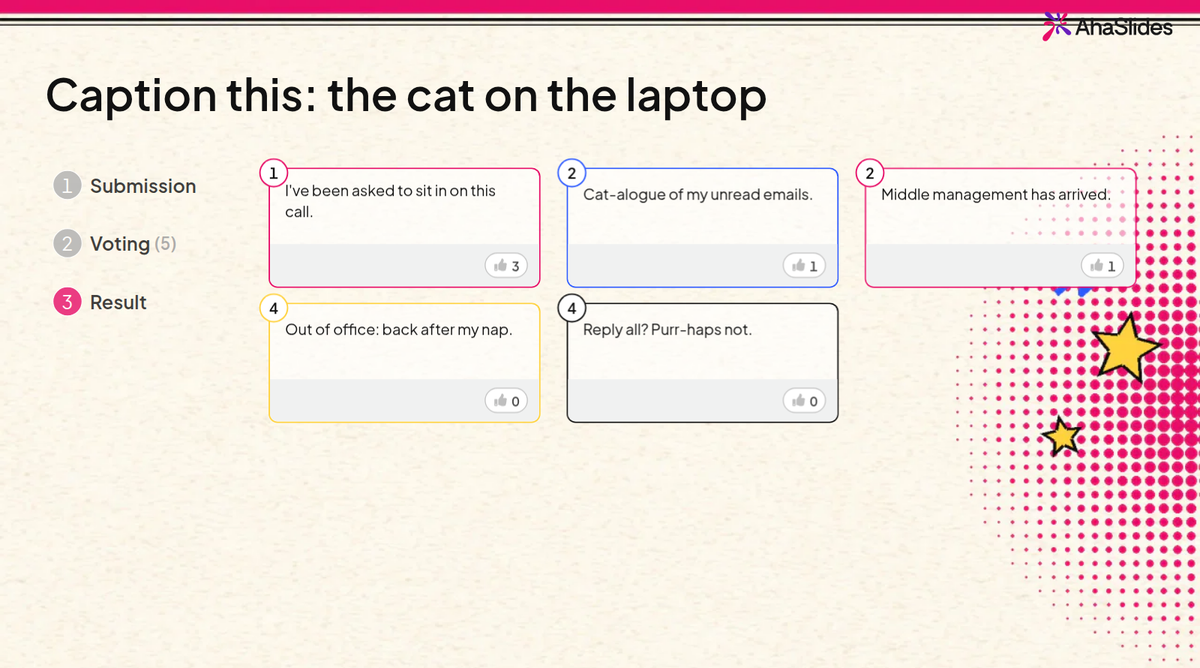
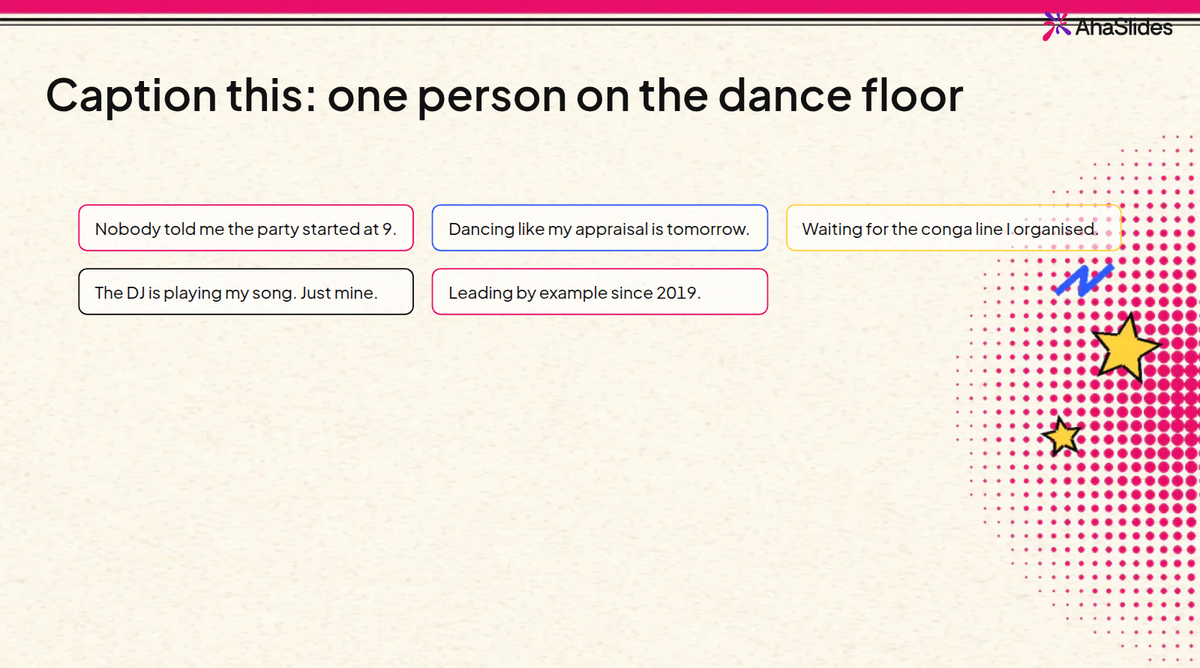
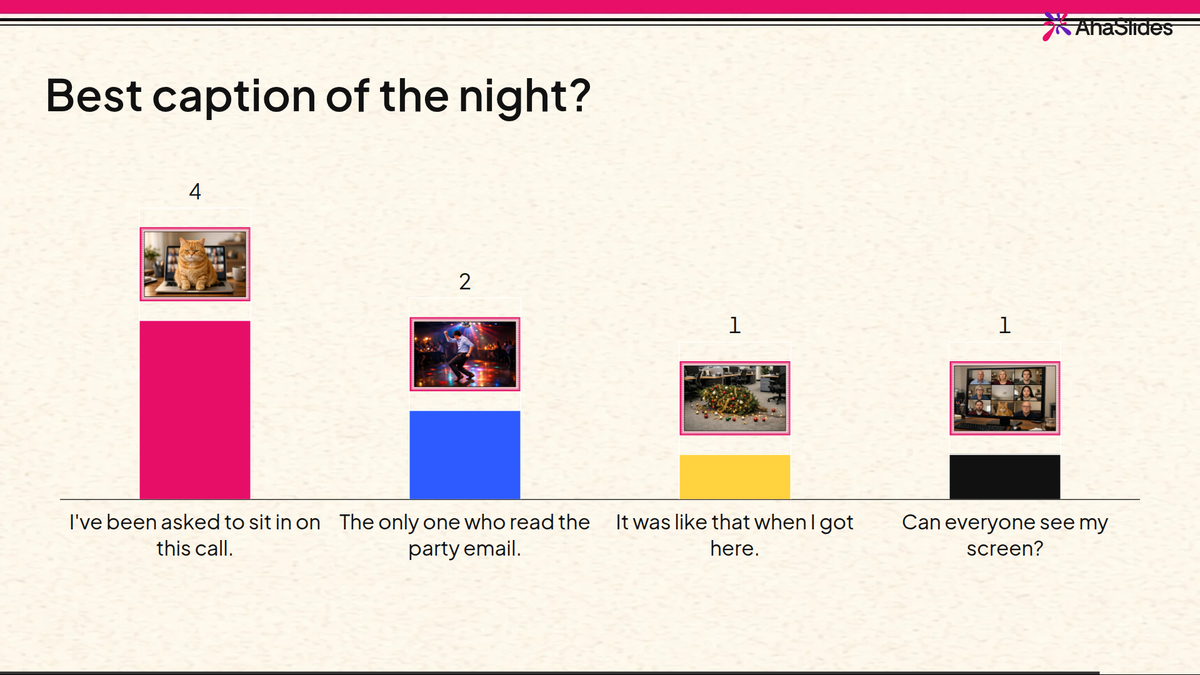
The template uses three interactive slide types (Brainstorm, Open Ended and Poll), which is more than the Gratisplanens grænse på 2 pr. præsentationEn gratis konto giver stadig mulighed for op til 50 mennesker join, so you can run the game with Brainstorm and Pick Answer alone, or copy the template and keep the types you need.
Tips for a better caption contest
- Play it in a group, not over email. Researchers reviewing the evidence in Trends in Cognitive Sciences note that people are 30 times more likely to laugh with others than alone (Scott and colleagues, 2014), so play it live where you can, rather than as a thread in a chat channel.
- Open with an easy photo. Start with an animal or an object, not a person. It warms the group up without anyone feeling like the joke.
- Use your own office. A photo of the broken coffee machine or the office plant beats any stock photo, as long as no person is in it without their consent.
- Hide names until the end. Anonymous captions get braver jokes and fairer votes.
- Award a real prize. A chocolate bar or first pick of the leftover food makes the final vote feel like it counts. For bigger prizes, see these lodtrækningspræmier til firmafestEller sjove priser til medarbejdere.
Ofte stillede spørgsmål
What is a caption this game?
A party game in which players write a funny caption for a photo and the group votes for the best one. Each round takes about 5 minutes.
How do you play caption this?
In 5 steps: show a photo, give everyone 90 seconds to write a caption, reveal the captions without names, vote, then crown the winner. Play 3 to 5 photos and add up the points.
What makes a good caption contest photo?
One clear scene with one thing going on, such as an animal at a desk or a fallen Christmas tree. Avoid photos of colleagues unless they have agreed.
How do you run a caption contest online?
Collect captions on phones while the photo is on the shared screen. On AhaSlides, a Brainstorm slide collects and ranks captions in one slide, and everyone votes from their phone or laptop.
How do you judge a caption competition?
Score each caption out of 8 (surprise 3, fit 3, brevity 2) or let the group vote, with no votes for your own caption. For a bigger event, put the top two captions from each photo into an 8-entry bracket for a head-to-head final.
Relaterede stillinger
- Want more themes for the party? See these temaer til årsafslutningsfester.
- Ready for something with words? Try the imposter word game.
- Planning the whole party? Pick from these Julefestspil på kontoret.
- Want another word-based game? Try the finish my sentence game.
- Need a warm-up before the first photo? Pick from these isbryder spil.
- Celebrating with remote colleagues? Try our Idéer til virtuel årsafslutningsfest.