
चरण १: मॉड्यूल के माध्यम से कार्य करें
कनेक्ट AhaSlides MCP सर्वर को क्लाउड या ChatGPT पर भेजें, प्रत्येक प्रॉम्प्ट भेजें और उसके द्वारा बनाए गए प्रॉम्प्ट को अपने अनुसार बनाएं।
Paste your call notes into Claude or ChatGPT, and the AhaSlides MCP server builds an interactive pitch deck in your house style, right in your AhaSlides account. Learn the prompts, and each call takes far less time to prepare.
लगभग 2 घंटे 20 मिनट · 6 मॉड्यूल · अपनी गति से सीखें · पूर्णता प्रमाणपत्र
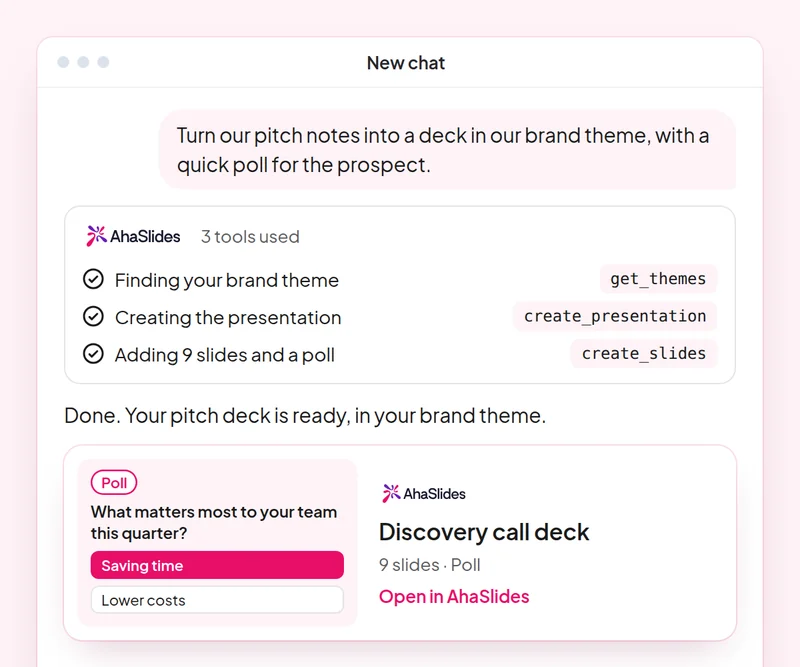
लक्ष्य: Build a discovery deck where the prospect answers, not only listens.
कौशल: build-presentation
प्रयत्न: “Build a 10-slide discovery presentation for a prospect in retail, with a poll on their biggest customer engagement challenge and speaker notes.”
आपको मिला: An editable deck where the prospect answers on their own phone.
लक्ष्य: Check the team's product knowledge with a quiz built only from your own material.
कौशल: make-quiz
प्रयत्न: “Make an 8-question quiz for our sales team on our new pricing tiers, using only this sheet: [paste the sheet].”
आपको मिला: A scored team quiz you can run in your next sales meeting.
लक्ष्य: Run live AhaSlides polls inside a PowerPoint pitch.
कौशल: powerpoint-addin
प्रयत्न: “Add a live poll and a word cloud to my pitch as a PowerPoint file, so I can run them in the meeting.”
आपको मिला: A .pptx with live AhaSlides slides, which run through the AhaSlides पावरपॉइंट के लिए ऐड-इन.
लक्ष्य: Share decks with the right people and role, confirmed before any invite goes out.
कौशल: share-and-collaborate
प्रयत्न: “Share my retail discovery deck with my sales manager at [their email] as an editor.”
आपको मिला: The invitation sent only after you confirm the person and their role.
लक्ष्य: Save a house style once so every new deck follows it.
कौशल: personal-skills
प्रयत्न: “Save our sales deck style as a skill: one idea per slide, a poll every third slide and a clear next step on the last slide.”
आपको मिला: A saved skill AhaSlides applies to your next presentations, shown to you before it is saved.
लक्ष्य: Know what each person in the room cared about, so every follow-up is specific.
कौशल: track-participants
प्रयत्न: “From my [Acme pitch] session, list what each person answered in the polls and draft a follow-up email to each one on the topic they rated highest.”
आपको मिला: A note per stakeholder on what they said, with a tailored follow-up email. Detailed per-person reports need a paid plan.
Prepare one real discovery call: build the deck in your house style, add a live poll for the prospect, share it with your manager for review, then quiz the team on what you learned. Keep the prompts that worked, so next time this work is a quick routine.
A 10-question quiz on pitch decks, PowerPoint polls, sharing and saving a house style. Pass it to earn your certificate of completion.
प्रत्येक पाठ्यक्रम एक है AhaSlides लगभग 2 घंटे 20 मिनट का ई-लर्निंग कोर्स, जिसे पूरा करने पर आपको एक सत्यापित प्रमाणपत्र मिलेगा।
कनेक्ट AhaSlides MCP सर्वर को क्लाउड या ChatGPT पर भेजें, प्रत्येक प्रॉम्प्ट भेजें और उसके द्वारा बनाए गए प्रॉम्प्ट को अपने अनुसार बनाएं।
अपने कार्यस्थल से जुड़े एक वास्तविक सत्र में इन छह कौशलों को एक साथ प्रयोग करें।
Take a 10-question quiz on pitch decks, PowerPoint polls, sharing and saving a house style.
क्विज़ पास करके सत्यापन योग्य पुरस्कार प्राप्त करें। AhaSlides आपको एक सत्यापन लिंक के साथ पूर्णता प्रमाणपत्र प्राप्त होगा जिसे आप साझा कर सकते हैं।
जी हां, इस कोर्स के लिए कोई शुल्क नहीं है। आप इसे अपने हिसाब से कर सकते हैं। AhaSlides खाता, और मॉड्यूल द्वारा उपयोग की जाने वाली कुछ सुविधाएं, जैसे विस्तृत रिपोर्ट, सशुल्क योजनाओं का हिस्सा हैं। देखें कीमत निर्धारण प्रत्येक योजना में क्या-क्या शामिल है, इसके लिए।
Claude (claude.ai, Cowork और Claude Code पर), ChatGPT और कोई भी क्लाइंट जो रिमोट MCP सर्वर को सपोर्ट करता हो। Claude में, एक कस्टम कनेक्टर जोड़ें। https://mcp.ahaslides.com/mcp सर्वर यूआरएल के रूप में। चैटजीपीटी में, खोजें AhaSlides प्लगइन्स टैब में देखें। AhaSlides एमसीपी सर्वर पूरी प्रक्रिया जानने के लिए अगला पृष्ठ देखें।
वे 17 सार्वजनिक हैं AhaSlides क्लाउड के लिए कौशल, मुफ्त और ओपन सोर्स पर GitHubहर कोई क्लाउड को बताता है कि कौन सा AhaSlides MCP टूल को कॉल करने और उसे इंगित करने के लिए। AhaSlides'स्वयं के लेखन दिशानिर्देश।