
Steg 1: Arbeta dig igenom modulerna
Anslut AhaSlides MCP-servern till Claude eller ChatGPT, skicka varje prompt och gör det den bygger till din egen.
Med AhaSlides MCP server connected to Claude or ChatGPT, one message turns the material you already have into a course, a knowledge check or an evaluation survey in your AhaSlides account. Learn the prompts, and new training is ready in a fraction of the time.
Cirka 2 timmar och 20 minuter · 6 moduler · I din egen takt · Intyg om genomförande
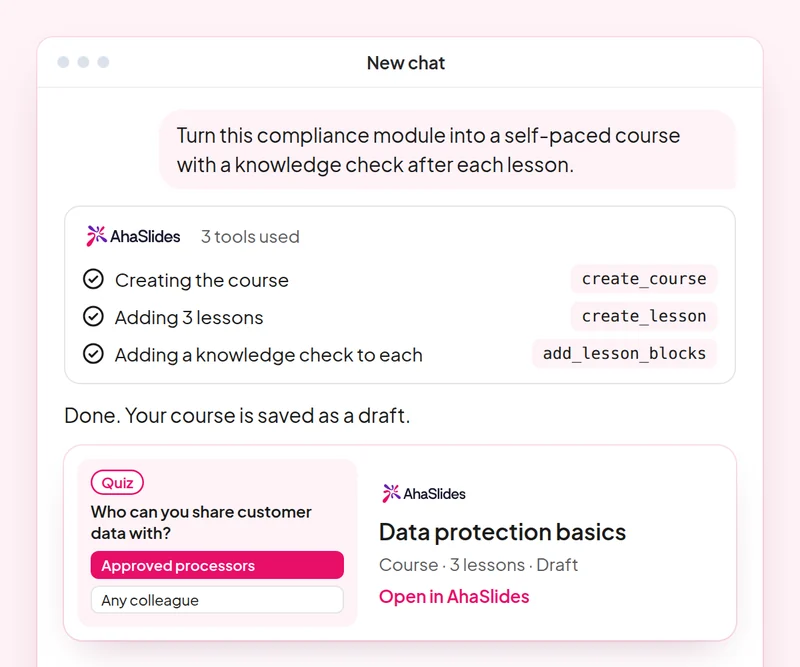
Mål: Turn an outline into a structured course with lessons, pages and blocks.
Skicklighet: build-course
prova: “Build a 4-lesson onboarding course for new customer support starters from this outline: [paste your outline]. Keep each page short.”
Du får: An unpublished eLearning course with lessons, pages and content blocks, and a link to open it in the editor.
Mål: Convert an existing workshop deck into self-paced learning and spot what did not carry over.
Skicklighet: convert-content
prova: “Turn my Giving Feedback workshop presentation into a self-paced course with one lesson per section of the deck.”
Du får: A new course built from your deck, with a note of anything that did not carry over.
Mål: Write a knowledge check that only uses facts from your own policy.
Skicklighet: make-quiz
prova: “Make a 12-question knowledge check on our new data handling policy for all staff. Here is the policy: [paste the policy].”
Du får: A scored quiz built only from the policy you gave it.
Mål: Measure a session with a short evaluation survey people finish.
Skicklighet: build-survey
prova: “Create a training evaluation survey for today's leadership workshop: 8 questions, mostly rating scales, with one open question at the end.”
Du får: A draft survey that asks before it is published.
Mål: Share results with stakeholders as a report page, only after you confirm what it shows.
Skicklighet: create-insight-report
prova: “Build a shareable report of quiz accuracy across all my onboarding sessions this quarter.”
Du får: A report page you can share by link once you say yes, without copying numbers into a spreadsheet.
Mål: Know who has finished, who is behind and what each learner still needs.
Skicklighet: track-participants
prova: “Check who has not finished my [new manager] course or scored under [70%] on its knowledge checks, and draft a reminder to each of them.”
Du får: A list of learners who are behind, with a reminder ready for each one. Detailed per-person reports need a paid plan.
Take one workshop you already run and ship it as a self-paced course with a knowledge check and an evaluation survey, then build a report of the results to share with your stakeholders. Keep the prompts that worked, so next time this work is a quick routine.
A 10-question quiz on choosing the right skill for a course, a conversion, a knowledge check, an evaluation or a report. Pass it to earn your certificate of completion.
Varje kurs är en AhaSlides E-learningkurs på cirka 2 timmar och 20 minuter som utfärdar ett verifierbart certifikat när du är klar.
Anslut AhaSlides MCP-servern till Claude eller ChatGPT, skicka varje prompt och gör det den bygger till din egen.
Samla de sex färdigheterna under en riktig session från ditt arbete.
Take a 10-question quiz on choosing the right skill for a course, a conversion, a knowledge check, an evaluation or a report.
Klara quizet för att få en verifierbar AhaSlides intyg om färdigställande, med en verifieringslänk som du kan dela.
Ja, kursen kostar ingenting att gå. Du följer den på ditt eget sätt. AhaSlides konto, och vissa funktioner som modulerna använder, såsom detaljerade rapporter, ingår i de betalda planerna. Se prissättning för vad varje plan inkluderar.
Claude (på claude.ai, Cowork och Claude Code), ChatGPT och alla klienter som stöder fjärr-MCP-servrar. Lägg till en anpassad koppling i Claude med https://mcp.ahaslides.com/mcp som serverns URL. I ChatGPT, hitta AhaSlides på fliken Plugins. Se AhaSlides MCP-server sidan för de fullständiga stegen.
De är de 17 offentliga AhaSlides färdigheter för Claude, gratis och öppen källkod på GitHubVar och en berättar för Claude vilken AhaSlides MCP-verktyg att anropa och pekar den på AhaSlidesegna författarguider.