
The best weekly team check-in questions are short, the same every week and easy to answer in under a minute. Pick three to five from the lists below, then send them in Slack - AhaSlides 對於 Slack: 類型 /ahaslides 創建選擇 每週脈搏, edit its questions, add your own and press 帖子.
When to use weekly check-in questions
A weekly check-in works when you want to know how the team is doing without adding another meeting. Say you lead a design team and want a read on workload before Monday planning. On Friday you post four questions in #team-design, and people answer between tasks.
其他精彩瞬間:
- A remote or hybrid team that rarely talks all at once
- The end of a sprint or a busy week
- A new team or a new manager, to learn what people need
- A slow week, to see whether slow means calm or stuck
Keep a weekly check-in short. If you need a long, formal survey, send it from a full AhaSlides survey link instead.
Why ask in Slack
- 人們會在他們所在的地方回答問題。 No new tab and no email to dig out, so answering takes seconds.
- You see how many have answered. The post sits in the channel and shows the number of people who have replied.
- 答案不會自動消失。 所有答案都會保存在您的資料庫中。 AhaSlides report, so you can compare one week with the next.
Weekly team check-in questions to copy
Each question is marked with the Slack question type that fits it. All of them are types you can pick in the Create window. For a rating or a score, you can change the words at each end of the scale.
The weekly pulse: start here
If you only ask two things, ask these. They are the two questions in the ready-made 每週脈搏 in AhaSlides 對於 Slack, and the second one is optional for the people answering.
| 問題 | Type in the Create window |
|---|---|
| 你這週過得怎麼樣? | Rating 1 to 5, from Very poor to Great |
| What made it that way? | Follow-up question, which people can skip |
Wins and progress
| 問題 | Type in the Create window |
|---|---|
| What's one thing you're proud of this week? | 簡答 |
| Did you finish what you planned this week? | 是或否 |
| How much progress did you make on your top priority? | Rating 1 to 5, from Barely any to A lot |
Workload and focus
| 問題 | Type in the Create window |
|---|---|
| Is your workload manageable right now? | Rating 1 to 5, from Not at all to Completely |
| Is anything blocking your work right now? | Yes or no, with a follow-up asked only when the answer is Yes |
| How much focus time did you get this week? | Multiple choice: Hardly any, Some, Plenty |
The second one is the ready-made 專注力和阻礙者 check-in: it asks "What is it?" only of people who answer Yes.
團隊和支持
| 問題 | Type in the Create window |
|---|---|
| Do you get the support you need from the team? | Rating 1 to 5, from Not at all to Completely |
| How connected do you feel to the team? | Rating 1 to 5, from Not at all to Very |
| Who helped you most this week? | 簡答 |
展望未來
| 問題 | Type in the Create window |
|---|---|
| What's your top priority for next week? | 簡答 |
| What's one thing we should change? | 簡答 |
| How ready do you feel for next week? | 得分1到10分 |
你需要什麼
- A Slack 工作區 AhaSlides 對於 Slack 安裝
- An AhaSlides account for the person who posts the check-in (any plan works, including Free)
- 回答問題的人不需要任何東西:他們不需要 AhaSlides 帳戶
How to send your weekly check-in in Slack
步驟1:新增 AhaSlides 對於 Slack
打開 AhaSlides 對於 Slack 安裝頁面 並將應用程式新增至您的工作區。第一次按下 帖子, AhaSlides asks you to sign in and keeps your draft while you do.
Step 2: Open the Create window and pick a check-in
In the channel you want, type /ahaslides 創建。 下 與團隊聯繫, 按 每週脈搏. For Workload, Focus and blockers, Team connection and more, press 所有模板.
Step 3: Swap in your questions
The channel you're in is already picked, and 留言 lets you add a line so people know why you're asking. Edit the first question's wording (it stays a rating question and keeps its follow-up), then press + 新增問題 for each question you want from the lists above, up to 10 in one post, and pick each one's type from its 類型 menu. Three to five questions is plenty.
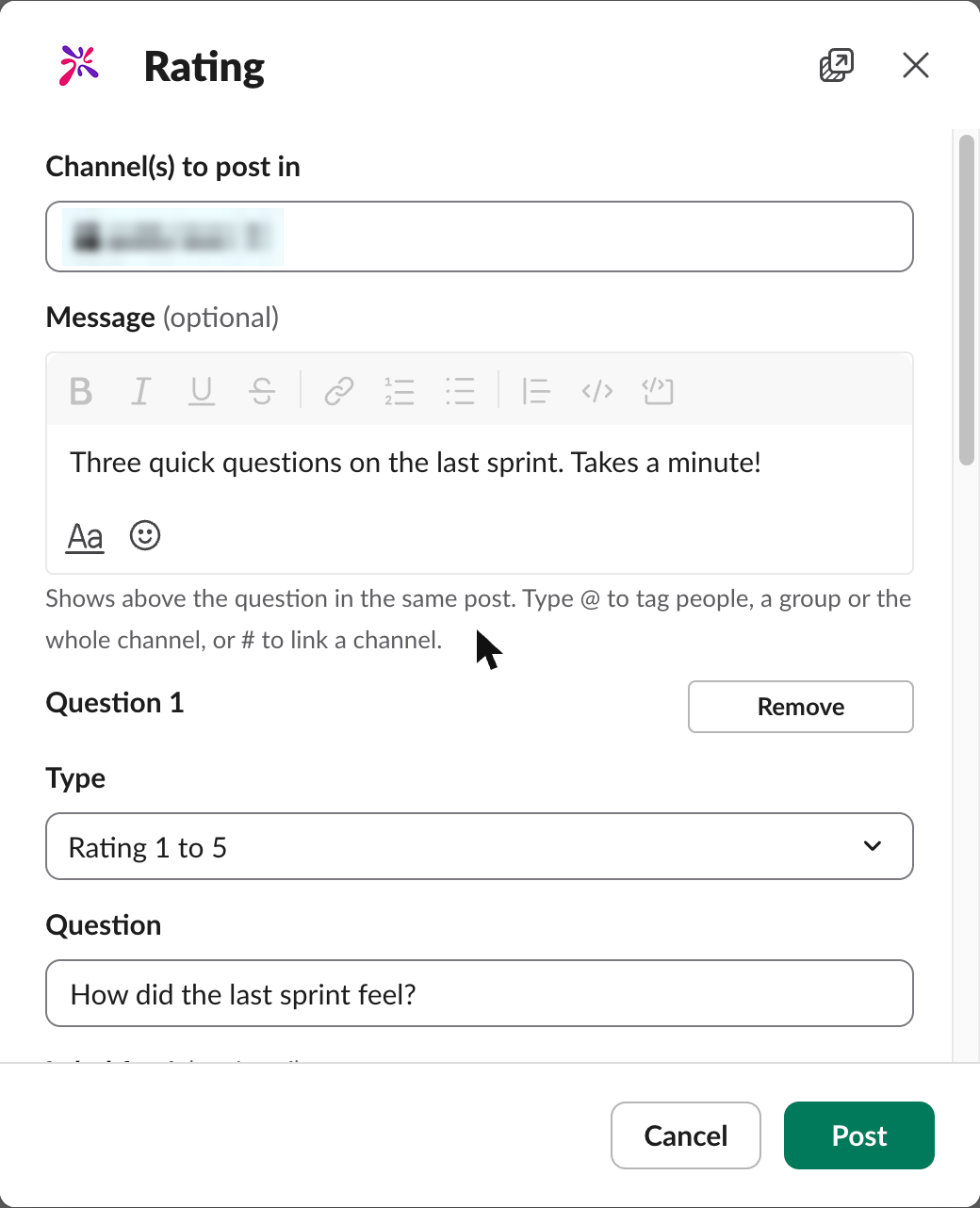
第四步:選擇匿名答案以及誰可以看到結果
下 設定,打勾 匿名回覆 if you want honest answers without names. Workload and Wellbeing start with it ticked; Weekly pulse starts with it off. 向所有人顯示結果 is ticked to start with, so the whole channel sees the results. Untick it to keep them to yourself.
第五步:發布帖子,然後等著看回覆吧。
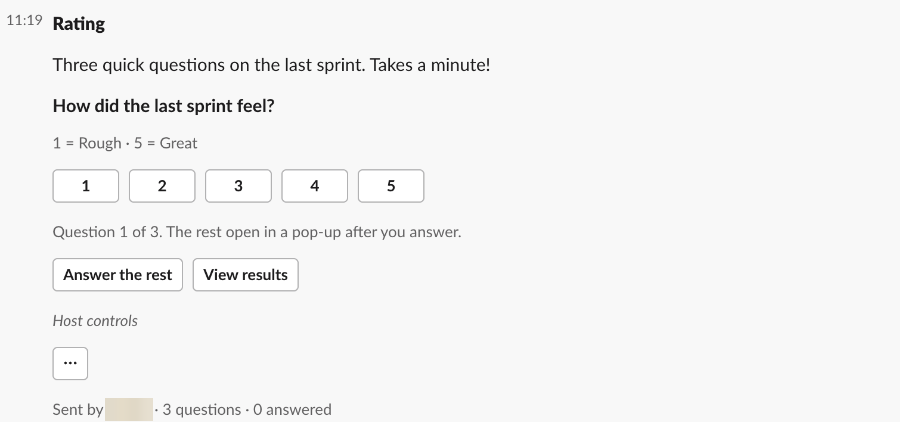
媒體中心 帖子. The first question sits right in the post, and people tap an answer. 回答其餘問題 opens the other questions in a pop-up, and the post shows how many people have answered. Post it on the same day each week so it becomes a habit.
卡在某個步驟上了嗎? The full guide covers every option and common fixes. For more on surveys, read 如何在…中建立調查 Slack. If you also want a daily rhythm, see 如何進行每日簽到 Slack. For a stand-up that runs in the channel, see 如何在 Slack.
Tips for a check-in people answer
- Ask the same first question every week, so you can see a trend.
- Keep it to five questions or fewer, and make the follow-up optional.
- Say why you're asking in the Message line.
- Use anonymous answers for workload and wellbeing, and named answers for wins and next steps.
- Share what you changed because of the answers, so people see the point of replying.
常見問題
How many weekly check-in questions should I ask?
Three to five. A short check-in gets more answers, and you can always add a question later. The Create window takes up to 10 in one post.
Should a weekly check-in be anonymous?
It depends on what you ask. Workload and wellbeing questions get more honest answers when they are anonymous. Questions about wins and next week work well with names. With 匿名回覆 ticked, names are hidden for everyone, you included.
人們需要註冊帳號才能回答這個問題嗎?
No. People answer in Slack 沒有 AhaSlides 帳戶。
How often should I send a weekly check-in?
Once a week, on the same day. You post it yourself each time. If something goes wrong when you send it, 導遊 has the fixes.
Try it in your workspace
Send your first weekly check-in in about a minute.