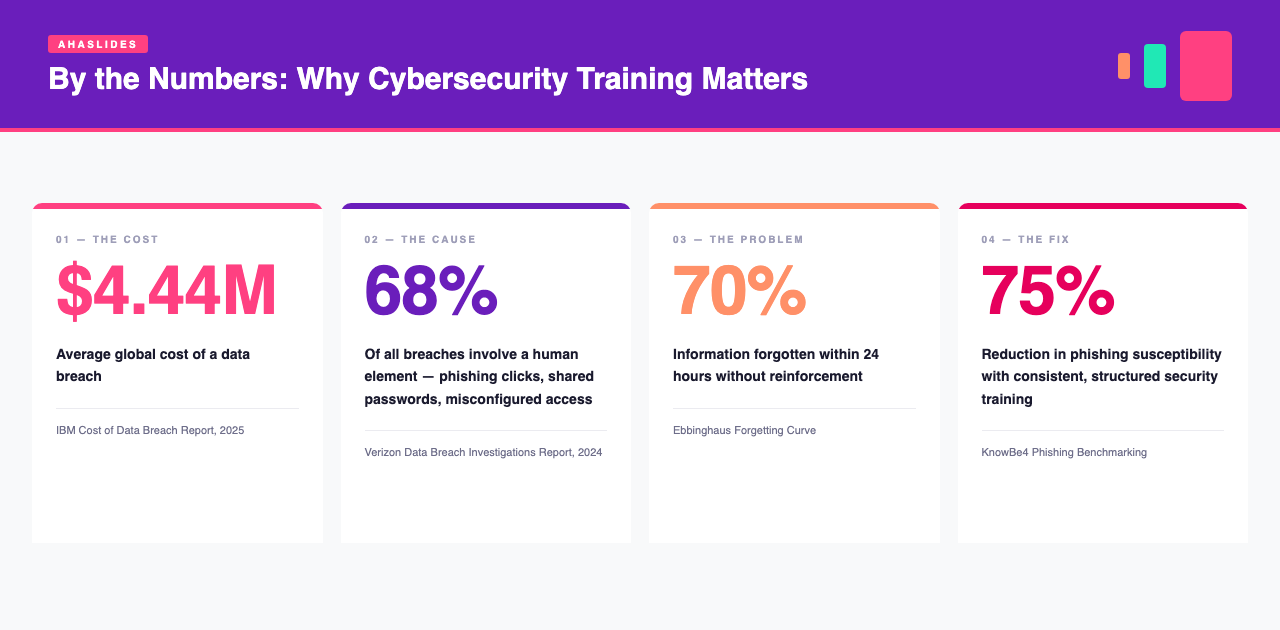
The average data breach now costs $4.44 million globally, according to IBM’s 2025 Cost of a Data Breach Report. And in most cases, the weakest link isn’t the firewall, it’s a person. The 2024 Verizon Data Breach Investigations Report found that 68% of breaches involve a human element: a phishing click, a shared password, a misconfigured access control.
Training can fix this. But most organisations deliver it in a way that doesn’t work.
This guide covers why traditional cybersecurity training fails, what research says changes behaviour, and which tools make it possible for live, hybrid and async teams.
Cybersecurity Awareness Month runs every October. In 2026 the US Cybersecurity and Infrastructure Security Agency (CISA) used the theme "Securing the Next 250" (CISA) and the National Cybersecurity Alliance (NCA) used "Don't Make It Easy for Them" (NCA). Scale is the reason to care: the FBI's Internet Crime Complaint Center received 1,008,597 complaints in 2025, with $20.877 billion in reported losses, up 26% (Výroční zpráva FBI IC3 za rok 2025). If you missed this year's month, you can run these ideas in any month, or plan them for next October.
Why most cybersecurity training fails

Upřímně se zeptejte sami sebe: Pamatuje si váš tým loňské každoroční bezpečnostní školení?
If the answer is “probably not,” the Ebbinghaus Forgetting Curve explains why. In Ebbinghaus's classic experiments, a day after learning lists of nonsense syllables, he needed about two-thirds of the original effort to relearn them. Real workplace knowledge is more meaningful than nonsense syllables, but without reinforcement, much of it still slips away. A one-hour annual compliance session, no matter how well designed, is no match for how human memory works.
Tři problémy s kombinací faktorů to zhoršují:
Krátké rozpětí pozornosti. Passive, content-heavy sessions lose employee attention within minutes. Once attention drops, critical details, the exact red flags that distinguish a phishing email from a legitimate one, get filtered out.
Žádné aktivní zpracování. Sledování slajdů není totéž co učení. Znalosti, které nejsou po skončení sezení aplikovány, otestovány nebo znovu zrekonstruovány, rychle vyprchají.
Bez výztužné smyčky. Most organisations run cybersecurity training once a year with no follow-up. Employees revert to unsafe habits between sessions, not because they don’t care, but because there’s nothing keeping the knowledge active.
What changes security behaviour
Udělejte živá vystoupení interaktivní

Nejefektivnějším posunem v živém školení je přechod od pasivního poskytování informací k aktivní účasti. Místo vysvětlování, jak phishing vypadá, umístěte zaměstnance do situace: „Právě jste obdrželi tento e-mail. Co uděláte?“ Nechte je hlasovat. Ukažte výsledky v reálném čase. Diskutujte, proč jsou špatné odpovědi tak lákavé.
This is active recall, retrieving knowledge rather than receiving it, and it significantly improves what people retain compared to listening or re-reading.
Používejte anonymní otázky a odpovědi
Employees often know where they’ve cut corners: shared credentials, unpatched devices, weak passwords. They rarely admit this publicly. Anonymous Q&A gives people a safe channel to surface what is happening in your organisation, giving trainers a far more accurate picture of real-world risk.
Udržujte kontrolní seznamy pro dodržování předpisů aktivní, ne statické
Security checklists handed out as PDFs get filed and forgotten. Running them as live polls, with employees voting Yes, No, or N/A to each item, turns a compliance exercise into a team conversation. This free cybersecurity checklist template covers physical access, data handling, and disposal procedures, ready to run with no setup.
???? Šablona kontrolního seznamu pro kybernetickou bezpečnost zdarma
Hybrid and async training: the spaced repetition model
Live sessions are powerful, but they can’t carry the full weight of behaviour change on their own. The forgetting curve doesn’t pause between training days.
Spaced repetition, revisiting material at increasing intervals over time, is one of the most well-supported principles in learning science. A randomised study of more than 26,000 family physicians and residents, published in Academic Medicine, found that spaced repetition produced significantly higher learning scores than no repetition (58% vs 43%).
V případě školení v oblasti kybernetické bezpečnosti to znamená nahrazení nebo doplnění každoročního školení kratšími a častějšími kontaktními body:
Týden 1: Živé nebo hybridní školení, spuštěné jako interaktivní scénáře
Týden 2: 5otázkový asynchronní kvíz pokrývající stejnou látku, přístupný přes odkaz nebo QR kód
Měsíc 2: A short module on a new topic, password hygiene, physical security, or incident response
2. čtvrtletí: Opakovací anketa začleněná do týmové schůzky
Cybersecurity Awareness Month ideas: 25 activities in 5 sets
Each activity takes 10 to 15 minutes in a live session (a suggestion, so adjust it), and lists who runs it and a live question to ask. Pick one set a week, or mix and match.
Set 1: the four behaviours (5 activities)
The NCA recommends four steps anyone can take: use strong passwords and a password manager, turn on multifactor authentication, recognise and report scams, and update your software (NCA). Set 1 gives each one a slot, plus a kick-off.
- Kick-off: what would a scammer need? 10 minutes, run by IT or security. Show the four behaviours and ask: "Which of these four do you do every day?"
- Password manager walk-through. 15 minutes, run by IT. Show the approved manager and how to save a login. Ask: "How many accounts do you have?"
- MFA check. 10 minutes, run by IT. Everyone checks that multifactor authentication is on for their work email. Ask: "Is multifactor authentication on for your email, yes or no?"
- Nahlásit podvod. 10 minutes, run by security. Show where to report a suspicious message at work. Ask: "Do you know where to report one?"
- Update day. 10 minutes, run by IT. Everyone installs pending updates on a laptop or phone. Ask: "How many updates were waiting?"
Our pick: the MFA check. It turns a policy into one visible action, and the yes or no count shows you the gap at once.
Set 2: phishing (5 activities)
Phishing and spoofing was the most reported crime type to the FBI's Internet Crime Complaint Center in 2025, with 191,561 complaints. Total losses across all complaint types were $20.877 billion, up 26% (Výroční zpráva FBI IC3 za rok 2025). For more attack types, see these příklady sociálního inženýrství.
- Spot the phish quiz. 15 minutes, run by security. Show six real-looking emails and ask people to vote "genuine" or "phish". Ask: "What was the clue?"
- Report-a-suspicious-email drill. 10 minutes, run by IT. Send a harmless test email and ask everyone to report it with the real button. Ask: "How long did it take you to find the button?"
- Fake invoice case. 15 minutes, run by finance with IT. Walk through an invoice with changed bank details. Ask: "Who would you call to check it?"
- Podvod s QR kódem. 10 minutes, run by IT. Show a poster with a sticker over its QR code. Ask: "Would you scan it?"
- Voice scam. 10 minutes, run by security. Read out a call script from "IT support" asking for a code. Ask: "What would you say?"
Our pick: the report-a-suspicious-email drill. People practise the step that matters most, and you learn how long it takes.
Set 3: account and device habits (5 activities)
- Screen-lock race. 5 minutes, run by any team lead. Everyone locks their screen as fast as they can. Ask: "What is your shortcut?"
- Public Wi-Fi talk. 10 minutes, run by IT. Cover what staff should do on a café or airport network. Ask: "Where did you last work from outside the office?"
- Shared account audit. 15 minutes, run by team leads. List the logins your team shares and agree who needs them. Ask: "Which shared login could we drop?"
- Lost-phone drill. 10 minutes, run by IT. Practise reporting a lost device. Ask: "Who would you tell first?"
- Desk and screen sweep. 10 minutes, run by office managers. Look for sticky notes with passwords and open screens. Ask: "What did you find?"
Our pick: the shared account audit. It ends with a real change to how the team works, not only a reminder.
Set 4: reporting and culture (5 activities)
- The scam I nearly fell for. 15 minutes, run by security. Collect stories anonymously and read them out. Ask: "What nearly caught you out?"
- Meet the security team. 15 minutes, run by IT. A question and answer session with the people who handle reports. Ask: "What would you like to know about our security?"
- Reporting walk-through. 10 minutes, run by security. Follow one report from the first click to the fix. Ask: "What happens after you report something?"
- Thank a reporter. 5 minutes, run by managers. Thank people who reported something, whether or not it was a real attack. Ask: "Who helped keep us safe this month?"
- Blameless story swap. 15 minutes, run by team leads. Share a mistake and what you learned. Ask: "What would make it easier to say 'I clicked'?"
Our pick: the scam I nearly fell for. Anonymous stories show people that others make the same slips, and they give you real examples for next time.
Set 5: wrap-up and measurement (5 activities)
- Final quiz with a leaderboard. 15 minutes, run by security. Ten questions from the month's sessions. Ask: "Which topic surprised you most?"
- Kontrola důvěry. 5 minutes, run by security. Repeat the rating from the kick-off. Ask: "How confident are you reporting a scam?"
- Team pledge. 10 minutes, run by team leads. Each team picks one habit to keep. Ask: "Which habit will you keep?"
- Prize draw for reporters. 5 minutes, run by IT. Give small prizes for reports, not for clicks avoided, so nobody hides a mistake. Ask: "Who reported something this month?"
- Plan the next refresher. 15 minutes, run by L&D. Use the results to choose topics for the next quarter, in line with the framework below. Ask: "What should we cover next?"
Our pick: the confidence check. Comparing the same question before and after shows whether the month changed anything. For tracking who took part, see jak sledovat dokončení školení zaměstnanců.
Ways to host a security awareness month with AhaSlides
Run each session from one deck, built from the activities above.
- Vyberte odpověď: "Spot the phish." Show an email and let people vote before you reveal the clue.
- Word Cloud: "What password habit would you change?" The biggest words tell you where to start.
- Stupnice hodnocení: "How confident are you reporting a scam?" from 1 to 5, asked at the kick-off and again at the wrap-up.
- Otevřený konec: an anonymous "The scam I nearly fell for". Anonymity makes people more willing to share.
The National Cybersecurity Alliance's champions toolkit adds a tip sheet, 8 printable posters and 16 social media graphics to go with the live sessions (NCA). You can also use the Základní informace o bezpečnosti a Phishing a sociální inženýrství course templates as the base for your slides. For a topic to add to your month, see the úrovně klasifikace dat vysvětlovač.
Best tools for cybersecurity awareness training
No single tool does everything. Here is what each one is good for, and where it falls short.
Kahoot
The go-to for gamified quizzes. Works well as a standalone knowledge check or end-of-session activity, but not built for full presentation and content delivery: you still need a separate deck to run the actual training around it.
Mentimeter
A live polling and presentation tool built around polls and word clouds, with quizzes as a separate slide type.
Quizlet
Zaměřeno čistě na studium vlastním tempem pomocí kartiček a kvízů s výběrem odpovědí. Užitečné pro individuální procvičování mezi jednotlivými lekcemi, ale omezené v tom, co dělá.
Geneticky
Nástroj pro tvorbu obsahu pro vytváření interaktivních prezentací a modulů mikroučení. Kvalita silně závisí na šabloně, se kterou začínáte, a vytvoření něčeho propracovaného od nuly vyžaduje skutečný čas a úsilí.
AhaSlides
AhaSlides is an all-in-one engagement platform for teams and classrooms. It covers live sessions, hybrid delivery and async follow-up, with quiz, poll, word cloud, Q&A, spinner wheel, rating and open-ended slide types. Post-session reports show scores and knowledge gaps by question, so follow-up is targeted.
Šablony školení o kybernetické bezpečnosti zdarma připravené ke spuštění:
A simple framework to start with
You don’t need to overhaul your entire training programme. Start here:
- Nahraďte jeden blok snímků hlasováním s živým scénářem. Vyberte si skutečný příklad phishingu, který váš tým obdržel, a spusťte ho jako otázku s výběrem odpovědí.
- Během týdne zašlete doplňující kvíz s 5 otázkami. Don’t wait a month, the forgetting curve is steepest in the first 24 hours.
- Témata střídejte čtvrtletně. V jednom čtvrtletí phishing, v dalším fyzický přístup, v dalším hygiena hesel. Každá relace se obnovuje a staví na té předchozí.
- Sledujte, co váš tým dělá špatně. Use that data to decide where to spend more time, not intuition.
KnowBe4’s 2022 Phishing by Industry Benchmarking research, covering more than 9.5 million users across over 30,000 organisations, found that the share of employees who clicked simulated phishing emails fell from 32.4% to 17.6% after 90 days of training, and to about 5% after a year of ongoing training.
Pokud nemáte žádné kurzy AhaSlides yet, the Courses page opens on 600+ ready-made course templates, including security awareness, so the self-paced part of this framework does not start from a blank page (začít s šablonou kurzu).
Často kladené otázky
When is Cybersecurity Awareness Month?
Every October. The campaign began in 2004, when the National Cyber Security Alliance, now the National Cybersecurity Alliance, launched it with the US Department of Homeland Security (NCA).
Who runs Cybersecurity Awareness Month?
CISA and the National Cybersecurity Alliance lead it together. Check both organisations' pages for the current theme and free resources.
Jaké bylo téma roku 2026?
CISA's theme was "Securing the Next 250" (CISA) and the NCA's was "Don't Make It Easy for Them" (NCA). The 2027 theme is not published yet, so check both pages in September.
What should staff do first?
Use a password manager and strong passwords, turn on multifactor authentication, report scams and update software. These are the four behaviours the NCA recommends.
How long should an activity take?
Ten to fifteen minutes is enough for a live session. That is a suggestion, so adjust it to your team's schedule.