
Samm 1: Töötage moodulite kaudu
Ühendage AhaSlides MCP server Claude'ile või ChatGPT-le, saada iga käsk ja muuda see, mida see loob, enda omaks.
Brief Claude or ChatGPT in the chat, and the AhaSlides MCP server builds your webinar deck, customer survey or event content in your AhaSlides account. Learn the prompts, and every campaign takes far less time to prepare.
Umbes 2 tundi 20 minutit · 6 moodulit · Omas tempos · Lõpetamistunnistus
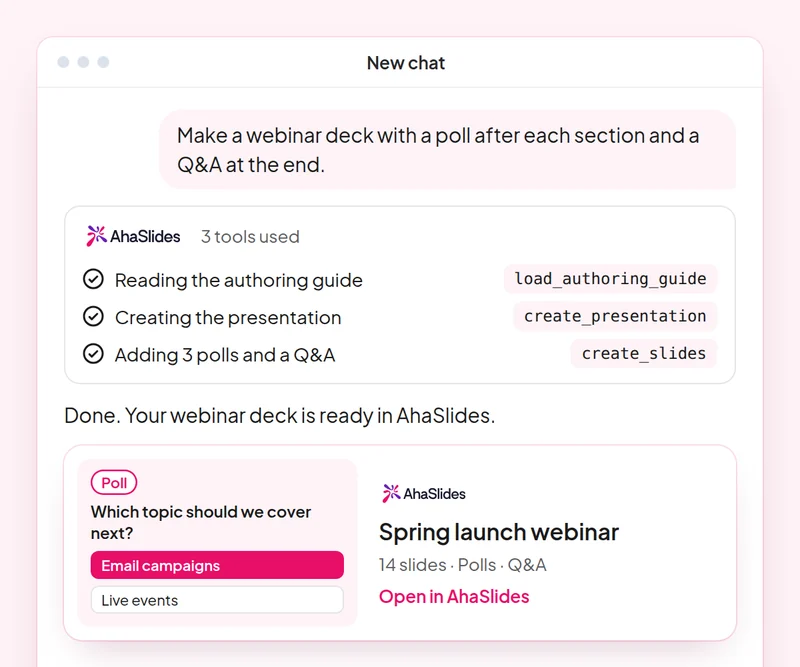
Eesmärk: Plan a webinar deck with polls, a word cloud and Q&A built in.
Oskus: build-presentation
proovida: “Build a 45-minute webinar presentation launching our spring collection, with a poll, a word cloud and a Q&A slide.”
Sa saad: An editable webinar deck with speaker notes.
Eesmärk: Find and choose images for your slides without leaving the conversation.
Oskus: add-images
proovida: “Find stock photos of people working in a café for the title and section slides of my webinar deck, and show me the options first.”
Sa saad: Photo options to choose from, uploaded to your slides once you pick.
Eesmärk: Ask customers for feedback with a short satisfaction survey.
Oskus: build-survey
proovida: “Create a 7-question customer satisfaction survey for people who joined our product webinar. Do not publish it yet.”
Sa saad: A draft survey that asks before it goes live.
Eesmärk: Share what an audience said as a report page your team can open.
Oskus: create-insight-report
proovida: “Build a shareable report of the poll and word cloud answers from last week's webinar.”
Sa saad: A report page you can share with the team once you confirm what it shows.
Eesmärk: Turn a one-off webinar into an on-demand course.
Oskus: convert-content
proovida: “Turn our product launch webinar deck into a 2-lesson self-paced course for new customers.”
Sa saad: A new course built from the webinar. The deck stays as it is.
Eesmärk: Know who joined your webinar and who engaged most, so sales talks to the right people.
Oskus: track-participants
proovida: “From my [product launch webinar], list the attendees who answered the most polls and questions, and draft a thank-you email for each of them.”
Sa saad: A ranked list of your most engaged attendees, with a thank-you ready for each. Detailed per-person reports need a paid plan.
Run one campaign from start to finish: plan the webinar deck with images, survey the people who joined, share a report of what they said and turn the webinar into a course for people who missed it. Keep the prompts that worked, so next time this work is a quick routine.
A 10-question quiz on webinar decks, images, customer surveys and reporting audience results. Pass it to earn your certificate of completion.
Iga kursus on AhaSlides Umbes 2 tundi ja 20 minutit kestev e-õppe kursus, mille läbimisel väljastatakse kontrollitav tunnistus.
Ühendage AhaSlides MCP server Claude'ile või ChatGPT-le, saada iga käsk ja muuda see, mida see loob, enda omaks.
Pange need kuus oskust kokku ühele päris töösessioonile.
Take a 10-question quiz on webinar decks, images, customer surveys and reporting audience results.
Läbi viktoriin, et teenida kontrollitavat AhaSlides lõputunnistus koos jagatava kinnituslingiga.
Jah, kursus on tasuta. Sa läbid selle omal moel. AhaSlides konto ja mõned moodulite kasutatavad funktsioonid, näiteks üksikasjalikud aruanded, on osa tasulistest pakettidest. Vaata hinnapoliitika selle kohta, mida iga plaan sisaldab.
Claude (claude.ai-s, Coworkis ja Claude Code'is), ChatGPT ja mis tahes klient, mis toetab MCP-servereid. Claude'is lisage kohandatud pistik koos https://mcp.ahaslides.com/mcp serveri URL-ina. ChatGPT-s leidke AhaSlides vahekaardil Pluginad. Vaadake AhaSlides MCP-server Täielike sammude lehel.
Nad on 17 avalikku AhaSlides oskused Claude'ile, tasuta ja avatud lähtekoodiga GitHubIgaüks ütleb Claude'ile, milline AhaSlides MCP tööriistad helistamiseks ja sellele suunamiseks AhaSlidesomaenda autorijuhendid.