


Les meilleures idées pour une présentation interactive sont les sondages en direct, les nuages de mots en guise d'échauffement, les quiz avec classement, les questions-réponses anonymes avec vote positif, le vote prioritaire en temps réel et le brainstorming numérique. Les sondages en direct sont idéaux pour obtenir rapidement des retours et évaluer le niveau de confiance des participants ; les nuages de mots permettent de démarrer les sessions en faisant ressortir ce que votre public associe déjà à votre sujet ; les quiz testent la mémorisation grâce à une compétition amicale ; les questions-réponses avec vote positif permettent de faire émerger les questions que tout le monde souhaite voir abordées sans que personne n'ait à prendre la parole ; et le vote prioritaire permet à votre public de choisir le sujet à traiter en premier. Des outils comme AhaSlides vous permettent de gérer toutes ces fonctionnalités depuis une seule présentation : les participants se connectent via un QR code ou un lien court, aucun téléchargement d'application n'est requis et les résultats s'affichent en temps réel sur votre écran.
Les statistiques sont alarmantes. La durée d'attention moyenne d'une personne est tombée à 45 secondes, contre 2.5 minutes il y a seulement vingt ans. Pourtant, nous continuons d'exiger des auditoires qu'ils assistent à des présentations d'une heure en restant passifs. Résultat ? Désengagement, faible mémorisation et occasions manquées de créer du lien avec son public.
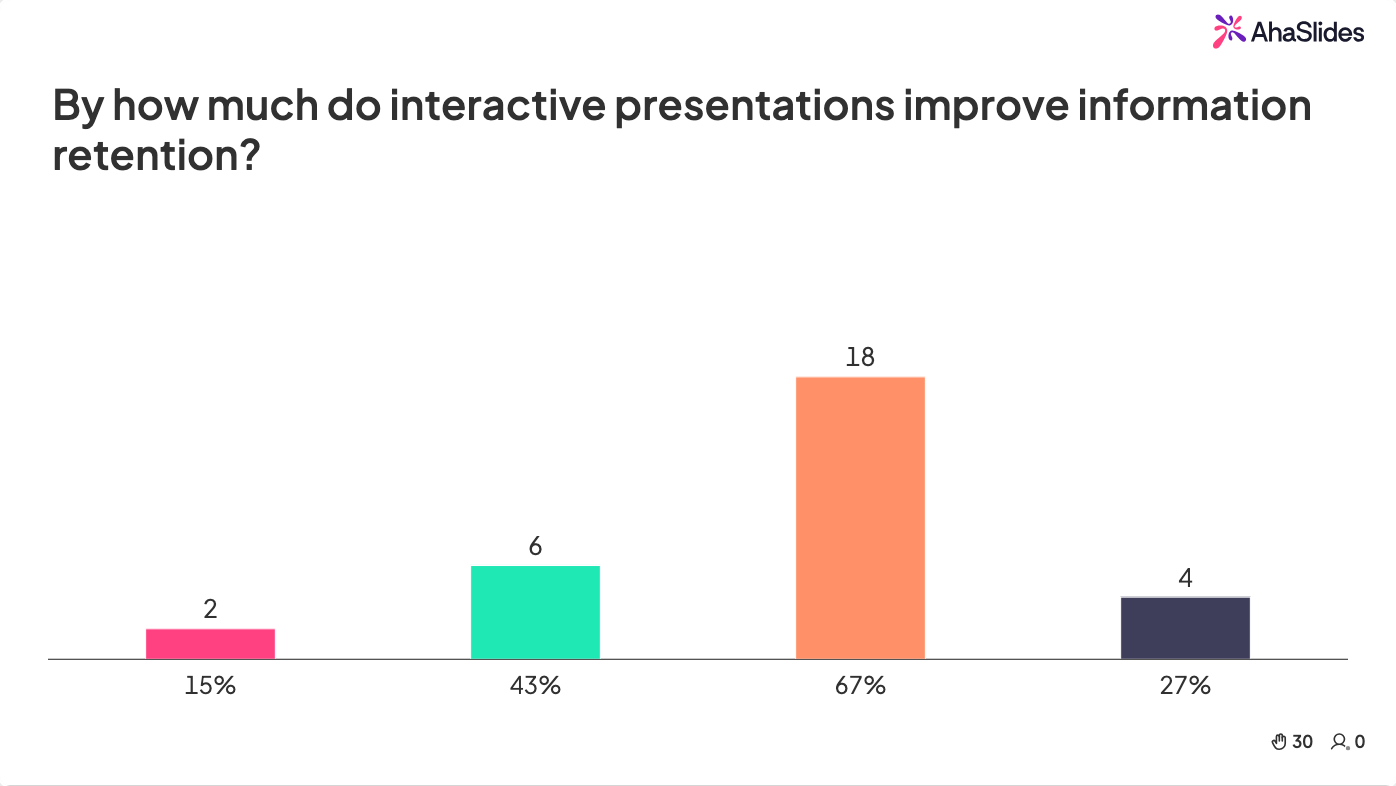
La solution n'est pas compliquée : présentations interactives C’est gagnant. En intégrant la participation du public, nous transformons les exposés monotones en conversations dynamiques. Les données le confirment : les présentations interactives améliorent de 67 % la mémorisation des informations et augmentent de 43 % la satisfaction des participants.
Voici 15 idées de présentations interactives que vous pouvez mettre en œuvre immédiatement, que ce soit devant une classe, une équipe en entreprise ou un public virtuel. Elles sont classées par temps de préparation, des activités complètes aux ajouts rapides permettant de captiver l'auditoire en seulement cinq minutes.
Idées de présentations interactives complètes
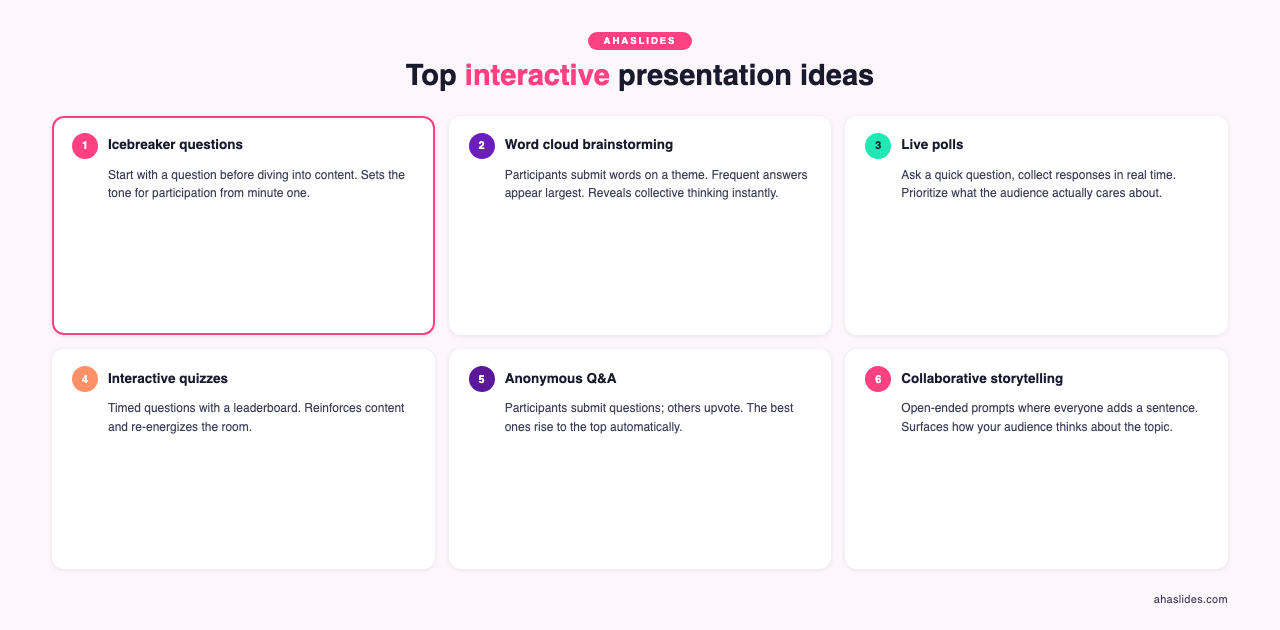
1. Questions brise-glace
Commencez par établir un lien avec votre auditoire avant d'aborder le contenu. Posez une question ouverte qui invite à la réflexion sans nécessiter de préparation approfondie. Par exemple : « Qu'avez-vous appris cette semaine ? » ou « Qu'est-ce qui vous a amené ici aujourd'hui ? » L'important n'est pas la question elle-même, mais de montrer à votre public que ses opinions vous importent.
Cela donne le ton et favorise la participation. Si les participants se sentent impliqués dès le début, ils resteront attentifs tout au long de votre présentation. Pour les présentations à distance, utilisez la messagerie instantanée pour recueillir les réactions. Pour les événements en présentiel, invitez les participants à échanger avec leur voisin.
2. Brainstorming par nuage de mots
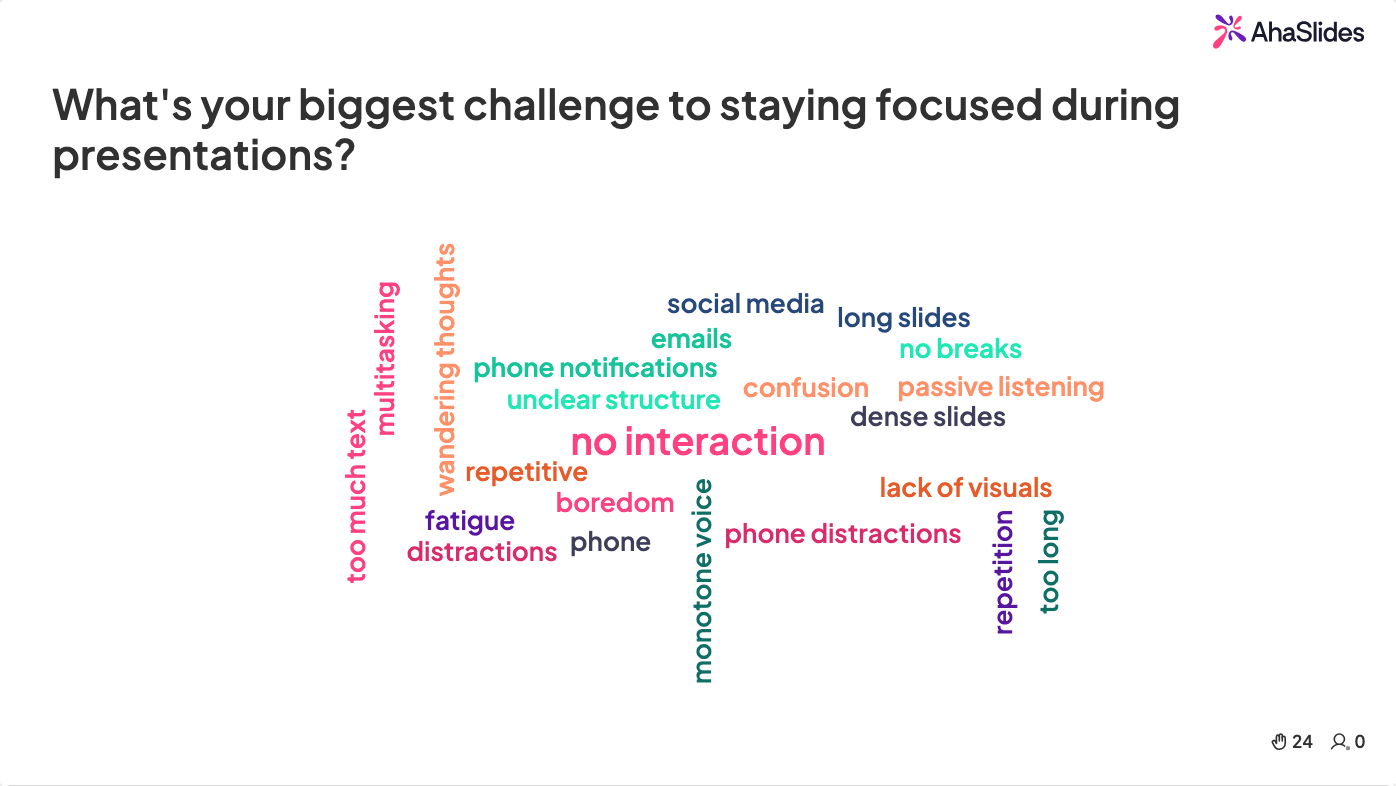
Demandez à votre public de soumettre des mots isolés ou de courtes expressions en rapport avec votre sujet. Affichez ces réponses sous forme de tableau. mot nuage Les mots fréquemment mentionnés y apparaissent en plus grand. Cela permet d'atteindre plusieurs objectifs : valoriser les connaissances préalables du public, diversifier les supports visuels et donner la parole à chaque participant, quel que soit son profil.
Par exemple, si vous présentez un exposé sur la productivité au travail, demandez : « Quel est le principal obstacle à votre productivité ? » Observez comment les thèmes émergent naturellement des réponses. Vous découvrirez souvent des points de vue auxquels vous n’aviez pas pensé, ce qui donnera à la présentation un aspect collaboratif plutôt que directif.
Les nuages de mots sont particulièrement efficaces à deux moments clés d'une session : en introduction (pour faire émerger les connaissances préalables des participants et leurs associations avec le sujet) et immédiatement après la présentation d'un concept clé (pour vérifier la bonne compréhension du message). Lors d'une session de 45 minutes, un nuage de mots en introduction et un autre lors d'un point de contrôle de la compréhension permettent de couvrir ces deux aspects sans ajouter plus de trois minutes à votre planning. Si les réponses se concentrent autour de termes inattendus, il s'agit d'une information précieuse : adaptez votre propos sur-le-champ.
3. Vote sur les priorités
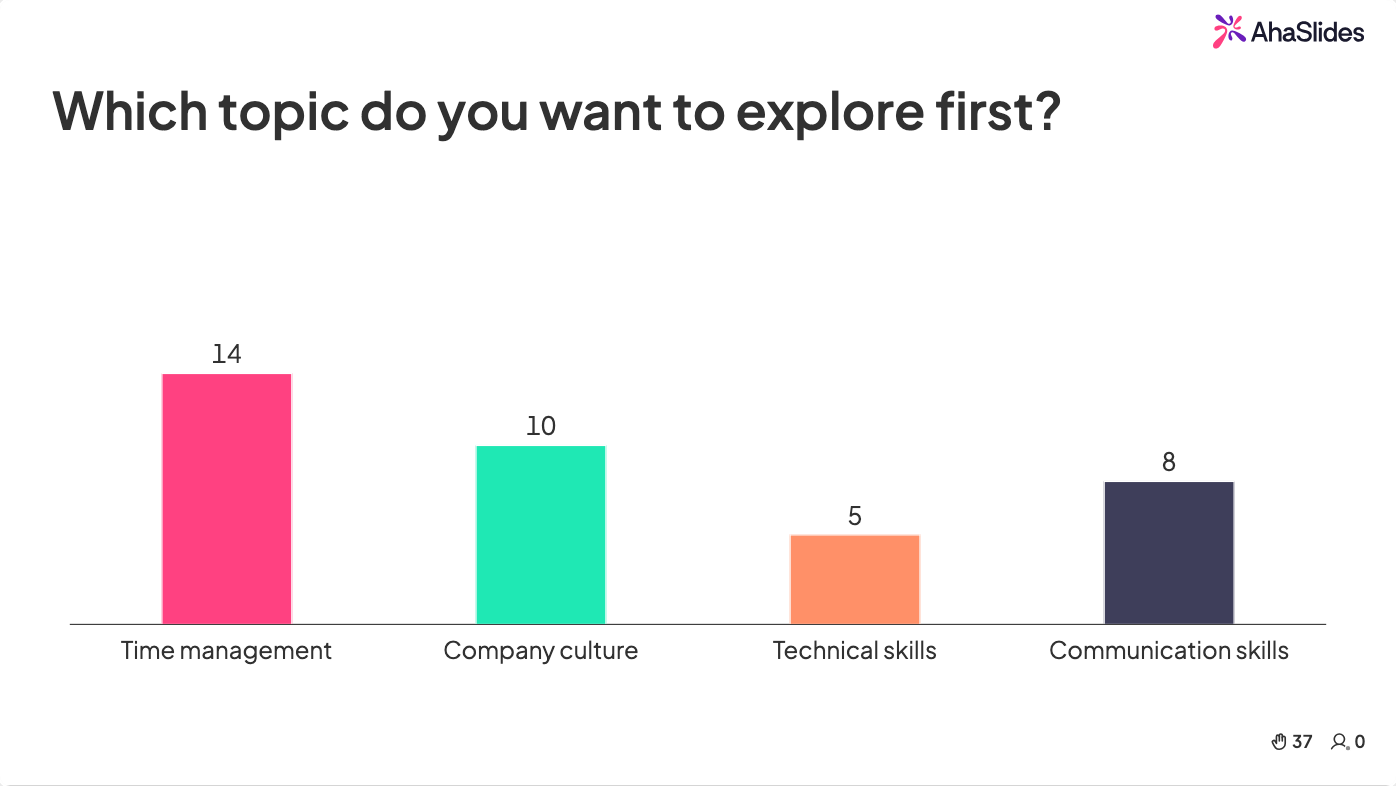
Présentez une liste de sujets, d'idées ou de questions et laissez votre public voter pour les plus importants. Cette approche est efficace si vous avez une certaine flexibilité dans le déroulement de votre présentation et que vous souhaitez prioriser le contenu en fonction des intérêts réels de votre auditoire. Si vous formez de nouveaux employés, vous pourriez leur demander quels sujets ils souhaitent approfondir : la communication, les compétences techniques, la culture d'entreprise ou la gestion du temps.
Le processus de vote lui-même devient captivant, et les participants restent attentifs car ils savent que la présentation portera sur le sujet pour lequel ils ont voté. Vous témoignez ainsi d'un réel respect pour leurs priorités.
4. Naviguez ensemble entre les diapositives.
Au lieu de contrôler le défilement des diapositives, invitez votre public à choisir la suivante. Proposez trois options : « Souhaitez-vous en savoir plus sur A, B ou C ? » Ce style de présentation interactive, où le participant choisit sa propre aventure, le maintient captivé.
Cette approche est particulièrement efficace pour présenter des sujets complexes sous différents angles. Au lieu d'imposer un parcours identique à tous, elle permet à différents groupes d'approfondir les sujets qui les intéressent le plus.
5. Sujets de réflexion
Faites des pauses régulières pour poser des questions qui invitent à la réflexion personnelle. « Comment auriez-vous abordé la situation différemment ? » ou « Que feriez-vous dans ce cas ? » Laissez 30 secondes aux participants pour réfléchir, puis sollicitez leurs réponses. Vous serez surpris par la diversité des idées lorsque vous leur offrez cet espace.
Les incitations à la réflexion fonctionnent dans tous les contextes et leur mise en œuvre est gratuite. Elles aident également à intégrer les nouvelles informations plutôt que de les recevoir passivement.
6. Quiz interactifs
Quiz interactifs Les quiz n'ont pas besoin d'être sérieux ni à forts enjeux. Ils peuvent être des outils ludiques et sans pression pour tester les connaissances et susciter la discussion. Utilisez des questions à choix multiples pour simplifier les réponses, puis discutez des raisons pour lesquelles certaines réponses étaient correctes. Un quiz permet de varier le rythme de la présentation et offre aux introvertis une manière confortable de participer (ils peuvent répondre via leur appareil plutôt que de lever la main).
Pour dynamiser l'engagement, créez un système de points avec un classement. Une saine compétition encourage la concentration. Des outils comme AhaSlides simplifient cette mise en place : vous pouvez ajouter des quiz chronométrés, afficher les résultats en direct et suivre les taux de participation en temps réel.
Les quiz ont également une fonction diagnostique. Si 60 % des participants ont répondu incorrectement à une question, cela vous incite à ralentir et à revoir la notion avant de passer à la suivante. Sans quiz, il serait impossible de le savoir : l’auditoire pourrait sembler attentif alors qu’il ne comprendrait que très peu de choses. Les outils d’analyse intégrés à AhaSlides affichent en temps réel le détail des réponses pour chaque question, transformant ainsi le quiz en un mécanisme de rétroaction bidirectionnel bénéfique à tous.
7. Moments multimédias
Aérez les diapositives trop chargées en texte avec des GIF, de courts clips vidéo ou d'autres éléments visuels. multimédia Les éléments multimédias ne doivent pas nécessairement être directement liés à votre sujet. Un GIF amusant peut apporter une touche de légèreté à une discussion sérieuse. Une courte vidéo illustre un concept bien plus clairement que de longs discours. Le multimédia est efficace car il modifie le stimulus. Après plusieurs minutes d'écoute ou de lecture, un changement visuel soudain capte à nouveau l'attention.
8. Vrai ou faux avec une petite variante
Présentez une affirmation et demandez à l'auditoire si elle est vraie ou fausse. La variante ? Au lieu d'un questionnaire à choix multiples, faites-leur répondre physiquement. Ceux qui pensent que c'est vrai se dirigent vers la gauche de la salle ; ceux qui pensent que c'est faux se dirigent vers la droite. En visioconférence, demandez-leur d'activer leur micro et de dire « vrai » ou « faux » ensemble, ou utilisez un sondage.
Le mouvement physique (lorsqu'il est possible) dynamise les participants et rend l'activité mémorable. La discussion de groupe qui suit la révélation de la réponse est souvent le moment où se produit le véritable apprentissage.
9. La méthode du bâton de parole
Pour gérer la prise de parole et encourager les contributions pertinentes, utilisez la méthode du bâton de parole. Seule la personne qui le tient parle. Lors de présentations physiques, faites circuler un objet. En virtuel, privilégiez un système symbolique, comme la distribution d'une icône numérique. Cela évite les interruptions et garantit un temps de parole égal pour tous.
10. Séance de questions-réponses en direct avec modération
Consacrez du temps aux questions du public, mais gérez leur déroulement. Vous pouvez demander aux participants de soumettre leurs questions à l'avance, les recueillir pendant la présentation via une fonction de chat, ou utiliser une session modérée. Session de questions / réponses Cela permet aux utilisateurs de voter pour les questions les plus importantes. Cette structure évite les digressions et vous assure de vous concentrer sur ce que le public souhaite réellement savoir.
Une séance de questions-réponses modérée et efficace se déroule en trois étapes : recueillir les questions tout au long de la séance (et pas seulement à la fin), faire émerger les plus importantes par un système de vote afin que le groupe décide de ce qui compte vraiment, puis traiter les trois à cinq questions les plus importantes en prévoyant suffisamment de temps pour un suivi. Garder toutes les questions pour une période de cinq minutes à la fin engendre des réponses précipitées et laisse les questions les plus importantes sans réponse. Intégrer la collecte des questions à la séance elle-même en change complètement la dynamique.
Idées interactives rapides de 5 minutes
11. Questions de sondage rapide
Posez une question simple, par oui ou par non, ou à choix multiple, dont la réponse prend 30 secondes. Les résultats s'affichent instantanément. Cette méthode fonctionne même pour une présentation de 10 minutes et offre un bref moment d'interaction qui dynamise l'écoute.
12. Quiz rapide
Cinq questions, 30 secondes chacune. C'est rapide, ciblé et cela crée un moment de compétition amicale. La pression du temps rend le jeu amusant plutôt qu'intimidant.
13. Résumé en deux mots
Demandez à votre public de résumer un concept en deux mots. Vous obtiendrez des réponses créatives et inattendues qui susciteront la discussion. C'est un outil de participation simple et efficace, adapté à tous les sujets.
14. Questions à voter pour
Laissez le public poser des questions et voter pour celles qui lui tiennent le plus à cœur. Affichez les trois questions les plus populaires pendant votre présentation. Ainsi, vous aborderez les véritables questions que les gens se posent, et non celles que vous auriez supposées.
15. Engagement par hashtag
Invitez les participants à tweeter ou à publier des messages à propos de votre présentation en utilisant un hashtag de marque. Affichez les réponses à l'écran en temps réel. Cette technique est efficace pour les événements de grande envergure et crée une preuve sociale : les participants voient leurs pairs interagir avec votre contenu, ce qui les encourage à participer davantage. Elle permet également d'étendre la portée de votre présentation au-delà de votre public initial.
Comment mettre en œuvre ces idées
Commencez modestement. Inutile d'utiliser les 15 idées en une seule présentation. Choisissez-en deux ou trois qui vous semblent pertinentes pour votre sujet et votre public. Un simple brise-glace bien mené et un quiz peuvent transformer une présentation plutôt passive en une expérience captivante.
Pour une exécution sans faille, utilisez outils de présentation Conçu pour favoriser l'interaction avec le public, AhaSlides s'intègre directement à votre présentation et gère les sondages, les quiz, les nuages de mots, les séances de questions-réponses et les classements sans que les participants aient à télécharger quoi que ce soit. Ils se connectent via un code ou un QR code et participent depuis leurs appareils. Vous visualisez les résultats en direct et pouvez adapter votre présentation en fonction des réactions du public.
Testez toute technologie au préalable. Rien n'est plus décourageant que de peiner à afficher un sondage ou à lire une vidéo. Maîtrisez votre configuration pour vous concentrer sur votre contenu et votre public.
Idées de présentations interactives selon le type de public
La combinaison optimale de ces idées varie selon le public et le contexte de la présentation. Trois contextes courants requièrent des approches différentes.
sessions de formation et de développement en entreprise
Les participants aux formations arrivent souvent sceptiques : ils ont déjà assisté à trop de sessions où la participation semblait purement formelle. Le moyen le plus rapide de susciter leur engagement est de rendre la formation utile immédiatement : un vote de priorité en début de session (« Parmi ces trois sujets, lequel est le plus important pour votre travail actuel ? ») montre que l’ordre du jour peut s’adapter au groupe. Des quiz toutes les 15 minutes permettent d’identifier les concepts qui nécessitent des explications supplémentaires avant de passer à la suite. Les questions-réponses anonymes lèvent les barrières liées au statut professionnel qui empêchent les participants débutants de poser les questions que tout le monde se pose. Pour des activités conçues spécifiquement pour consolider les acquis, voir : 15 jeux interactifs pour les séances de formation afin de renforcer l'apprentissage.
Publics scolaires et étudiants
Le public étudiant est souvent le plus exigeant : l’attention des pairs revêt une importance sociale plus grande qu’en entreprise. Il est donc primordial de faciliter l’accès à l’information : réponses anonymes, nuages de mots où aucune réponse n’est privilégiée et classements de quiz qui rendent la compétition ludique plutôt que compétitive. Des activités brise-glace en début de discussion permettent d’instaurer un climat de confiance et de confiance, propice à la prise de parole. Pour des idées spécifiquement adaptées à ce public, voir : 14 idées de présentations interactives pour stimuler l'engagement des étudiants.
Présentations virtuelles et hybrides
Les sessions virtuelles perdent la présence sociale qui favorise naturellement l'engagement en présentiel. Impossible d'interpréter le langage corporel, de maintenir un contact visuel à travers la pièce ou de sentir les baisses d'énergie. Les outils interactifs y remédient directement : un sondage oblige à interrompre l'observation passive, un nuage de mots permet de visualiser qui est encore présent et actif, et un quiz génère des données d'engagement concrètes et tangibles. Prévoyez un élément interactif toutes les 10 à 12 minutes en session virtuelle, soit un rythme plus soutenu qu'en présentiel. Pour plus de conseils spécifiques à ce format, consultez : 7 conseils pour des présentations Zoom réussies : combattez la fatigue et stimulez l’engagement..
Pourquoi l'interactivité est importante

Les données de la plateforme AhaSlides montrent que la présence d'éléments interactifs permet à 80.9 % des participants de s'engager activement, et à 44.6 % d'interagir avec chaque page interactive d'une présentation. Il ne s'agit pas de gains marginaux : ces résultats témoignent d'un changement fondamental dans la manière dont les participants vivent une session lorsqu'ils sont invités à participer plutôt que de simplement recevoir.
Les présentations interactives sont efficaces car elles respectent l'intelligence et l'attention de votre public. Vous affirmez : « Votre avis compte. Cette conversation est un échange. » Lorsque les gens participent, ils s'investissent dans le contenu. Ils le retiennent mieux. Ils se sentent plus proches de vous et des autres participants.
Face à la diminution de la capacité d'attention et à l'inefficacité croissante des cours magistraux passifs, les présentations interactives ne sont plus un luxe, mais une nécessité. Les présentations les plus réussies sont celles qui considèrent l'auditoire comme un collaborateur, et non comme un simple récepteur. Commencez par une idée de cette liste, observez son accueil et développez-la ensuite.
Foire aux questions
Qu'est-ce qui rend une présentation interactive ?
Une présentation est interactive lorsqu'elle exige une participation active du public — en répondant à un sondage, en contribuant à un nuage de mots, en participant à un quiz ou en posant des questions via un outil de questions-réponses — plutôt qu'une écoute passive. Les études montrent que les présentations interactives améliorent la mémorisation des informations de 67 % et la satisfaction des participants de 43 % par rapport aux cours magistraux.
Quelle est l'idée de présentation interactive la plus facile à mettre en œuvre ?
Un nuage de mots interactif ou un sondage à choix unique est la solution la plus simple à mettre en œuvre. Les participants répondent sur leur téléphone en moins de 30 secondes, les résultats s'affichent instantanément à l'écran et aucune configuration préalable n'est requise, hormis l'ouverture de l'outil. Cette solution fonctionne même pour une présentation de 10 minutes.
À quelle fréquence dois-je utiliser les éléments interactifs ?
Utilisez un élément interactif toutes les 10 à 12 minutes lors des présentations virtuelles et toutes les 15 à 20 minutes en présentiel. Une session de 30 minutes est idéale avec 2 à 3 points d'interaction. Au-delà, cela donne une impression de performance ; en moindre quantité, on risque de perdre l'attention du public.
Les participants doivent-ils télécharger une application ?
Non. Les outils comme AhaSlides ne nécessitent aucun téléchargement d'application. Les participants se connectent via un code QR ou une URL courte sur n'importe quel appareil, répondent dans leur navigateur et voient les résultats en temps réel sur l'écran du présentateur.
Quels sont les meilleurs outils de présentation interactive ?
Les meilleurs outils de présentation interactive sont AhaSlides, Mentimeter, Slido, Kahoot et Poll EverywhereAhaSlides est particulièrement performant pour combiner sondages, quiz, nuages de mots et questions-réponses dans une seule présentation ; Mentimeter pour la collecte de données visuelles ; Slido pour les grands événements d'entreprise ; Kahoot pour les sessions de quiz ludiques uniquement ; et Poll Everywhere pour un sondage simple et autonome.
Pour ajouter des sondages en direct, des quiz, des nuages de mots et des questions-réponses à votre prochaine session, AhaSlides gère tout cela à partir d'un compte gratuit, sur PowerPoint, Google Slides, ou son propre rédacteur en chef.