Skip to content
Claim this template

Free course template · Global

From creative brief to persuasive copy: Message development for brand teams

A ready-made course, live deck and two surveys for copywriters. 35 minutes, 6 lessons. Last reviewed 21 October 2026; not legal advice.

Claim the templatePreview the courseDownload SCORM for your LMS

Free. No credit card. Edit everything.

Play a game from the course

From creative brief to persuasive copy: Message development for brand teams: try 3 questions

Three questions from this course. Pick an answer, then see why.

Play the game

Game not loading? Open it in a new tab (opens in a new tab)

Three pieces that work together

Learners sign in, so every finish and score is recorded. 10 fields to fill in with your details.
Claim the template
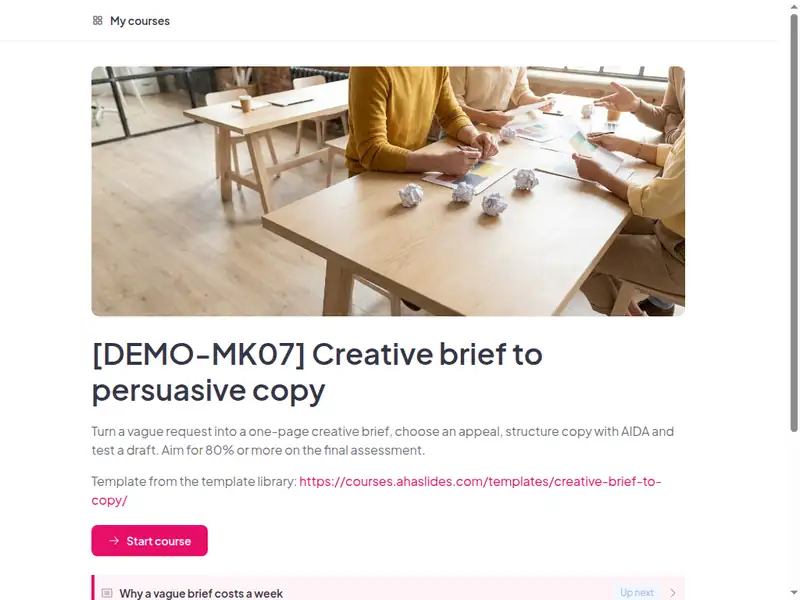
The From creative brief to persuasive copy: Message development for brand teams course as a learner first sees it

6 lessons, about 35 minutes

Minutes are an estimate.

  • Lesson 1: Why a vague brief costs a week · 7 min

    Before you begin · The brief that said "make it pop" · Why did it drift?

  • Lesson 2: The parts of a creative brief · 7 min

    The one-page brief · Spot the vague line · Check

  • Lesson 3: Choosing an appeal and structuring the copy · 7 min

    Rational or emotional · AIDA in four moves · Match the audience

  • Lesson 4: Grey areas: taglines, claims and taste · 6 min

    Distilling a tagline · Three branching scenarios · Check

  • Lesson 5: Testing messages and giving useful feedback · 4 min

    First reactions · Feedback that helps

  • Lesson 6: Brief, draft and critique: put it together + final assessment · 4 min

    Practice · Practice

Claim the template

Inside this course

Taken from the course itself.

By the end, learners can

  • Turn a vague request into a one-page creative brief with audience, single-minded proposition, proof and tone
  • Choose a rational, emotional or mixed appeal to suit the audience and the product
  • Structure a short piece of copy with AIDA (attention, interest, desire, action) or a simpler alternative
  • Write a tagline that is short, specific and supported by evidence the organisation holds
  • Gather first reactions to a draft, separate taste from signal and revise

Sample questions, with answers

  1. What is the best first fix for the Larkfield brief?

    • Name one audience and one proposition
    • Ask for more drafts
    • Change the agency
    • Add more adjectives

    Answer: Name one audience and one proposition. A brief that names one audience and one thing to remember gives every draft the same target.

    Lesson 1: Why a vague brief costs a week

  2. The email goes to finance managers. Which appeal should lead?

    • Emotional only
    • Rational, with one emotional touch
    • A joke
    • A mood image

    Answer: Rational, with one emotional touch. Pair evidence with a human touch, and give one action.

    Lesson 3: Choosing an appeal and structuring the copy

  3. What is the most useful question to ask when testing a first reaction?

    • "Do you like it?"
    • "Would you buy it?"
    • "What was this saying, and who is it for?"
    • "Can you make it shorter?"

    Answer: "What was this saying, and who is it for?". Taste is not signal. What people took away is.

    Lesson 5: Testing messages and giving useful feedback

A scenario from "Choosing an appeal and structuring the copy"

A payroll software email to finance managers.

Best response: Lead with a rational appeal about time saved at month end, one emotional touch about calm, one action.

Weaker responses: An all-feelings story; A list of fifteen features; No next step.

Common questions

Yes. Claiming the template and editing it are free.

Yes. The course is self-paced and online, and the live deck lets you add a live session in the room or online.

At onboarding for new copywriters or brand managers, before a campaign cycle starts, and when an agency relationship begins.

Copywriters, creative leads, and brand and agency teams.

Record completion in your own LMS or record system, so you can show who finished the course and when.

Your own details, each highlighted inside the course:
  • Help contact
  • Policy link
  • Escalation route
  • LMS or record system
  • Next course link
  • Course URL
  • Live session URL
  • Brief template link
Then edit anything else you like: wording, scenarios, your logo.
Visit the help centre (opens in a new tab)