Skip to content
Claim this template

Free course template · Global

Planning, producing and measuring social media content that builds community and delivers results

A ready-made course, live deck and two surveys for social media managers. 40 minutes, 6 lessons. Last reviewed 21 October 2026; not legal advice.

Claim the templatePreview the courseDownload SCORM for your LMS

Free. No credit card. Edit everything.

Play a game from the course

Planning, producing and measuring social media content that builds community and delivers results

Three questions from this course. Pick an answer, then see why.

Play the game

Game not loading? Open it in a new tab (opens in a new tab)

Three pieces that work together

Learners sign in, so every finish and score is recorded. 11 fields to fill in with your details.
Claim the template
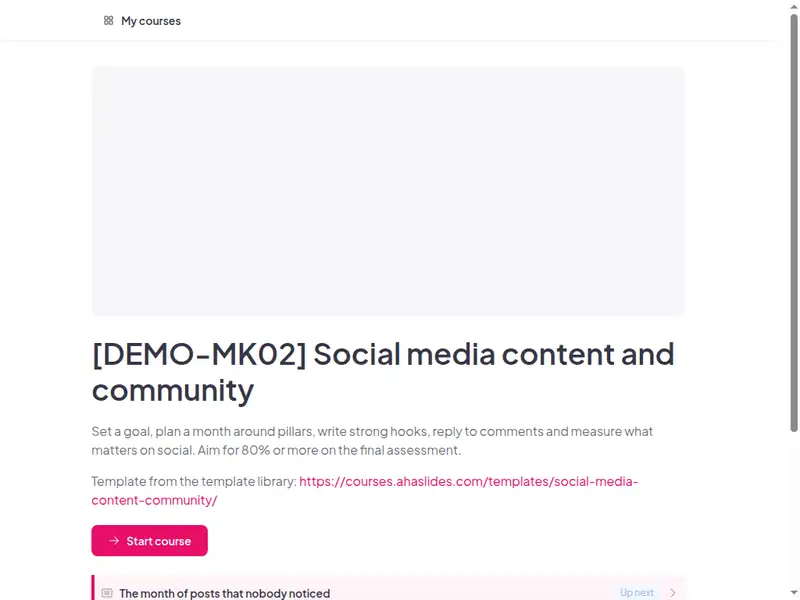
The Planning, producing and measuring social media content that builds community and delivers results course as a learner first sees it

6 lessons, about 40 minutes

Minutes are an estimate.

  • Lesson 1: The month of posts that nobody noticed · 8 min

    Before you begin · Thirty posts, no pattern · Activity is not a plan

  • Lesson 2: Goals, platforms and audiences in brief · 8 min

    Goal, audience, platform · Key terms · Check

  • Lesson 3: Planning and producing: a content process · 8 min

    From brief to post · Pick the hook · Check

  • Lesson 4: Community and grey areas · 7 min

    The sharp comment · Trend or trap? · Sort it

  • Lesson 5: Measure and apply · 7 min

    Pick the metric · Followers stalled · Report it

  • Lesson 6: Final assessment and completion · 2 min

    Practice

Claim the template

Inside this course

Taken from the course itself.

By the end, learners can

  • Set a social goal that links to a business aim and match it to a platform and audience
  • Build a month plan around three to five content pillars and a realistic posting rhythm
  • Write a strong opening hook and caption for a given audience and format
  • Reply to comments, including public criticism, in the organisation's tone and escalate when needed
  • Choose a metric that fits the goal and describe what to do when it stalls

Sample questions, with answers

  1. What was missing first in Noor's month?

    • A goal linked to a business aim
    • More hashtags
    • A better camera
    • A daily posting time

    Answer: A goal linked to a business aim. Without a goal you cannot choose a pillar, a format or a metric.

    Lesson 1: The month of posts that nobody noticed

  2. Which metric best matches a goal of sending people to a booking page?

    • Follower growth
    • Number of posts
    • Link clicks and completed bookings from tracked links
    • Likes per post

    Answer: Link clicks and completed bookings from tracked links. The metric must match the goal. Clicks and bookings show whether people reached the page and acted.

    Lesson 5: Measure and apply

  3. What should come first when planning a month of social content?

    • A goal linked to a business aim
    • The posting time
    • The number of hashtags
    • The newest filter

    Answer: A goal linked to a business aim. Everything else follows from the goal.

    Lesson 6: Final assessment and completion

A scenario from "Community and grey areas"

A customer posts a public comment saying a delivery was late and the team ignored them.

Best response: Reply quickly and politely, say sorry for the experience, move details to a private channel your help contact.

Weaker responses: Delete the comment; Argue about the dates; Reply with a joke.

Common questions

Yes. Claiming the template and editing it are free.

Yes. The course is self-paced and online, and the live deck lets you add a live session in the room or online.

At onboarding for social and content roles, before a new quarterly content plan, and when a team changes platform focus.

Social media managers, community managers, junior content creators and marketing coordinators; run by L&D with brand, marketing and communications teams.

Record completion in your own LMS or record system, so you can show who finished the course and when.

Your own details, each highlighted inside the course:
  • Policy link
  • Help contact
  • Escalation route
  • Who signs off a post before it goes live
  • Where monthly social results are shared
  • Next course link
  • LMS or record system
  • Course URL
  • Live session URL
Then edit anything else you like: wording, scenarios, your logo.
Visit the help centre (opens in a new tab)