
Lépés 1: Dolgozz a modulokon
Csatlakoztassa a AhaSlides MCP szervert Claude-nak vagy ChatGPT-nek, küldd el az egyes promptokat, és alakítsd át a sajátoddá a felépítetteket.
Paste your call notes into Claude or ChatGPT, and the AhaSlides MCP server builds an interactive pitch deck in your house style, right in your AhaSlides account. Learn the prompts, and each call takes far less time to prepare.
Körülbelül 2 óra 20 perc · 6 modul · Saját tempódban · Elvégzési igazolás
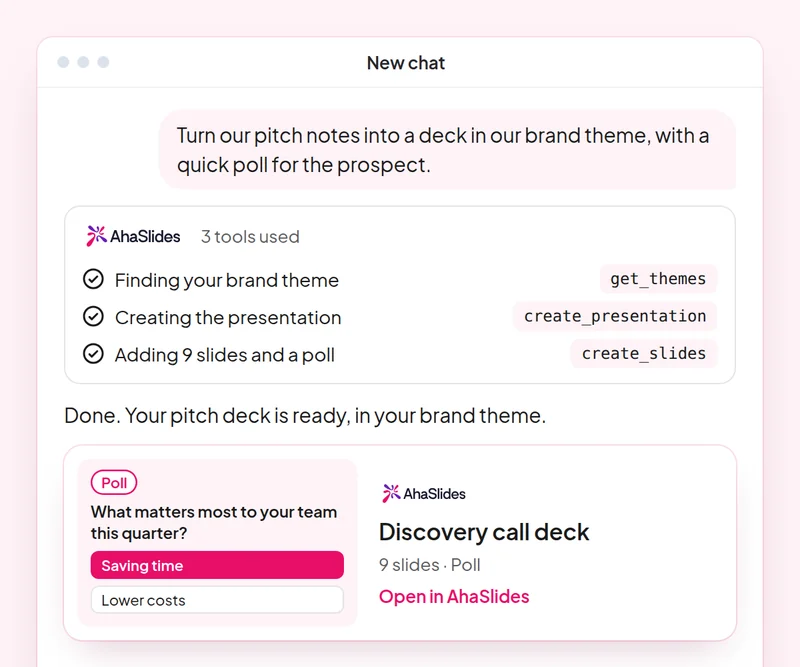
Cél: Build a discovery deck where the prospect answers, not only listens.
Skill: build-presentation
próbálja ki: “Build a 10-slide discovery presentation for a prospect in retail, with a poll on their biggest customer engagement challenge and speaker notes.”
Kapsz: An editable deck where the prospect answers on their own phone.
Cél: Check the team's product knowledge with a quiz built only from your own material.
Skill: make-quiz
próbálja ki: “Make an 8-question quiz for our sales team on our new pricing tiers, using only this sheet: [paste the sheet].”
Kapsz: A scored team quiz you can run in your next sales meeting.
Cél: Run live AhaSlides polls inside a PowerPoint pitch.
Skill: powerpoint-addin
próbálja ki: “Add a live poll and a word cloud to my pitch as a PowerPoint file, so I can run them in the meeting.”
Kapsz: A .pptx with live AhaSlides slides, which run through the AhaSlides bővítmény a PowerPointhoz.
Cél: Share decks with the right people and role, confirmed before any invite goes out.
Skill: share-and-collaborate
próbálja ki: “Share my retail discovery deck with my sales manager at [their email] as an editor.”
Kapsz: The invitation sent only after you confirm the person and their role.
Cél: Save a house style once so every new deck follows it.
Skill: personal-skills
próbálja ki: “Save our sales deck style as a skill: one idea per slide, a poll every third slide and a clear next step on the last slide.”
Kapsz: A saved skill AhaSlides applies to your next presentations, shown to you before it is saved.
Cél: Know what each person in the room cared about, so every follow-up is specific.
Skill: track-participants
próbálja ki: “From my [Acme pitch] session, list what each person answered in the polls and draft a follow-up email to each one on the topic they rated highest.”
Kapsz: A note per stakeholder on what they said, with a tailored follow-up email. Detailed per-person reports need a paid plan.
Prepare one real discovery call: build the deck in your house style, add a live poll for the prospect, share it with your manager for review, then quiz the team on what you learned. Keep the prompts that worked, so next time this work is a quick routine.
A 10-question quiz on pitch decks, PowerPoint polls, sharing and saving a house style. Pass it to earn your certificate of completion.
Minden kurzus egy AhaSlides Körülbelül 2 óra 20 perces e-learning kurzus, amelynek elvégzése után hitelesíthető tanúsítványt adunk ki.
Csatlakoztassa a AhaSlides MCP szervert Claude-nak vagy ChatGPT-nek, küldd el az egyes promptokat, és alakítsd át a sajátoddá a felépítetteket.
Gyűjtsd össze a hat készséget egy valós foglalkozáson a munkád alapján.
Take a 10-question quiz on pitch decks, PowerPoint polls, sharing and saving a house style.
Sikeresen teljesítsd a kvízt, hogy ellenőrizhető pontot szerezz AhaSlides elvégzési igazolás, egy megosztható ellenőrző linkkel.
Igen, a kurzus elvégzése ingyenes. A saját belátásod szerint végzed. AhaSlides fiók, és a modulok által használt egyes funkciók, például a részletes jelentések, a fizetős csomagok részét képezik. Lásd: árazás hogy mit tartalmaz az egyes tervek.
Claude (a claude.ai, Cowork és Claude Code oldalakon), ChatGPT és bármely olyan kliens, amely támogatja a távoli MCP szervereket. A Claude-ban adj hozzá egy egyéni csatlakozót a következővel: https://mcp.ahaslides.com/mcp a szerver URL-címeként. A ChatGPT-ben keresse meg a következőt: AhaSlides a Bővítmények lapon. Lásd a AhaSlides MCP-kiszolgáló oldal a teljes lépésekért.
Ők a 17 nyilvános AhaSlides készségek Claude-nak, ingyenes és nyílt forráskódú GitHubMindegyik elmondja Claude-nak, hogy melyik AhaSlides MCP eszközök a híváshoz és a célpontok AhaSlidessaját szerzői útmutatók.