
Good activities take time to find, so the 11 online classroom games below are for remote and hybrid classes: they run over a video call or in a mixed room, each takes five minutes of prep or less, and they work across subjects. Two bonus games follow at the end. Teaching everyone in the same room? Our משחקים שכיף לשחק בכיתה בנויים לכך.
A 2020 review of 93 studies of Kahoot!, a classroom quiz game, found it can improve learning performance, classroom dynamics and attitudes, and lower students' anxiety, though some studies found little or no effect [1].
משחקי כיתה תחרותיים אונליין
These games add points, teams or a leaderboard to revision.
Set 1: quick whole-class games (1 to 4)
1. חידון חי
A live quiz is a direct way to add game mechanics to a review session. Students answer simultaneously on their own devices, scores update in real time, and you can add a leaderboard after any question.
איך זה עובד: צור או השתמש בתבנית חידון חינמית ב תוכנת חידון חי. Present from your laptop while students join on their phones or tablets. Quizzes can be played individually, or in teams on the Pro, Enterprise and larger Edu plans, according to the team quiz guide (checked 18 November 2026).
Tip: The same review [1] found that scoring by speed can push some students to guess without thinking. For a revision round, turn off Faster answers get more points so a correct answer counts the same however quickly it comes.
AhaSlides is an all-in-one engagement platform for teams and classrooms. Its quiz slides range from multiple choice to short answer, correct order and sorting questions, and the AI assistant can draft a quiz from the class materials you upload. To skip the set-up, start from the online classroom game template.
2. בלדרדש
Balderdash turns vocabulary into a bluffing game. Students write fake-but-convincing definitions for obscure words, then vote on which answer they think is correct. Students earn points for creative definitions and for careful reading.
איך זה עובד: הציגו מילת יעד. כל תלמיד מגיש הגדרה. לאחר סגירת ההגשות, הציגו את כל התשובות באופן אנונימי ותנו לכיתה להצביע. העניקו נקודה אחת לכל תלמיד שהגדרתו המזויפת מקבלת הצבעה. העניקו שתי נקודות לכל תלמיד שמזהה נכון את ההגדרה האמיתית. ערכו מספר סיבובים, ולאחר מכן ספרו.
Tip: Show the answers without names, so students judge each definition on its own.
3. טפסו על העץ
A simple team game that needs no special tools. Draw two trees on the board, one per team, or on a whiteboard you share on screen in a remote class. Leave the base empty until each team has voted on their animal.
איך זה עובד: Before the game starts, let each team vote on which animal they want to represent them. Then ask questions to the whole class. When a student answers correctly, their team's animal moves up the tree. First team to reach the top wins.
4. סובבו את הגלגל
A spinner wheel is a flexible tool for any lesson. It works as a random selector, a point generator, or a category picker.
איך זה עובד עם AhaSlides: Use the spinner to pick a student to answer the next question, draw a random question from a list, select a category for students to name items from, or spin for a bonus point value that you then award.
You can use the spinner wheel with any age group. For ready-made wheels, use the תבנית משחקי גלגל ספינר בכיתה.
Set 2: sort, guess and bluff (5 to 7)
5. משחק המיון
Students receive a mixed set of items (words, concepts, images) and race to place each one in the correct category. Students test their classification knowledge, and everyone sees the answers come in live.
איך זה עובד: הגדירו קטגוריות כגון "עובדה מול דעה" או "בעלי חוליות מול חסרי חוליות". הוסיפו 10 עד 15 פריטים למיון. התלמידים מצטרפים במכשירים שלהם וגוררים פריטים לקטגוריות. התוצאות מופיעות בזמן אמת.
6. זום תמונה
Start with an extreme close-up of a familiar image. Students guess what it is before the full image is revealed.
איך זה עובד: Show a photo zoomed all the way into one detail. Give students time to type their guess, then award a point for each correct answer.
טיפ: השתמשו בתמונות הרלוונטיות לנושא. עבור שיעור ביולוגיה, הגדילו את מבנה התא. עבור היסטוריה, הגדילו את תצלום מפורסם.
7. שתי אמיתות, שקר אחד
פורמט קלאסי שהופך לכלי לסקירת שיעורים כשהוא מקושר לתוכן תוכנית הלימודים.
איך זה עובד: לאחר שיעור, התלמידים (בנפרד או בצוותים) כותבים שתי הצהרות נכונות מהתוכן והצהרה אחת שגויה שנשמעת סבירה. כל תלמיד מציג את שלוש ההצהרות שלו. חברי הכיתה מצביעים איזו מהן היא השקר. התלמיד שכתב את השקר מקבל נקודה על כל הצבעה שגויה. חברי הכיתה שזיהו את השקר מקבלים נקודה כל אחד.
הבחירה שלנו: Live quiz, because every student answers at once and you can see straight away which students need another go at the topic.
משחקים יצירתיים לכיתה אונליין
Not every student enjoys a competitive format. In these games, students score for creativity, collaboration and original thinking.
8. חסר טעם
Based on the British TV format, the goal in Pointless is a correct answer that no one else thinks of.
איך זה עובד: השתמשו בכלי ענן מילים. תנו לכיתה קטגוריה ובקשו מכל אחד לשלוח את התשובה הנכונה והמעורפלת ביותר שהם יכולים לחשוב עליה. המילים הפופולריות ביותר מופיעות כגדולות ביותר. מחקו ערכים שגויים, ולאחר מכן עברו מהמילה הנפוצה ביותר עד שנשארת אחת. התלמיד שתשובתו שרדה הכי הרבה זמן מנצח.
9. בנה סיפור
פעילות סיפור שיתופית המתפקדת גם כחימום יצירתי וגם כתרגול אוריינות.
איך זה עובד: התחילו סיפור במשפט אחד. העבירו אותו לתלמיד שמוסיף משפט אחד, ואז מעביר אותו הלאה. כל תוספת חייבת להתחבר באופן הגיוני לקודמתה. רשמו כל תרומה כדי שהכיתה תוכל לראות את הסיפור מתפתח. סיימו בקריאה כיתתית של הסיפור המלא.
Use it as a warm-up before an independent writing task.
10. מה היית עושה?
An open-ended scenario game for practising critical thinking and creative reasoning.
איך זה עובד: הציגו תרחיש שקשור לשיעור שלכם. שאלו את התלמידים מה הם היו עושים, ללא כללים לגבי הפורמט. השתמשו בכלי סיעור מוחות כדי לאסוף את כל התשובות בו זמנית, ולאחר מכן ערכו הצבעה כיתתית על התשובה היצירתית ביותר.
טיפ: לאתגר נוסף, בקשו מהתלמידים לענות מנקודת מבטה של דמות היסטורית או דמות אותה למדתם.
11. נחשו את הסדר
A sequencing game where students arrange a jumbled list of items (historical events, steps in a process, recipe instructions) into the correct order. It tests recall in a format that feels like a puzzle.
איך זה עובד עם AhaSlides: Create a "Correct Order" slide. Type items in the correct sequence and the platform shuffles them automatically. Students race to arrange the items on their devices. Only the right order scores, and faster correct answers earn more points.
Use it for history timelines, scientific processes and procedural writing.
הבחירה שלנו: Guess the order, because a jumbled timeline turns recall into a puzzle, and the reveal shows you which steps the class mixed up.
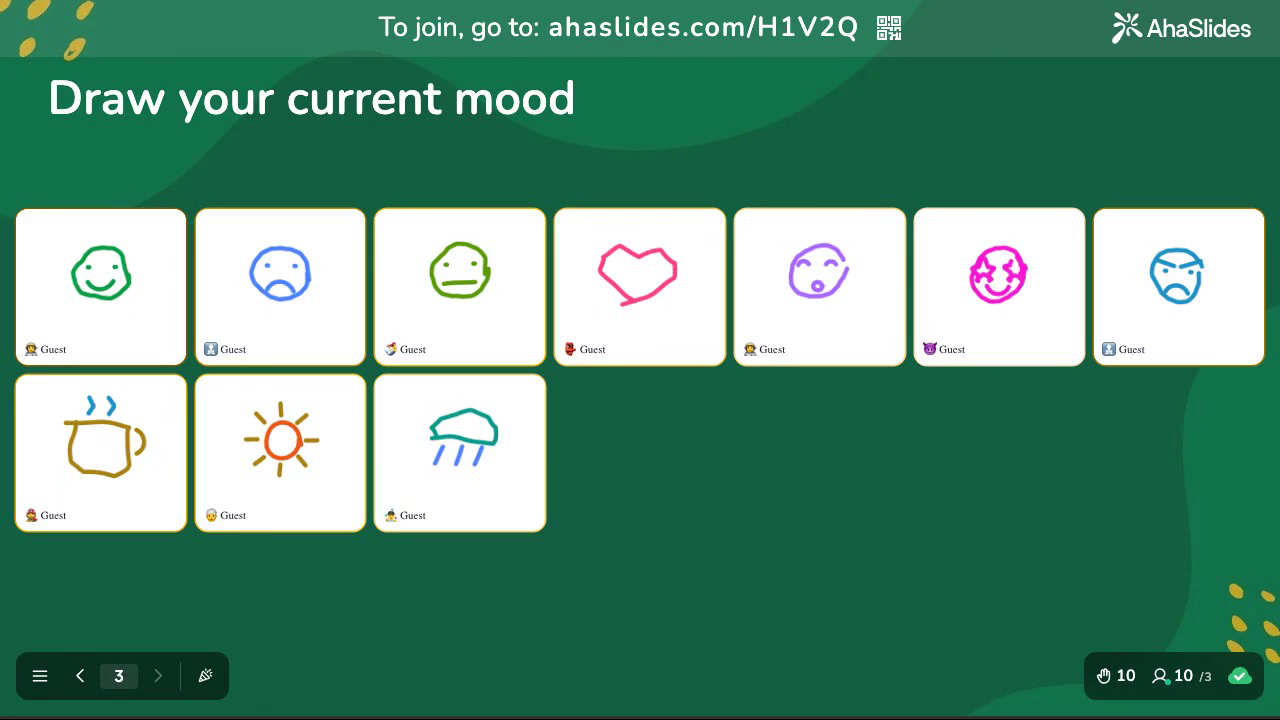
בונוס: ציירו את התשובה
Some answers are faster to draw than to write. Every student can contribute from their phone.
איך זה עובד עם AhaSlides: Add a Draw Answer slide and type your prompt as the question. Students join on their phones and each get a blank canvas with pen colours, a brush-size slider, an eraser, and undo. They sketch, send their drawing, and every drawing appears on your screen together. Each card shows the student's name if you collect it, or "Anonymous" if you do not.
It works as a comprehension check ("draw what the water cycle looks like"), a mood read ("draw how this unit is going so far"), or a straight warm-up ("draw your weekend in one picture"). There is no scoring and no leaderboard, so the pressure stays low.
Tip: Keep prompts to one idea and give students about a minute.
Bonus: Escape room
A class review that runs against the clock. Students work through picture rooms on their phones, answer a revision question for each clue and collect the pieces of a door code to get out.
איך זה עובד עם AhaSlides: Add an Escape Room slide, build up to six rooms (one per topic works well) and place clues in each room's picture, each with a multiple-choice or short-answer revision question. Set the door code and a time limit, then press Start. Students clear each room in turn, their names move between rooms on your screen, and the Escaped board lists everyone who gets out, fastest first.
Tip: This one needs a little set-up, so build it once and reuse it for each unit. Put the easiest clues first so every student gets an early win.
התחל בעבודה AhaSlides
Several of the games above, including the live quiz, spinner wheel, word cloud, sorting game, correct order activity and escape room, run directly on AhaSlides with no downloads required. Students join on their phones using a join code, and results appear live on your screen. The slide types behind them are Pick Answer, Spinner Wheel, Word Cloud, Categorise, Correct Order, Draw Answer and Escape Room. The free plan covers up to 50 live participants, unlimited presentations and 2 question types per presentation (AhaSlides תמחור, נבדק ב-18 בנובמבר 2026).
שאלות נפוצות
האם המשחקים האלה מתאימים לתלמידים מבוגרים יותר?
Yes, from secondary school to adult learners. Use harder content and categories for older students.
האם תלמידים צריכים מכשירים משלהם?
Only for the digital games. The live quiz, word cloud, sorting game, correct order, Draw the answer and escape room need a phone or tablet per student, or per pair. The non-tech games (Balderdash, Climb the tree, Build a story, Two truths, one lie) need no devices.
כמה זמן לוקחים המשחקים האלה?
Most take 5 to 15 minutes. The live quiz takes as long as your question count, the escape room runs to the time limit you set, and Build a story and What would you do? can run longer if you extend the discussion.
האם ניתן להשתמש במשחקים אלה לצורך הערכה?
Yes. The live quiz and sorting game both generate data you can review after the session. On plans that include export, you can download the results to Excel to see which questions students struggled with most, which makes these games useful for formative assessment as well as engagement.
מקורות
[1] Wang, A. I., & Tahir, R. (2020). The effect of using Kahoot! for learning: A literature review. מחשבים וחינוך, 149, 103818. https://doi.org/10.1016/j.compedu.2020.103818