



A maioria dos problemas com pesquisas ocorre antes mesmo de alguém abrir o link. O objetivo é vago, então as perguntas se espalham por muitos caminhos. As perguntas são mal formuladas, tornando os dados ambíguos. Não há um plano de análise, então os resultados ficam em um painel que ninguém revisita. Este guia abrange todo o processo: definir o que você deseja aprender, escolher o tipo certo de pesquisa, elaborar boas perguntas, distribuir a pesquisa de forma eficaz, melhorar as taxas de resposta e transformar dados em decisões. Cada seção contém links para um guia mais aprofundado sobre o respectivo tópico.
O que é uma pesquisa online?
Uma pesquisa online é um conjunto estruturado de perguntas, apresentado digitalmente e respondido pelos participantes em seus próprios dispositivos. Pode ser distribuída como um link independente, incorporada em um slide de apresentação ou compartilhada por meio de um código QR. As respostas são coletadas e exibidas em um painel, geralmente em tempo real.
Diferentemente das votações ao vivo, em que os participantes respondem a uma única pergunta durante uma sessão, uma pesquisa coleta feedback estruturado por meio de várias perguntas. Ela pode ser realizada de forma síncrona (durante uma reunião, treinamento ou evento) ou assíncrona (os participantes a respondem quando quiserem, por meio de um link).
O mercado global de software para pesquisas online foi avaliado em US$ 3.6 bilhões em 2023, com mais de 78% das empresas utilizando ferramentas de pesquisa para obter feedback de funcionários e realizar pesquisas de mercado. As ferramentas acompanharam o fluxo de trabalho. O desafio é utilizá-las bem.
Tipos de pesquisas online e quando usar cada uma delas.
O design de questionários varia significativamente dependendo da finalidade. Usar o mesmo modelo para todos os casos de uso é um dos erros mais comuns. Veja a seguir quando cada tipo é a escolha certa.
Pesquisas de satisfação de funcionários
Essas pesquisas medem como os funcionários se sentem em relação ao seu trabalho, equipe, gerente, remuneração e condições de trabalho. Elas combinam escalas de avaliação com algumas perguntas abertas de acompanhamento e funcionam melhor quando aplicadas trimestralmente ou anualmente para acompanhar as tendências ao longo do tempo. Veja: Pesquisas de satisfação de funcionários: tipos, perguntas e modelos gratuitos.
Pesquisas de engajamento de funcionários
As pesquisas de engajamento vão além da satisfação, medindo o esforço discricionário e a conexão com o propósito organizacional. Elas exigem um planejamento cuidadoso das perguntas para evitar linguagem tendenciosa e necessitam de mecanismos robustos de confidencialidade para obter respostas honestas. Veja: Como criar a melhor pesquisa de engajamento de funcionários (60 exemplos de perguntas).
Pesquisas pós-evento e de treinamento
O tipo de pesquisa mais comum em contextos de treinamento e desenvolvimento e eventos. Realizada durante ou imediatamente após uma sessão para obter as maiores taxas de conclusão e a recordação mais precisa. As pesquisas pós-evento focam na experiência e na logística; as avaliações de treinamento focam na transferência e aplicação do aprendizado. Veja: Mais de 30 perguntas de pesquisa pós-evento que geram feedback acionável..
Pesquisas de Net Promoter Score (NPS)
O NPS mede a lealdade e a recomendação usando uma única pergunta com pontuação ("Qual a probabilidade de você nos recomendar?") mais perguntas de acompanhamento opcionais. Ele produz uma métrica única e comparável para acompanhar ao longo do tempo, tornando-o útil para o rastreamento de clientes e participantes em diferentes grupos. Veja: Mais de 20 perguntas excelentes para pesquisas NPS com exemplos..
questionários de satisfação no trabalho
Focado especificamente na satisfação com o papel, a carga de trabalho e as condições de trabalho, frequentemente utilizado em avaliações de RH ou na investigação do risco de rotatividade. Mais curto e direcionado do que uma pesquisa de engajamento completa. Veja: Questionário de satisfação no trabalho: 46 perguntas de exemplo para RH e T&D.
pesquisas de avaliação de liderança
Utilizada para coletar feedback 360 graus sobre gerentes e líderes seniores. Requer um design que garanta anonimato robusto, perguntas cuidadosamente elaboradas para evitar linguagem tendenciosa e um plano de como os resultados serão comunicados ao entrevistado. Veja: 26 perguntas para uma avaliação eficaz da liderança..
Passo 1: Defina seu objetivo antes de escrever qualquer pergunta.
O erro mais comum em pesquisas é abrir a ferramenta antes de definir um objetivo. Antes de elaborar qualquer pergunta, responda a estas três questões:
Uma avaliação de treinamento que visa "entender se os participantes conseguem aplicar o conteúdo no trabalho" gera perguntas muito diferentes de uma que visa "verificar se as pessoas gostaram da sessão". Ambos são objetivos legítimos. Confundi-los resulta em uma pesquisa que não responde a nenhum dos dois de forma clara.
Etapa 2: Escolha os tipos de perguntas corretos
Os tipos de perguntas em pesquisas não são intercambiáveis. Cada um coleta um tipo diferente de dado, e escolher o tipo errado para o seu objetivo é um problema estrutural que não pode ser corrigido na análise.
Múltipla escolha É para perguntas fechadas com um conjunto de respostas definido: departamento, função, sessão assistida, sim ou não. Produz contagens precisas que facilitam a filtragem.
Escalas de classificação São o formato adequado para dados de atitude e satisfação. Uma escala de 5 pontos funciona na maioria dos contextos profissionais. Use uma escala de 7 pontos quando precisar detectar diferenças mais sutis entre grupos ou acompanhar pequenas mudanças ao longo do tempo.
Itens da escala Likert São um formato específico de avaliação que utiliza rótulos de concordância (Concordo totalmente a Discordo totalmente). É o formato mais comum em pesquisas com funcionários. Para orientações sobre a seleção da escala e exemplos prontos para uso, consulte: Mais de 40 exemplos de escala Likert para pesquisas, treinamentos e feedback de RH..
Questões em aberto Gere respostas em texto livre. Útil para perguntas de acompanhamento ("O que você mudaria?") quando se deseja um contexto qualitativo em vez de pontuações. Limite-se a uma ou duas por pesquisa. Perguntas abertas aumentam significativamente o tempo de preenchimento e as taxas de abandono.
Questões matriciais Agrupe itens relacionados em uma única tabela, reduzindo o espaço na tela e permitindo a comparação direta entre declarações semelhantes.
Para uma descrição completa de cada tipo de pergunta, quando cada uma funciona e o que cada uma produz, consulte: Tipos de perguntas em pesquisas: um guia prático para obter melhores resultados..
Etapa 3: Elabore perguntas que produzam dados confiáveis.
A formulação das perguntas é a fonte mais comum de dados não confiáveis em pesquisas. Algumas regras básicas previnem a maioria dos problemas.
Uma ideia por pergunta. A pergunta "O facilitador era experiente e acessível?" é duas perguntas em uma. Os respondentes que consideraram o facilitador experiente, mas não acessível, não têm uma resposta válida. Separe-os.
Evite linguagem tendenciosa. "Em que medida o treinamento melhorou suas habilidades?" pressupõe melhoria. "Como você avaliaria o impacto deste treinamento em suas habilidades?" não.
Escreva em um nível de leitura que seja acessível ao público mais amplo possível. Evite jargões, siglas e duplas negativas. "A sessão atendeu às suas expectativas?" é um tipo de pergunta real que aparece em pesquisas corporativas e produz dados que ninguém consegue interpretar.
Mantenha curto. Pesquisas sobre fadiga em pesquisas mostram consistentemente que as taxas de conclusão caem após cerca de 10 minutos de tempo de resposta. Cronometre sua própria pesquisa antes de distribuí-la.
Faça um teste piloto antes de publicar. Envie o questionário primeiro para dois colegas. Eles identificarão ambiguidades na redação e falhas de lógica que você não perceberá depois de analisar o rascunho por uma hora.
Para um banco de perguntas prontas para uso em contextos de RH, treinamento e feedback do cliente, consulte: Mais de 65 exemplos eficazes de perguntas para pesquisas de RH, treinamento e feedback de clientes.Para perguntas elaboradas para aumentar a participação e obter respostas honestas em pesquisas de equipe, consulte: Mais de 100 perguntas divertidas para pesquisas sobre engajamento no ambiente de trabalho.
Passo 4: Configure sua pesquisa no AhaSlides
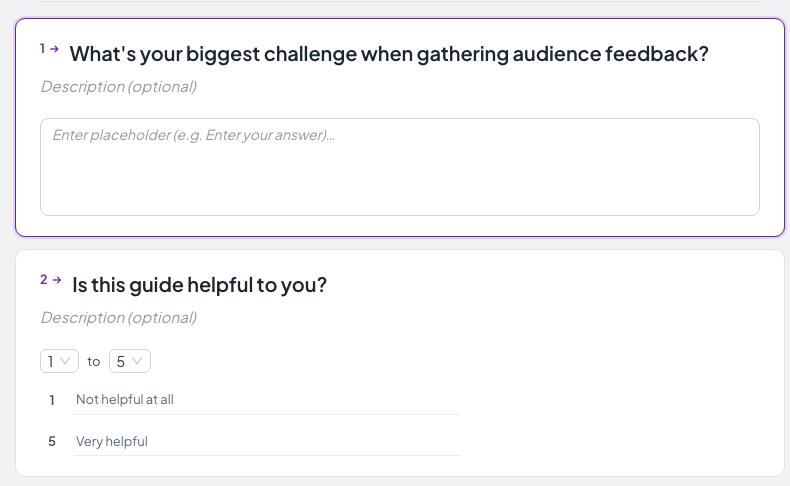
Vou ao Painel AhaSlides Crie uma conta gratuita. No painel de controle, selecione "Pesquisa". O AhaSlides Survey oferece suporte a perguntas de múltipla escolha, escalas de classificação, perguntas abertas e perguntas matriciais em um único formulário com várias perguntas, que pode ser compartilhado por link ou código QR ou incorporado em um slide de apresentação.
O Criador de pesquisas gratuito AhaSlides Lida com casos de uso ao vivo e assíncronos a partir da mesma interface, para que as equipes de T&D possam executar uma avaliação de treinamento incorporada em um slide da sessão e, em seguida, distribuir a mesma pesquisa como um link para os participantes que assistiram remotamente, sem precisar reconstruir nada.
Etapa 5: Distribua o questionário
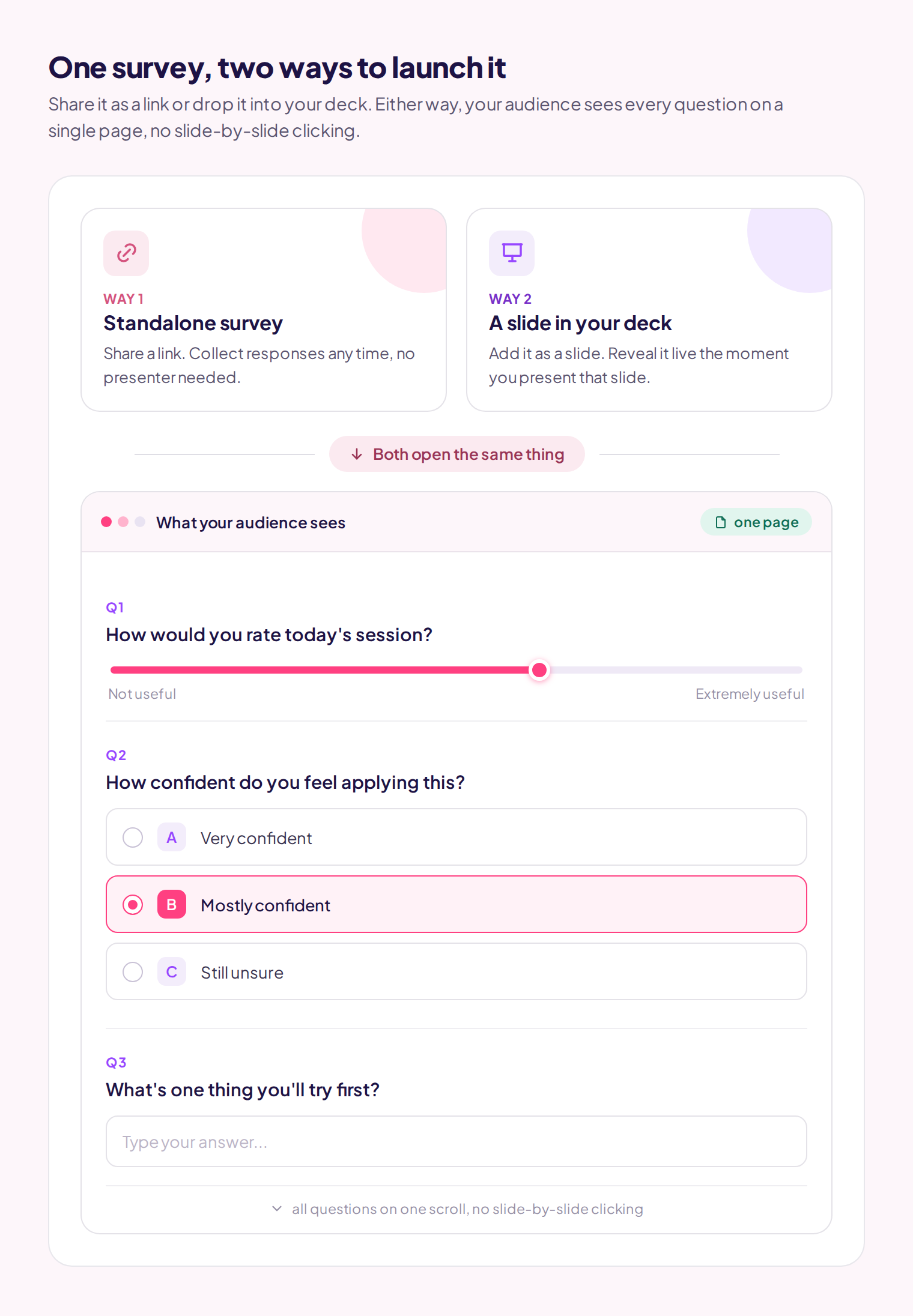
O AhaSlides gera um link compartilhável e um código de acesso. Dois modos de distribuição atendem a contextos diferentes:
Ao vivo (em sessão): Adicione um slide de pesquisa à sua apresentação do AhaSlides. Ao avançar para esse slide durante a sessão, os participantes verão a pesquisa completa em seus próprios dispositivos. Isso gera as maiores taxas de resposta, pois os participantes já estão engajados e contextualizados, sem a necessidade de qualquer ação posterior.
Assíncrono (por link): Compartilhe o link por e-mail, Slack ou sua plataforma de aprendizagem online (LMS). Os participantes o preenchem no seu próprio tempo. As taxas de resposta são menores, mas esse modo é necessário para públicos que você não consegue reunir simultaneamente, para pesquisas pós-evento enviadas após a saída dos participantes e para avaliações rápidas que precisam de um período de coleta mais longo.
No AhaSlides, existe um recurso para Enviar e-mail solicitando participação na pesquisa. Você cola os endereços de e-mail dos respondentes selecionados e o sistema enviará um e-mail de acompanhamento solicitando que eles preencham sua pesquisa.
Como melhorar as taxas de resposta em pesquisas
As pesquisas online têm uma taxa média de conclusão de 33% a 44%, em comparação com 56% a 75% para pesquisas equivalentes em papel. Para pesquisas internas, onde você controla o contexto, as taxas costumam ser mais altas, mas ainda exigem gerenciamento ativo.
O fator mais importante é o momento certo. Envie a pesquisa quando a experiência ainda estiver fresca na memória e os participantes ainda estiverem engajados. Uma avaliação de treinamento realizada nos 10 minutos finais da sessão apresenta resultados consistentemente melhores do que uma enviada por e-mail 48 horas depois.
Para pesquisas assíncronas, um único lembrete enviado 48 horas antes do prazo final melhora as taxas de conclusão em 10 a 20 pontos percentuais. Mais de um lembrete gera ressentimento, que pode se estender a pesquisas futuras.
Antes de distribuir o questionário, escreva uma introdução de uma ou duas frases: o objetivo da pesquisa, quanto tempo leva para respondê-la e se as respostas são anônimas. Os participantes que entendem para que os dados serão usados fornecem respostas mais ponderadas.
Para uma análise completa das táticas de taxa de resposta com parâmetros de referência reais, consulte: 6 maneiras de melhorar as taxas de resposta em pesquisas (com parâmetros reais).
Pesquisas anônimas versus pesquisas com nome
Para questões sobre eficácia da gestão, cultura organizacional, remuneração ou qualquer outro tema em que os respondentes possam se preocupar com a identificação, a coleta anônima produz respostas significativamente mais honestas. Um estudo de 2020 constatou que os funcionários tinham o dobro da probabilidade de relatar problemas no ambiente de trabalho quando as respostas eram anônimas em comparação com as respostas atribuídas.
Para avaliações de treinamento em que é necessário vincular os resultados a registros de conclusão individuais, ou quando o acompanhamento com participantes específicos faz parte do plano, as respostas nomeadas são apropriadas.
A regra mais importante: se você disser aos participantes que uma pesquisa é anônima, ela precisa ser tecnicamente anônima. A quebra de confiança nesse ponto afetará todas as pesquisas que você realizar posteriormente. Veja o guia completo: Pesquisa anônima: um guia para iniciantes sobre feedback honesto no ambiente de trabalho.
Etapa 6: Analisar e apresentar os resultados
O AhaSlides exibe os resultados em tempo real como um painel visual. Em sessões ao vivo, você pode compartilhar a tela e apresentar as descobertas aos participantes enquanto a experiência ainda está fresca na memória, o que tende a gerar discussões mais ricas do que enviar um relatório em PDF duas semanas depois.
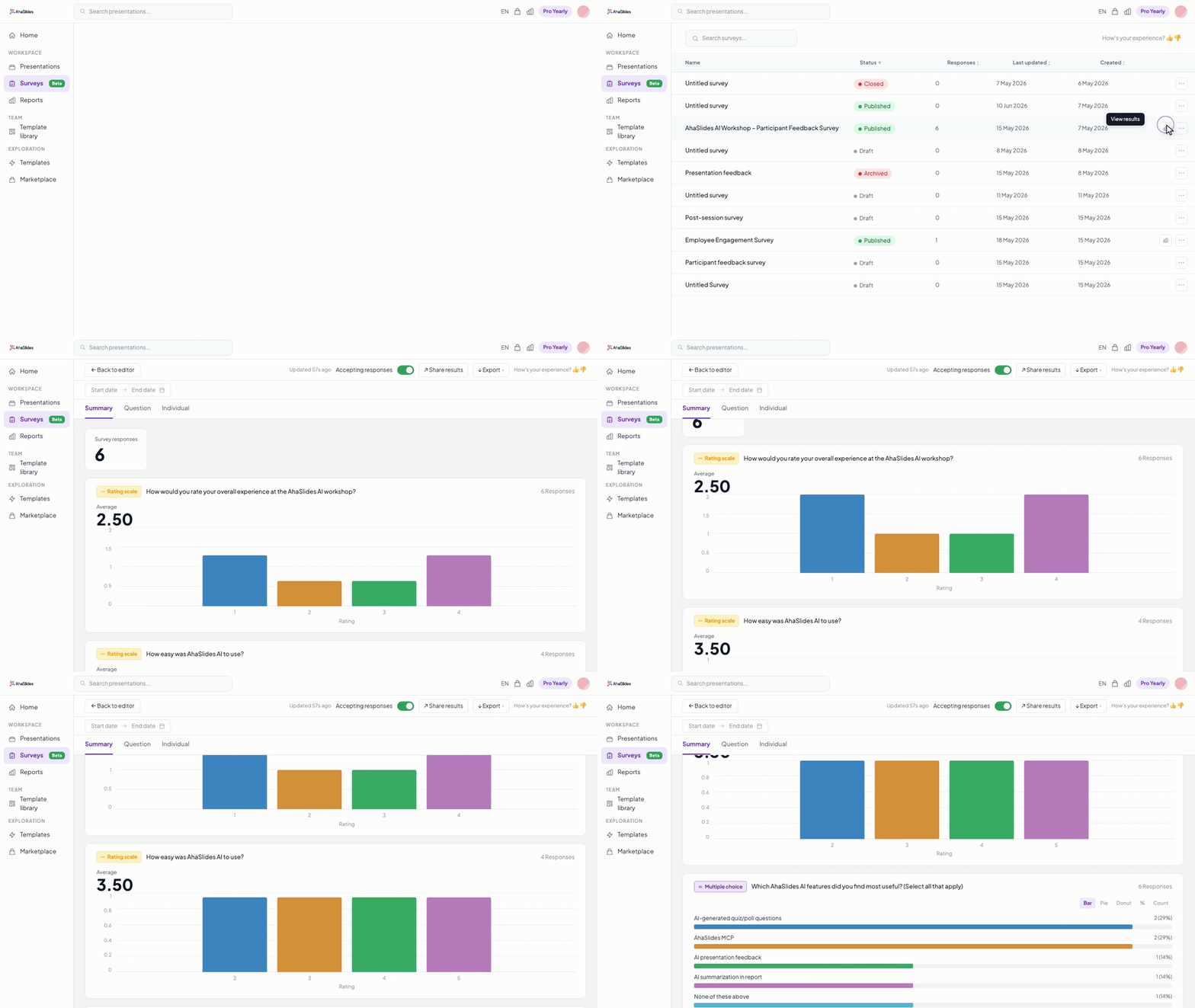
Para uma análise mais aprofundada, exporte as respostas para o Excel. A partir daí, você pode cruzar dados por departamento ou função, calcular as pontuações médias entre as coortes ou usar uma ferramenta de IA para analisar os dados textuais e identificar temas em grandes conjuntos de respostas.
Planeje a etapa de análise antes de realizar a pesquisa, não depois. Antes de distribuí-la, anote duas ou três perguntas específicas que você deseja que os dados respondam. Assim que os resultados chegarem, relacione as descobertas diretamente a essas perguntas. Isso mantém a análise focada e facilita a comunicação dos resultados em linguagem simples, em vez de enviar um arquivo bruto que a maioria das pessoas não abrirá.
Para obter orientações sobre como estruturar resultados em apresentações que realmente incentivem a ação, consulte: Apresentação dos resultados da pesquisa: como compartilhar descobertas que realmente sejam utilizadas..
Modelos de pesquisa para começar
Se você estiver criando uma pesquisa do zero, começar com um modelo elimina o problema da página em branco e oferece uma estrutura para editar em vez de inventar. Os modelos predefinidos abrangem os casos de uso mais comuns: feedback pós-evento, avaliações de treinamento, pesquisas de clima organizacional e satisfação do cliente.
Os modelos também servem como uma verificação de calibração: se o seu rascunho parecer significativamente diferente de um modelo bem projetado para o mesmo caso de uso, isso geralmente indica que algo está estruturalmente errado. Veja: Modelos e exemplos de questionários: 4 opções gratuitas e personalizáveis.
Escolher a ferramenta de pesquisa certa
Para equipes que realizam treinamentos e reuniões presenciais, uma ferramenta que integra pesquisas diretamente às apresentações, permitindo que os participantes respondam na hora em vez de procurarem um link posteriormente, geralmente apresenta melhor desempenho do que plataformas de pesquisa independentes em termos de taxas de resposta e integridade dos dados.
Para grandes públicos externos, pesquisas de clientes ou questionários que exigem lógica de ramificação avançada, plataformas dedicadas como SurveyMonkey, Typeform ou Google Forms oferecem mais flexibilidade. A escolha certa depende do seu principal caso de uso, do fluxo de trabalho da equipe e se a mediação ao vivo faz parte do processo.
Para uma comparação completa das melhores opções gratuitas com uma análise honesta das vantagens e desvantagens, consulte: As 10 melhores ferramentas gratuitas de pesquisa para empresas: análise e comparação detalhadas..
Dicas práticas para obter melhores dados
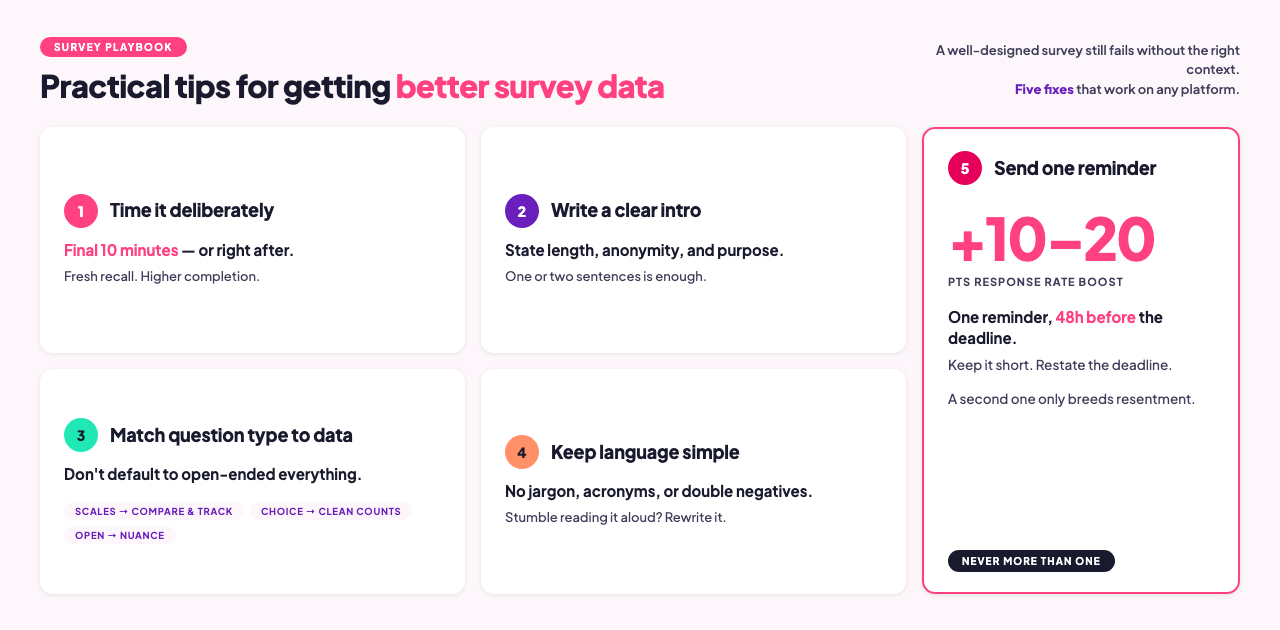
Associe o tipo de pergunta aos dados que você precisa. Escalas de classificação são boas para comparar diferentes grupos e acompanhar mudanças ao longo do tempo. Perguntas abertas revelam contexto e nuances. Questões de múltipla escolha fornecem contagens precisas. Um erro comum é usar perguntas abertas para tudo por acreditarem que são suficientes, quando uma escala de classificação produz dados mais comparáveis e úteis para toda a coorte.
Mantenha a linguagem simples. Elabore perguntas em um nível de leitura que abranja a maior variedade possível de respondentes. Leia cada pergunta em voz alta antes de publicar. Se você hesitar ou se atrapalhar, reescreva-a.
Feche o ciclo. Se as pessoas respondem a uma pesquisa e nunca recebem notícias sobre os resultados, as taxas de resposta nas pesquisas seguintes caem. Mesmo um resumo de um parágrafo, como "aqui está o que ouvimos, aqui está o que vamos mudar", mantém a confiança que torna as pesquisas futuras viáveis.
Não trate todos os tipos de pesquisa como idênticos. Os tipos de perguntas, a extensão, o momento de aplicação e os requisitos de anonimato diferem significativamente entre uma avaliação pós-treinamento, uma pesquisa de engajamento de funcionários e uma medição do NPS. Cada uma possui sua própria lógica de design.
Erros comuns a corrigir antes do lançamento
Pulando o episódio piloto. Antes de distribuir o questionário para todos, envie-o para um ou dois colegas. Eles identificarão ambiguidades na redação, links quebrados e perguntas que geram dados inutilizáveis, algo que você não perceberá ao analisar o rascunho.
Muitas perguntas sem resposta definitiva. Uma ou duas perguntas abertas são úteis. Seis são excessivas. A maioria dos respondentes abandonará uma pesquisa que se assemelha a uma prova escrita.
Sem plano de análise. Se não houver um plano para o que fazer quando os resultados chegarem, os dados ficarão sem uso. Inclua a etapa de análise no seu fluxo de trabalho antes de executar a pesquisa.
Ferramenta inadequada para este caso de uso. Uma ferramenta otimizada para pesquisa de clientes não é a mesma que uma otimizada para avaliações de treinamento ao vivo. Veja a comparação de ferramentas para mais detalhes: As 10 melhores ferramentas gratuitas de pesquisa para empresas.
Perguntas frequentes
Quantas perguntas deve conter uma pesquisa online?
Para sessões ao vivo em que os participantes respondem em tempo real, o ideal é que haja de 5 a 8 perguntas. Isso geralmente leva de 3 a 5 minutos e mantém a taxa de conclusão próxima a 100%, já que os participantes já estão engajados no contexto. Para pesquisas assíncronas enviadas por link, de 10 a 12 perguntas é um limite razoável. Cronometre sua pesquisa antes de distribuí-la; as taxas de conclusão caem após cerca de 10 minutos de tempo de resposta.
As pesquisas devem ser anônimas?
Depende do tema. Questões sobre eficácia da gestão, cultura e remuneração se beneficiam do anonimato e produzem dados mais honestos. Avaliações de treinamento, que exigem registros individuais de conclusão, não. A chave é a transparência: se você disser aos participantes que uma pesquisa é anônima, ela precisa ser tecnicamente anônima. Veja o guia completo: Pesquisa anônima: um guia para iniciantes sobre feedback honesto no ambiente de trabalho.
O que devo fazer com as respostas em texto aberto?
Comece lendo uma amostra de 15 a 20 respostas para entender a variedade de opiniões. Em seguida, agrupe as respostas em temas manualmente ou use uma ferramenta de IA para identificar ideias recorrentes. Para conjuntos de dados com menos de 50 respostas, a codificação manual geralmente é mais rápida e precisa. Para conjuntos maiores, ferramentas como ChatGPT ou Claude podem resumir temas a partir de textos colados em segundos. De qualquer forma, ancore as descobertas de texto aberto em um contexto quantitativo: "40% das respostas abertas mencionaram ritmo" é mais útil do que uma lista de citações.
Qual é a melhor ferramenta de pesquisa para equipes de RH e de Treinamento e Desenvolvimento?
Para equipes que realizam treinamentos presenciais e precisam incorporar pesquisas às apresentações, o AhaSlides combina a coleta de dados da pesquisa com a própria apresentação, permitindo que os participantes respondam na hora, em vez de por e-mail. Para pesquisas assíncronas independentes ou pesquisas de engajamento em toda a organização, plataformas de RH dedicadas oferecem análises mais aprofundadas. Veja: As 10 melhores ferramentas gratuitas de pesquisa para empresas.
Qual a diferença entre uma pesquisa e uma enquete?
Uma enquete é uma pergunta única, geralmente usada para obter feedback rápido da plateia durante uma reunião ou apresentação ao vivo. Uma pesquisa é um instrumento estruturado com várias perguntas, projetado para coletar dados sistemáticos sobre um tópico. Enquetes são mais adequadas para engajamento em tempo real e tomada de decisões no local. Pesquisas são mais adequadas para pesquisa, avaliação e coleta de feedback, situações em que você precisa de dados para agir posteriormente.
Posso usar a mesma pesquisa para públicos ao vivo e assíncronos?
Sim. No AhaSlides, uma pesquisa pode ser incorporada em um slide de apresentação para sessões ao vivo e distribuída como um link independente para participantes remotos ou que não puderam comparecer. Ambos os conjuntos de respostas são integrados ao mesmo painel, portanto, os resultados são combinados automaticamente, sem necessidade de mesclagem manual.
Realize sua primeira pesquisa com o AhaSlides
O AhaSlides funciona tanto para pesquisas presenciais com mediação, incorporadas em apresentações, quanto para pesquisas assíncronas distribuídas por link. Escalas de avaliação, múltipla escolha, matrizes e perguntas abertas estão disponíveis a partir de uma conta gratuita. Os resultados aparecem em tempo real à medida que os participantes respondem, e você pode exportá-los para o Excel para uma análise mais aprofundada.
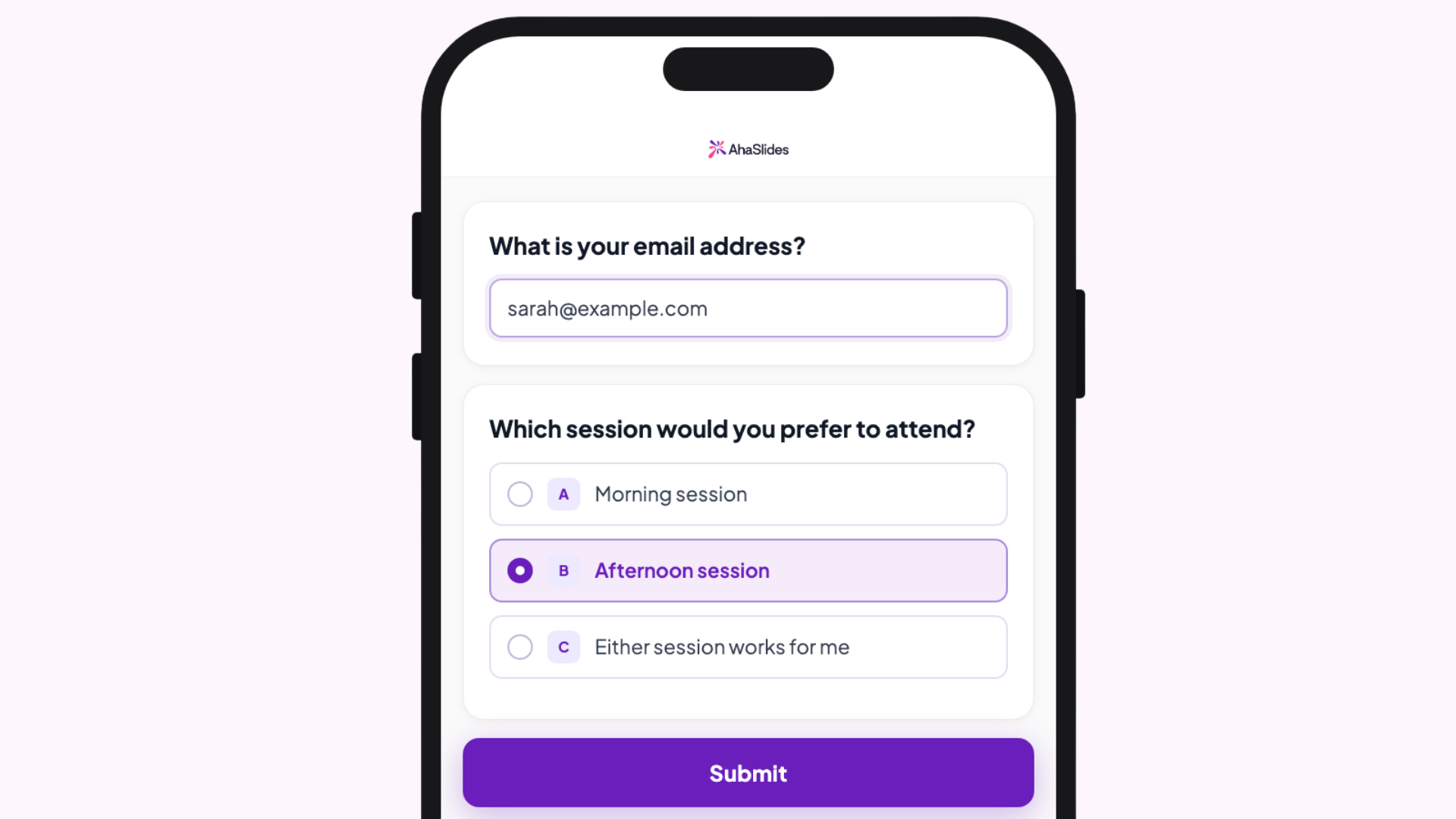
Experimente o criador de pesquisas AhaSlides gratuitamente. e realize sua primeira pesquisa em menos de cinco minutos.
Fontes
[1] Nulty, DD (2008). "A adequação das taxas de resposta a pesquisas online e em papel". Avaliação e Mensuração no Ensino Superior. Universidade do Alasca Fairbanks PDF — uma meta-análise mostra que as pesquisas online têm uma média de 33% contra 56% das pesquisas equivalentes em papel.
[2] Pesquisa Grand View. Relatório sobre o tamanho e a participação de mercado de softwares para pesquisas online, 2030. grandviewresearch. com — dados sobre o tamanho do mercado e a adoção pelas empresas.