
Bước 1: Work through the modules
Kết nối AhaSlides MCP server to Claude or ChatGPT, send each prompt and make what it builds your own.
Paste your call notes into Claude or ChatGPT, and the AhaSlides MCP server builds an interactive pitch deck in your house style, right in your AhaSlides account. Learn the prompts, and each call takes far less time to prepare.
About 2 hours 20 minutes · 6 modules · At your own pace · Certificate of completion
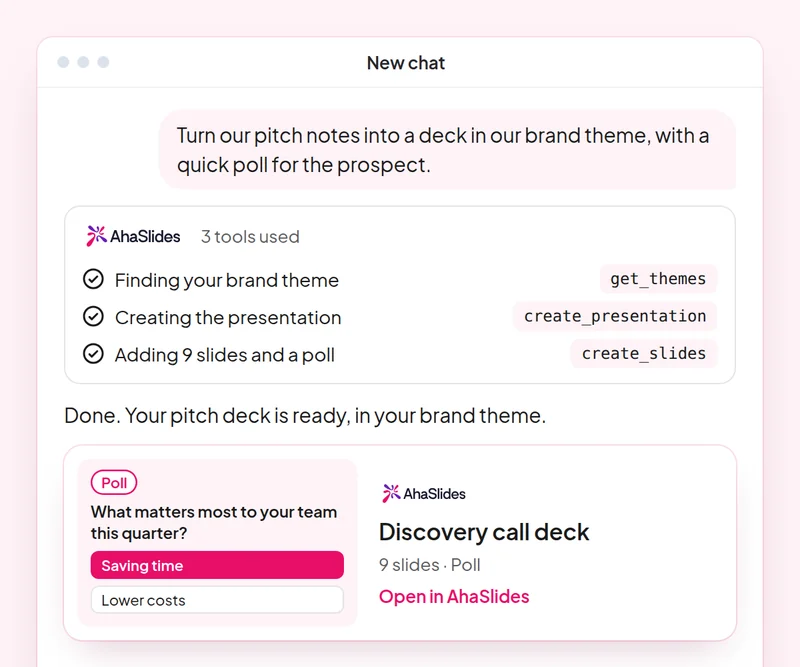
Mục tiêu: Build a discovery deck where the prospect answers, not only listens.
Kỹ năng: build-presentation
thử: “Build a 10-slide discovery presentation for a prospect in retail, with a poll on their biggest customer engagement challenge and speaker notes.”
Bạn lấy: An editable deck where the prospect answers on their own phone.
Mục tiêu: Check the team's product knowledge with a quiz built only from your own material.
Kỹ năng: make-quiz
thử: “Make an 8-question quiz for our sales team on our new pricing tiers, using only this sheet: [paste the sheet].”
Bạn lấy: A scored team quiz you can run in your next sales meeting.
Mục tiêu: Run live AhaSlides polls inside a PowerPoint pitch.
Kỹ năng: powerpoint-addin
thử: “Add a live poll and a word cloud to my pitch as a PowerPoint file, so I can run them in the meeting.”
Bạn lấy: A .pptx with live AhaSlides slides, which run through the AhaSlides tiện ích bổ sung cho PowerPoint.
Mục tiêu: Share decks with the right people and role, confirmed before any invite goes out.
Kỹ năng: share-and-collaborate
thử: “Share my retail discovery deck with my sales manager at [their email] as an editor.”
Bạn lấy: The invitation sent only after you confirm the person and their role.
Mục tiêu: Save a house style once so every new deck follows it.
Kỹ năng: personal-skills
thử: “Save our sales deck style as a skill: one idea per slide, a poll every third slide and a clear next step on the last slide.”
Bạn lấy: A saved skill AhaSlides applies to your next presentations, shown to you before it is saved.
Mục tiêu: Know what each person in the room cared about, so every follow-up is specific.
Kỹ năng: track-participants
thử: “From my [Acme pitch] session, list what each person answered in the polls and draft a follow-up email to each one on the topic they rated highest.”
Bạn lấy: A note per stakeholder on what they said, with a tailored follow-up email. Detailed per-person reports need a paid plan.
Prepare one real discovery call: build the deck in your house style, add a live poll for the prospect, share it with your manager for review, then quiz the team on what you learned. Keep the prompts that worked, so next time this work is a quick routine.
A 10-question quiz on pitch decks, PowerPoint polls, sharing and saving a house style. Pass it to earn your certificate of completion.
Each course is an AhaSlides eLearning course of about 2 hours 20 minutes that issues a verifiable certificate when you finish.
Kết nối AhaSlides MCP server to Claude or ChatGPT, send each prompt and make what it builds your own.
Put the six skills together on one real session from your work.
Take a 10-question quiz on pitch decks, PowerPoint polls, sharing and saving a house style.
Pass the quiz to earn a verifiable AhaSlides certificate of completion, with a verify link you can share.
Yes, the course costs nothing to take. You follow it in your own AhaSlides Tài khoản và một số tính năng mà các mô-đun sử dụng, chẳng hạn như báo cáo chi tiết, là một phần của các gói trả phí. Xem giá Mỗi gói dịch vụ bao gồm những gì.
Claude (trên claude.ai, Cowork và Claude Code), ChatGPT và bất kỳ ứng dụng khách nào hỗ trợ máy chủ MCP từ xa. Trong Claude, hãy thêm một trình kết nối tùy chỉnh với https://mcp.ahaslides.com/mcp là URL máy chủ. Trong ChatGPT, hãy tìm AhaSlides trong tab Plugin. Xem AhaSlides Máy chủ MCP Xem trang này để biết các bước thực hiện đầy đủ.
Họ là 17 người dân thường. AhaSlides các kỹ năng dành cho Claude, miễn phí và mã nguồn mở trên GitHubMỗi người đều nói với Claude điều nào. AhaSlides Công cụ MCP để gọi và trỏ nó đến AhaSlides' hướng dẫn viết bài riêng.