AhaSlides cho Slack: polls and quizzes your team answers in one click

Need everyone's view without booking another meeting? This Slack poll app lets you post a poll, quiz or survey in seconds, and your team answers right where they already talk.

Thêm vào Slack Hãy đọc hướng dẫn cài đặt.

Works on every AhaSlides plan, Free included. Only you sign in.

Được đánh giá 4.7 trên 5 sao trên G2, dựa trên 428 bài đánh giá.
  • Logo Đại học Abu Dhabi
  • Logo Airbus
  • Logo trường Bend La Pine
  • Logo BMC
  • Logo Bosch
  • Logo Criteo
  • Logo Ferrero Rocher
  • Biểu trưng Intel
  • Logo trường Cao đẳng Cộng đồng Ivy Tech
  • Logo chương trình đố vui

Như thế nào Slack poll app works

Three steps from question to answers, and nobody leaves Slack.

  1. Bước 1: Type /ahaslides create

    Pick a poll, rating, brainstorm or quiz. Or start from a check-in template such as Weekly pulse, eNPS or Wellbeing.
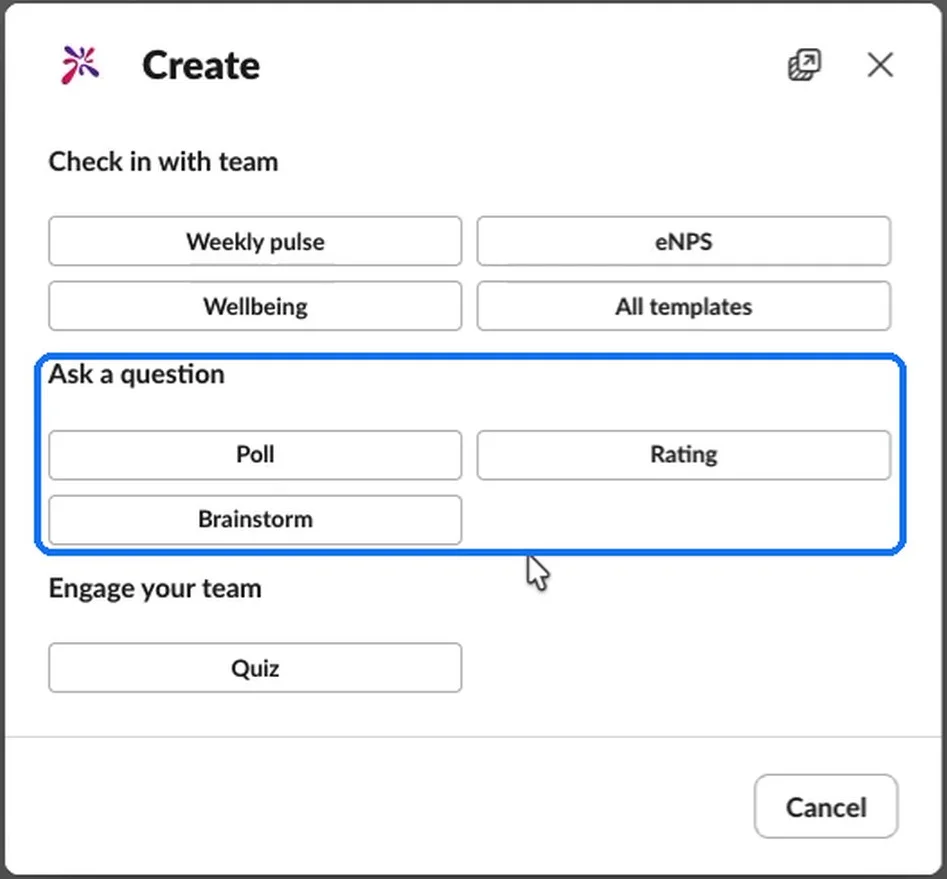
    Đây là trò chơi truyền cảm hứng bằng AhaSlides Create window in Slack, with the Ask a question group (Poll, Rating and Brainstorm) highlighted
  2. Bước 2: Viết câu hỏi của bạn

    Add your options and choose your settings. Add more questions and your poll becomes a survey.
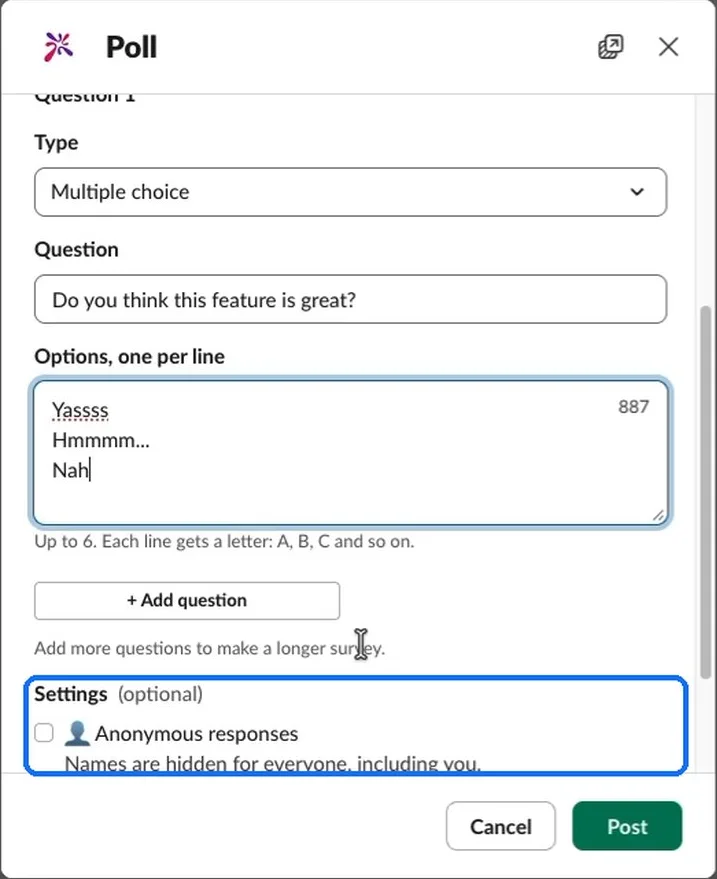
    The Poll window in AhaSlides cho Slack, with the Settings section and the Anonymous responses option highlighted
  3. Bước 3: Post it to your channel

    People answer with a button, and every answer goes straight into your AhaSlides báo cáo.
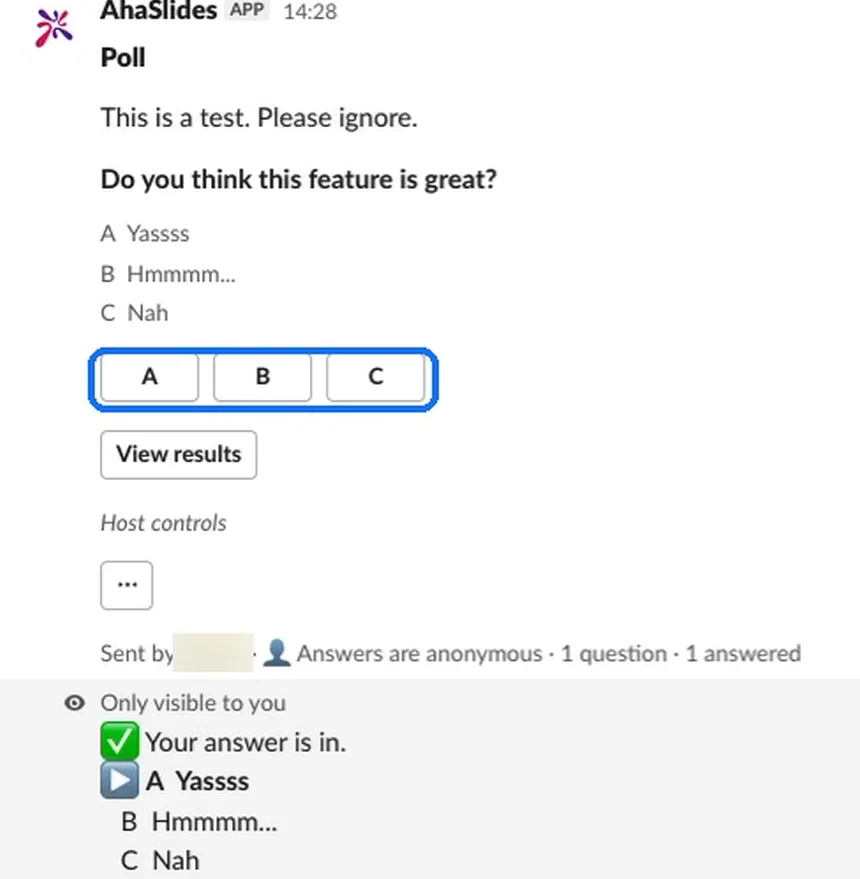
    An AhaSlides poll posted in a Slack channel, with the answer buttons highlighted and the reply only the person who answered can see
Thêm vào Slack

Bring a survey or presentation you already made

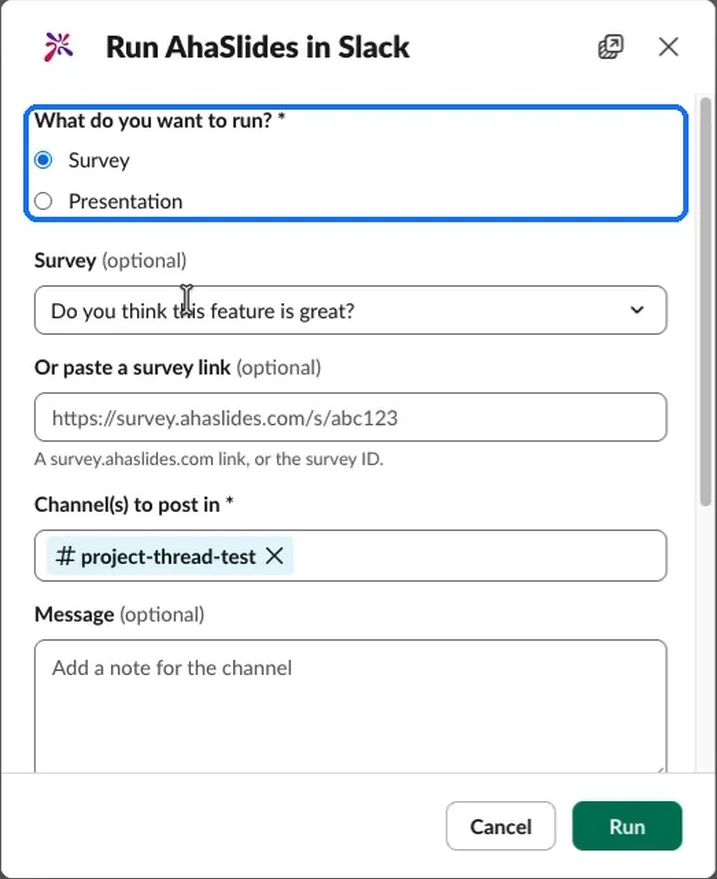
Already made a survey in AhaSlides? Type /ahaslides run and post it where your team will see it.

  • Choose from your account

    Pick a survey or presentation you made, or paste its link.

  • Post to several channels

    Send the same survey to more than one channel in one go.

  • Ở trong kiểm soát

    View results, end answering or open it in AhaSlides từ tin nhắn.

  • Share results when you choose

    Turn on Show results to everyone and the whole channel sees them.
Thêm vào Slack
Cuộc chạy AhaSlides in Slack window, with the choice between Survey and Presentation highlighted

Một Slack app for polls, quizzes and surveys

  • No account to answer

    Only the host signs in. Everyone else answers with a click.

  • Anonymous polls in Slack

    Turn on anonymous responses and names are hidden for everyone, you included.

  • Every answer in your report

    Answers go straight into your AhaSlides report, so nothing gets lost in the thread.

  • A Slack quiz app too

    Run a quick quiz or trivia round to give the team a break.

  • Public and private channels

    Public channels work straight away. In a private channel, type /invite @AhaSlides đầu tiên.

  • Bao gồm gói miễn phí

    AhaSlides cho Slack works on every plan, Free included.

Thêm vào Slack

Các câu hỏi thường gặp

AhaSlides cho Slack là một Slack poll app from AhaSlides, an all-in-one engagement platform for teams and classrooms. You create polls, ratings, brainstorms, quizzes and surveys in Slack, and your team answers there.

No. Only the host signs in. Everyone else answers with the buttons in Slack.

Yes. Turn on Anonymous responses when you create the poll. Names are hidden for everyone, the host included.

Đúng vậy. Nó có tác dụng với mọi loại máy. AhaSlides plan, Free included.

Yes. Public channels work straight away. For a private channel, type /invite @AhaSlides in that channel first.

Every answer goes into your AhaSlides report. From the message, choose View results to check them or End answering to close it.

Yes. Type /ahaslides run, choose a survey or presentation, pick your channels and post it.
Hãy đọc hướng dẫn cài đặt.