To track employee training completion, decide what counts as "complete", record the same few facts for every person, keep the evidence for as long as your regulator expects, and check the numbers on a fixed schedule. A spreadsheet can do this for a small team. A course tool that records progress for you removes the chasing and the retyping.
This guide is for people who run mandatory or compliance training and have to prove it was done. It covers what to record, how to write completion rules, what auditors ask to see, and three ways to keep the record, with healthcare and insurance as worked examples.
What to record for every completed training
A training record has to answer four questions: who, what, when and how well. Anything less and you cannot show that a person was trained, only that they were invited.
| Field | What to capture | Why an auditor asks |
|---|---|---|
| Learner | Full name and a unique ID, such as an employee number or work email | Names repeat and people change roles, so the ID ties the record to one person |
| Course and version | Title, plus the version or date of the policy it taught | Shows which rules the person was trained on |
| Assignment | Date assigned and the reason (new starter, annual refresher, policy change) | Shows training reached the right people on time |
| Completion | Date completed and the rule they met | Separates "opened" from "finished" |
| Result | Score or pass/fail against the pass mark | Shows the person understood the material |
| Time spent | Active learning time, where you can capture it | Helps challenge a click-through |
| Next due | Refresher date | Stops a lapse going unnoticed |
Keep one row per person per course attempt, not one row per person. A second attempt after a failed one is evidence too.
Write the completion rule before you track anything
"Completed" means different things in different teams. Fix it in writing first, or two managers will report two different completion rates for the same course.
A usable rule has up to three parts:
- Coverage: the learner worked through every lesson, not just the last page.
- Understanding: the learner reached a minimum score on the knowledge checks, for example 80% correct.
- Effort: the learner spent a minimum active time on the material, which filters out someone who skims a one-hour course in two minutes.
Then decide what happens when someone does not meet the rule. Do they retry straight away, or wait for a supervisor? Does the record show the earlier attempt? Write it down once and apply it to everyone.
The same discipline gives you a clean training completion rate: people who met the rule divided by people you assigned. If you assigned 40 people and 34 met the rule, your rate is 85%. Always state the denominator, because "34 completed" means little without "out of 40".
What auditors and regulators expect to see
Rules differ by sector and country, so confirm the exact requirement with your compliance team. These three examples show the pattern: train the right people, then be able to show the record.
US healthcare (HIPAA). The Privacy Rule requires a covered entity to train all members of its workforce on its privacy policies and procedures, to train new starters within a reasonable period of joining, and to retrain staff affected by a material policy change. It also requires the entity to document that the training was provided, and to keep that documentation for six years (45 CFR 164.530). The Security Rule asks for written records of required actions and activities too, again for six years (45 CFR 164.316). In practice that means a record per person with a date, not a single "all staff trained" entry.
UK health and care (NHS). Employers decide which statutory and mandatory training each staff group needs, using the Core Skills Training Framework published by Skills for Health as a benchmark. According to Skills for Health, NHS organisations in England that have submitted a Declaration of Alignment to the framework can record and report aligned training on the Electronic Staff Record (Skills for Health, Core Skills Training Framework FAQs). If you run training outside ESR, such as for a private care provider, you still need your own record of who completed what and when.
Insurance (anti-money-laundering). US insurance companies that issue covered products must run an anti-money-laundering programme that includes ongoing training of appropriate persons on their responsibilities. The company can train its employees, agents and brokers directly, or verify that they were trained by another insurer or a competent third party (31 CFR 1025.210). The second route only works if you hold evidence of that outside training, so your tracker needs a field for "trained elsewhere" and a copy of the proof.
What these have in common is simple. The regulator rarely asks for your method. It asks for the record: person, training, date, and proof it was retained.
Three ways to keep the record
| Method | Works best when | Watch out for |
|---|---|---|
| Spreadsheet | Under about 30 people, one or two courses, one owner | Manual entry, no proof of what the learner did, version drift when two people edit |
| HR or learning management system | You already own one and it holds the system of record | Setup time, cost per user, and training content still has to be built or bought |
| Course tool with built-in tracking | You build your own training and want completion recorded as people learn | May not replace the HR system of record, so plan an export |
A spreadsheet is a fair start, and it is what most small teams use. It breaks down when you need the evidence behind each tick: the score, the time and the attempt. The more courses and people you add, the more of your week goes on retyping.
Whichever you choose, test it with one question: can I produce the full record for one named person, for one course, in under five minutes? If not, the next audit will find that out for you.
How to track completion with AhaSlides Courses
AhaSlides Courses is one practical way to do this when you build the training yourself. It records learner progress and results as people go, so you do not rebuild the record by hand. Based on the live product on 15 October 2026, this is what it covers:
- Build or convert. Create a course from scratch, with AI from a prompt or file, or turn a presentation you already use for live training into a self-paced course. Check the generated draft before you publish it.
- Learners sign in. Anyone with the link can open the course, but learners must sign in or create an account so their progress is saved against them. You can also restrict a course to assigned learners only.
- Assign people and groups. Choose individual participants or learner groups, which suits "all new starters" or "all claims handlers".
- Set completion rules. Require all lessons to be completed, a minimum percentage of correct answers across the course's knowledge checks, a minimum active learning time, or a combination. Learners see the requirements, and the pass decision is made on the server, not by the learner.
- Score automatically. Knowledge checks are graded for you, so each learner has a score without anyone marking.
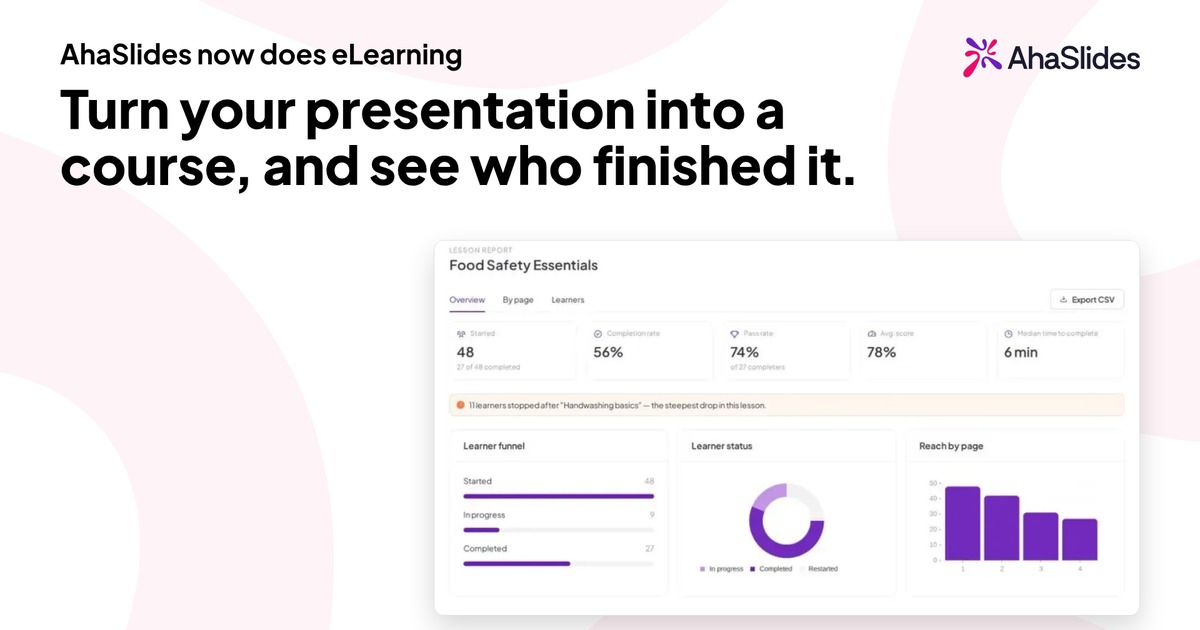
- Read the course report. The report shows an overview, results by lesson and a learner-by-learner view, including each person's activity record. You can export it as CSV or PDF for your own file, which is how you hand evidence to an auditor or load it into another system.
This makes the earlier table of fields largely automatic: learner, course, completion, result and time spent are captured as people learn. You still add the policy version, the assignment reason and your refresher schedule yourself.
AhaSlides Courses is not a full HR or learning management system. If your organisation must hold records in a particular system, treat the export as the bridge into it. Use the course for the training itself and the record of how each person did.
If you also run the training live, you can run the session in AhaSlides first, then turn the same presentation into a self-paced course for people who missed it. Our guide to measuring training beyond course completion covers what to measure once completion is under control.
You can read how a course is created and published in the AhaSlides help centre.
A simple routine to keep the numbers accurate
Tracking only helps if someone looks at it. A short routine works better than a big annual clean-up:
- Weekly: check new starters have been assigned their required courses.
- Monthly: pull the completion report, compare completed against assigned and message people who have not met the rule.
- Quarterly: check the refresher dates for the next 90 days and assign them early.
- Yearly: test the whole process by producing the full record for three random people, and confirm records are kept for the period your regulator sets.
Frequently asked questions
What is the best way to track employee training?
For a handful of people, a spreadsheet with the fields above is enough. Once you run several courses or need proof of scores and time, use a tool that records completion as the learner works, then export the report for your file.
How do you track compliance training completion?
Assign the course to named people, define a completion rule, record the date, result and proof of each completion, and keep the records for the retention period your regulator sets. Review the completion rate monthly and chase gaps before a deadline, not after.
What is a good training completion rate?
For mandatory training the target is every assigned person, so aim for 100% by the deadline you set. Track the rate by team to find where completion slips, and always state how many people you assigned.
How long should training records be kept?
It depends on the rule that applies to you. US HIPAA documentation, for example, must be kept for six years (45 CFR 164.530). Ask your compliance team for your own period and set it as a standing rule.
Our verdict
Start with the record, not the tool. Write the completion rule, capture the same few fields for everyone and be able to produce one person's full history in minutes. If a spreadsheet gives you that, keep it. If you are retyping scores and chasing people by email, a course tool that records progress for you will save the time. AhaSlides Courses is a good fit when you build your own training and want sign-in, assignment, completion rules, scoring and an exportable report in one place. If your records must live in an HR or learning management system, keep that system and use the export.