



Your feedback helps thousands of people choose the right tool, and we'd love to get your take. Leave an honest review of the AhaSlides add-on on the Zoom App Marketplace and we'll thank you with $20 in AhaSlides Credit.
🎁 What you get
Leave a review of the AhaSlides add-on on the Zoom App Marketplace and receive $20 as AhaSlides Credit once we've verified it.
How to leave your review
Step 1: Go to https://marketplace.zoom.us/

Step 2: Sign in to your Zoom account.

Step 3: Search “AhaSlides” — or use this direct link.

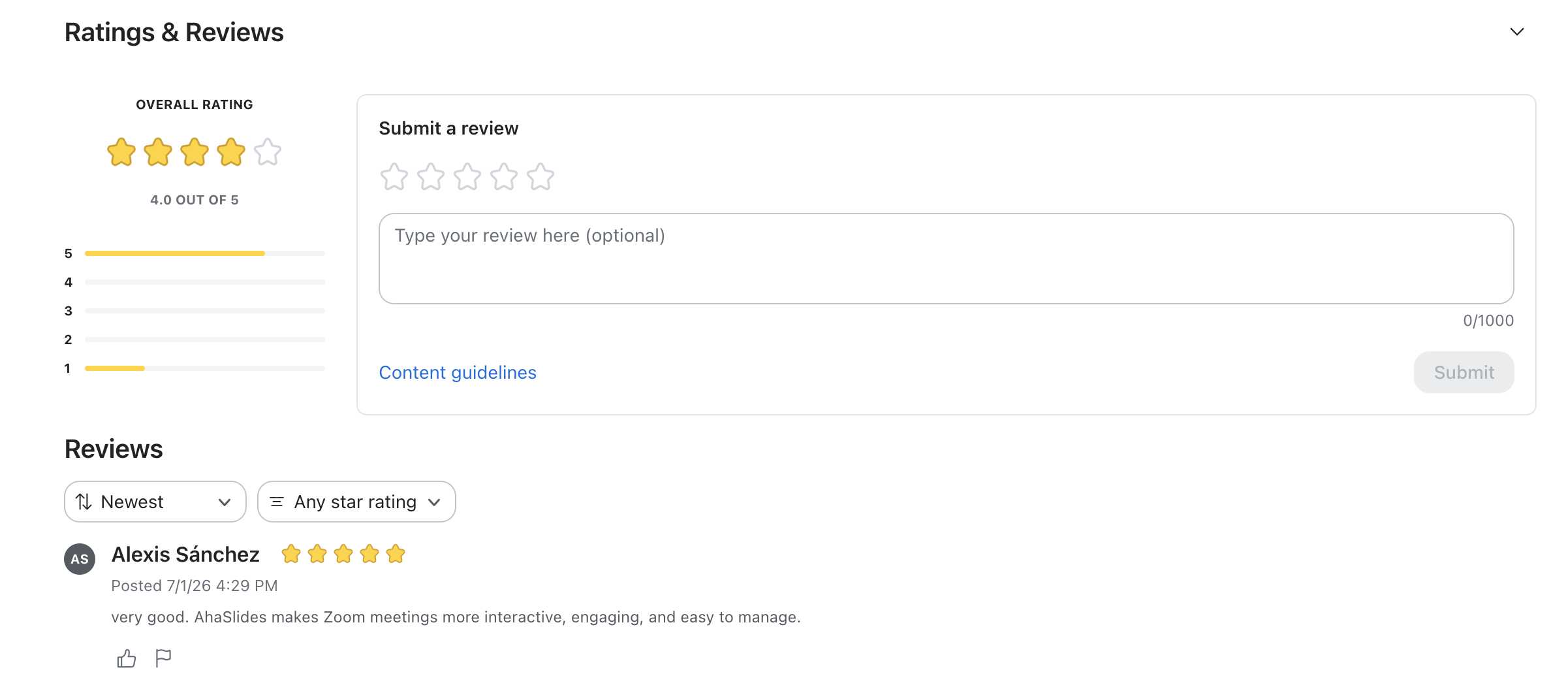
Step 4: Scroll down to the reviews section.

Step 5: Rate, type your review and submit.
How to claim your credit
- Leave your review using the steps above.
- Once published, screenshot or copy your review link.
- Send it to hi@ahaslides.com.
- We'll confirm and add the credit to your account.
FAQs
Can I submit a review without signing in?
No. You must be signed into your Zoom account to leave a review on the Zoom App Marketplace.
Do you only reward positive reviews?
No. We want honest feedback, good or bad. Every genuine review qualifies for the credit.