



Most meetings produce decisions that disappear. Someone walks out with a mental note about a deadline, someone else remembers the conversation differently, and by Thursday the action item no longer has an owner. Meeting minutes exist to close that gap.
This guide covers what meeting minutes are, what to include, how to write them well, and what a finished set looks like in practice. There are also three free templates at the end.
What are meeting minutes?
Meeting minutes are the written record of what was discussed, decided, and assigned during a meeting. The term comes from the Latin minuta scriptura (small writing), not from the unit of time.
A good set of minutes does three things:
That last point matters more than most people realise. For board meetings and formal committees, minutes are often a legal requirement. Under the UK Companies Act 2006, for example, board minutes must be kept for at least ten years [1]. In the US, requirements vary by state and type of organisation, so check your bylaws and state law. Even for informal team meetings, having a written record protects everyone when memory conflicts arise.
Who writes the minutes?
The minute-taker is whoever is assigned to record the meeting. That might be an executive assistant, a team lead, a project manager, or a rotating role within a team. The title matters less than the skill set: the minute-taker needs to listen carefully, write concisely, and stay neutral about what goes on the record.
One practical note: the minute-taker should not also be the meeting facilitator. Running the discussion and capturing it simultaneously leads to gaps in both.
8 components of effective meeting minutes
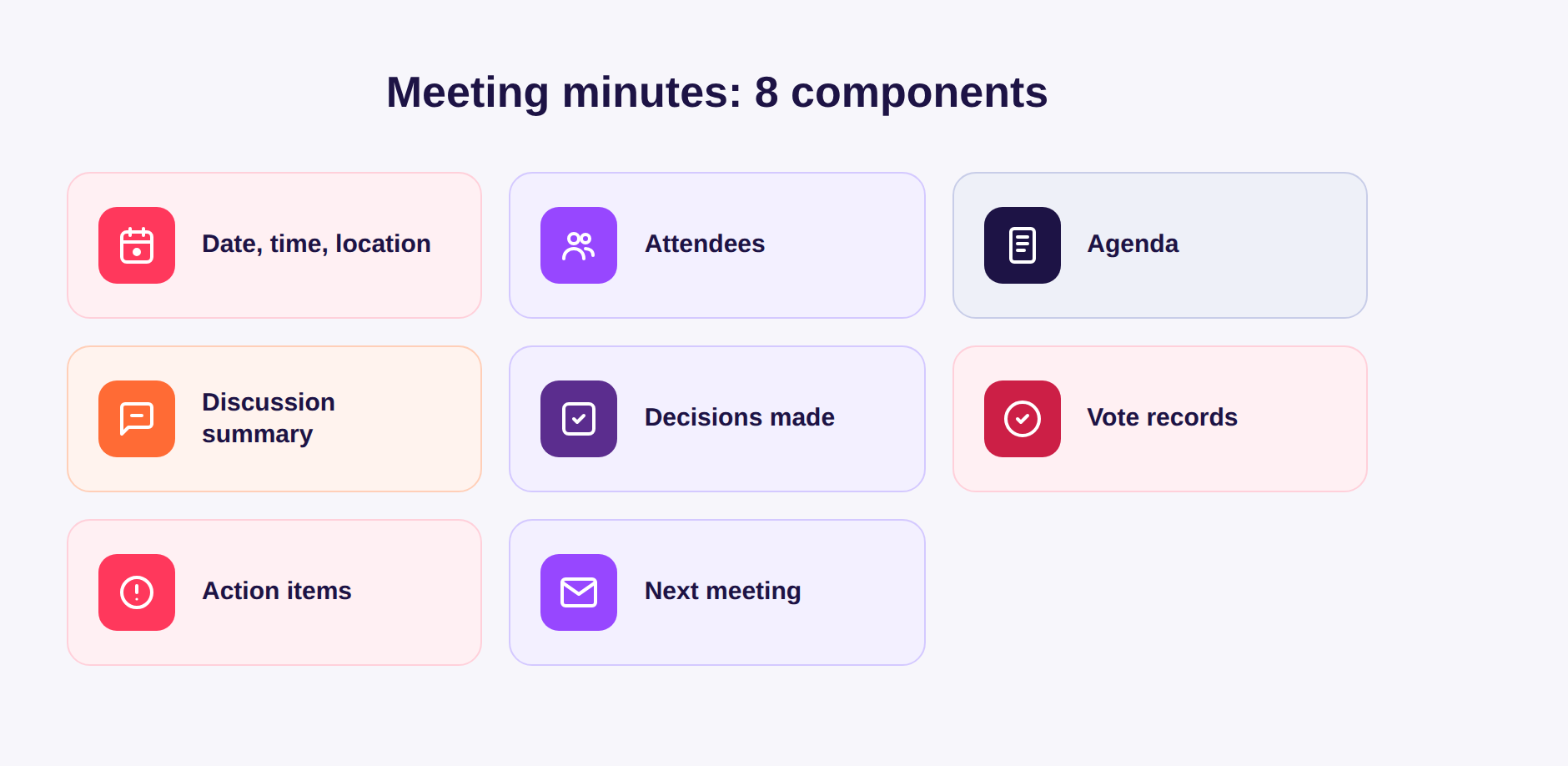
Well-structured minutes follow a consistent format regardless of meeting type. These eight elements cover everything a reader needs:
Action items deserve particular attention. A decision without an owner and a deadline is not really a decision at all. Every action should answer three questions: what needs to happen, who is doing it, and by when.
How to write meeting minutes: 6 steps

1. Prepare before the meeting
Get a copy of the agenda in advance. Review any background materials, previous minutes, or open action items from the last session. Set up a note-taking template so you are not formatting while the meeting is running.
2. Record during the meeting
Focus on capturing key points, decisions, and action items rather than transcribing everything said. Note the names of decision-makers and the specific wording of any commitments. If something is unclear, ask for clarification in the moment, because it is much harder to reconstruct later.
Avoid vague phrasing like "the team discussed marketing." Instead: "The team agreed to launch the Q3 email campaign on July 14. Priya to send the first draft to the group by July 5."
3. Write up promptly
The sooner you write up the minutes after a meeting, the better. Context fades quickly. Aim to complete the draft within 24 hours while the conversation is still fresh.
4. Be objective
Minutes are a factual record, not an editorial. Leave out personal opinions, speculation, and informal banter. If two people disagreed on something, record that a disagreement occurred and what decision resulted and not who was right.
5. Review and circulate
Before sending, check that every action item has an owner and a deadline, that all decisions are stated clearly, and that attendee names are spelled correctly. Share the draft with the meeting chair or a senior attendee for a quick accuracy check, then distribute to all participants.
6. Store and follow up
Minutes should live somewhere the whole team can access: a shared drive, project management tool, or intranet. At the next meeting, open by reviewing the action items from the previous set of minutes to confirm completion.
Real-world example: project status meeting
Here is what a short set of minutes looks like in practice.
Date: Tuesday, 18 March 2026, 10:00–10:45 AM
Location: Zoom (recording not shared)
Attendees: Sarah Lee (Product Lead), Tom Okafor (Engineering), Dana Reyes (Design), Marcus Huang (QA)
Apologies: None
1. Sprint 14 status update
2. Customer feedback review
3. Launch timeline
Discussion and decisions
Sprint 14 status: Tom confirmed that the API integration is complete. Two accessibility fixes remain outstanding; QA to begin testing by end of week.
Customer feedback: Dana presented findings from last week's usability test. Three participants struggled with the onboarding flow. Team agreed to simplify the step-by-step modal before the public launch.
Launch timeline: The original April 2 date was discussed. Given the onboarding changes, the team decided to push the launch to April 9. Sarah to notify stakeholders by March 20.
Action items
| Action | Owner | Due |
|---|---|---|
| Complete accessibility fixes | Tom | 20 Mar |
| Begin QA testing on sprint 14 | Marcus | 21 Mar |
| Redesign onboarding modal | Dana | 26 Mar |
| Notify stakeholders of new launch date | Sarah | 20 Mar |
Next meeting: Tuesday, 25 March 2026, 10:00 AM
That format takes about ten minutes to produce and gives anyone reading it a clear picture of what happened and what comes next.
Meeting minutes templates
Simple meeting template
MEETING MINUTES

Meeting title:
Date and time:
Location/platform:
Chair:
Minute-taker:

Attendees:
- Name, role
Apologies:
- Name, role

AGENDA ITEMS

1. [Item title]
   Discussion:
   Decision:
   Action:

2. [Item title]
   Discussion:
   Decision:
   Action:

ACTION ITEMS SUMMARY
| Action | Owner | Deadline |
|---|---|---|
Next meeting:
Minutes approved by:
Date:
Board meeting template
BOARD MEETING MINUTES

Organisation:
Date and time:
Location:
Chair:
Secretary:

Board members present:
Board members absent:
Also in attendance:

1. Call to order
   Meeting called to order at [time] by [Chair name].

2. Approval of previous minutes
   Minutes of [date] meeting approved / approved with amendments as noted.

3. Financial report
   Presented by: [Name]
   Key figures:
   Motion: [text of any motion]
   Voted: In favour [n] / Against [n] / Abstain [n]
   Result:

4. Strategic items
   Item:
   Discussion summary:
   Decision:

5. Other business

6. Next meeting
   Date:
   Agenda items to carry forward:

7. Adjournment
   Meeting adjourned at [time].

Signed:
Chair: ___________________  Date: ________
Secretary: _______________  Date: ________
Project management template
PROJECT MEETING MINUTES

Project name:
Meeting type: [Kickoff / Status / Review / Retrospective]
Date and time:
Platform:

Attendees:
Facilitator:

AGENDA AND DISCUSSION

1. Project status update
   Status: [On track / At risk / Off track]
   Notes:

2. Risks and blockers
   Risk:
   Owner:
   Mitigation:

3. Progress by workstream
   Workstream / Owner / Status:

4. Decisions made

5. Action items
| Action | Owner | Due date | Priority |
|---|---|---|---|
Next meeting:
Common mistakes to avoid
Minute-takers most often go wrong in these ways. Recognising the patterns makes them easy to fix before they become habits.
Writing too much. Minutes should summarise, not transcribe. If your minutes run longer than the meeting itself, you are capturing the wrong things. A useful test: if you can read the minutes in under three minutes, the length is probably right. If you are writing full paragraphs of back-and-forth dialogue, trim to the outcome.
Omitting deadlines. "Tom will look into the server issue" is not an action item. "Tom to submit hosting upgrade proposal by March 25" is. Without a date attached, tasks tend to drift indefinitely. When someone does not provide a deadline during the meeting, the minute-taker should flag it before the session ends rather than leaving it blank.
Sending too late. Minutes circulated a week after the meeting arrive too late to be useful. The action items have either been forgotten or already handled in ways that may not match what was agreed. A 24-hour turnaround should be the default; anything beyond 48 hours significantly reduces the value of the document.
Using vague language. Phrases like "the team discussed options" or "general agreement was reached" leave room for different interpretations later. Be specific about what was decided. If the outcome was to defer a decision, say that explicitly along with when the decision will be revisited.
Inconsistent formatting. If each meeting's minutes look different, people spend time figuring out the structure rather than reading the content. A fixed template solves this. Even a simple shared document with consistent headings makes minutes easier to skim and easier to search when someone needs to look something up later.
Frequently asked questions
These questions come up regularly from HR coordinators and L&D managers who are setting up or refining their meeting documentation practices.
How long should meeting minutes be?
There is no fixed length, but most team meeting minutes should fit on one page. Board or committee minutes for formal governance purposes tend to run longer because they need to capture vote records, quorum confirmation, and formal motions in detail. For a 30-minute internal meeting, a half-page summary is usually enough. If your minutes are regularly exceeding two pages for an ordinary team sync, the document is likely too detailed.
Do meeting minutes need to be approved?
For board meetings and formal committees, yes. Approval of the previous meeting's minutes is typically the first substantive agenda item at the next session. The chair asks whether attendees agree the minutes are accurate, any corrections are noted, and the minutes are then signed off. For informal team meetings, a lighter process works fine: share the draft, give people 24–48 hours to flag corrections, and treat silence as acceptance. Keeping a record of any corrections received is good practice even for informal meetings, since it shows the document went through a review step.
What is the difference between meeting minutes and meeting notes?
The terms are used loosely, but there is a practical distinction. Meeting notes tend to be informal: personal summaries, bullet points, or highlights that one person took for their own reference. Meeting minutes are the official shared record distributed to all participants and stored as the authoritative account of what happened. Minutes are written in third person, kept neutral, and retained long-term. Notes do not carry the same formal weight.
Running live feedback with AhaSlides
One recurring challenge for minute-takers is capturing input from a room full of people without losing track of who said what or letting louder voices crowd out quieter ones. AhaSlides lets meeting facilitators run live polls, open-ended questions, and idea boards directly during the session. Responses appear on screen in real time, which means the minute-taker has a structured, attributed record of participant input rather than a set of notes scraped together from memory.
For recurring team meetings, training wrap-ups, and town halls, this approach also makes the minutes more complete: you end up with actual response data rather than a paraphrase of what the facilitator thought the room felt.
For more on running the session itself, see our guides to a project kickoff meeting and meeting etiquette.
Sources
[1] UK Companies Act 2006, s. 248–249: requirements to keep minutes of board meetings for ten years. Diligent: Legal requirements for board minutes
[2] Flowtrace. "100 surprising meeting statistics for 2026." https://www.flowtrace.co/collaboration-blog/50-meeting-statistics