



AhaSlides is now in ChatGPT’s plugin directory. Add it once and you can ask ChatGPT for a quiz, a poll or a whole presentation, then host it live while your audience answers on their phones. No copying questions from the chat into another tool.
This guide shows how to turn ChatGPT into a quiz maker: how to add the plugin, what to ask for and how to run the quiz with a room or a video call. AhaSlides is an all-in-one engagement platform for teams and classrooms, and the plugin works with any ChatGPT account, free ones included.
Two ways to use ChatGPT as a quiz maker
1. Ask for questions, then paste them somewhere. ChatGPT writes the questions and answers in the chat. You copy them into a quiz tool, a form or a slide, one by one. It works for a printed handout, but nobody can play it live.
2. Ask ChatGPT to build the quiz in AhaSlides. With the AhaSlides plugin, ChatGPT creates the quiz in your AhaSlides account: question slides, answer options, correct answers, a timer and a leaderboard. You open it, check it and press present. Your audience joins with a code or QR code and plays on their phones.
The rest of this guide covers the second way.
How to add AhaSlides to ChatGPT
You need a ChatGPT account and a free AhaSlides account. The quickest way in is the AhaSlides plugin in ChatGPT.
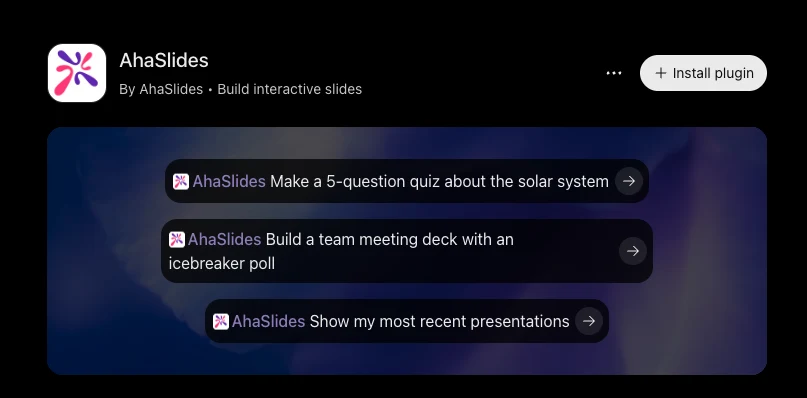
- Open Plugins. In ChatGPT, open the Plugins tab.
- Find AhaSlides. Search for AhaSlides and open its listing.
- Install it. Click Install plugin.
- Sign in. The first time ChatGPT uses an AhaSlides tool, it asks you to sign in with your AhaSlides account. There is no API key to copy.
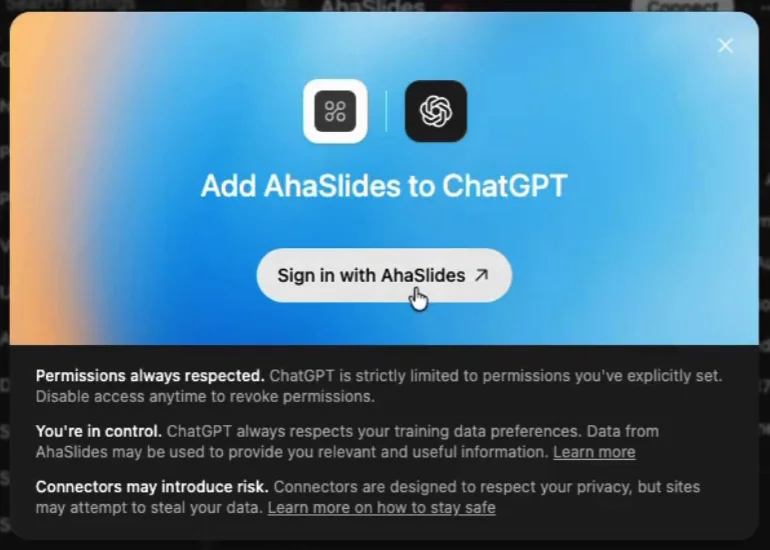
After you sign in, ChatGPT can create and edit presentations in your AhaSlides account. You can revoke the access at any time from your AhaSlides account settings.
What to ask the ChatGPT quiz generator
Describe the quiz the way you would brief a colleague: the topic, who it is for, how many questions and what kind. ChatGPT picks the slide types and writes the questions. Prompts to copy:
- “Make a 5-question quiz about the solar system.”
- “Make a 10-question multiple choice quiz on workplace safety for new hires, with 4 answer options each.”
- “Build a Friday team quiz with 3 rounds: company trivia, general knowledge and guess the emoji. Add a leaderboard after each round.”
- “Turn this lesson plan into a quiz my Year 9 class can play at the end of the lesson.” (Paste the plan below the prompt.)
- “Build a team meeting deck with an icebreaker poll.”
AhaSlides quizzes can use these slide types, so you can name them in a prompt when you want a mix:
- Pick Answer. Multiple choice, with one or more correct answers.
- Short Answer. Players type the answer.
- Match Pairs. Players match items from two lists.
- Correct Order. Players put steps or events in order.
- Categorise. Players sort items into groups.
Add a Leaderboard slide to show the scores, or ask for the Quiz game recipe, which sets up a live competitive quiz with scoring and a leaderboard for you. If you build quizzes often, ask ChatGPT to save your own recipe, such as “My quiz style: 10 questions, 20 seconds each, a leaderboard every 5 questions”. You can save up to 50.
Check it and host it live
ChatGPT is quick, but you are the expert on your audience. Before you present:
- Open the quiz in AhaSlides and read every question and correct answer. AI can get facts wrong, so check anything you would not bet on.
- Edit by hand where it is faster: fix a word, swap an answer, change the timer. You can also ask ChatGPT to make the change for you.
- Present it. Your audience joins on their phones by scanning the QR code or typing the join code. It works in a room, on a video call or both.
Players score points for correct answers, and the leaderboard shows who is ahead. If you want to build or tweak quizzes without ChatGPT, the AhaSlides quiz maker works the same way in the editor.
More than quizzes
The same plugin builds the rest of your session:
- Polls and opinions: Poll, Word Cloud, Brainstorm, Open Ended, Scale and Q&A slides for a check-in or a discussion.
- Presentations: a full deck with content slides and interactive slides mixed in.
- Surveys and courses: a survey people answer in their own time, or a short course with lessons and quick checks.
After the session, ask ChatGPT about the results. For example: “Show me which quiz questions had the lowest correct answer rate in my last training session.” That tells you what to cover again next time.
What happened to the AhaSlides GPT?
The AhaSlides plugin replaces our AhaSlides GPT. OpenAI is moving custom GPTs to plugins, and at retirement custom GPTs “stop running and leave the GPT directory” (OpenAI). OpenAI plans to retire them in December (TechRepublic).
If you used the AhaSlides GPT, install the plugin and keep going. Your presentations live in your AhaSlides account, so nothing you made is lost.
Tips for better ChatGPT quizzes
- Say who it is for. “New hires in a warehouse” and “Year 9 science” get different questions.
- Give it your material. Paste the lesson, the policy or the meeting notes, and ask for questions only from that text.
- Ask for a mix of slide types. Five Pick Answer questions in a row feel like a test. A Correct Order or Match Pairs question changes the pace.
- Keep it short. 5 to 10 questions fit the end of a lesson or the start of a meeting.
- Check the answers yourself. Always read the correct answers before you present.
Frequently asked questions
Can ChatGPT make a quiz?
Yes. ChatGPT can write quiz questions in the chat, and with the AhaSlides plugin it builds a quiz in AhaSlides that your audience plays live on their phones.
Is there a free ChatGPT quiz maker?
Yes. The AhaSlides plugin works with any ChatGPT account, including free ones, and you sign in with a free AhaSlides account.
How do I add AhaSlides to ChatGPT?
Open the Plugins tab in ChatGPT, search for AhaSlides, click Install plugin and sign in with your AhaSlides account when ChatGPT first uses it.
What is a good ChatGPT quiz prompt?
Name the topic, the audience, the number of questions and the question type. For example: “Make a 10-question multiple choice quiz on workplace safety for new hires, with 4 answer options each.”
Does the AhaSlides GPT still work?
The plugin replaces it. OpenAI plans to retire custom GPTs in December, so install the AhaSlides plugin instead.
Add AhaSlides to ChatGPT
Install the plugin, ask for your first quiz and host it live today.