


Security awareness training often ends up as slides people click through and a quiz they forget by lunch. That matters, because the human element plays a part in around 60% of breaches, according to Verizon’s 2025 Data Breach Investigations Report. A cybersecurity escape room gives the same lessons a reason to stick: people have to find the clues and use what they learned to get out.
Below are 10 cybersecurity escape room ideas in two rounds of five: phishing and scam messages, then passwords, devices and data. Each idea is one room, with the clues people find and the lock they open to escape. Each round has an Our pick, the room we would build first. After the ideas, you’ll see how to build them as a self-paced course that people play on a phone or a big screen.
What is a cybersecurity escape room?
A cybersecurity escape room is a puzzle game in which players use security know-how, such as spotting a fake email or a weak password, to open locks and escape. Teams play physical ones at awareness events. A digital escape room lets each person play alone, at their own pace, on their own device, which suits training that everyone in an organisation has to complete.
The two rounds at a glance
- Round 1: Phishing and scam messages (ideas 1 to 5)
- Round 2: Passwords, devices and data (ideas 6 to 10)
Round 1: Phishing and scam messages
Phishing works because it asks people to act fast. In these five rooms, people slow down and practise the check. Our pick: idea 1, the inbox, because everyone has an inbox and the answer is a habit they can use the same day.
Set 1: Rooms that train the pause before the click
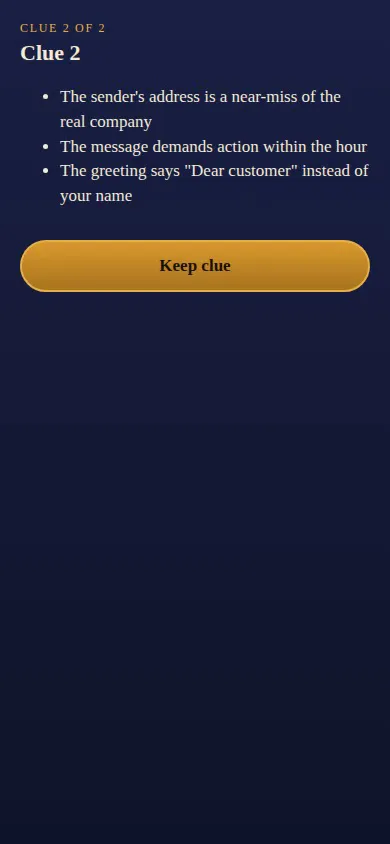
- The inbox: spot the phishing email. Clues: three red flags, one per card. The sender’s address is a near-miss of the real company, the message demands action within the hour, and the greeting says “Dear customer” instead of your name. Lock: a multiple choice question. “An email says your account closes in one hour unless you click a link. What is the safest first move?” The right answer is to go to the official site yourself and check.
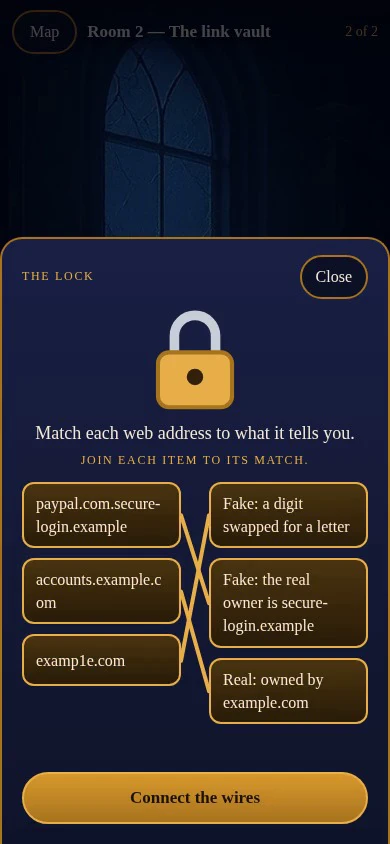
- The link vault: real or fake web address. Clues: one rule people can use on any link. Find the first single slash in a web address and read back from there: the last two parts before it (three for endings like .co.uk) name the real owner, and a familiar name earlier in the address proves nothing. Lock: a matching question. Learners join three addresses,
accounts.example.com,examp1e.comandpaypal.com.secure-login.example, to what each one tells them: real, a digit swapped for a letter, or a fake owned by secure-login.example. - The control room: the one-word rule. Clues: a short recap of the first two rooms and one rule of thumb: if it feels urgent, slow down. Lock: a fill in the blank question. “When a message creates ____, pause and check before you act.” The code is “urgency”.
- The attachment desk: which file is safe to open? Clues: an invoice from a sender nobody knows, sent as a zip file. A document that asks you to “enable content” before you can read it. A shared file from a colleague you were expecting it from. Lock: a multiple response question: pick every file you would report instead of opening.
- The text and the call: scams beyond email. Clues: a text about a parcel with a short link, and a caller who says they’re from IT support and asks for the code just sent to your phone. Lock: “A caller from IT support asks for the code you just received. What do you do?” The right answer is to hang up and call IT on a number you already know.
Round 2: Passwords, devices and data
These rooms cover the everyday habits that keep an account or a laptop safe. Our pick: idea 8, the open office, because every object people tap is a real risk they walk past at work.
Set 2: Rooms that build everyday habits
- The password lab: which password is strongest? Clues: longer beats more complicated, never reuse a password, and a password manager remembers them so you don’t have to. Lock: a multiple choice question with three options: a short word with a number and a symbol, a common word with letters swapped for numbers, and a long passphrase of several random words. The passphrase opens the lock.
- The second lock: sign-in prompts. Clues: what a sign-in approval prompt is for, and why a prompt you didn’t ask for is a warning sign that someone may be trying to sign in as you. Lock: a matching question. Learners join “a prompt you just asked for” to “approve it”, “a prompt you didn’t ask for” to “deny it and report it”, and “lots of prompts in a row” to “deny them and report it to IT”.
- The open office: what would you fix before you leave? Clues: the objects in the room. A sticky note with a password on a screen, a laptop left unlocked, a printout of customer details on a shared desk, and a visitor badge left behind. Lock: a multiple response question: pick every risk in the room. All four are right.
- The café table: working on shared Wi-Fi. Clues: anyone on a public network may be able to see unprotected traffic, a laptop left unattended can be stolen or tampered with in moments, and a VPN your organisation provides protects what you send. Lock: “You need to send a work file from a café. What do you do first?” The right answer is to connect to your organisation’s VPN.
- The report room: the way out. Clues: who to tell, how fast to tell them, and what to include. Reporting a mistake quickly limits the damage. Lock: a fill in the blank question. “If you clicked a link you shouldn’t have, the first thing to do is ____ it.” The code is “report”. A short closing card makes a good finale here.
How to build a cybersecurity escape room course with AhaSlides
AhaSlides is an all-in-one engagement platform for teams and classrooms, and its courses now have an Escape Room style. It turns each lesson into a room on a map. Learners tap objects to find clue cards, answer the lesson’s knowledge check to open the lock, and move on room by room, on a phone or a big screen. You write the lessons once, and the style turns them into the game, so there are no puzzles to code and no room to book.
You apply the Escape Room style by asking an AI assistant connected to AhaSlides. There is no way to apply it without an AI assistant yet.
- Build the course first. Make a standard course with one lesson per room. Give each lesson a few short blocks of text or images, which become the clues (split across up to four objects in the room), and end it with one knowledge check, which becomes the lock. Only the first knowledge check in a lesson becomes the lock, so keep one per lesson. The guide to creating a course covers the basics.
- Connect your AI assistant. In an assistant that supports custom MCP connectors, such as Claude or ChatGPT, add the AhaSlides MCP server,
https://mcp.ahaslides.com/mcp, and sign in with your AhaSlides account. The MCP getting started guide has the steps for both. - Ask for the Escape Room style. Name the course and the style, for example: “Use the Escape Room plugin on my course Phishing basics.” You can also ask for a theme (Haunted House, Space Station or Jungle Ruins), a timer in each room, a finale at the end of the map and your own short story for each room. The timer only shows how long someone has spent in a room. It never limits their time.
- Preview it, then publish. Open My files, click Courses and open the course, then click Preview to play through the rooms the way your learners will. Publish it and share the link as you would any other course. Learners open it on learn.ahaslides.com, on a phone or a computer.
What your learners see
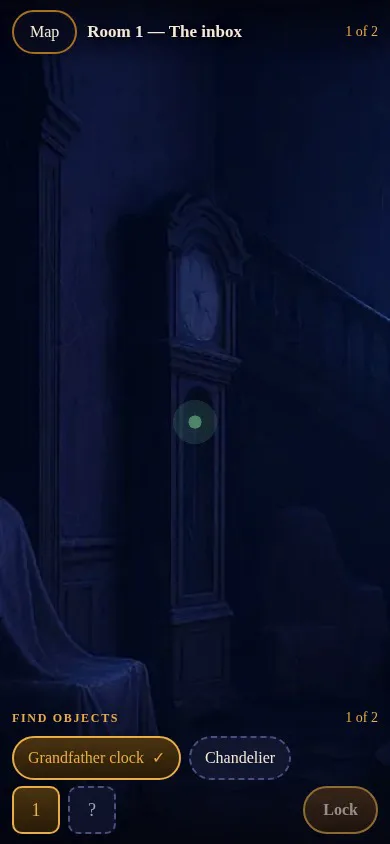
Each room has up to four objects to tap, and the names are listed under Find objects. Every object opens a clue card. Learners read it and tap Keep clue: clue cards are never answered, so people learn before they are tested.
The screens below are from a three-room phishing course built from ideas 1 to 3 above.
Once every clue is found, learners tap Lock and answer the knowledge check. The type of question decides the lock:
- Multiple choice or Multiple response becomes a padlock. Learners pick their answer and tap Turn the lock.
- Matching becomes wires. Learners join each item to its match and tap Connect the wires.
- Fill in the blank becomes a keypad. Learners type the answer and tap Enter the code.
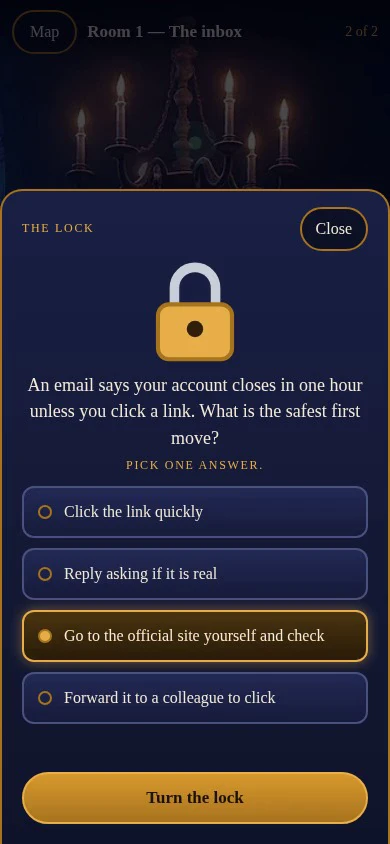
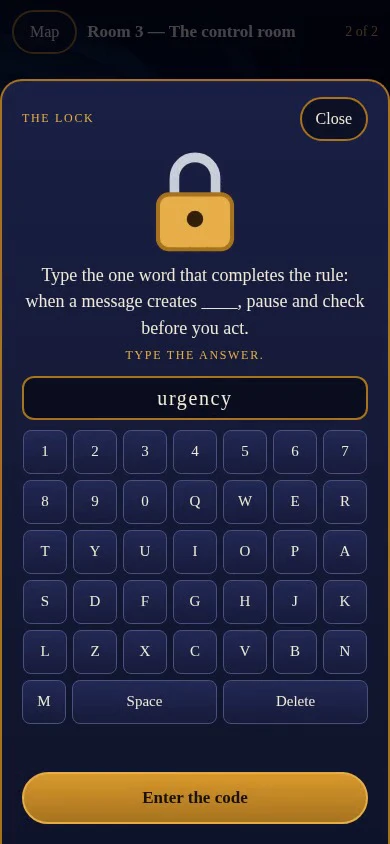
A wrong answer shows “Not quite. Try again.”, and learners can try as often as they need. After two wrong tries, a hint appears. When the lock opens, they move on to the next room on the map. On a phone, they swipe to look around a room, and if they leave and come back, they return to the room they were in.
Running a live game for a group instead? The Escape Room slide is a live game inside a presentation, while the Escape Room course style is for self-paced courses.
Ready to turn your next security course into an escape room? The help guide has the prompt and every option.
Tips for a cybersecurity escape room people finish
- Keep each room short. Two to four clues and one lock is enough. Long reading belongs in a standard course, not a game.
- Write wrong options people would choose. “Reply asking if it is real” is a better wrong answer than something nobody would pick, because it is the mistake people actually make.
- Aim for a habit, not a score. With the human element in around 60% of breaches (Verizon, 2025), what counts is what people do with the next suspicious message. End every room with something they can do tomorrow.
- Learn the basics alone, then do the valuable part together. Ask people to play the course before a team session, so the time together goes on real examples, questions and near-misses instead of definitions.
- Turn on the finale. A closing card after the last room gives people a clear finish, and a place for your one key message.
Frequently asked questions
How many rooms should a cybersecurity escape room have?
Three to five rooms works well for a self-paced course. Each room teaches one idea and has one lock, so a short course stays a game rather than a chore.
How do you create a digital escape room for training?
Build a standard AhaSlides course with one lesson per room, then ask an AI assistant connected to the AhaSlides MCP server to apply the Escape Room style to it. Each lesson’s knowledge check becomes its lock.
Can people play it on a phone?
Yes. Learners open the course link on learn.ahaslides.com on a phone or a computer, and swipe to look around each room on a phone.
Can I export an Escape Room course to my LMS?
Not yet. SCORM export isn’t available for courses that use a course style such as Escape Room. Keep a course in the standard style if you need to export it.
Do I need an AI assistant to make one?
Yes, for now. The Escape Room style is applied by an AI assistant connected to AhaSlides. Once it is on, you can still edit the lessons by hand in the course editor.