An exit ticket is a short question students answer before they leave a lesson, and their answers tell you where to start the next one. It takes about three minutes, and it means you don't have to be a mind reader to know what your students are thinking.
It is one of the simplest forms of formative assessment, and research on formative assessment is encouraging. When Paul Black and Dylan Wiliam reviewed 250 sources on classroom assessment, they found typical effect sizes of 0.4 to 0.7, larger than most of those found for educational interventions. Their catch: assessment only becomes formative when you use the evidence to adapt your teaching.
Below are 30 exit ticket ideas in 3 rounds, each split into 2 sets of 5, so you can pick one for tomorrow and keep the rest for later. Every idea names the slide type to run it on students' phones. Every round has an Our pick, the one we would try first.
Round 1: check what they learned
Ten knowledge checks. They tell you who has the key idea and who needs another go before you move on.
Set A: quick recall5 ideas
1One key word
How it works"Sum up today's lesson in one word." Run it on a Word Cloud: the biggest words show you what stuck.
2The big idea
How it works"What is the most important thing you learned today, in one sentence?" Use Open Ended.
3Fill the gap
How it works"Photosynthesis turns light, water and ___ into glucose." Use Fill in the Blanks in Free Type mode, where students type the missing word, so it tests recall rather than recognition.
4Spot the right answer
How it worksOne multiple-choice question on the core concept, with a common mistake as one of the wrong options. Use Pick Answer.
5Spell the key term
How it worksShow today's new word with letters hidden, plus a clue. Use Missing Letters: students drag letter tiles into the gaps.
Set B: show me you can do it5 ideas
6One maths problem
How it worksA single question like the ones you modelled, such as "What is 3/4 of 24?" Use Fill in the Blanks for the answer, or Open Ended if you want to see the working.
7Find the mistake
Our pick: how it worksShow a worked example with one error. "Which step is wrong, and why?" Use Open Ended.
8Put it in order
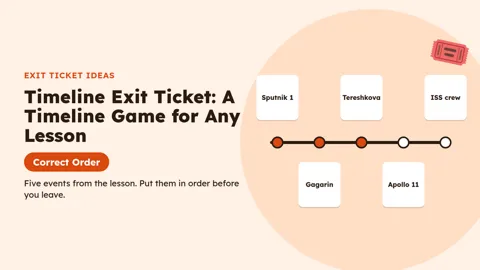
How it works"Put the stages of the water cycle in order." Use Correct Order: students drag the steps into sequence, so it checks they understand the process, not just the words.
9Five-word crossword
How it worksTurn today's vocabulary into a mini crossword with an optional hint per word. Use Crossword, which takes 2 to 6 words.
10Pop the right bubble
How it worksFor younger students: "Which of these animals is a mammal?" Use Pick-a-Boo: options float as bubbles and students pop the right one.
Our pick: idea 7, find the mistake. It shows whether students understand the method, not just whether they can copy it, and their explanations tell you exactly what to reteach.
Play a timeline version of idea 8 on the Correct Order slide:
Round 2: reflection prompts
Ten prompts that get students thinking about their own learning. These are the classic exit slip questions, and they give you the richest answers to read.
Set A: the classics5 ideas
113-2-1
How it works"Write 3 things you learned, 2 things you found interesting and 1 question you still have." Use three Open Ended slides, or one with the full prompt.
12Muddiest point
Our pick: how it works"What was the most confusing part of today?" Use Open Ended.
13Before and after
How it works"I used to think... Now I think..." Use Open Ended.
14Explain it to a friend
How it works"How would you explain today's topic to someone who missed the lesson?" Use Open Ended.
15Headline
How it works"Write a newspaper headline for today's lesson." Use Open Ended.
Set B: looking ahead5 ideas
16One question left
How it works"What is one question you still have about this topic?" Use Open Ended, then answer the top three at the start of the next lesson.
17Real-world link
How it works"Where could you use this outside school?" Use Open Ended.
18Next step
How it works"What do you need to practise before the test?" Use Word Cloud to see the most common answer.
19Connect it
How it works"How does today link to last week's lesson?" Use Open Ended.
20Teach me something
How it works"Tell me one thing about today's topic I did not say in class." Use Open Ended for the students who read ahead.
Our pick: idea 12, muddiest point. It takes ten seconds to answer, and the same confusing step often comes up in several answers. That step is your next lesson's starter.
Round 3: confidence checks and fun exit ticket questions
Ten quick ways to see how students feel about what they learned, plus a few to end the day on a lighter note.
Set A: confidence checks5 ideas
21How sure are you?
How it works"Rate how confident you feel about today's topic, from 1 to 5." Use Rating Scale.
22Rate each skill
Our pick: how it worksList two to four statements, such as "I can find the area of a triangle" and "I can find the area of a circle", and students rate each one. Use Rating Scale, which takes up to 8 statements.
23Traffic light
How it works"Green, amber or red: how ready are you to move on?" Use Pick Answer with three options.
24Help needed
How it works"What would help you most next lesson: an example, practice time or a recap?" Use Pick Answer.
25Effort check
How it works"How hard did you work today, from 1 to 5?" Use Rating Scale.
Set B: fun exit ticket questions5 ideas
26Emoji summary
How it works"Which emoji sums up today's lesson?" Use Word Cloud.
27Tweet it
How it works"Sum up the lesson in a post of 20 words or fewer." Use Open Ended.
28Would you rather
How it works"Would you rather redo today's experiment or write about it?" Use Pick Answer.
29Give it a title
How it works"If today's lesson were a film, what would it be called?" Use Word Cloud.
30Shout-out
How it works"Who helped you learn something today, and how?" Use Open Ended.
Our pick: idea 22, rate each skill. One slide shows which part of the lesson students feel shaky on, so you can tell the difference between "the whole topic is lost" and "only the circles".
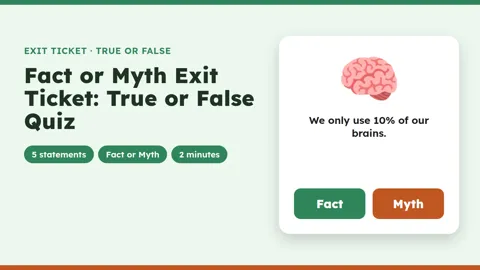
Want a fact-or-myth check? This deck uses the True or False slide.
How to host it on AhaSlides
AhaSlides is an all-in-one engagement platform for teams and classrooms. You put your exit ticket on a slide at the end of the lesson, students join from a phone or tablet with a code, and every answer comes in at once. No sheets of paper to collect, and nothing to type up afterwards.
Pick the slide for the question
- Open Ended for reflection prompts like 3-2-1 and the muddiest point. Students can write up to 500 characters, and you can show answers as a grid or one by one.
- Word Cloud for one-word summaries. Each student can send up to 10 short entries, and the most common answers grow the biggest.
- Rating Scale for confidence checks, with up to 8 statements on one slide.
- Pick Answer for a quick multiple-choice question or a traffic light.
- Fill in the Blanks when you want students to recall a word, and Drag and Drop when you want them to recognise it from a list. Try the Exit Ticket: The Water Cycle deck in Demo mode.
- Missing Letters and Crossword for key vocabulary, and Pick-a-Boo for younger students, who pop the right bubble on their device. You can read more in the Pick-a-Boo guide. Try the Pop the Right Bubble, Five-Word Crossword and Spell the Key Term decks in Demo mode.
Who sees whose answer
Keep the confidence and muddiest-point questions anonymous so students answer honestly, and keep names for the knowledge checks, where you want to see who got what. Check the audience settings in the editor before you present.
Let students answer at their own pace
If the bell beats you, switch the presentation to self-paced: in Settings, set Who takes the lead to Audience (self-paced). Students can then answer the exit ticket on their own time, and their answers still come back to you.
Open the next lesson with the results
With Look Back, you can bring an earlier slide and its real results into a new presentation. Start tomorrow's lesson with yesterday's word cloud or confidence ratings, show students what they said, and teach the part they found hardest.
For a ready-made start, use the Learn at Your Own Pace: The Async Class Check-in template and swap in your own exit questions.
Tips for running exit tickets
- Use the answers tomorrow. Black and Wiliam's point was that assessment becomes formative only when the evidence is used to adapt the teaching. Sort the answers into "got it", "nearly" and "not yet", and plan the next starter around the "not yet" group.
- Keep it to one or two questions. An exit ticket should take three minutes, not ten. One knowledge check plus one reflection prompt is plenty.
- Leave time for it. Put the exit ticket in your lesson plan with a fixed slot, or the bell will cut it short.
- Let students answer honestly. Confidence and muddiest-point questions tend to get more honest answers when nobody else can see who wrote what. Keep those anonymous, and keep names for the knowledge checks.
- Mix the types across the week. A knowledge check on Monday, a 3-2-1 on Wednesday and a confidence rating on Friday give you three different views of the same class.
Frequently asked questions
What is an exit ticket?
A short question students answer at the end of a lesson, before they leave. It shows the teacher what each student understood, so the next lesson can start where the class is.
What is the difference between an exit ticket and an exit slip?
Nothing important. Exit ticket, exit slip, exit card and exit pass are all common names for the same end-of-lesson check.
How many questions should an exit ticket have?
One to three. Any more and it stops being a three-minute check and becomes a test.
What are some good exit ticket questions?
"What was the most confusing part of today?", "Sum up today's lesson in one word" and the 3-2-1 prompt are good places to start. Ideas 7, 12 and 22 above are our picks.
Are exit tickets formative assessment?
Yes. They are one of the quickest forms of it, as long as you use the answers to change what you teach next.
Related posts
- For more ways to check learning during a lesson, see our formative assessment activities.
- Try these peer assessment examples.
- Run a round of think-pair-share activities.
- Fill a spare five minutes with some quick games to play in the classroom.
Host your exit tickets on AhaSlides for free
Sign up, add your own prompts and share the link in the last few minutes of the lesson. Students answer on any device, with no app to download.