
Step 1: Work through the modules
Connect the AhaSlides MCP server to Claude or ChatGPT, send each prompt and make what it builds your own.
Paste your call notes into Claude or ChatGPT, and the AhaSlides MCP server builds an interactive pitch deck in your house style, right in your AhaSlides account. Learn the prompts, and each call takes far less time to prepare.
About 2 hours 20 minutes · 6 modules · At your own pace · Certificate of completion
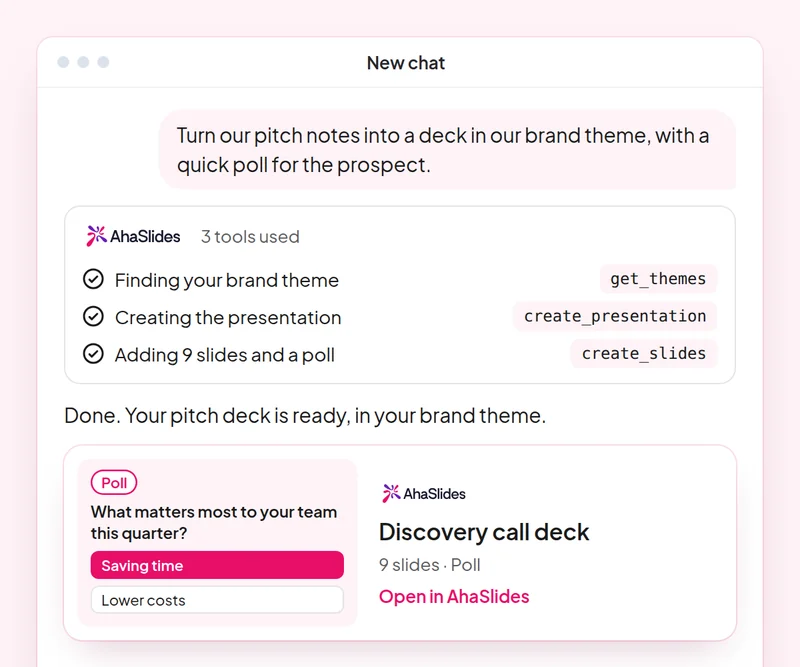
Goal: Build a discovery deck where the prospect answers, not only listens.
Skill: build-presentation
Try: “Build a 10-slide discovery presentation for a prospect in retail, with a poll on their biggest customer engagement challenge and speaker notes.”
You get: An editable deck where the prospect answers on their own phone.
Goal: Check the team's product knowledge with a quiz built only from your own material.
Skill: make-quiz
Try: “Make an 8-question quiz for our sales team on our new pricing tiers, using only this sheet: [paste the sheet].”
You get: A scored team quiz you can run in your next sales meeting.
Goal: Run live AhaSlides polls inside a PowerPoint pitch.
Skill: powerpoint-addin
Try: “Add a live poll and a word cloud to my pitch as a PowerPoint file, so I can run them in the meeting.”
You get: A .pptx with live AhaSlides slides, which run through the AhaSlides add-in for PowerPoint.
Goal: Share decks with the right people and role, confirmed before any invite goes out.
Skill: share-and-collaborate
Try: “Share my retail discovery deck with my sales manager at [their email] as an editor.”
You get: The invitation sent only after you confirm the person and their role.
Goal: Save a house style once so every new deck follows it.
Skill: personal-skills
Try: “Save our sales deck style as a skill: one idea per slide, a poll every third slide and a clear next step on the last slide.”
You get: A saved skill AhaSlides applies to your next presentations, shown to you before it is saved.
Goal: Know what each person in the room cared about, so every follow-up is specific.
Skill: track-participants
Try: “From my [Acme pitch] session, list what each person answered in the polls and draft a follow-up email to each one on the topic they rated highest.”
You get: A note per stakeholder on what they said, with a tailored follow-up email. Detailed per-person reports need a paid plan.
Prepare one real discovery call: build the deck in your house style, add a live poll for the prospect, share it with your manager for review, then quiz the team on what you learned. Keep the prompts that worked, so next time this work is a quick routine.
A 10-question quiz on pitch decks, PowerPoint polls, sharing and saving a house style. Pass it to earn your certificate of completion.
Each course is an AhaSlides eLearning course of about 2 hours 20 minutes that issues a verifiable certificate when you finish.
Connect the AhaSlides MCP server to Claude or ChatGPT, send each prompt and make what it builds your own.
Put the six skills together on one real session from your work.
Take a 10-question quiz on pitch decks, PowerPoint polls, sharing and saving a house style.
Pass the quiz to earn a verifiable AhaSlides certificate of completion, with a verify link you can share.
Yes, the course costs nothing to take. You follow it in your own AhaSlides account, and some features the modules use, such as detailed reports, are part of the paid plans. See pricing for what each plan includes.
Claude (on claude.ai, Cowork and Claude Code), ChatGPT and any client that supports remote MCP servers. In Claude, add a custom connector with https://mcp.ahaslides.com/mcp as the server URL. In ChatGPT, find AhaSlides in the Plugins tab. See the AhaSlides MCP server page for the full steps.
They are the 17 public AhaSlides skills for Claude, free and open source on GitHub. Each one tells Claude which AhaSlides MCP tools to call and points it at AhaSlides' own authoring guides.