
Step 1: Work through the modules
Connect the AhaSlides MCP server to Claude or ChatGPT, send each prompt and make what it builds your own.
Connect the AhaSlides MCP server to Claude or ChatGPT, then ask for a lesson in the chat: the deck, the quiz and a summary of the results land in your AhaSlides account. Six modules teach you the prompts, so lessons take far less time to prepare.
About 2 hours 20 minutes · 6 modules · At your own pace · Certificate of completion
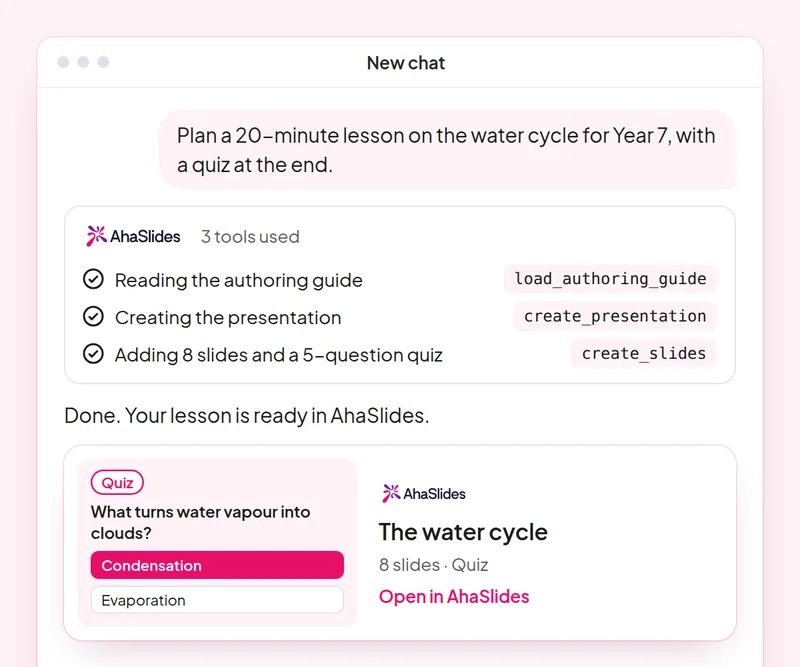
Goal: Write a lesson prompt that names the topic, age group, length and interactive slides you want.
Skill: build-presentation
Try: “Turn my Year 8 lesson on the water cycle into a 12-slide AhaSlides presentation with a word cloud warm-up, two polls and speaker notes on every slide.”
You get: An editable deck in your AhaSlides account, with a one-line summary of each slide.
Goal: Get a fair, accurate quiz at the right level, and check every answer before you run it.
Skill: make-quiz
Try: “Make a 10-question quiz on adding fractions for 11-year-olds, with one correct answer and three plausible wrong answers per question.”
You get: A scored quiz presentation and how your students join it.
Goal: Collect honest student feedback and keep a survey as a draft until you have read it.
Skill: build-survey
Try: “Create a 6-question end-of-term survey for my students about homework load, lesson pace and what helped them most. Do not publish it yet.”
You get: A draft survey you can read through before you publish it.
Goal: Read quiz results by question and turn them into a plan for the next lesson.
Skill: review-results
Try: “How did my class answer in yesterday's fractions quiz? Which questions did most students get wrong?”
You get: Participant numbers, the headline result per question and one or two ideas for the next lesson.
Goal: Reuse a lesson as self-paced revision without changing the original deck.
Skill: convert-content
Try: “Turn my water cycle presentation into a self-paced revision course with three short lessons.”
You get: An unpublished AhaSlides course built from your deck. The deck itself is not changed.
Goal: Know which students need help, by name, before the next lesson.
Skill: track-participants
Try: “Look at the results of my [Year 8 fractions] quiz and list the students who scored under [60%], with the questions each one missed. Then draft a short, kind note to each of them.”
You get: A follow-up list by student and a note ready to send to each one. Detailed per-person reports need a paid plan.
Plan one real lesson end to end: build the deck and the quiz with Claude or ChatGPT, run them with your class, then ask for a summary of the results and plan the next lesson from it. Keep the prompts that worked, so next time this work is a quick routine.
A 10-question quiz on writing good prompts for lessons and quizzes, and on checking what the MCP server builds before it reaches your class. Pass it to earn your certificate of completion.
Each course is an AhaSlides eLearning course of about 2 hours 20 minutes that issues a verifiable certificate when you finish.
Connect the AhaSlides MCP server to Claude or ChatGPT, send each prompt and make what it builds your own.
Put the six skills together on one real session from your work.
Take a 10-question quiz on writing good prompts for lessons and quizzes, and on checking what the MCP server builds before it reaches your class.
Pass the quiz to earn a verifiable AhaSlides certificate of completion, with a verify link you can share.
Yes, the course costs nothing to take. You follow it in your own AhaSlides account, and some features the modules use, such as detailed reports, are part of the paid plans. See pricing for what each plan includes.
Claude (on claude.ai, Cowork and Claude Code), ChatGPT and any client that supports remote MCP servers. In Claude, add a custom connector with https://mcp.ahaslides.com/mcp as the server URL. In ChatGPT, find AhaSlides in the Plugins tab. See the AhaSlides MCP server page for the full steps.
They are the 17 public AhaSlides skills for Claude, free and open source on GitHub. Each one tells Claude which AhaSlides MCP tools to call and points it at AhaSlides' own authoring guides.