


The best review games for the classroom make every student pull answers out of their own memory, not just the one with the fastest hand. Here are 20 of them in four rounds of five: quick quiz races, word and spelling games, games that test how ideas fit together, and team games for the end of a lesson. Each round has our pick, and each game names the AhaSlides slide that runs it, including the newest ones such as Bubble Rush, Crossword and Tournament Bracket.
Why games, and not another read-through of the notes? Students remember more when they do something with what they learned, and recalling it is what makes it stick. In a well-known memory study, students who studied a passage for five minutes and then took three recall tests on it remembered 61% of it a week later, while students who spent four five-minute periods reading it remembered 40% (Roediger and Karpicke, 2006). A good review game is a recall test that doesn't feel like one.
This guide is for teachers planning a revision lesson, and for anyone who runs review sessions with a group.
Round 1: quick quiz races on phones
Everyone plays at once, on their own phone, so nobody sits out while one student answers. These five suit the start of a revision lesson, when you want to see quickly what the class remembers.
1. Bubble Rush race
A multiple-choice race where each student moves to the next question as soon as they answer. Each correct answer lights a bubble in their lane on the big screen, and the first to light all their bubbles wins. A wrong answer lights nothing, and you can add a short pause before the next question, so guessing doesn't pay.
Use it for: a sprint on one topic. "Which planet is closest to the Sun?", "Which part of the body pumps blood?", "Which gas do plants take in from the air?"
Slide: Bubble Rush.
Our pick: this one. Quick students keep going instead of waiting for the timer, and slower students keep answering until the race ends, so the whole class stays busy.
2. True or false sprint
Read out a statement, and the class votes True or False. "Bats are mammals." "Sound travels faster than light." It's fast, and the wrong answers tell you which myths still need clearing up.
Slide: True or False.
3. Classic quiz rounds
Five questions per round, one topic per round, scores carried over to a leaderboard at the end. Everyone answers the same question at the same time, so you can stop after each one and explain the right answer.
Slide: Pick Answer, with the leaderboard switched on.
4. Pop the right answers
Made for younger pupils. The answers float in bubbles on their phones, and they pop every one they think is right: "Pop the even numbers" with 2, 7, 12, 15 and 18. One wrong pop scores nothing, so pupils learn to check before they tap. When the question closes, each bubble shows how many pupils popped it.
Slide: Pick-a-Boo.
5. Video checkpoint quiz
Play a short explainer video from the unit and pin questions to its timeline. The video pauses at each one, students answer on their phones, the right answer shows, and the video plays on. Play it through once beforehand, as YouTube shows ads in some videos.
Slide: YouTube Quiz (in beta).
Round 2: word and spelling games
Key terms are where a lot of marks go missing. These five check that students can recall, spell and define the words a topic depends on.
6. Fill the gap
Show a sentence from your notes with the key word missing: "Plants make their food through ____." Students type the missing word on their phones. Typing it, rather than picking it, is a tougher recall test.
Slide: Fill in the Blanks.
7. Missing letters
Show a clue and a word with gaps, such as "photosynthesis" with three letters taken out, and students drag letter tiles into the gaps. Nobody has to type, and a few wrong letters among the tiles make it harder. It suits the subject words students keep misspelling.
Slide: Missing Letters.
8. Class crossword
Type up to six key words with a hint for each, and AhaSlides builds the grid. Students fill it in on their phones and score for every word they get right: "The red planet" for Mars, "Our nearest star" for Sun.
Slide: Crossword.
Our pick: one grid checks up to six words from a topic at once, and when it closes you see the share of the class that got each word right. The word most students missed is your next starter.
9. Match it up
Give students two lists to pair: animals and their habitats, organs and their jobs, words and their meanings. It works well for vocabulary, where the link between a term and its definition is the thing you're testing.
Slide: Match Pairs.
10. Brain dump
Ask "What's one word you remember about the water cycle?" and watch the answers grow on screen. The biggest words are what the class remembers. The missing ones are what they don't.
Slide: Word Cloud.
Round 3: games that test how ideas fit together
Facts are the start. These games check whether students can sort, order and connect what they've learned, which is closer to what an exam asks of them.
11. Sort it out
Give the class a mixed list and some groups to sort it into: animals into mammals, birds, reptiles and fish, or foods into the food groups. The groups fill up live on your screen, so you can spot the items that keep ending up in the wrong one.
Slide: Categorise.
Our pick: sorting shows you what students misunderstand as well as what they forgot. If half the class puts the whale with the fish, you know what to teach next.
12. Put it in order
Mix up the steps of a process and ask students to put them back in order: the first five planets from the Sun, the stages of a butterfly's life cycle, the path food takes through the body.
Slide: Correct Order.
13. Label the diagram
Put a diagram on screen, such as the human heart or a flower, and ask students to mark where a part is. You see every answer at once, so a common mistake is easy to spot.
Slide: Annotate, where students mark spots on an image you upload.
14. Draw it
Ask students to sketch the answer instead of writing it: a plant cell, the phases of the Moon, a simple food chain. Drawings show you who has the idea and who has only the words.
Slide: Draw Answer.
15. Escape room review
Students search each room for clues on their phones. Solving every clue in a room opens the next one, and the last room ends at a final door code. It takes a little more set-up than the other games here, so save it for the end of a unit.
Slide: Escape Room.
Round 4: team games for the end of a lesson
Ten minutes left? These five get students working together, taking turns and telling you what still needs work.
16. Students write the questions
Split the class into random groups on screen and give each group a topic from the unit. Each group writes three questions on its topic, and you run them as the next lesson's quiz. Writing a good question is a review in itself.
Slide: Random Group Maker, with each group named after a topic.
17. Hot seat
Spin a wheel of names or topics, and whoever it lands on answers a question out loud, with help from their table if they need it. Students who would never volunteer get a turn without having to put their hand up.
Slide: Spinner Wheel.
18. Duck race for the bonus question
Everyone who joins becomes a duck, and the race picks a winner by pure luck. The winner answers the bonus question, or chooses the topic for the next round. It takes seconds, and nobody can say the teacher picked them.
Slide: Duck Race.
19. Knockout debate
Give the class eight answers to an open question, such as "the most important cause of the First World War" or "the invention that changed daily life most", and vote head to head until one is left. Pause before each vote to hear a reason from each side, so the revision happens in the arguing.
Slide: Tournament Bracket.
20. Muddiest point
Finish with "What's the one thing from this topic you're still unsure about?" Turn on Allow anonymous questions and students can post without a name. They upvote the questions they share, so the most common worry rises to the top.
Slide: Q&A.
Our pick: the students who never ask in class get their question answered too, and the top of the list is the plan for your next lesson.
How to host your review games on AhaSlides
AhaSlides is an all-in-one engagement platform for teams and classrooms. Every game above runs from one deck: you present, and students join with an access code on their own phones, with no account needed. Mix a Bubble Rush race, a Crossword and a Categorise slide in one lesson, with one leaderboard keeping score.
Set up a Bubble Rush review race
Bubble Rush runs in live sessions only, so set it up for a lesson you present.
- Add the slide. In the editor, click New slide and type Bubble Rush in the search box. It shows up under Content with a Beta tag. It starts with three sample questions, so you can try it straight away.
- Write your questions. Add multiple-choice questions with 2 to 6 options each and mark the correct one, up to 50. Write at least as many questions as bubbles to win, or questions will repeat.
- Set the race length. Bubbles to win is how many correct answers a student needs, from 1 to 20. The default is 10.
- Choose the order and the pause. Random gives each student their own shuffle. Sequential gives everyone the same order, which helps when you talk through the questions afterwards. Keep the pause after a wrong answer on (1 to 10 seconds) to stop random tapping.
- Present and start. Share the access code, wait for everyone to join, and click Start. The race runs until you click End race, or until a time limit you set runs out.
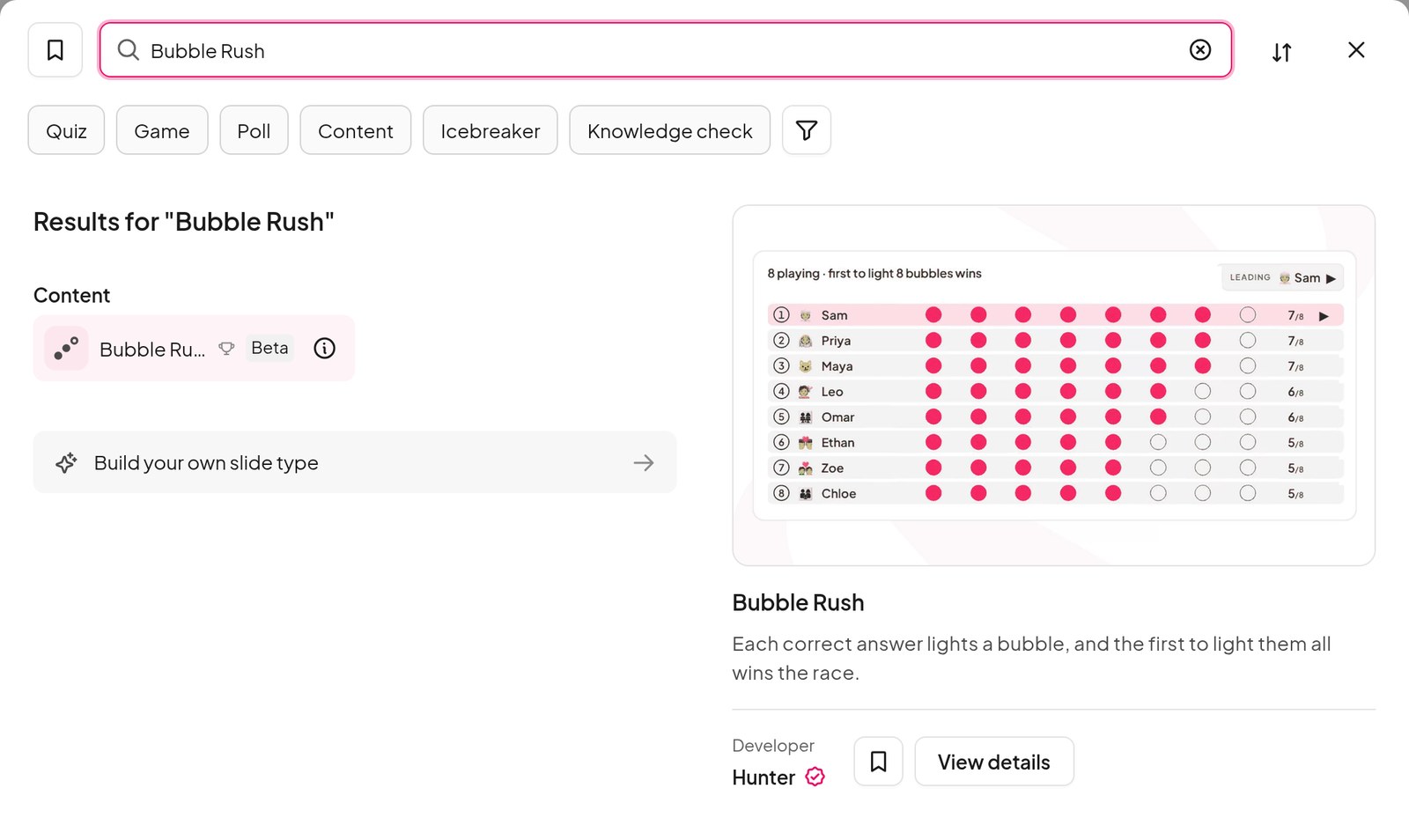
Search by name to find Bubble Rush in the slide picker. Hover over it to preview the race before you add it.
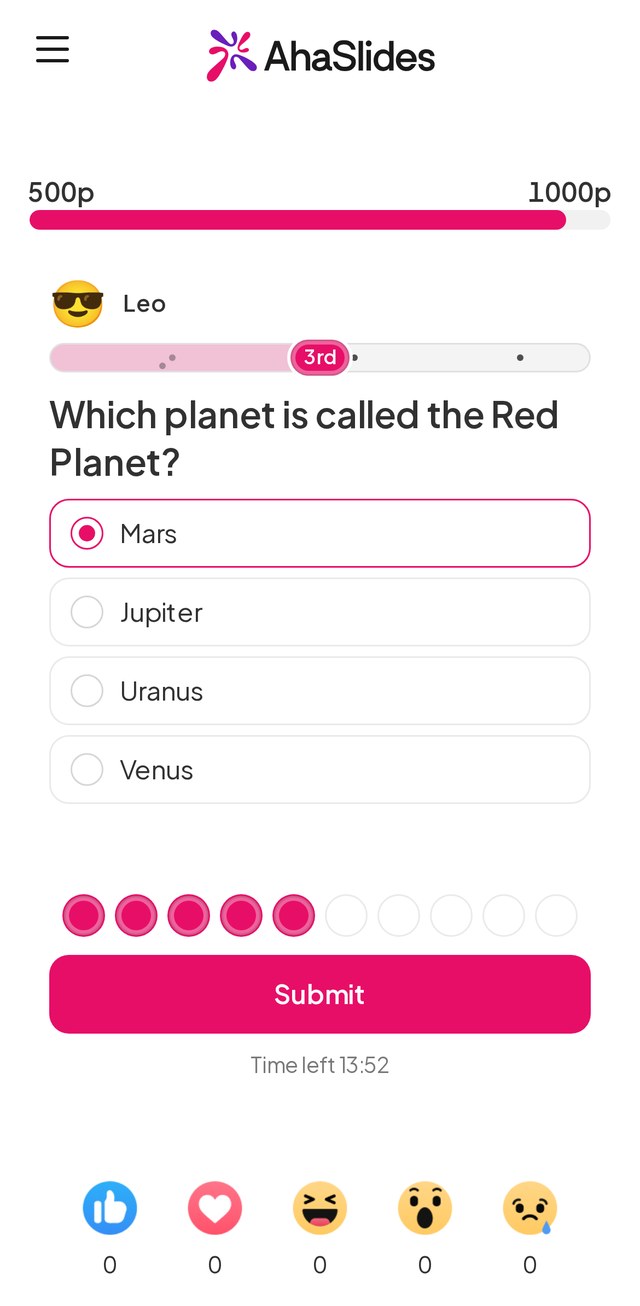
Each student sees one question at a time, their place in the race and the bubbles they've lit so far. A correct answer lights the next bubble and the next question comes up.
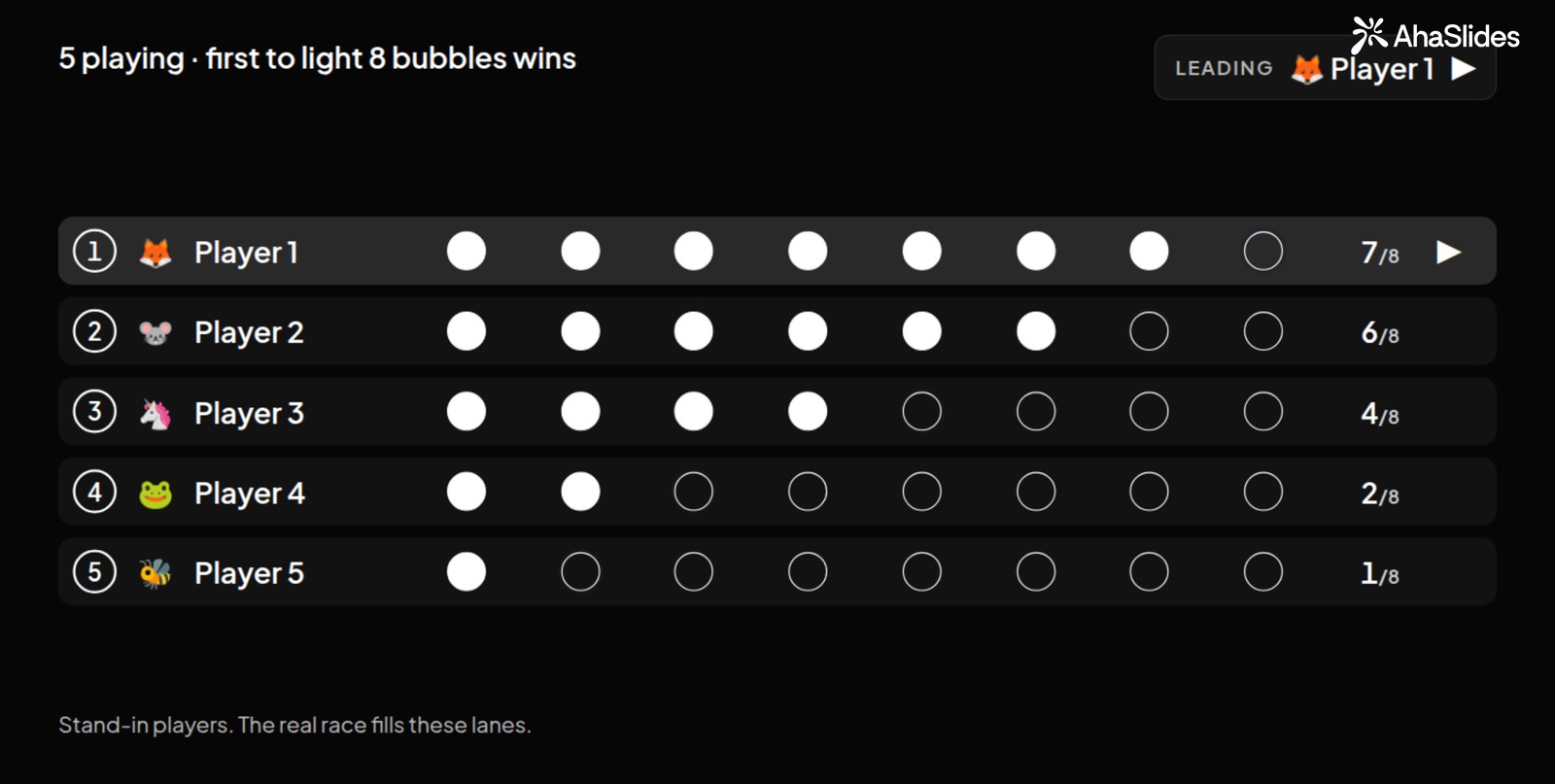
On the big screen, every student has a lane. Before anyone joins, stand-in players show how the race will look. Once the race starts, the lanes reorder as it changes, so the class can see who has pulled ahead.
The first student to light every bubble is marked the winner, and the race carries on so everyone else can finish. Points feed the leaderboard, so you can run a race per topic and keep a running score.
Try the ready-made Bubble Rush quiz
Don't want to write the questions yourself? Planet Pop Race is a ready-made Bubble Rush quiz about space. Open it, copy it into your account and run it with your class as it is, or swap in your own topic.
Every setting is explained in the Bubble Rush help guide.
Tips for a review lesson that sticks
- Make them recall, not reread. Remember the 61% against 40% from the memory study above: three recall tests beat four rounds of reading (Roediger and Karpicke, 2006). Start the lesson with a game, not a summary of last week.
- Keep each game short. Five to ten questions per topic is enough. Two short games on two topics beat one long one.
- Talk through the misses. The answers students got wrong are the most useful part of the game. Stop after each round and go over the one most of the class missed.
- Mix the formats. A race, then a crossword, then a sorting game. Each one tests a different way of knowing the same thing.
- Come back to it. Run a quick game on the same topic a week later. Spacing the review out helps the answers stay.
FAQ
What are good review games for the classroom?
Games where every student answers, not just one. A phone quiz race such as Bubble Rush, True or False, a class crossword, sorting games and Word Cloud brain dumps all get the whole class recalling at once.
How long should a review game take?
Around 5 to 10 minutes. That's enough for 5 to 10 questions on one topic, with time to go over the answers most students missed.
Can students play review games on their phones?
Yes. With AhaSlides, students join with an access code on their own phones and answer there, while the questions and results show on your screen. They don't need an account.
What are fun review games for middle school?
Ones with a race, a vote or a bit of luck. Bubble Rush, a knockout debate with Tournament Bracket and a duck race for the bonus question all work well with 11 to 14 year olds.
What is the best review game for a large class?
A race or quiz that everyone plays at the same time on their phones. Bubble Rush gives every student their own lane on the big screen, so nobody waits for a turn.
How do you make revision fun?
Add a goal and a bit of competition, keep it short and let everyone take part. Even a plain recall question feels like a game when students can see their progress on screen.
Host your review games on AhaSlides for free
Ready for revision day? Try the ready-made Bubble Rush quiz with your class, free on every AhaSlides plan.
Want a head start? Try the Revision rally classroom review games template or the classroom escape room review round, then change the questions to fit your lesson.
Related reading
- Need more ideas for any lesson? Try these fun games to play in class.
- Short on time? Here are some quick games to play in the classroom.
- Teaching online? Read our list of online classroom games for all ages.
- Building your own review quiz? Follow our guide on how to make a quiz.
- Revising vocabulary? See these vocabulary classroom games.