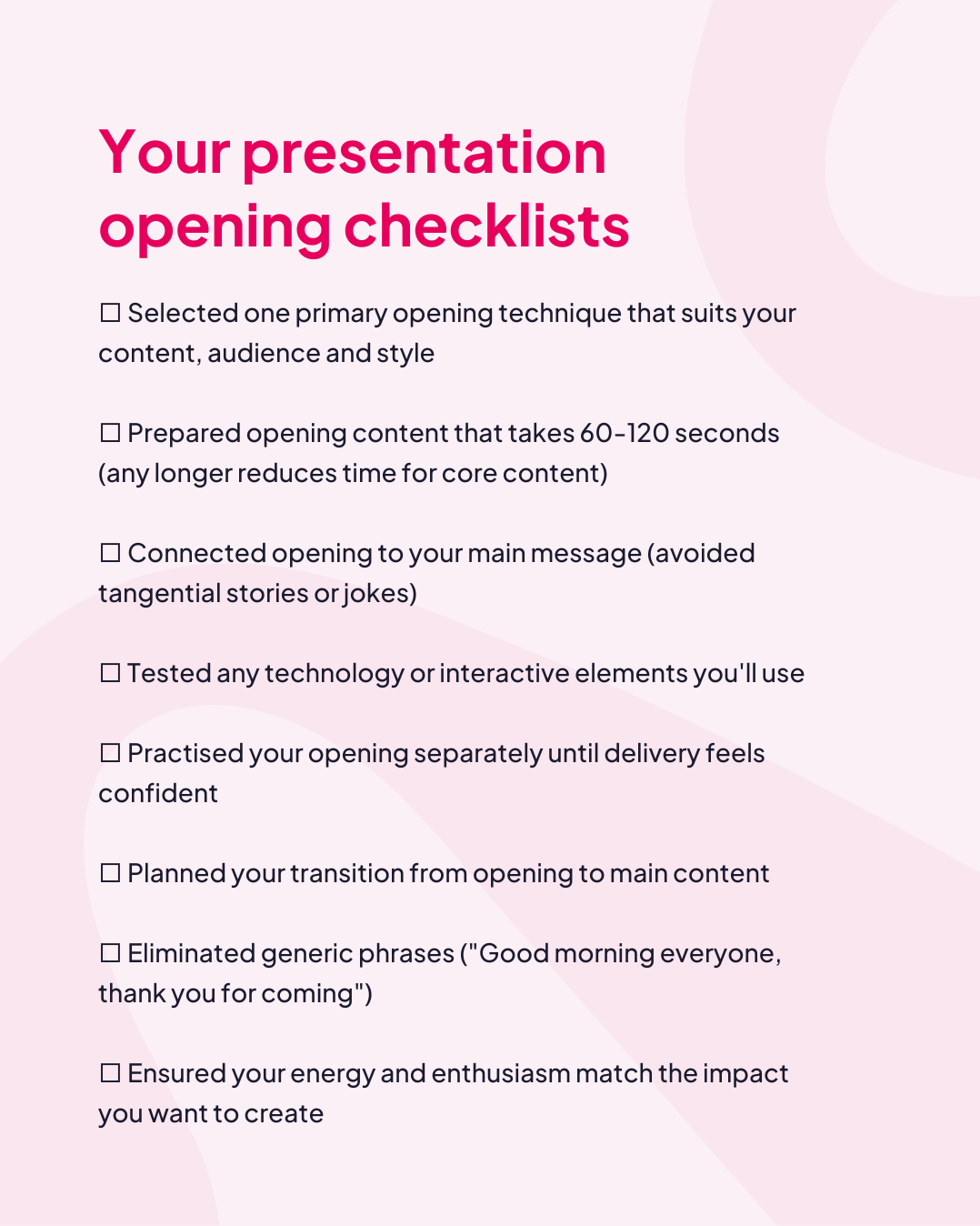



The first 30 seconds of your presentation determine whether your audience stays engaged or starts checking their phones. Research from Duarte shows that audience attention lapses within the first minute if you haven't captured their interest.
With these 12 ways to start a presentation and appealing presentation starting words, you can captivate any audience from your very first sentence.
The Science Behind Effective Presentation Starts
Understanding how audiences process information helps you craft more effective presentation openings.
The attention span reality
Contrary to popular belief, human attention spans haven't shrunk to eight seconds. However, research from the National Center for Biotechnology Information shows that sustained attention in professional settings operates in 10-minute cycles. This means your opening must hook attention immediately and establish engagement patterns you'll maintain throughout.
The power of first impressions
Psychological research demonstrates the primacy effect: information presented at the beginning and end of learning sessions is remembered most effectively. Your presentation opening isn't just about grabbing attention, it's about encoding key messages when retention capacity is highest.
Why interactive elements work
A study published in the Journal of Experimental Psychology found that active participation increases information retention by up to 75% compared to passive listening. When presenters incorporate audience response mechanisms in their presentation openings, they activate multiple brain regions, improving both attention and memory formation.
Proven Ways to Start a Presentation
1. Ask a Question That Demands a Response
Questions engage the brain differently than statements. Rather than rhetorical questions your audience answers silently, consider questions that require visible response.
Robert Kennedy III, the international keynote speaker, lists four types of questions to use right at the beginning of your presentation:
| Types of Question | Examples |
|---|---|
| 1. Experiences |
|
| 2. Accompaniments (To be shown alongside something else) |
|
| 3. Imagination |
|
| 4. Emotions |
|
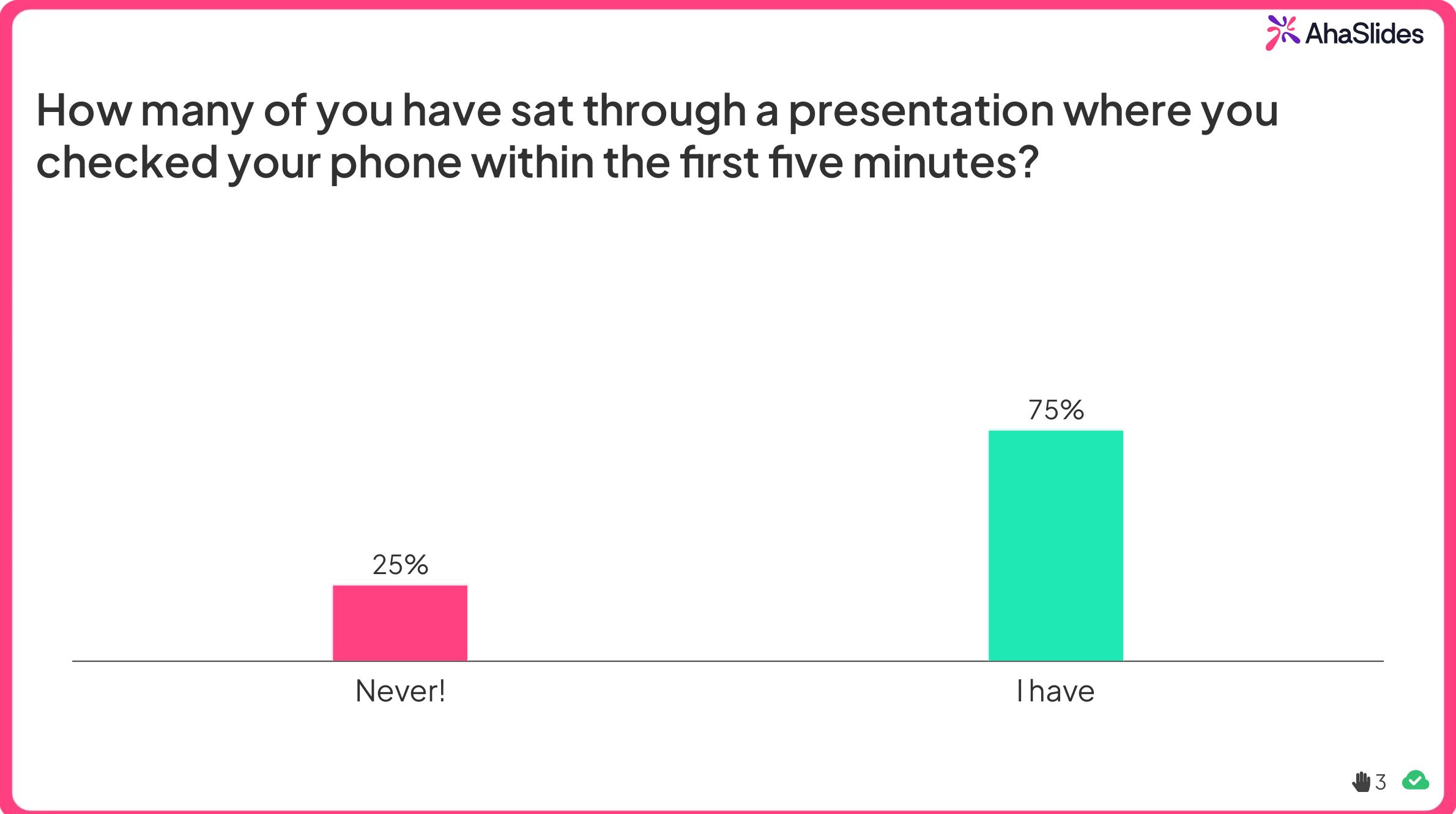
How to implement: Pose a question and ask for a show of hands, or use interactive polling tools to gather real-time responses. For example, "How many of you have sat through a presentation where you checked your phone within the first five minutes?" displays results instantly, validating shared experiences whilst demonstrating your awareness of presentation challenges.
2. Share a Relevant Story
Stories activate the sensory cortex and motor cortex in the brain, making information more memorable than facts alone. Research from Stanford University shows that stories are up to 22 times more memorable than facts.
How to implement: Open with a 60-90 second story that illustrates the problem your presentation solves. "Last quarter, one of our regional teams lost a major client pitch. When we reviewed the recording, we discovered they'd opened with 15 minutes of company background before addressing the client's needs. That presentation opening cost them a £2 million contract."
Tip: Keep stories concise, relevant and focused on your audience's context. The most effective presentation stories feature people your audience can relate to facing situations they recognise.
3. Present a Striking Statistic
Using a fact as an opener to a presentation is an instant attention grabber.
Naturally, the more shocking the fact is, the more your audience is drawn to it. While it's tempting to go for pure shock factor, facts need to have some mutual connection with the topic of your presentation. They need to offer an easy segue into the body of your material.
Why this works to start a presentation: Statistics establish credibility and demonstrate you've researched your topic. For L&D professionals, relevant data shows you understand business challenges and participant needs.
How to implement: Choose one surprising statistic and contextualise it for your audience. Rather than "73% of employees report low engagement," try "Three out of four people in this room feel disengaged at work according to recent research. Today we're exploring how to change that."
Tip: Round numbers for impact (say "nearly 75%" rather than "73.4%") and connect statistics to human impact rather than leaving them abstract.
If you don't have any relevant statistics to show, using powerful quotes is also a good way to gain immediate credibility.
4. Make a Bold Statement
Provocative statements create cognitive tension that demands resolution. This technique works when you can back up the claim with solid evidence.
Why this works to start a presentation: Bold statements signal confidence and promise value. In training contexts, they establish that you'll challenge conventional thinking.
How to implement: Open with a counterintuitive claim related to your topic. "Everything you know about employee motivation is wrong" works if you're presenting research-based alternatives to traditional motivation theories.
Caution: This technique requires substantial expertise to avoid seeming arrogant. Support bold claims quickly with credible evidence.
5. Show Compelling Visuals
Research from Dr John Medina's "Brain Rules" shows that people remember 65% of information presented with relevant images compared to just 10% of information presented verbally alone.
Why this works for professional presenters: Visuals bypass language processing and communicate instantly. For training sessions covering complex topics, strong opening visuals create mental frameworks for the content that follows (source: AhaSlides' visual learning and memory)
How to implement: Rather than text-heavy title slides, open with a single powerful image that captures your theme. A trainer presenting on workplace communication might open with a photograph of two people talking past each other, immediately visualising the problem.
Tip: Ensure images are high-quality, relevant and emotionally resonant. Stock photos of people in suits shaking hands rarely create impact.

6. Acknowledge Your Audience's Experience
Recognising the expertise in the room builds rapport and establishes respect for participants' time and knowledge.
Why this works to start a presentation: This approach particularly suits facilitators working with experienced professionals. It positions you as a guide rather than a lecturer, encouraging peer learning.
How to implement: "Everyone in this room has experienced communication breakdowns in remote teams. Today we're pooling our collective wisdom to identify patterns and solutions." This validates experience whilst establishing a collaborative tone.
7. Create Curiosity With a Preview
Humans are hardwired to seek closure. Opening with intriguing preview questions creates what psychologists call information gaps that audiences want to fill.
Why this works to start a presentation: Previews set clear expectations whilst building anticipation. For corporate trainers managing tight schedules, this immediately demonstrates value and time respect.
How to implement: "By the end of this session, you'll understand why three simple words can transform difficult conversations. But first, we need to explore why traditional approaches fail."
8. Make it Humorous
One more thing a quote can offer you is the chance to get people laughing.
How many times have you, yourself, been an unwilling audience member in your 7th presentation of the day, needing some reason to smile as the presenter plunges you head-first into the 42 problems of stopgap solution bring?
Humour takes your presentation one step closer to a show and one step further from a funeral procession.
Aside from being a great stimulator, a bit of comedy can also give you these benefits:
- To melt the tension - For you, primarily. Kicking off your presentation with a laugh or even a chuckle can do wonders for your confidence.
- To form a bond with the audience - The very nature of humour is that it's personal. It's not business. It's not data. It's human, and it's endearing.
- To make it memorable - Laughter has been proven to increase short-term memory. If you want your audience to remember your key takeaways: make 'em laugh.
9. Address the Problem Directly
Starting with the problem your presentation solves immediately demonstrates relevance and respects your audience's time.
Audiences appreciate directness. Presenters who are addressing specific challenges show they understand participant pain points.
How to implement: "Your team meetings run long, decisions get delayed and people leave frustrated. Today we're implementing a structure that cuts meeting time by 40% whilst improving decision quality."
10. Make It About Them, Not You
Skip the lengthy biography. Your audience cares about what they'll gain, not your qualifications (they'll assume you're qualified or you wouldn't be presenting).
This approach positions your presentation as valuable to them rather than important to you. It establishes participant-centred learning from the first moment.
How to implement: Rather than "I'm Sarah Chen, I have 20 years in change management," try "You're facing organisational changes that seem to fail more often than they succeed. Today we're exploring why that happens and what you can do differently."
11. Establish Common Grounds
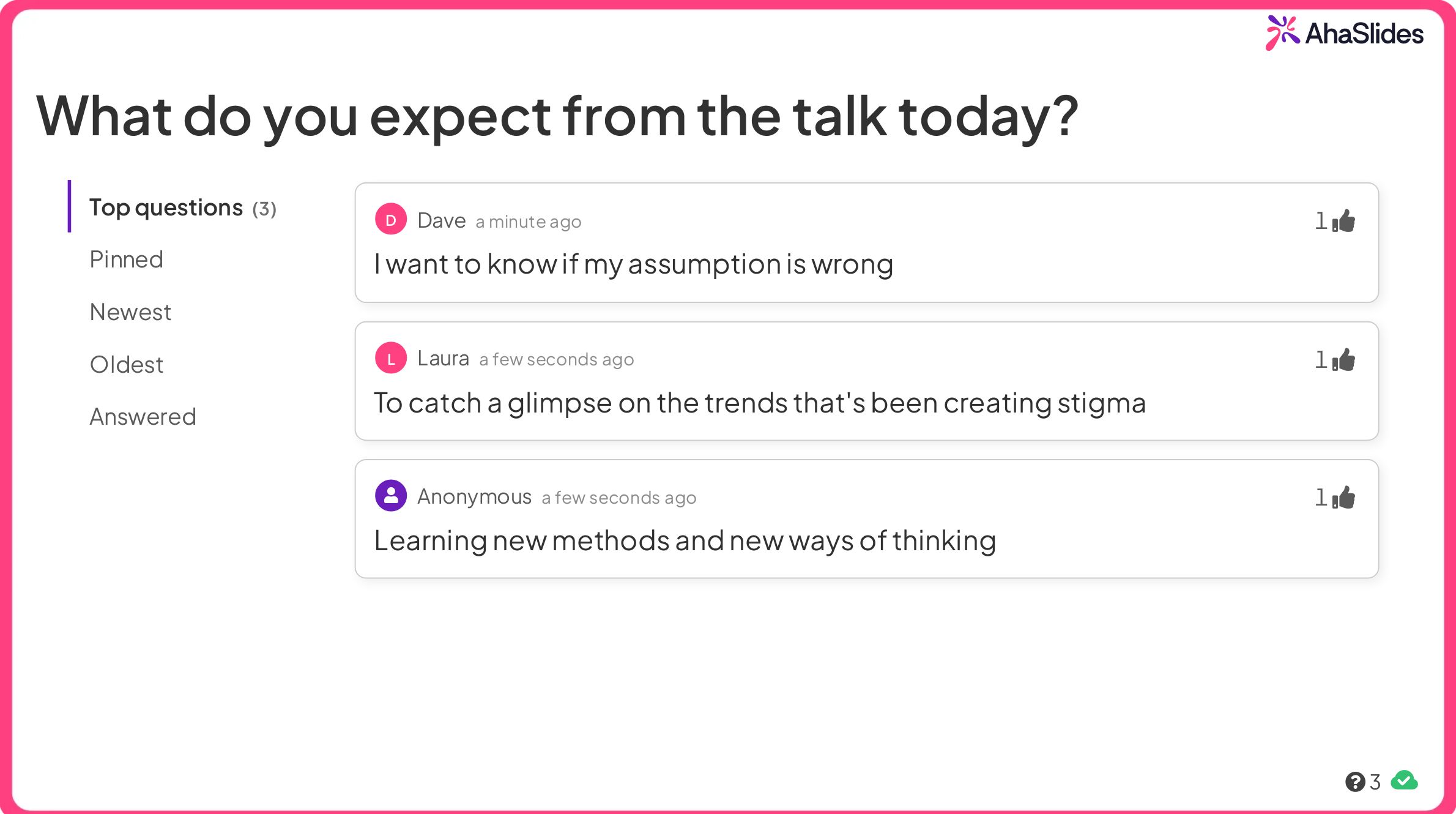
People have different expectations and background knowledge when they attend your presentations. Knowing their objectives can provide a value that you can use to adjust your presenting style. Adapting to people’s needs and meeting the expectations of everyone can result in a successful presentation for all involved.
You can do this by holding a small Q&A session on AhaSlides. When you start your presentation, invite attendees to post the questions they are most curious about. You can use the Q and A slide pictured below.
12. Play Games to Warm up
Games transform passive audiences into active participants from the first moment. Depending on your audience size, time and space, you can either whip up a physical activity or a simple, two-minute game like Two Truths One Lie. Check out some of the best icebreakers here.
How to Choose the Right Opening for Your Presentation
Not every opening technique suits every presentation context. Consider these factors when selecting your approach:
Audience seniority and familiarity - Executive audiences often prefer directness. Newer teams may benefit from community-building openings.
Session length and format - In 30-minute sessions, you might use only one quick opening technique. Full-day workshops can incorporate multiple engagement strategies.
Topic complexity and sensitivity - Complex topics benefit from curiosity-building previews. Sensitive subjects require careful establishment of psychological safety before diving in.
Your natural style - The most effective opening is one you can deliver authentically. If humour feels forced for you, choose a different technique.
Environmental factors - Virtual presentations benefit from interactive elements that overcome screen fatigue. Large auditorium settings might call for more dramatic visual openings.