



A new team spends its first weeks guessing. Who wants the detail up front, who needs to talk an idea through, who goes quiet when a plan changes at the last minute. A personality test for team building turns that guesswork into a short conversation.
Google’s research into its own teams points the same way. Across 180 teams it studied, what mattered most was how the team worked together. A shared language for how people like to work is a quick way into that.
This guide shows how to run a team personality test live, with everyone answering on their phones at once, and how to turn the results into a useful discussion rather than a set of labels.
What a personality test for team building is for
A team building personality test is a conversation starter. Everyone answers the same short set of statements, gets a result, and the group talks about what the mix means for how they work together.
It is not a hiring tool or a performance measure. Keep it that way and people answer honestly, because nothing rides on the result.
Many personality tests ask each person to complete a long questionnaire alone before the meeting. That works, but it splits the activity in two and relies on everyone doing the homework. Running it live keeps everyone in the same moment: the room answers together, the results land together, and the discussion starts while people are still curious.
When to run a team personality test
- Kick-offs and new teams. A fun personality test for team building gives a new group something to talk about beyond job titles. It works as an icebreaker for new teams that goes deeper than “two truths and a lie”.
- Building balanced teams. When you see the room’s mix on one chart, it is easy to spot a project group with five Achievers and nobody who enjoys trying new ideas.
- Splitting workshop or classroom groups. Trainers and teachers can mix types across groups, or put similar types together for a task that suits them.
- Onboarding. New starters get a quick, low-pressure way to share how they like to work, and their manager gets a head start on the first one-to-one.
How to run a personality test live in AhaSlides
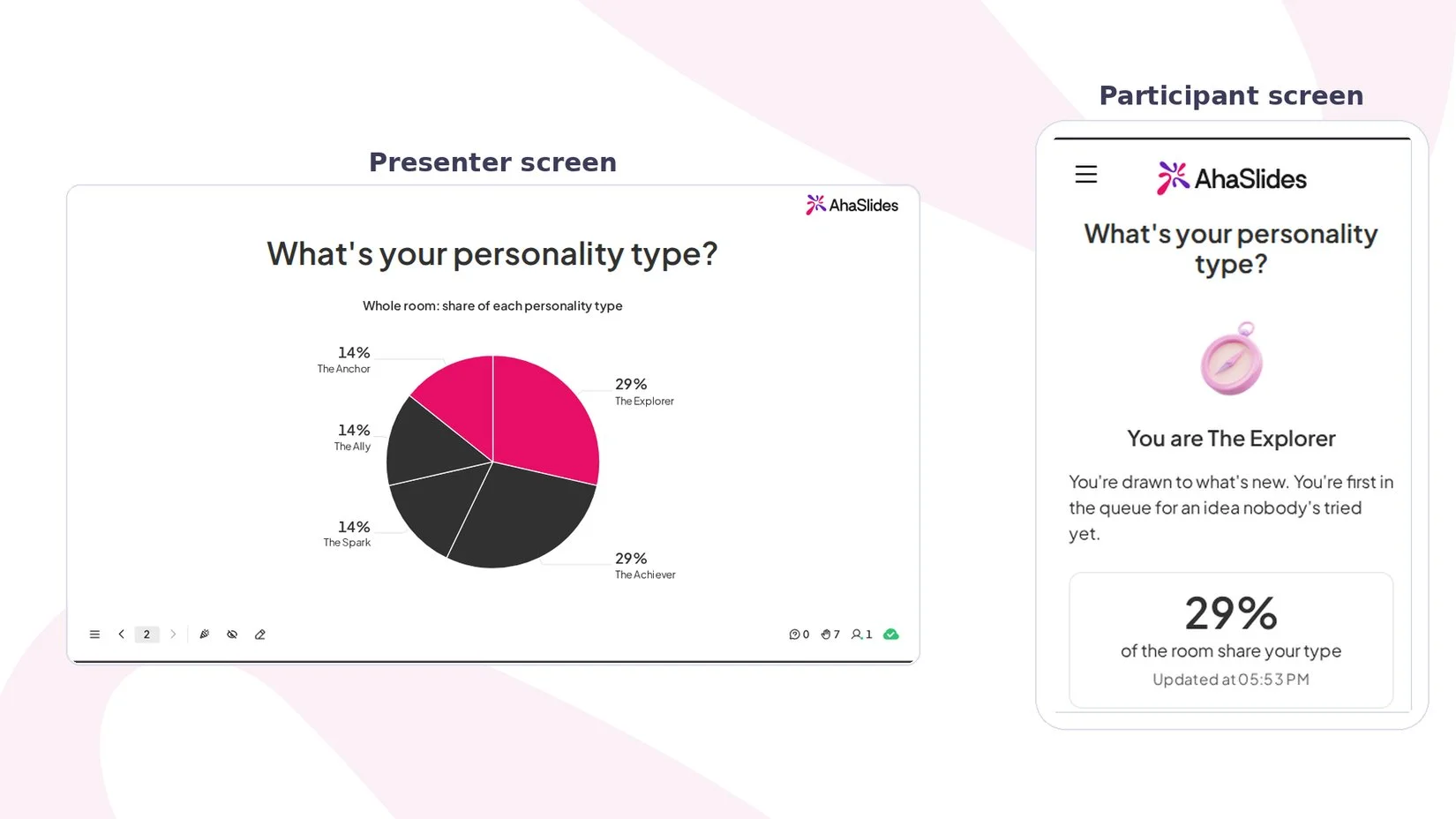
AhaSlides has a Personality Test slide built for this. Everyone answers ten quick statements on their phone and gets one of five types. Your screen shows the whole room’s mix, and each participant gets a result card made for sharing.
The slide is based on the Big Five personality model, the five broad traits psychologists use to describe personality: openness to experience, conscientiousness, extraversion, agreeableness and emotional stability (the opposite end of the trait researchers call neuroticism). Answers are scored on a sliding scale, so people are not forced into a box by one answer.
Set it up
- Add the slide. Click New slide and search for Personality Test in the slide type picker. It comes with ten ready-made statements, two per trait.
- Name it. Type a title under Your question, such as “What’s your personality type?”
- Make it yours, if you like. You can reword any statement, keep between 5 and 20 of them, and rename the three answer choices (Disagree, Neutral, Agree) to suit your group. Renaming the choices does not change the scoring.
- Decide when to show the chart. Turn on Show results manually if you want to keep the room’s chart hidden until the reveal. People still see their own type straight away.
The full walkthrough is in the Personality Test help guide.
Run it
Click Present and share the access code. Each person taps Disagree, Neutral or Agree for each statement, then taps “Reveal my profile”. Their phone shows their type, a short description and the percentage of the room that shares it, plus a “Save result image” button for a card they can keep or post in the team chat.
Your screen fills in a chart of each type’s share of the room as results arrive. If someone’s traits all sit close to the middle, they see “Too close to call” and can change their answers or keep the result.
The five types
- The Explorer (openness to experience): drawn to what’s new, first in the queue for an idea nobody has tried yet.
- The Achiever (conscientiousness): gets things done, and done properly.
- The Spark (extraversion): brings the energy and warms up a room.
- The Ally (agreeableness): looks out for people and is always in someone else’s corner.
- The Anchor (emotional stability): stays calm through ups and downs, a steady presence when things get busy.
Five questions to ask after the reveal
The chart is the start of the activity. Put one or two of these to the room, out loud or on a Word Cloud or Open Ended slide so quieter people can answer too:
- Does your result feel like you? What would you change about it?
- Which type is the biggest slice in this room, and what does that make us good at?
- Which type is missing or small, and when might we miss it?
- What is one thing a teammate of a different type could do to make your week easier?
- How should this team share news of a change, given the mix on screen?
Question 3 is a good one to spend time on. A team light on Anchors might agree to flag stress early; a team light on Explorers might set aside time for new ideas.
Tips to keep a team personality test fun and fair
- Make sharing optional. Everyone sees their own result. Let people choose whether to say it out loud.
- Talk about the mix, not the person. The room chart is about the team as a whole, so start there before anyone discusses individual results.
- Treat types as tendencies. Five types are a simplification of five sliding traits. Nobody is only one thing, and the “Too close to call” result is a fair answer.
- Keep it out of decisions about people. Never use results for hiring, promotion or appraisals. Google’s study found how a team works together mattered more than who was on it, so use the results to agree how you work, not to judge who should be in the room.
- Come back to it. Rerun the slide when the team changes shape, and compare the new mix with the old one.
Use the results to build groups
For a workshop or class, write the types on the board and ask people to form groups with at least three different types in each. If you would rather mix people at random first and look at the types afterwards, the AhaSlides random team generator splits a list of names into teams in a click.
Availability
The Personality Test slide is on every AhaSlides plan, in the slide picker on presenter.ahaslides.com. It works in 39 languages: participant screens, the chart and the result card follow your presentation’s language. It is not on the EU server yet, so if your account is on the EU server you will not see it in the slide picker for now.
FAQs
What is the best personality test for team building?
One that is short, free of right answers and taken together. A Big Five-based test like the AhaSlides Personality Test suits a team session because it takes ten statements, gives a simple result and shows the whole group’s mix on one screen.
How long does a team personality test take?
A few minutes for the test, plus the discussion. The test itself is ten statements, each answered with one tap, so add whatever time you want for talking through the results.
Are there free personality tests for groups?
Yes. The AhaSlides Personality Test slide is on every plan, and participants join from their phones without an account.
Can I use a personality test for hiring?
Keep a team building test out of it. A short, ten-statement test is a conversation starter, so use the results to agree how a team works together, never to decide who gets a job.
Does it work with students?
Yes. Teachers can use it to split a class into mixed groups or to start a lesson on working together. Participants only need a phone or laptop and the access code.
Related reading
- For more ways to warm up a new group, try these icebreaker games.
- Pair the test with a few ice breaker questions for a full kick-off.
- Planning a new starter’s first week? See our guide to onboarding new staff.
- Short on time? Here are 5-minute team building activities.