
A good pulse survey is a few short questions, each tied to one thing you want to know. Below are pulse survey questions grouped by goal, each marked with the question type that suits it, so you can copy them straight into a Slack survey made with AhaSlides for Slack.
How to choose pulse survey questions
Start from the decision the answers will feed, then pick the questions. If you want to know whether the team is overloaded, ask about workload, not about everything. A few rules keep a pulse useful:
- Three to five questions. A pulse is meant to take a minute. One or two questions on a single topic beat ten on five.
- Mix the question types. Use a rating or score for the number you can track, and one short answer question for the reason behind it.
- Ask the same core question each time. A repeated question shows a trend. Change the follow-ups, not the question you track.
- Only ask what you will act on. If nothing will change whatever the answer, leave the question out.
Pulse survey questions by goal
Every question below fits one of the types you can pick in Slack: Rating 1 to 5, Score 1 to 10, Yes or no, Multiple choice or Short answer.
To check how the week went (engagement and mood)
| Question | Type in Slack |
|---|---|
| How was your week? | Rating 1 to 5 (Very poor to Great) |
| What made it that way? | Short answer |
| How likely are you to recommend working here to a friend? | Score 1 to 10 |
| What is the main reason for your score? | Short answer |
To check workload
| Question | Type in Slack |
|---|---|
| Is your workload manageable right now? | Rating 1 to 5 (Not at all to Completely) |
| How does your workload feel? | Multiple choice: Too light, About right, Too heavy |
| What would make it lighter? | Short answer |
To check wellbeing
These are sensitive. The Wellbeing template starts with Anonymous responses ticked; for your own wellbeing questions, tick it under Settings before you post.
| Question | Type in Slack |
|---|---|
| How are you feeling this week? | Rating 1 to 5 (Very poor to Great) |
| Are you able to switch off after work? | Multiple choice: Usually, Sometimes, Rarely |
| Is there anything we could do to support you? | Short answer |
To check manager support
| Question | Type in Slack |
|---|---|
| Do you get the support you need from your manager? | Rating 1 to 5 (Not at all to Completely) |
| Do you know what is expected of you this week? | Yes or no |
| What would help most? | Short answer |
To check how connected the team feels
| Question | Type in Slack |
|---|---|
| How connected do you feel to your team? | Rating 1 to 5 (Not at all to Very) |
| What would help us feel closer? | Short answer |
To make meetings better
| Question | Type in Slack |
|---|---|
| Was this meeting a good use of your time? | Yes or no |
| Was the meeting the right length? | Multiple choice: Too short, About right, Too long |
| What would make it better? | Short answer |
To catch blockers early
| Question | Type in Slack |
|---|---|
| Is anything blocking your work right now? | Yes or no |
| What is it? | Short answer |
To support a new starter or a change
| Question | Type in Slack |
|---|---|
| How is your first week going? | Rating 1 to 5 (Very poor to Great) |
| What is one thing you still need? | Short answer |
| How do you feel about this change? | Rating 1 to 5 (Very poor to Great) |
| What questions do you still have? | Short answer |
How to send pulse survey questions in Slack
With AhaSlides for Slack you can send any of these question sets in a few clicks, and your team answers with buttons right in the channel.
Step 1: Add AhaSlides for Slack
Open the AhaSlides for Slack install page and add the app to your workspace. The first time you press Post, AhaSlides asks you to sign in to your AhaSlides account and keeps your draft while you do.
Step 2: Open the Create window
In the channel you want to ask, type /ahaslides create. Under Check in with team, pick Weekly pulse, eNPS or Wellbeing to start with the questions already written, or open All templates for more, such as workload, manager support, team connection, focus and blockers, or a change check-in. For your own questions, pick a single question under Ask a question and add more.
Step 3: Paste in your questions and pick each type
Write or edit each question, then press + Add question for the next one, up to 10 in one post. Choose each question's type from its Type menu: Multiple choice, Rating 1 to 5, Score 1 to 10, Yes or no or Short answer. For a rating or score you can change the words at each end of the scale, and for multiple choice you can add up to six options.
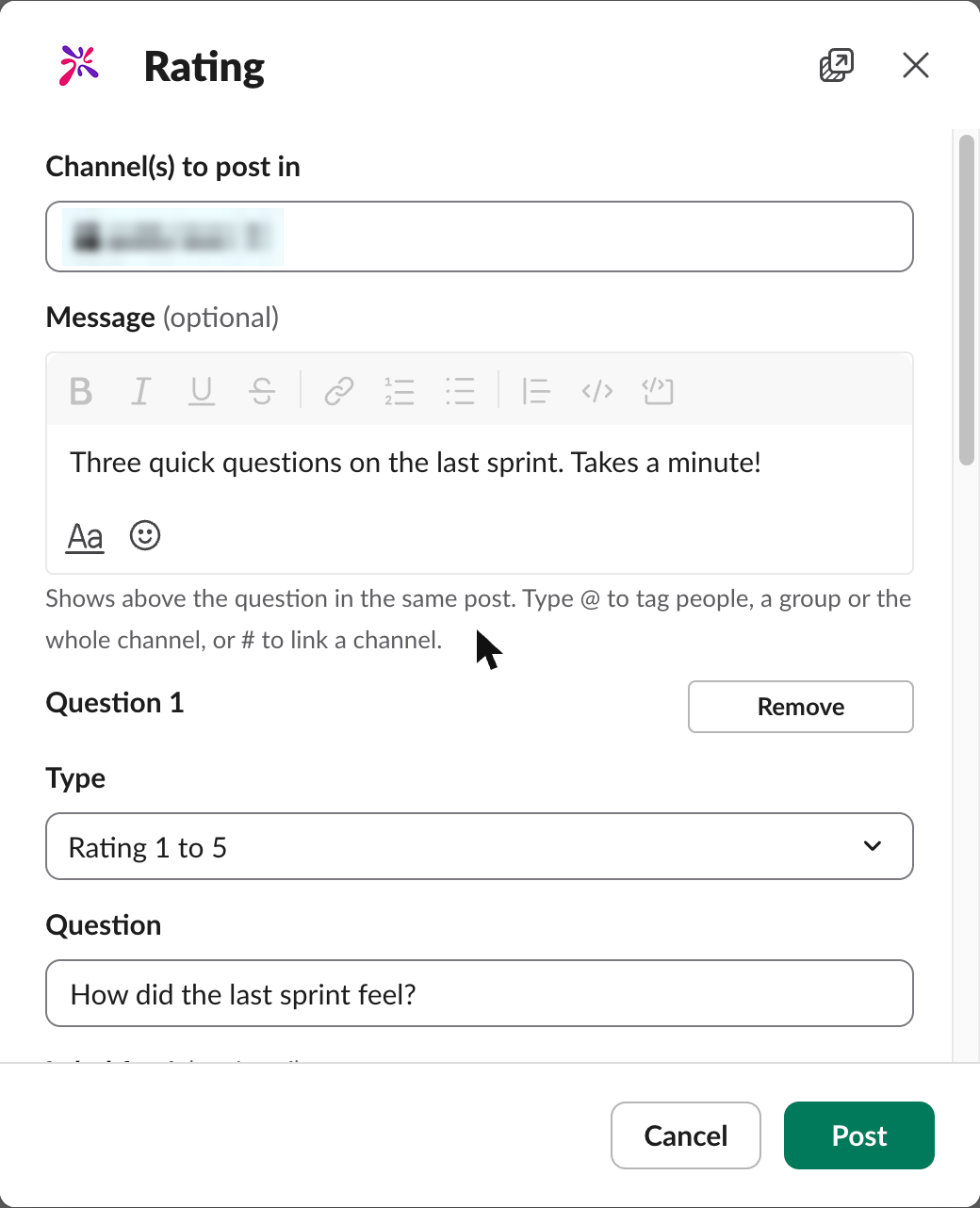
Step 4: Choose anonymous answers if you need them
Under Settings, Anonymous responses is already ticked on the eNPS, Wellbeing, Workload, Manager support and Change check-in templates. For your own questions on topics such as workload and wellbeing, tick it yourself. Names are then hidden for everyone, you included. Keep Show results to everyone ticked if you want the whole channel to see the results.
Step 5: Post it and read the answers
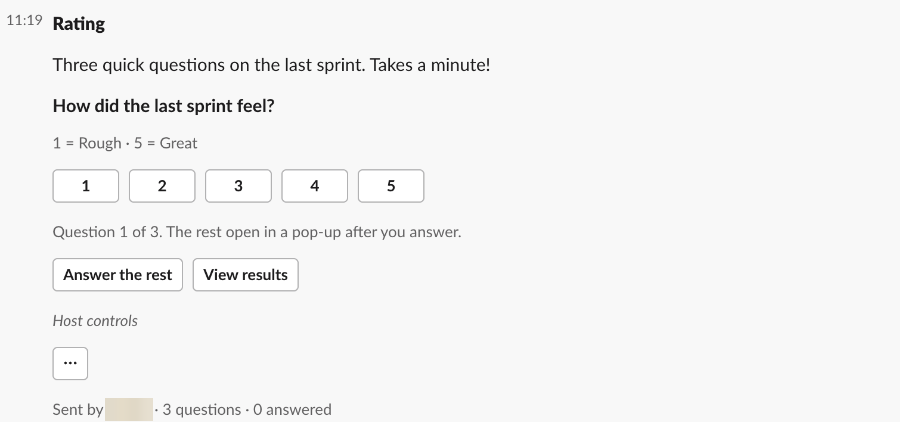
Press Post. The first question sits right in the post, and Answer the rest opens the others. Open the results from the post as the host, or in your AhaSlides report. A pulse does not repeat by itself, so post it again whenever you want a new read, such as at the end of each week.
Stuck on a step? The AhaSlides for Slack guide covers every option and the most common fixes.
Tips for pulse survey questions people answer
- Use plain words. "How was your week?" gets more honest answers than "Rate your overall level of engagement."
- One idea per question. "Do you feel supported and recognised?" is two questions. Split it.
- Keep the scale the same. If 5 is good in one question, keep it good in every other.
- End with a short answer. One open question often gives you the most useful reply.
- Share what you heard. A short summary of the results and one change you will make shows people their answers count.
FAQ
How many questions should a pulse survey have?
Three to five. A pulse should take about a minute to answer, so short sets get more replies.
How often should you send a pulse survey?
Weekly, every two weeks or monthly all work. Pick a rhythm you can keep and ask the same core question each time, so you can see change.
Can a pulse survey be anonymous?
Yes. Keep Anonymous responses ticked (some templates start with it on) before you post, and names are hidden for everyone, including you, in Slack and in your AhaSlides report.
Do people need an account to answer?
No. Only the person who creates the survey signs in to AhaSlides. Everyone else answers with buttons in Slack.
Is AhaSlides for Slack free?
Yes. It works on every AhaSlides plan, including Free.
What if my workspace needs apps approved first?
Slack asks you to send an install request, and a workspace owner or app manager approves it. For more help, see the AhaSlides for Slack guide.
Related reads: How to create a survey in Slack, for the full walk-through, and How to create a poll in Slack, for a single quick question. More in this series: What is a pulse survey? and How to run a pulse survey in Slack.
Ask your team the right questions, right where they work. Add AhaSlides for Slack and post your first pulse in a few minutes.