
A pulse survey is a short survey you send often, with only a few questions, to take a quick read of how your team is doing. You can run one in Slack with AhaSlides for Slack: type /ahaslides create, pick Weekly pulse and press Post. Answers come in right in the channel.
What is a pulse survey?
Think of taking a pulse: a quick check that tells you how things are going right now, without a full medical. A pulse survey does the same for a team. It asks a handful of questions about one thing, such as how the week went, whether workload feels manageable or how people feel about a recent change. Because it is short, people answer it in under a minute.
The value is in repeating it. One answer tells you little. The same two questions every week or month show you a trend, so you spot a dip while it is still easy to act on.
Pulse survey vs engagement survey
Both ask how people feel at work. They suit different jobs:
| Pulse survey | Engagement survey | |
|---|---|---|
| Length | A few questions | Dozens of questions |
| How often | Weekly, every two weeks or monthly | Usually once or twice a year |
| Best for | Catching changes early and tracking one topic over time | A broad, detailed picture of the whole employee experience |
| Effort to answer | Under a minute | Often a block of time set aside |
They work well together: the engagement survey sets the big picture, and pulse surveys keep you in touch between rounds. For a long, formal survey, see the best employee engagement surveys.
What a pulse survey can measure
Pick one topic per pulse. Common ones:
- How the week went. A simple rating plus a "why".
- Workload. Is the load manageable right now?
- Wellbeing. Energy, stress and whether people can switch off.
- Manager support. Do people get the support they need?
- Team connection. Do people feel close to the team, especially when remote?
- A change or announcement. How people feel a week after it.
- eNPS. How likely people are to recommend working here.
How many questions, and how often?
Keep each pulse to a rating or score, plus one open question that asks why. Two or three questions is plenty. Short is what keeps people answering week after week.
For how often, consistency matters more than the exact number. A rough guide:
- Weekly: how the week went, or blockers.
- Every two weeks: workload.
- Monthly: wellbeing, manager support and team connection.
- Once a quarter: eNPS.
These match the times AhaSlides for Slack suggests under each ready-made check-in. They are suggestions, so choose the rhythm that suits your team and post the next pulse when it is due.
Why teams use pulse surveys
- You hear about problems early. A low score this month is easier to fix than a pattern found in a yearly survey.
- People answer, because it is quick. A short survey is easy to say yes to, so you get more replies.
- You see the trend. The same question over time shows whether things are improving after you act.
- People feel heard. Asking often, and acting on what you hear, shows that their answers matter.
Good pulse survey questions
Write each question so it takes one tap to answer, then add one open question for the reason. Examples:
| Topic | Question | Answer type |
|---|---|---|
| Week | How was your week? | Rating 1 to 5 |
| Workload | Is your workload manageable right now? | Rating 1 to 5 |
| Blockers | Is anything blocking your work right now? | Yes or no |
| eNPS | How likely are you to recommend working here to a friend? | Score 1 to 10 |
| The reason | What made it that way? | Short answer |
How to run a pulse survey in Slack
If your team already lives in Slack, that is the easiest place to ask. People answer between tasks, and you don't have to chase replies by email. The steps in short, with the full walkthrough in How to create a survey in Slack:
Step 1: Add AhaSlides for Slack
Open the AhaSlides for Slack install page and add the app to your workspace.
Step 2: Open the Create window and pick a check-in
In the channel you want to ask, type /ahaslides create. Under Check in with team, choose Weekly pulse, eNPS or Wellbeing, or press All templates for more, including Workload, Manager support, Team connection, Focus and blockers and Change check-in. Each one comes with its questions already written, plus a follow-up question people can skip.
Step 3: Make it yours
Edit the wording, add a line in Message so people know why you're asking, and add more questions if you need them, up to 10 in one post. Under Settings, tick Anonymous responses to hide names from everyone, you included. Workload, eNPS, Wellbeing, Manager support and Change check-in start with it ticked.
Step 4: Post it and watch the answers come in
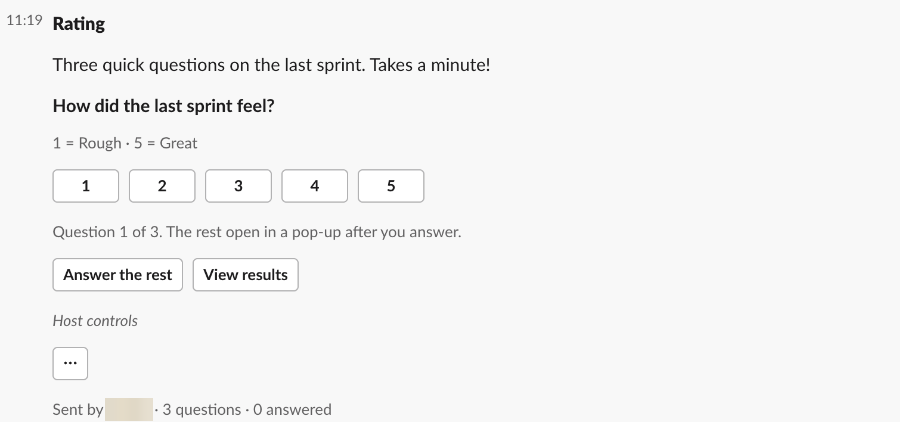
Press Post. The first question sits right in the channel post, and people answer with a tap. The post shows how many have answered.
Step 5: Read the results
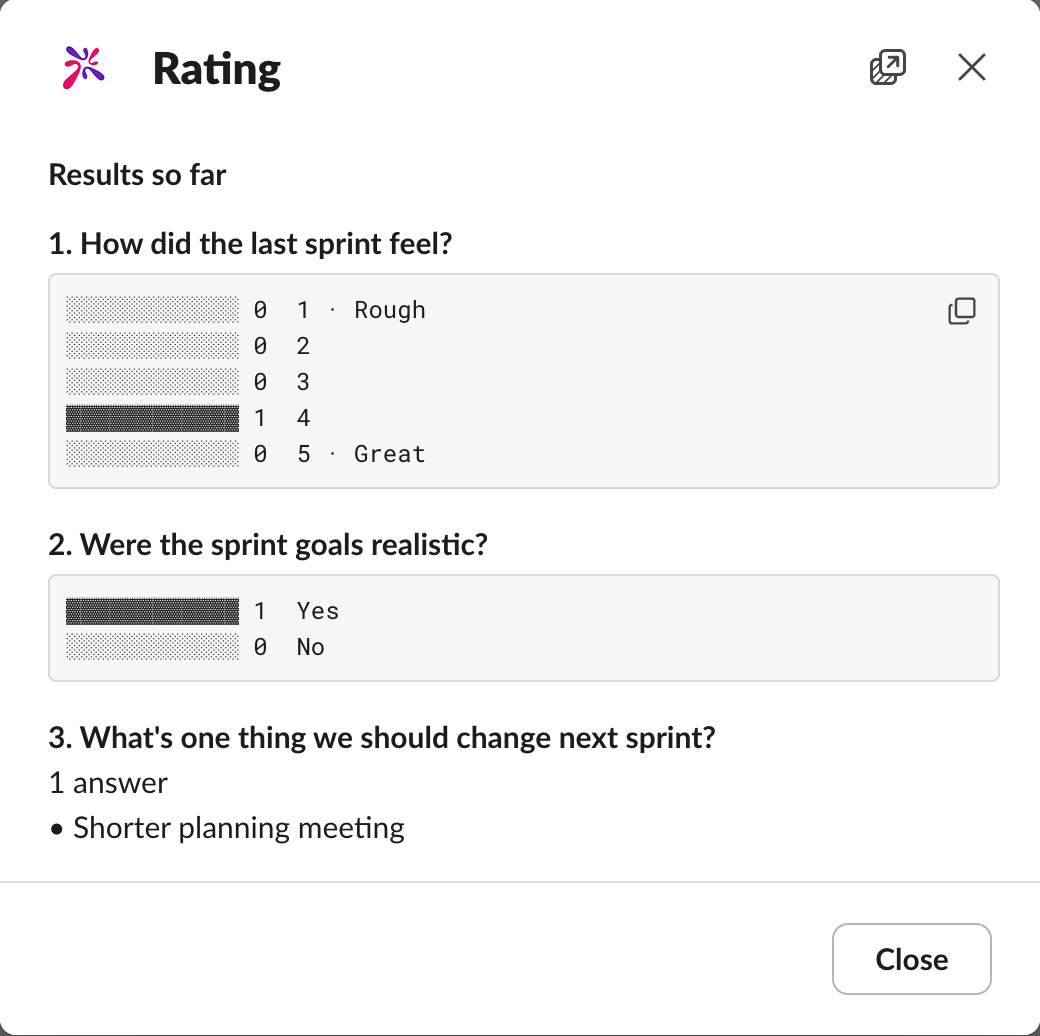
Press the … button under Host controls and choose View results. With Show results to everyone left on, everyone else gets a View results button too. Every answer is also saved in your AhaSlides report. When it is time for the next pulse, post it again from /ahaslides create.
Stuck on a step? The AhaSlides for Slack guide covers every option and the most common fixes.
Tips for a pulse survey people answer
- Keep the same core questions. Changing them each time makes the trend impossible to read.
- Go anonymous for sensitive topics. On workload, wellbeing or managers, people are more open when their name isn't attached. See how anonymous surveys encourage honest feedback.
- Always ask why. A short open question after the rating gives you the reason behind the number.
- Close the loop. Share what you heard and what you will do about it. Seeing the last pulse change something is the best reason to answer the next one.
- Don't over-ask. A pulse that arrives too often feels like noise. Pick a rhythm you can keep.
FAQ
What is a pulse survey?
A short survey, sent regularly, that gives a quick read of how a team feels about one topic, such as workload, wellbeing or the week just gone.
How many questions should a pulse survey have?
Two or three: a rating or score, plus one open question asking why.
How often should you send a pulse survey?
Weekly to monthly suits most teams. Pick a rhythm you can keep, because a steady one makes the trend easy to see.
Are pulse surveys anonymous?
They can be. In AhaSlides for Slack, tick Anonymous responses before you post and names are hidden for everyone, including you, in Slack and in your AhaSlides report.
Do people need an account to answer?
No. Only the person who creates the survey signs in to AhaSlides. Everyone else answers with buttons in Slack. Setup problems? The AhaSlides for Slack guide has the fixes.
Is AhaSlides for Slack free?
Yes. It works on every AhaSlides plan, including Free.
What if my workspace needs apps approved first?
Slack asks you to send an install request, and a workspace owner or app manager approves it.
Related reads: How to create a survey in Slack, How to run an async stand-up in Slack and Anonymous survey: a beginner's guide to honest workplace feedback.
Try it in your workspace
Take your team's pulse in a minute, right where they already talk. Add AhaSlides for Slack and post your first pulse today.